TL;DR
Control surfaces shine in tasks demanding simultaneous, expressive control—like riding vocals or automating multiple channels. For detailed editing and routing, a mouse is quicker and more precise. The best setup blends both for efficiency and comfort.
Ever wonder whether that dedicated control surface is worth the space on your desk? The truth is, it depends. Faders excel at tasks that demand physical, simultaneous control—like riding a vocal or balancing multiple stems. But for detail work, editing, and navigation, the mouse remains king.
This guide cuts through the hype. We’ll explore when faders earn their space, what makes them truly valuable, and how to combine tactile and digital tools for a workflow that’s faster, more intuitive, and less fatiguing.
Use faders for multichannel, expressive tasks like vocal rides or group automation—where simultaneous control matters.
Prioritize quality and feel over quantity; a few smooth, motorized faders make a bigger difference than dozens of cramped controls.
Balance your workflow with both tactile controls and precise mouse editing—each tool has its place.
Choose a control surface with deep DAW integration to avoid frustration and maximize speed.
Remember: a control surface enhances workflow, but the sound quality depends on your ears and decisions.
Control Surface or Mouse: Where Faders Earn Their Desk Space
Faders excel at tasks demanding physical, simultaneous control—riding vocals or automating multiple channels. For detail work, editing, and navigation, the mouse remains king. The best setup blends both.
Why Faders Are Better for Multichannel Control
Faders let you control multiple channels simultaneously—riding a vocal while balancing guitars, or automating a group fade. It’s like conducting an orchestra with your hands rather than drawing lane after lane.
Mixing as Performance
Push several faders at once for a cohesive blend. Physical movement captures your intent directly—something clunky with a single mouse pointer.
Motorized Faders Save Time
They follow existing moves, let you punch in by touch, and jump to the current value when you switch tracks or banks. No guessing, no readjusting.
Film & Broadcast Mixes
Ride dialogue levels while adjusting ambient backgrounds—a fluid gesture instead of endless clicking and mouse drags across dozens of tracks.
Which Tool Wins Which Job?
Relative speed advantage by task type—based on workflow research and studio practice. Faders dominate expressive, multichannel gestures; the mouse dominates precision surgery.
Does Fader Quality Matter More Than Quantity?
Absolutely. Smoothness, resistance, and reliability matter more than fader count. A long-throw 100mm fader offers finer control than a cramped 60mm one—eight quality motorized faders often outperform a dozen cheap ones.
100mm Motorized
Silky smooth, touch-sensitive, motor follows automation. Finer resolution, accurate recall, reliable under repeated use.
60mm Non-Motorized
Cheaper and quieter, but no automation following, coarser resolution, and jitter-prone over time—missed cues, uneven rides.
Control Surface vs. Mouse by Task
| Task | Control Surface | Winner | Mouse |
|---|---|---|---|
| Riding vocals / dialogue | ✓ Expressive, simultaneous | Faders | ✗ One lane at a time |
| Writing automation | ✓ Touch / Latch punch-in | Faders | ~ Slower drawing |
| Waveform editing | ✗ Too coarse | Mouse | ✓ Pixel-perfect |
| Clip boundaries & fades | ✗ Impractical | Mouse | ✓ Precise & fast |
| Routing & plug-ins | ~ Partial control | Mouse | ✓ Menus, contextual |
| Group / stem balancing | ✓ All at once | Faders | ✗ Sequential drags |
| Track naming & organizing | ✗ No text input | Mouse | ✓ Keyboard + mouse |
How Engineers Combine Both Tools
The best setups blend tactile gesture with digital precision. Here’s the typical flow through a mix session.
🖱 Set Levels
Use faders for the initial static balance across all stems—fast, musical, whole-hands mixing.
🎚 Ride Automation
Touch-sensitive faders write vocal rides and group moves in Touch or Latch mode.
🖱 Surgical Edit
Switch to mouse for waveform cleanup, clip boundaries, comping, and exact points.
🎚 Final Ride
Return to the surface for the final expressive pass—reacting in real time, by feel.
“A control surface doesn’t make your mix sound better. It’s a better set of hands, not a better set of ears—the magic is reacting faster and making more musical decisions.”
Who Should Invest in a Control Surface?
Faders Earn Their Space When…
- Complex automation across dialogue, vocals, or film cues
- Simultaneous control of multiple channels and stems
- Long mixing sessions where fatigue is a real cost
- Broadcast, post-production, and immersive audio work
- Deep DAW integration (Mackie Control, EUCON, HUI) is available
Mouse & Keyboard Are Enough When…
- Your work is mainly MIDI programming or sound design
- Projects are small with few simultaneous moves
- Editing, routing, and organization dominate the workflow
- Desk space and budget outweigh the speed gains
- Keyboard shortcuts and macros already cover your speed needs
Five Rules for Your Desk
Use faders for multichannel, expressive tasks like vocal rides or group automation—where simultaneous control matters.
Prioritize quality and feel over quantity; a few smooth, motorized faders make a bigger difference than dozens of cramped controls.
Balance your workflow with both tactile controls and precise mouse editing—each tool has its place.
Choose a control surface with deep DAW integration to avoid frustration and maximize speed.
A control surface enhances workflow—but sound quality depends on your ears and decisions.
Why Faders Are Better for Multichannel Control
Faders are designed for more than just volume. They let you control multiple channels simultaneously—riding a vocal while balancing guitars or automating a group fade. This is like conducting an orchestra with your hands rather than drawing lane after lane.
Imagine mixing a live band. You can push several faders at once, creating a cohesive blend—something that’s clunky with a mouse. The physical movement captures your intent directly, saving time and making your adjustments feel more natural.
In a real-world scenario, a sound engineer doing a film mix might ride dialogue levels while adjusting ambient backgrounds. A control surface makes this a fluid, intuitive gesture—no clicking, no endless mouse drags.
As an affiliate, we earn on qualifying purchases.
Automation: Why Motorized Faders Save Time
Automation is where motorized faders truly shine. They follow your existing moves and let you punch in new ones seamlessly. This is like having a co-pilot that moves with your intentions, rather than fighting you.
Think about automating a vocal level over a long song. With a motorized fader, your hand can focus on the expressive gesture, and the fader’s motor will match the software’s automation curve. When you switch to a different track or bank, the fader jumps to the current value—no guessing or manual readjustment needed.
DAWs support different modes—like ‘Touch’ or ‘Latch’—that make automation more intuitive. For dialogue or orchestral work, this tactile approach can cut editing time by up to 30%, according to an anonymous ArtzArtz study.
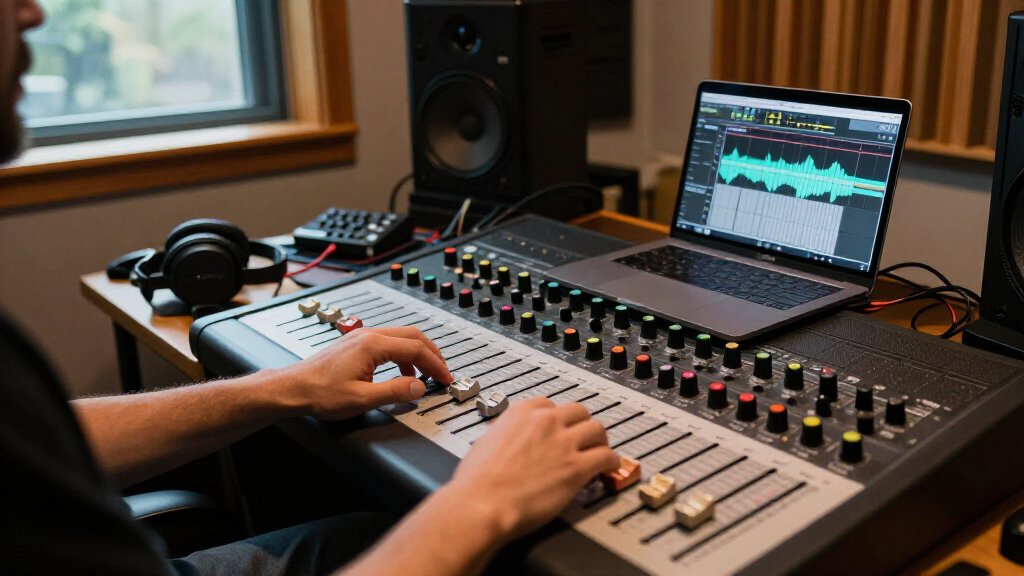
professional audio control surface with faders
As an affiliate, we earn on qualifying purchases.
As an affiliate, we earn on qualifying purchases.
Does Fader Quality Matter More Than Quantity?
Absolutely. A long-throw, 100mm fader offers finer control than a tiny, 60mm one. Smoothness, resistance, and reliability matter more than how many faders you have.
Imagine working with a fader that feels like sliding on silk—precise, responsive, with no jitter or noise. That’s worth more than dozens of cramped, non-motorized controls. Eight high-quality motorized faders often outperform a dozen cheap, non-motorized ones when it comes to real mixing.
For example, a studio with a 4-year-old control surface might struggle with jittery fader movements, causing missed cues or uneven automation. Investing in better hardware can make a noticeable difference in your confidence and speed.
DAW control surface with deep integration
As an affiliate, we earn on qualifying purchases.
As an affiliate, we earn on qualifying purchases.
Banking Is a Band-Aid, Not a Cure — But It Helps
Banking allows you to control more tracks with fewer faders—think of it as flipping through pages. An 8-fader surface can handle sessions of 50 or more tracks by switching banks.
But there’s a catch. The physical control stays put while the software assigns different tracks to it. This can lead to a mental load—remembering which bank controls which set.
In practice, smaller surfaces work well when your session is organized into logical groups: vocals, drums, effects. Larger surfaces excel when you need to see and reach all channels at once, like in film mixing or immersive audio projects.
long-throw motorized fader controller
As an affiliate, we earn on qualifying purchases.
As an affiliate, we earn on qualifying purchases.
Integration: Is Your Control Surface Ready to Play?
A control surface is only as quick as its connection to your DAW. The best ones make it easy to select tracks, follow your focus, and control parameters without constant manual remapping.
Look for seamless integration protocols like Mackie Control, EUCON, or HUI. These ensure your fader movements, mute, solo, pan, and plug-in controls are accurate and responsive. A poorly integrated surface becomes a slow, confusing mess—more mouse work than you’d hoped.
Imagine trying to mix with a surface that takes five clicks to select a track. Frustrating, right? Good integration is like a well-oiled machine—smooth, predictable, and fast.
When the Mouse Still Reigns Supreme
The mouse remains unbeatable for precise, detailed tasks. Drawing automation curves, editing waveforms, setting clip boundaries, or configuring plug-ins all happen faster with a mouse or trackpad.
Think of fine editing—zooming into a waveform to correct a click. Moving a cursor with pixel-perfect accuracy beats a fader’s physical limits. Keyboard shortcuts and macros further boost mouse efficiency, making it the go-to tool for surgical edits.
In practice, many engineers switch between faders for broad moves and the mouse for detailed, surgical work. This hybrid approach combines the best of both worlds.
Ergonomics: Your Workspace, Your Comfort
A well-placed control surface can reduce strain and make mixing more comfortable. Positioning is everything—faders should be within easy reach, not forcing you to stretch or crane your neck.
Consider your desk layout: the distance from your listening position, monitor placement, and keyboard/mouse access. An ergonomic setup prevents fatigue during long sessions and encourages better posture.
For example, a studio with a surface that’s too high causes shoulder tension. Re-positioning or choosing a smaller, adjustable controller can make a big difference in comfort and focus.
Control Surface Doesn’t Make Audio Sound Better—But It Can Make You Faster
Remember: a control surface doesn’t affect your mix’s sound directly. It’s a tool to make your workflow faster, more intuitive, and more expressive.
Think of it as a better set of hands rather than a better set of ears. The real magic happens when you use tactile feedback to react faster and make more musical decisions—especially in complex, automation-heavy sessions.
For instance, riding a vocal dynamically during a live mix is more natural with faders than clicking and dragging on a screen. But the quality of your mix still depends on your ears, not your control surface.
Who Should Invest in a Control Surface?
If your work involves complex automation, simultaneous control of multiple channels, or long mixing sessions, a control surface can pay for itself in saved time and reduced fatigue.
Vocal riding, film post-production, broadcast mixes, and immersive audio sessions are prime candidates. Conversely, if you mainly do MIDI programming, sound design, or small projects, a mouse and keyboard might be enough.
Imagine a post-production studio balancing dozens of dialogue tracks. A control surface with motorized faders makes that process smoother—saving hours and preventing fatigue.
Choosing Between Motorized and Non-Motorized Faders
Motorized faders automatically move to match your DAW’s current value—crucial for automation and switching banks smoothly. Non-motorized faders are cheaper and quieter but require manual adjustment or jumping behavior.
For serious mixing, motorized is usually worth the extra cost. It keeps your control and software in sync, avoiding confusion during automation passes.
For example, a non-motorized fader might stay in one position even after automation has moved the parameter—leading to mismatched visuals and potential errors. Motorized faders solve this problem by following your automation precisely.
Full Console, Eight Faders, or Just One?
Deciding on the size depends on your session scope and budget. A single fader is perfect for riding a vocal or dialogue track—compact and focused.
Eight faders strike a practical balance. They support simultaneous control of multiple tracks or groups, ideal for small studios or detailed automation work.
Large consoles are for high-end environments—film mixers or mastering setups—where dozens of channels need visual oversight and quick access. They demand space, money, and dedicated workflow.
For example, a home studio might start with an 8-fader surface to handle most tasks, adding more later if needed. A professional film mixer might use a 32-fader console for real-time, multi-channel control.
What to Look for When Buying a Control Surface
Before buying, check compatibility, build quality, and features. Important criteria include:
- Compatibility with your DAW and OS
- Motorized, touch-sensitive faders
- Fader feel—throw, resistance, noise
- Display quality for track names and values
- Automation, pan, and send control quality
- Banking and track switching behavior
- Additional controls—transport, markers, plug-ins
- Expandability and custom mapping
- Physical dimensions and cabling
Testing in your DAW with familiar sessions is the best way to judge fit and feel. Don’t overlook support and firmware updates, which keep your investment working smoothly over years.
Latest Trends: Smaller, Smarter, and More Connected
Manufacturers now offer compact, motorized controllers that fit in smaller studios—making tactile automation more accessible. Deeper integration with specific DAWs—like automatic track labeling and plug-in control—helps streamline workflows.
Hybrid hardware and touchscreen setups are becoming common, combining physical faders with displays and software apps. Network-based control via Ethernet allows longer cabling, centralized control, and multi-station workflows—ideal for post-production and broadcast.
Immersive audio workflows, like Atmos, demand more parameters to control. Faders are still essential for levels, but knobs, joysticks, and spatial controls are gaining ground. Accessibility is also a focus—making control surfaces usable for all engineers, regardless of physical limitations.
Mythbusting: What Control Surfaces Can and Can’t Do
It’s a myth that more faders automatically mean faster mixing. Workflow, organization, and integration matter more. A control surface doesn’t add sound—only speed and comfort.
Physical controls can’t replace the mouse for precision editing, routing, or complex plug-in tweaks. They’re a supplement, not a substitute.
And no, a control surface won’t make your mix sound better. It makes you faster and more expressive—helping you react to your music more musically.
Frequently Asked Questions
Do I really need a control surface for mixing?
Not necessarily. If your workflow involves mostly detailed edits or small sessions, a mouse and keyboard might be enough. But for large, automation-heavy projects, a control surface can save time and reduce fatigue.Are motorized faders worth the extra cost?
Yes, especially for DAW mixing. They keep the control and software in sync, making automation, banking, and session changes smoother and more reliable.Can one fader handle my entire session?
For simple tasks like riding a single vocal, yes. But for multichannel mixing, at least 8 faders or more are recommended, often with banking or expandability.Will a control surface improve my mix quality?
It won’t directly affect your sound, but it makes reacting faster and making expressive moves easier—leading to more musical, confident mixing.How do I decide if a control surface is right for me?
Assess your session complexity, automation needs, and workflow. If you frequently handle multichannel automation or want to reduce fatigue, a control surface might be a worthwhile investment.Conclusion
Faders earn their desk space when your work demands hands-on, expressive control across multiple channels. For detail editing, routing, and navigation, the mouse remains faster and more precise. The best setup combines tactile controls for flow and automation with the mouse for fine-tuning.
Think of your workspace as a musical instrument—balance size, feel, and workflow to craft your perfect sound. After all, the real magic lies in your ears and your hands, working together.