TL;DR

Get audio and creator gear delivered free with Prime
- Fast, free delivery on millions of items
- Prime Video, Amazon Music and more included
- Member-only deals all year
Position your nearfield monitors so that they and your listening position form an equilateral triangle. This simple rule helps achieve accurate stereo imaging and balanced sound, but room acoustics and measurement tools can further optimize your setup.
Ever set up your monitors and wondered why your mixes sound off? The secret often lies in how you position your speakers. Tiny adjustments can make a huge difference in stereo imaging and clarity. That’s where the equilateral triangle rule comes into play—it’s a straightforward, reliable guide to getting your nearfield monitors just right.
In this guide, you’ll learn how this rule works, why it matters, and how to adapt it to your space. Whether you’re a hobbyist or serious about your mixes, this simple principle can transform your listening experience—no fancy gear required.
Position your monitors and listening spot so they form an equilateral triangle—equal distances on all sides.
Use a tape measure to double-check distances and a mirror or laser for precise toe-in angles.
Modern measurement tools and acoustic treatment can refine your setup beyond the basic triangle rule.
Avoid placing monitors too close or too far apart; both can skew your stereo image and bass response.
Small adjustments in placement and angling can dramatically improve your mix accuracy and clarity.
What is the Equilateral Triangle Rule and Why It Matters
The equilateral triangle rule is a basic geometry principle applied to monitor placement. It states that your two speakers and your listening position should form a perfect equilateral triangle—equal distances on all sides.
Why care? Because this setup ensures your brain receives a balanced stereo image, making your mixes sound more accurate and focused. Think of it as creating a visual triangle that guides your ears, ensuring that sound waves reach you evenly from each speaker. This balance is crucial because it influences how you perceive the stereo field, depth, and the placement of instruments. If your setup deviates from this ideal, your mixes can sound skewed, overly bass-heavy, or artificially wide, which can be misleading during mixing.
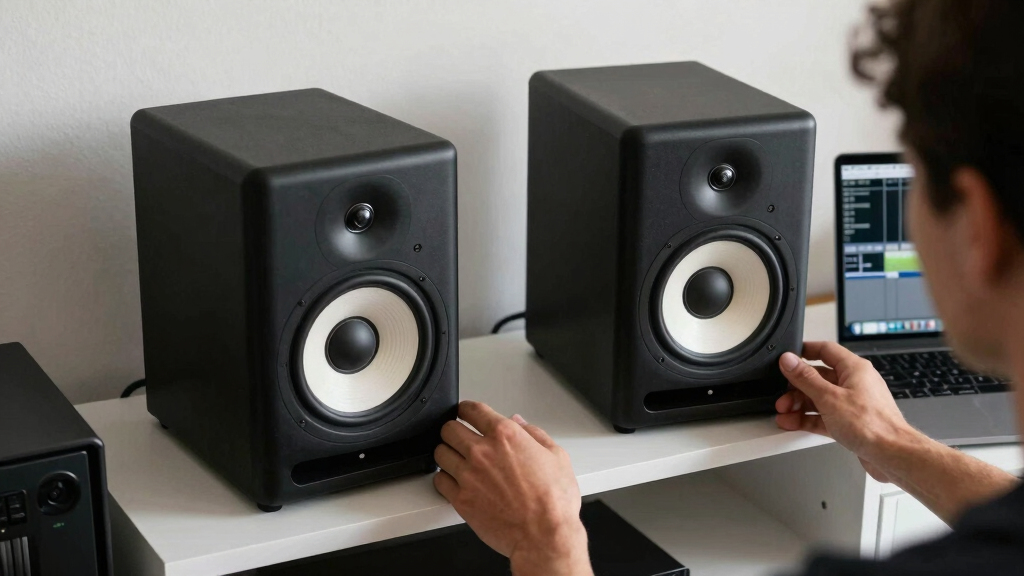
For example, if your monitors are 4 feet apart, your listening position should be 4 feet from each monitor. The monitors should face inward so their drivers point directly at your ears, creating a focused, three-point setup. This symmetry minimizes phase issues and ensures that your stereo image is coherent, helping you make more accurate mixing decisions.
nearfield studio monitor placement
As an affiliate, we earn on qualifying purchases.
As an affiliate, we earn on qualifying purchases.
How to Set Up Your Monitors Using the Triangle Rule in 3 Easy Steps
- Measure and place your monitors: Decide on a comfortable distance—most find 3 to 5 feet works well. Place your monitors so that the distance between them equals your distance from each to your listening spot. This symmetry is vital because it ensures that sound waves arrive at your ears simultaneously, reducing phase issues and stereo imbalance. The tradeoff is that perfect geometry might not fit every room or desk setup, so be prepared to make slight adjustments based on listening tests and measurements.
- Position your listening spot: Sit right between the monitors, at the point where the triangle is perfect. Use a tape measure to double-check. This position is where your brain will interpret the stereo image most accurately. Sitting too close or too far can distort this perception, making it harder to judge how your mix will translate elsewhere.
- Angle the monitors inward: Toe-in the speakers so their drivers point directly at your ears, typically at about a 30-degree angle. This alignment helps focus the stereo image and reduces reflections from walls or other surfaces, which can muddy your sound. The tradeoff is that excessive toe-in can create a narrow stereo image, so find a balance that maintains width without sacrificing focus. Using a mirror or laser pointer ensures precise aiming, which is critical for consistent results.
For instance, if your monitors are 4 feet apart, sit 4 feet away, with each monitor angled inward to hit your ears dead center. Use a mirror or laser pointer for precise toe-in, ensuring the drivers aim exactly at your listening position. Proper setup minimizes phase cancellations and ensures a balanced stereo field, giving you a clearer picture of your mix.
equilateral triangle monitor setup
As an affiliate, we earn on qualifying purchases.
As an affiliate, we earn on qualifying purchases.
Compare Different Monitor Placement Scenarios in a Table
| Scenario | Monitor Distance | Listener Distance | Toe-In | Result |
|---|---|---|---|---|
| Perfect Triangle | 4 ft | 4 ft | Yes, 30° inward | Clear stereo image, balanced sound |
| Too Close | 2 ft | 2 ft | Yes, 30° inward | Potential bass buildup, phase issues, and exaggerated stereo width |
| Too Distant | 6 ft | 6 ft | Yes, 30° inward | Sound loses focus, imaging blurs, and low-end response may weaken |
As an affiliate, we earn on qualifying purchases.
Troubleshooting Common Placement Problems
If your mixes sound off or imaging feels unfocused, your monitor placement might be the culprit. Common issues include monitors too far apart, sitting too close or too far from the monitors, or not angling them properly.
For example, if your stereo image is skewed or your bass sounds boomy, check your distances. Use a tape measure to confirm you’re following the triangle rule within a couple of inches. Adjust toe-in to improve focus, and consider adding acoustic treatment like bass traps or diffusers to tame room reflections.
Remember: small tweaks can make a big difference. Use test tones or measurement software like Room EQ Wizard to verify your setup. Proper placement reduces phase cancellations, improves low-frequency response, and enhances stereo clarity, which are all essential for accurate mixing and monitoring.
acoustic treatment for mixing room
As an affiliate, we earn on qualifying purchases.
As an affiliate, we earn on qualifying purchases.
Modern Tools and Tips to Perfect Your Monitor Setup
While the triangle rule is a great starting point, modern tools can take your placement to the next level. Use measurement microphones with software like REW to analyze your room’s response and make data-driven adjustments.
Invest in monitor stands, isolation pads, or laser alignment tools to precisely position your speakers. Digital calibration can also compensate for room anomalies, giving you a flatter frequency response and tighter stereo image.
For example, a studio owner used a measurement mic and REW to identify a bass bump in the room. After adjusting monitor height and adding bass traps, their mixes became clearer and more consistent across different playback systems. The tradeoff is that these tools require some learning but provide invaluable insights into how your room affects sound, leading to more accurate and reliable mixes.
Frequently Asked Questions
How strict is the equilateral triangle rule?
It’s a solid guideline, but slight deviations—an inch or two—usually won’t hurt. Large discrepancies can impair stereo imaging and frequency balance, so aim for close adherence but prioritize listening and measurement.What if my room isn’t ideal for perfect placement?
Use acoustic treatment like bass traps and diffusers to fix room issues. Measurement tools can help you identify problem areas, and calibration can compensate for less-than-perfect placement.Should I always toe-in my monitors?
Yes. Angling your monitors toward your ears sharpens stereo imaging and focus, making your mixes sound more precise and natural. Proper toe-in reduces reflections and phase cancellations, which are critical for an accurate stereo image.How do I know if my placement is correct?
Use test tones, measurement software, and critical listening. Check for a centered stereo image, balanced frequency response, and clear transients. If the sound is focused, balanced, and translates well to other systems, your placement is likely good. Adjust based on both measurements and your ears.Do different monitors require different placement?
Nearfield monitors are designed for close placement, typically 3-5 feet apart. Larger or different types may need slight adjustments, but the triangle rule remains a reliable baseline. Always consider the specific characteristics of your monitors and room acoustics.Conclusion
Getting your monitors in the right spot is the foundation for accurate mixing. The equilateral triangle rule is simple but powerful—think of it as the blueprint for honest, balanced sound. Combine it with measurement tools and room treatment, and you’ll hear your mixes more clearly than ever.
Remember, your space isn’t perfect, and small tweaks make big differences. Trust your ears, measure carefully, and don’t be afraid to experiment until it sounds right. That’s how great mixes happen.
Halloween Picks
halloween
As an affiliate, we earn on qualifying purchases.