For most home studios, I’d start with the Focusrite Scarlett 2i2 4th Gen: its two mic inputs suit vocals and instruments, while its compact format keeps a desk setup simple. The Audient iD14 MKII stands out for musicians who want an expandable setup, and the Scarlett 2i2 Studio bundle is a practical route for new creators who also need a microphone and headphones. The main tradeoffs are input count, included gear, and whether you need recording features or podcast controls. A bigger interface can handle more sources, but it also takes up more space and adds setup choices. Read on for the full comparison and the best fit for different home studio needs.

Get audio and creator gear delivered free with Prime
- Fast, free delivery on millions of items
- Prime Video, Amazon Music and more included
- Member-only deals all year
Complete the kit


Key Takeaways
- Two inputs are the useful middle ground: The Scarlett 2i2 4th Gen records a vocalist and instrument together without the footprint or extra connections of the Scarlett 16i16.
- Bundles suit first-time setups: The Scarlett 2i2 Studio and Scarlett Solo Studio include recording essentials, while standalone interfaces leave you free to choose each piece of gear.
- Expansion changes the long-term fit: The Audient iD14 MKII offers an additional path for expanding inputs, while compact one- and two-input models are better for fixed, small setups.
- Not every interface is aimed at music recording: The Vocaster One is tailored to solo podcasting, so musicians who need instrument inputs or multiple sources should look elsewhere.
- Generation and model name matter: The Scarlett Solo 3rd Gen and 4th Gen differ, and the Solo and 2i2 serve different recording needs; check the exact model before choosing.
| Universal Audio Volt 1 USB Audio Interface |  | Best for a Characterful Single-Input Setup | Connectivity: USB | Inputs/Outputs: 1-in/2-out | Maximum sample rate: 192 kHz | VIEW LATEST PRICE | See Our Full Breakdown |
| Focusrite Scarlett 2i2 Studio 4th Gen USB-C Audio Interface Bundle |  | Best Complete Starter Bundle | Generation: 4th Gen | Connectivity: USB-C | Microphone preamps: 2 | VIEW LATEST PRICE | See Our Full Breakdown |
| Focusrite Scarlett Solo Studio 4th Gen USB-C Audio Interface Bundle |  | Best for a Solo Singer or Instrumentalist | Connectivity: USB-C | Inputs: 1 XLR mic preamp; 1 Hi-Z instrument input | Bit depth: 24-bit | VIEW LATEST PRICE | See Our Full Breakdown |
| PreSonus Quantum ES 2 USB-C Audio Interface with Fender Studio Pro Software |  | Best for Guitar-Focused Home Studios | Connectivity: USB-C | Channels: 2 | Microphone preamps: 2 MAX-HD preamps | VIEW LATEST PRICE | See Our Full Breakdown |
| RØDE AI-1 USB Audio Interface |  | Best Compact Single-Source Interface | Connectivity: USB | Input: Neutrik combo XLR/1/4-inch jack | Channels: 1 | VIEW LATEST PRICE | See Our Full Breakdown |
| Audient iD14 MKII USB Audio Interface |  | Best for Home Studios Ready to Expand | Connectivity: USB-C | Channels: 4 | Microphone preamps: 2 Class-A | VIEW LATEST PRICE | See Our Full Breakdown |
| PreSonus AudioBox USB 96 Studio Recording Bundle |  | Best Starter Recording Bundle | Connectivity: USB, bus-powered | Channels: 2 | Mic preamps: 2 Class-A with +48V phantom power | VIEW LATEST PRICE | See Our Full Breakdown |
| Focusrite Scarlett 2i2 4th Gen USB-C Audio Interface |  | Best for Easy Level Management | Connectivity: USB-C | Channels: 2 | Microphone preamps: 2 | VIEW LATEST PRICE | See Our Full Breakdown |
| Audient iD4 MKII USB-C Audio Interface with Class A Microphone Preamplifier |  | Best Compact Desktop Pick | Connectivity: USB-C | Channels: 2 | Preamplifier: Class A microphone preamplifier | VIEW LATEST PRICE | See Our Full Breakdown |
| Mackie Onyx Artist 1×2 USB Audio Interface |  | Best for Guitar and Bass Recording | Channels: 2 in x 2 out | Connectivity: USB 2.0 | Recording resolution: 24-bit/192 kHz | VIEW LATEST PRICE | See Our Full Breakdown |
| M-Audio M-Track Solo USB Audio Interface |  | Best Budget-Friendly Starter | Recording channels: 2 | Maximum audio resolution: Up to 48 kHz | Inputs: 1 combo XLR/line input with phantom power; 1 switchable line/instrument input | VIEW LATEST PRICE | See Our Full Breakdown |
| Focusrite Scarlett 16i16 4th Gen USB-C Audio Interface |  | Best for Expanding Studios | Generation and connection: 4th Gen; USB-C | Inputs and outputs: 16 inputs, 16 outputs | Mic preamps: 2 | VIEW LATEST PRICE | See Our Full Breakdown |
| Focusrite Scarlett Solo 3rd Gen USB-C Audio Interface |  | Best Compact Singer-Songwriter Pick | Generation: 3rd Gen | Channels: 2 | Maximum sample rate: 192 kHz | VIEW LATEST PRICE | See Our Full Breakdown |
| Focusrite Scarlett Solo 4th Gen USB-C Audio Interface |  | Best Refined Solo Interface | Generation and connection: 4th Gen; USB-C | Channels: 2 | Microphone input: 1 XLR mic preamp | VIEW LATEST PRICE | See Our Full Breakdown |
| Focusrite Vocaster One USB Podcasting Audio Interface | 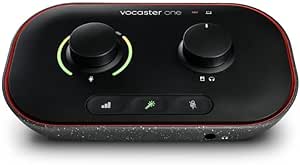 | Best for Solo Podcasting | Type and connection: USB audio interface | Channels: 1 | Microphone gain: Over 70 dB | VIEW LATEST PRICE | See Our Full Breakdown |
| USB audio interfaces for home studio | Maximum sample rate | Connectivity | Channels |
|---|---|---|---|
| Universal Audio Volt 1 USB Aud | 192 kHz | USB | — |
| Focusrite Scarlett 2i2 Studio | 192 kHz | USB-C | — |
| Focusrite Scarlett Solo Studio | 192 kHz | USB-C | — |
| PreSonus Quantum ES 2 USB-C Au | 192 kHz | USB-C | 2 |
| RØDE AI-1 USB Audio Interface | 96 kHz | USB | 1 |
| Audient iD14 MKII USB Audio In | 96 kHz | USB-C | 4 |
| PreSonus AudioBox USB 96 Studi | 96 kHz | USB, bus-powered | 2 |
| Focusrite Scarlett 2i2 4th Gen | 192 kHz | USB-C | 2 |
| Audient iD4 MKII USB-C Audio I | 96 kHz | USB-C | 2 |
| Mackie Onyx Artist 1×2 USB Aud | — | USB 2.0 | 2 in x 2 out |
| M-Audio M-Track Solo USB Audio | — | — | — |
| Focusrite Scarlett 16i16 4th G | — | — | — |
| Focusrite Scarlett Solo 3rd Ge | 192 kHz | — | 2 |
| Focusrite Scarlett Solo 4th Ge | — | — | 2 |
| Focusrite Vocaster One USB Pod | 48 kHz | — | 1 |
More Details on Our Top Picks
Universal Audio Volt 1 USB Audio Interface
The Volt 1 suits a home studio built around one performer recording at a time. Its Vintage preamp mode, inspired by UA’s 610 preamp, offers a tonal option for vocals and instruments, while 24-bit/192 kHz recording covers detailed sessions. Compared with the RØDE AI-1, it adds bundled software and support for compatible iPad and iPhone devices; both keep recording to a single input. That limit means I would skip it for duets or simultaneous mic-and-instrument tracking. Mobile use also needs extra power and, for Lightning devices, an adapter. For a compact vocal or guitar setup where the preamp character and software bundle matter, the Volt 1 is a more rounded pick than a bare-bones interface.
Pros:- Vintage preamp mode provides an alternate tonal character for vocals and instruments.
- Records at up to 24-bit/192 kHz.
- Portable design supports computers and compatible iPad and iPhone devices.
- Includes recording software and plug-ins.
Cons:- One input prevents simultaneous recording of multiple sources.
- iPhone and Lightning-equipped iPad use requires extra power and a camera adapter.
Best for: Solo singers, guitarists, or podcasters who want one input, a vintage-style preamp option, and bundled production software.
Not ideal for: Musicians recording multiple performers or separate microphone and instrument sources at once, since it has only one input.
- Connectivity:USB
- Inputs/Outputs:1-in/2-out
- Maximum sample rate:192 kHz
- Bit depth:Up to 24-bit
- Compatible operating systems:Windows, macOS, iOS 14+
- Dimensions:5.12 × 5.71 × 1.97 in
- Weight:544 g
Our verdict“Choose the Volt 1 for solo home recording when its Vintage preamp mode and software bundle matter more than having multiple inputs.”
Focusrite Scarlett 2i2 Studio 4th Gen USB-C Audio Interface Bundle
For someone assembling a first home studio, the Scarlett 2i2 Studio bundle puts the main recording pieces together: a two-preamp interface, CM25 MkIII microphone, SH-450 headphones, and production software. Its two inputs let a beginner record a microphone and instrument together, a more flexible arrangement than the single-input Volt 1 or RØDE AI-1. Auto Gain and Clip Safe also reduce the chance that a first take is too quiet or clips. Air mode gives vocals and guitars another tonal option. The tradeoff is that the included mic and headphones make this a bundled choice rather than a focused upgrade for someone who already owns studio gear. I’d choose it when a ready-to-start kit matters more than selecting each component separately.
Pros:- Bundle includes a two-preamp interface, condenser microphone, headphones, and recording software.
- Two inputs support recording a mic and instrument at the same time.
- Auto Gain and Clip Safe help manage recording levels.
- Air mode adds a tonal option for vocals and guitars.
Cons:- Two inputs limit larger sessions with several simultaneous sources.
- The bundle is less useful to buyers who already have a microphone and headphones.
Best for: New home-studio owners who need an interface, condenser microphone, headphones, and starter software in one setup.
Not ideal for: Recordists who already own a suitable microphone and headphones or need more than two inputs for a band setup.
- Generation:4th Gen
- Connectivity:USB-C
- Microphone preamps:2
- Maximum sample rate:192 kHz
- Dynamic range:120 dB
- Included microphone:CM25 MkIII condenser microphone
- Included headphones:SH-450
- Warranty:3 years
Our verdict“Pick this bundle if you want the core gear for a first two-source home recording setup in one package.”
Focusrite Scarlett Solo Studio 4th Gen USB-C Audio Interface Bundle
The Scarlett Solo Studio bundle packages a microphone, headphones, and software around a recording path meant for one mic and one instrument. Its XLR mic preamp and separate Hi-Z instrument input suit a singer-songwriter who wants to capture vocals and a direct guitar or bass performance without moving cables between takes. Like the Scarlett 2i2 Studio, it includes the CM25 MkIII mic and SH-450 headphones, but the 2i2’s two mic preamps make it the better fit for two-mic recording. The Solo’s simpler input arrangement is easier to match to a one-person workflow, and Air mode adds presence and harmonic character. Its limit is clear: it cannot record two microphones together, so duets and stereo mic setups call for another interface.
Pros:- Includes a condenser microphone, headphones, and production software.
- Separate XLR mic and Hi-Z instrument inputs suit vocal-and-instrument recording.
- Supports 24-bit/192 kHz recording with a 120 dB dynamic range.
- Air mode adds presence and harmonic character.
Cons:- Only one XLR microphone input, so it cannot capture two mic sources simultaneously.
- The included bundle adds little value for buyers who already own recording essentials.
Best for: Solo singer-songwriters who want to record vocals and a direct guitar or bass signal with a bundled mic and headphones.
Not ideal for: Duos, interview setups, or musicians who need two microphone preamps for simultaneous recording.
- Connectivity:USB-C
- Inputs:1 XLR mic preamp; 1 Hi-Z instrument input
- Bit depth:24-bit
- Maximum sample rate:192 kHz
- Dynamic range:120 dB
- Included microphone:CM25 MkIII condenser microphone
- Included headphones:SH-450
- Warranty:3 years
Our verdict“Choose the Scarlett Solo Studio bundle for a one-person vocal-and-instrument setup that needs its own mic and headphones.”
PreSonus Quantum ES 2 USB-C Audio Interface with Fender Studio Pro Software
The Quantum ES 2 is the most appealing pick here for a guitarist who also records vocals: it pairs a Fender co-developed instrument input with two MAX-HD mic preamps offering up to 75 dB of gain. Auto Gain and LED meters help keep setup straightforward, while loopback audio can bring computer playback into a recording or stream. The Scarlett 2i2 Studio is a closer fit for someone who needs a microphone and headphones supplied; the ES 2 instead emphasizes input flexibility, monitoring, and a perpetual Studio One Pro license. Its two channels still set a firm ceiling for a home band or multi-mic drum setup. I’d favor it over the smaller single-input Volt 1 when guitar, two-mic capability, and loopback are central to the room.
Pros:- Two MAX-HD preamps provide up to 75 dB of gain.
- Fender co-developed instrument input is tailored to guitar and bass recording.
- Auto Gain and LED metering assist with level setup.
- Loopback, balanced outputs, and a perpetual Studio One Pro license support flexible home workflows.
Cons:- Two channels limit simultaneous recording for larger ensembles.
- Requires a USB connection to a compatible computer.
Best for: Guitarists and singer-songwriters who want a dedicated instrument input, two mic preamps, and loopback for home recording or streaming.
Not ideal for: Bands and multi-mic recording setups that need more than two input channels at once.
- Connectivity:USB-C
- Channels:2
- Microphone preamps:2 MAX-HD preamps
- Maximum preamp gain:+75 dB
- Maximum sample rate:192 kHz
- Main outputs:2 balanced 1/4-inch TRS
- Software included:Perpetual Studio One Pro license
- Weight:680 g
Our verdict“Choose the Quantum ES 2 if guitar recording and flexible two-channel routing matter more than an included microphone bundle.”
RØDE AI-1 USB Audio Interface
The RØDE AI-1 keeps a solo recording chain simple: its Neutrik combo input accepts either an XLR microphone or a quarter-inch instrument, and phantom power supports condenser mics. A dedicated headphone level control makes direct monitoring easier to adjust at the desk. Compared with the Universal Audio Volt 1, it records at a lower maximum sample rate and lacks the described vintage preamp mode and software bundle; the Volt also offers two output channels. The AI-1’s strength is a compact, uncomplicated path for one source at a time. That same simplicity becomes a ceiling for anyone who wants to record vocals and guitar simultaneously or capture two microphones. I’d pick it for a small solo setup where the combo input and headphone control matter more than extra recording options.
Pros:- Neutrik combo input accepts XLR microphones or quarter-inch instruments.
- Phantom power supports condenser microphones.
- Dedicated headphone output level control simplifies monitoring.
- Compact footprint suits a small recording desk.
Cons:- Single input limits simultaneous recording to one source.
- Maximum sample rate is 96 kHz, below the 192 kHz support listed for the Volt 1 and Scarlett models.
Best for: Solo podcasters, vocalists, or instrumentalists who need a compact interface for one microphone or instrument at a time.
Not ideal for: Singer-songwriters recording vocals and instruments together, or anyone needing multiple simultaneous inputs.
- Connectivity:USB
- Input:Neutrik combo XLR/1/4-inch jack
- Channels:1
- Phantom power:Yes
- Maximum sample rate:96 kHz
- Headphone output:Studio-quality, with level control
- Dimensions:3.94 × 4.88 × 1.5 in
- Warranty:1 year
Our verdict“Choose the AI-1 for a compact, one-source home setup where simple mic-or-instrument connections are enough.”
Audient iD14 MKII USB Audio Interface
The Audient iD14 MKII pairs two Class-A mic preamps with four total channels, giving a small home studio more room to connect sources than the two-channel iD4 MKII. Its monitor mix and panning controls help tailor what performers hear while recording, and the two headphone outputs can serve a musician and engineer at once. The all-metal desktop chassis suits a setup that stays assembled, while USB-C and Mac, PC, and iOS compatibility make it flexible across devices. The tradeoff is its 96 kHz ceiling; the Scarlett 2i2 4th Gen supports up to 192 kHz and adds level-assistance features. Choose the iD14 when the extra channel capacity and monitoring controls matter more than higher sample rates or automated setup aids.
Pros:- Two Class-A microphone preamps for recording a pair of mic sources.
- Four channels provide more capacity than the two-channel Audient iD4 MKII.
- Two headphone outputs and monitor mix controls support shared, customized monitoring.
- All-metal chassis and USB-C connection suit a durable desktop setup.
Cons:- Four channels may still be restrictive for a full band or larger multi-mic setup.
- Maximum sample rate is 96 kHz, below the Scarlett 2i2 4th Gen’s 192 kHz capability.
Best for: Home studio owners recording a vocalist and instruments who want two headphone outputs and more channel capacity than a basic two-channel interface.
Not ideal for: Producers who need several simultaneous mic inputs or want sample rates above 96 kHz; its four-channel capacity and sample-rate ceiling may be limiting.
- Connectivity:USB-C
- Channels:4
- Microphone preamps:2 Class-A
- Headphone outputs:2
- Maximum sample rate:96 kHz
- Compatibility:Mac, PC, iOS
- Chassis:All-metal
- Weight:1,250 g (2.76 lb)
Our verdict“Choose the iD14 MKII if your home studio needs flexible monitoring and more than two channels, and 96 kHz recording meets your needs.”
PreSonus AudioBox USB 96 Studio Recording Bundle
The AudioBox USB 96 Studio Bundle is the most ready-to-record option here: it includes a two-channel interface, M7 condenser microphone, HD7 headphones, stand, cable, and recording software. That makes it a practical starting point for someone who has a computer but no recording gear. Its zero-latency hardware monitoring lets a performer hear a live input without the delay that can make tracking uncomfortable, and MIDI In/Out adds a path for older keyboards or controllers. Compared with the standalone Mackie Onyx Artist 1×2, this package supplies more of the basic studio kit, while the Mackie offers 24-bit/192 kHz recording. The AudioBox is limited to two channels and 96 kHz, so it is better for simple vocal or instrument sessions than expanding multi-mic setups.
Pros:- Bundle includes an interface, M7 condenser microphone, HD7 headphones, stand, cable, and software.
- Two Class-A preamps with +48V phantom power support condenser microphones.
- Zero-latency hardware monitoring helps performers hear inputs while recording.
- MIDI In/Out supports compatible keyboards and controllers.
Cons:- Two channels limit simultaneous recording to a small number of sources.
- Maximum sample rate of 96 kHz is lower than the Mackie Onyx Artist 1×2’s 192 kHz.
- Recording and production still require a compatible computer and software.
Best for: First-time home recordists who need an interface, condenser microphone, headphones, stand, and starter software in one compatible setup.
Not ideal for: Musicians recording multiple performers or instruments simultaneously, or buyers seeking a 192 kHz interface like the Mackie Onyx Artist 1×2.
- Connectivity:USB, bus-powered
- Channels:2
- Mic preamps:2 Class-A with +48V phantom power
- Maximum sample rate:96 kHz
- Inputs:Combo inputs for mic, instrument, and line-level sources
- Monitoring:Zero-latency hardware monitoring
- MIDI:MIDI In/Out
- Included components:Interface, M7 microphone, HD7 headphones, stand, USB cable, recording software
Our verdict“Pick this bundle to start a basic home recording setup with the core gear included, provided two-channel recording is enough.”
Focusrite Scarlett 2i2 4th Gen USB-C Audio Interface
The Scarlett 2i2 4th Gen is a strong match for home studios that want help setting and protecting recording levels. Auto Gain can set input levels, while Clip Safe helps guard against clipping; those tools reduce the chance that a good vocal or instrument take is spoiled by an avoidable level mistake. Its two mic preamps, two inputs, Air mode, and 192 kHz maximum sample rate give it a more feature-rich recording path than the Audient iD4 MKII, which tops out at 96 kHz. The iD4, however, offers two headphone outputs and monitor mix and panning controls, so it may better suit shared monitoring. The Scarlett remains a two-channel interface, and its guidance features do not add inputs for recording a larger group at once.
Pros:- Auto Gain helps set recording levels quickly.
- Clip Safe helps prevent input clipping during takes.
- Maximum sample rate of 192 kHz exceeds the 96 kHz limit of the Audient iD4 MKII.
- Air mode provides an alternate tonal character for recordings.
Cons:- Two-channel input configuration limits simultaneous sources.
- It lacks the iD4 MKII’s two headphone outputs and monitor mix and panning controls.
Best for: Solo musicians and small home studios that want two inputs with automated level assistance and a high maximum sample rate.
Not ideal for: Home engineers who need more than two channels or prioritize two headphone outputs and monitor mix controls like those on the Audient iD4 MKII.
- Connectivity:USB-C
- Channels:2
- Microphone preamps:2
- Maximum sample rate:192 kHz
- Dynamic range:120 dB
- Input features:Auto Gain, Clip Safe, Air mode
- Compatible operating systems:Mac OS, Windows OS, iOS
- Included software:Pro Tools Intro+, Ableton Live Lite, Cubase LE, Hitmaker Expansion
Our verdict“Choose the Scarlett 2i2 4th Gen for a two-input home studio that values level assistance, Clip Safe, and 192 kHz recording.”
Audient iD4 MKII USB-C Audio Interface with Class A Microphone Preamplifier
The Audient iD4 MKII suits a compact home setup centered on one microphone and an instrument. Its Class-A microphone preamp, monitor mix and panning controls, and two headphone outputs give a solo recordist useful monitoring options without moving up to the larger, four-channel iD14 MKII. The all-metal housing makes it a sturdy desktop choice, and USB-C plus Mac, PC, and iOS compatibility supports more than one recording device. Compared with the Focusrite Scarlett 2i2 4th Gen, the iD4 offers only two channels and a lower 96 kHz maximum sample rate; the Scarlett adds Auto Gain, Clip Safe, and 192 kHz recording. In exchange, the Audient brings two headphone outputs and monitor controls that can help a musician and engineer listen together.
Pros:- Class-A microphone preamplifier for a single mic input.
- Two headphone outputs support shared listening.
- Monitor mix and panning controls provide flexible monitoring.
- Compact all-metal housing with USB-C connectivity.
Cons:- Two channels limit simultaneous recording capacity.
- Maximum sample rate is 96 kHz, below the Scarlett 2i2 4th Gen’s 192 kHz.
Best for: Solo musicians with a small desk who record one mic and an instrument and want two headphone outputs for shared monitoring.
Not ideal for: Producers recording several mic sources at once or seeking 192 kHz recording and level-assistance features like those on the Scarlett 2i2 4th Gen.
- Connectivity:USB-C
- Channels:2
- Preamplifier:Class A microphone preamplifier
- Headphone outputs:2
- Monitor features:Monitor mix and monitor panning
- Maximum sample rate:96 kHz
- Chassis:All-metal
- Weight:740 g
Our verdict“Choose the iD4 MKII for a compact solo setup where monitor controls and two headphone outputs matter more than extra channels.”
Mackie Onyx Artist 1×2 USB Audio Interface
The Mackie Onyx Artist 1×2 is a straightforward fit for a home studio built around one microphone and a guitar or bass. Its Hi-Z instrument input accepts an instrument signal directly, while the Onyx mic preamp and +48 V phantom power accommodate a condenser mic. Direct monitoring sends the input to headphones without computer-processing delay, which is useful for tracking along to a session. Compared with the PreSonus AudioBox USB 96 bundle, Mackie offers 24-bit/192 kHz recording and a focused instrument input, while the PreSonus package includes a microphone, headphones, stand, and software. Neither provides many channels, and the Mackie depends on a connected computer for USB power. Its practical value is in a lean guitar-and-vocal workflow, not a full-band recording setup.
Pros:- Hi-Z instrument input supports direct guitar or bass recording.
- Onyx microphone preamp with +48 V phantom power supports condenser microphones.
- 24-bit/192 kHz recording specification.
- Zero-latency direct monitoring and USB bus power suit compact recording.
Cons:- Two input channels restrict simultaneous recording setups.
- USB bus power requires a connected computer.
Best for: Guitarists or bassists building a compact home setup who want to record an instrument and a microphone with direct monitoring.
Not ideal for: Beginners who need a complete recording kit or bands needing several simultaneous inputs; the PreSonus AudioBox bundle includes more starter gear, while this Mackie has two input channels.
- Channels:2 in x 2 out
- Connectivity:USB 2.0
- Recording resolution:24-bit/192 kHz
- Microphone preamp:Onyx
- Phantom power:+48 V
- Instrument input:1/4-inch TRS with Hi-Z switch
- Monitoring:Zero-latency direct monitoring
- Power:USB bus-powered
Our verdict“Choose the Onyx Artist 1×2 for a simple guitar-or-bass and vocal setup with direct monitoring and 192 kHz capability.”
M-Audio M-Track Solo USB Audio Interface
The M-Track Solo is a straightforward pick for a first home setup built around one microphone and one instrument. Its combo input supplies phantom power for a condenser mic, while the switchable second input accepts an instrument such as a guitar; direct monitoring lets you hear the input without the delay of monitoring through a computer. Compared with the Focusrite Scarlett Solo 4th Gen, it records at a lower maximum sample rate and offers a simpler feature set, but its RCA outputs and included MPC Beats give new users a practical starting point for recording or making tracks. The compromises are tangible: recording tops out at 48 kHz, and the headphone jack is 1/8-inch, so some studio headphones need an adapter. It suits basic sessions better than a setup expected to grow.
Pros:- USB-powered compact design is easy to place in a small home studio or take on the go.
- Combo input with phantom power supports condenser microphones.
- Switchable line/instrument input accommodates a guitar or other line-level source.
- Direct monitoring and included MPC Beats support simple recording and production.
Cons:- Maximum recording resolution is 48 kHz, below the 192 kHz support listed for the Scarlett Solo models.
- The 1/8-inch headphone output may require an adapter for common 1/4-inch headphone plugs.
- iOS connection requires a separate Apple Lightning to USB 3 Camera Adapter.
Best for: First-time home recordists who need a compact USB-powered interface for one microphone and one instrument.
Not ideal for: Producers who want higher sample rates, multiple mic preamps, or a setup with room to expand.
- Recording channels:2
- Maximum audio resolution:Up to 48 kHz
- Inputs:1 combo XLR/line input with phantom power; 1 switchable line/instrument input
- Outputs:1/8-inch headphone output; stereo RCA outputs
- Monitoring:Zero-latency direct monitoring with USB/Direct balance switch
- Power:USB-powered
- Included software:MPC Beats
Our verdict“Choose the M-Track Solo for an inexpensive, compact first setup if 48 kHz recording and a single mic input meet your needs.”
Focusrite Scarlett 16i16 4th Gen USB-C Audio Interface
The Scarlett 16i16 4th Gen is the clear choice here for a home studio that needs to connect more than the usual mic-and-guitar pair. Two mic preamps handle basic recording, while ADAT, S/PDIF, and MIDI connections make it easier to add digital gear and external instruments as a setup grows. Auto Gain and Clip Safe help manage levels, and Focusrite Control 2 provides routing options beyond a simple desktop interface. That flexibility sets it apart from the Scarlett Solo 4th Gen, which is smaller and simpler but offers just one mic preamp and one instrument input. The tradeoff is that the 16i16 needs an external power supply and involves more routing choices than a beginner may need. Its listed 125 kHz frequency response looks unusual, so I would not use that figure to compare it with other interfaces.
Pros:- ADAT, S/PDIF, and MIDI connectivity support a wider range of studio equipment.
- Two mic preamps plus Hi-Z and line inputs accommodate varied recording sources.
- Auto Gain and Clip Safe assist with setting and managing recording levels.
- 24-bit/192 kHz converters and a stated 122 dB dynamic range support detailed recording.
Cons:- Requires an external power supply, unlike the USB-powered Scarlett Solo models.
- Its routing and connectivity may be unnecessary for a basic one- or two-source home setup.
- The listed 125 kHz frequency response is unusual and may be a data error.
Best for: Home-studio owners recording multiple sources or planning to add ADAT, S/PDIF, or MIDI equipment.
Not ideal for: Solo vocalists or guitarists who want a small, bus-powered interface with a simple setup.
- Generation and connection:4th Gen; USB-C
- Inputs and outputs:16 inputs, 16 outputs
- Mic preamps:2
- Digital connectivity:ADAT and S/PDIF
- MIDI:MIDI I/O
- Audio resolution:24-bit/192 kHz
- Dynamic range:122 dB
- Power:External power supply included
Our verdict“Pick the 16i16 if your home studio needs digital expansion and flexible routing, and skip it if you only record one source at a time.”
Focusrite Scarlett Solo 3rd Gen USB-C Audio Interface
For a singer-songwriter recording a vocal and guitar in separate passes, the Scarlett Solo 3rd Gen keeps the setup small and focused. It has one microphone input and one instrument input, with Gain Halos that make input levels easier to monitor and a switchable Air mode that can add presence to a vocal or acoustic recording. Balanced outputs suit a pair of studio monitors, while USB bus power keeps the interface simple to place on a desk. Compared with the Scarlett Solo 4th Gen, this earlier model offers the same listed 24-bit/192 kHz resolution but lacks the newer generation’s stated 120 dB dynamic range and included software details. Its main limitation is the same basic layout: it cannot record two microphones at once. Some bundled software also requires registration and download.
Pros:- One XLR mic input and one instrument input cover common solo recording needs.
- Gain Halos provide a visible way to monitor input levels.
- Air mode offers an additional tonal option for vocals and acoustic sources.
- USB bus power and balanced outputs suit a simple computer-and-monitor setup.
Cons:- Only one microphone preamp limits simultaneous vocal or multi-mic recording.
- Bundled software and plug-ins require registration and download.
- The 3rd Gen listing gives less current-generation detail than the Scarlett Solo 4th Gen.
Best for: Singer-songwriters recording one mic and one guitar or bass input at a time on a compact desk setup.
Not ideal for: Duos or podcasters who need two microphone preamps for simultaneous recording.
- Generation:3rd Gen
- Channels:2
- Maximum sample rate:192 kHz
- Bit depth:24-bit
- Inputs:XLR microphone and instrument
- Outputs:2 balanced outputs
- Power:USB bus-powered; no external power required
- Dimensions:1.71 x 5.65 x 3.77 inches
Our verdict“Choose the Scarlett Solo 3rd Gen for compact solo recording if you do not need more than one microphone input.”
Focusrite Scarlett Solo 4th Gen USB-C Audio Interface
The Scarlett Solo 4th Gen makes sense for a solo creator who wants a current, compact recording interface without buying a larger multi-input box. Its one XLR preamp and one Hi-Z input suit a vocal-and-guitar workflow, and 24-bit/192 kHz recording with a stated 120 dB dynamic range gives it a more detailed spec sheet than the M-Track Solo’s 48 kHz ceiling. Air modes offer a way to shape the sound of vocals and instruments, and the software bundle gives a new user tools to start recording. Compared with the Scarlett Solo 3rd Gen, the core two-source layout remains familiar, so an upgrade matters most to someone who values the newer generation’s stated specs and included package. Its fixed input count is the real boundary: it cannot take two microphones at once, and the listed 20 kHz frequency response adds little distinction.
Pros:- One XLR preamp and one Hi-Z input support a common solo vocal-and-instrument setup.
- 24-bit/192 kHz recording and a stated 120 dB dynamic range offer a stronger spec sheet than the M-Track Solo.
- Air modes provide additional tonal options for recorded sources.
- Includes Pro Tools Intro+, Ableton Live Lite, Cubase LE, and Hitmaker Expansion.
Cons:- Only one microphone preamp limits simultaneous multi-mic recording.
- Two-channel capacity leaves little room for recording several sources at once.
- The stated 20 kHz frequency response offers limited help in distinguishing it from alternatives.
Best for: Solo vocalists and instrumentalists who want a compact USB-C interface with one mic input, one instrument input, and bundled recording tools.
Not ideal for: Two-person podcasts, bands, or home studios that need several simultaneous microphone inputs.
- Generation and connection:4th Gen; USB-C
- Channels:2
- Microphone input:1 XLR mic preamp
- Instrument input:1 Hi-Z input
- Audio resolution:24-bit/192 kHz
- Dynamic range:120 dB
- Power:Not specified in supplied product data
- Dimensions:3.78 x 5.63 x 1.83 inches
Our verdict“Choose the Scarlett Solo 4th Gen for a polished, compact solo setup, provided one mic input is enough for your sessions.”
Focusrite Vocaster One USB Podcasting Audio Interface
The Vocaster One is shaped around a solo spoken-word setup: it pairs one XLR microphone input with over 70 dB of gain, Auto Gain, voice-enhancement presets, and a mute button. Those controls can make it easier to get a speaker ready without adding a separate mic booster or spending as much time setting levels. Phone, camera, and stereo loopback connections also help when a podcast or stream draws in audio from other devices. Compared with the Scarlett Solo 4th Gen, the Vocaster prioritizes podcast controls and connections over the more general vocal-and-instrument workflow. That focus is a poor fit for recording multiple musicians: it is a single-channel interface, and its maximum sample rate is 48 kHz. Phone and camera connections also call for separate TRRS and TRS cables.
Pros:- Over 70 dB of mic gain supports a broad range of XLR microphones without a separate booster.
- Auto Gain and voice-enhancement presets simplify spoken-word setup.
- Phone, camera, and stereo loopback connections support varied podcast and streaming sources.
- A dedicated mute button helps cut interruptions during recording.
Cons:- Single-channel design is aimed at solo recording and does not support multiple mic inputs.
- Maximum sample rate is 48 kHz, below the Scarlett Solo 4th Gen’s stated 192 kHz.
- Phone and camera connections require separate TRRS and TRS cables.
Best for: Solo podcasters and streamers who record one XLR microphone and want built-in level assistance, voice presets, and mute control.
Not ideal for: Musicians recording instruments or multiple performers simultaneously, or podcasters who need supplied phone and camera cables.
- Type and connection:USB audio interface
- Channels:1
- Microphone gain:Over 70 dB
- Maximum sample rate:48 kHz
- Audio input:Microphone
- Connections:Phone, camera, and stereo loopback
- Included component:USB-A to USB-C cable
- Weight:349 g
Our verdict“Choose the Vocaster One for a solo podcast workflow with built-in voice and level controls, not for multi-source music recording.”
How We Picked
I ranked these interfaces by how well they solve common home studio jobs: recording a voice or instrument, capturing two sources at once, building a complete starter setup, and expanding as needs change. I weighed input and output options, workflow features, included gear, portability, and how much setup complexity each model brings. The ranking favors useful recording flexibility for the space and likely needs of a home user, rather than a long feature list alone.
The Scarlett 2i2 4th Gen takes the top spot because two inputs cover a wider range of music recording than a solo interface while keeping the setup manageable. Models with strong specialist advantages follow: the Audient iD14 MKII for expansion, bundle options for starting from scratch, and the Scarlett 16i16 for larger sessions. Compact one-input models rank lower for general home studio use because their simplicity comes with narrower recording options; the Vocaster One is best judged as a podcast-focused choice.
| USB audio interfaces for home studio | Connectivity |
|---|---|
| Universal Audio Volt 1 USB Aud | USB |
| Focusrite Scarlett 2i2 Studio | USB-C |
| Focusrite Scarlett Solo Studio | USB-C |
| PreSonus Quantum ES 2 USB-C Au | USB-C |
| RØDE AI-1 USB Audio Interface | USB |
| Audient iD14 MKII USB Audio In | USB-C |
| PreSonus AudioBox USB 96 Studi | USB, bus-powered |
| Focusrite Scarlett 2i2 4th Gen | USB-C |
| Audient iD4 MKII USB-C Audio I | USB-C |
| Mackie Onyx Artist 1×2 USB Aud | USB 2.0 |
| M-Audio M-Track Solo USB Audio | — |
| Focusrite Scarlett 16i16 4th G | — |
| Focusrite Scarlett Solo 3rd Ge | — |
| Focusrite Scarlett Solo 4th Ge | — |
| Focusrite Vocaster One USB Pod | — |
Factors to Consider When Choosing USB Audio Interfaces For Home Studios
Before choosing an interface, I’d map out the recording sessions you expect to do, the gear you already own, and the space available at your desk. These decisions often matter more than small feature differences between models.
Count sources you need to record at the same time
Count simultaneous sources, rather than the total number of instruments you own. A singer who records vocals over pre-made tracks may need only one mic input, while a singer-songwriter playing guitar and singing live needs two. Recording a drum kit, several musicians, or stereo keyboards calls for more inputs, and the number printed in a product name may not tell the whole story about available inputs. Check how many microphone preamps are included and whether extra inputs require external gear. Buying too few inputs can force you to record parts separately; buying far more than you use adds cost and desk clutter without improving a solo workflow.
Choose a bundle only if its parts match your setup
A bundle can simplify a first purchase by pairing an interface with a microphone and headphones, but the included items may not suit every voice or room. If you already own either piece, a standalone interface avoids paying for gear that will sit unused. Think about what else a starter kit needs: a mic stand, pop filter, cables, and a suitable recording space can matter as much as the interface. Bundles are convenient for getting started quickly, while separate purchases let you focus on the parts that most affect your recordings. I’d compare the included components with the gear you actually plan to use before treating a bundle as a complete studio.
Plan for headphones, speakers, and monitoring
Input counts get most of the attention, but outputs determine how comfortably you can listen and record. If you want to monitor through speakers and headphones, check the available output connections and whether the interface gives you direct monitoring of an input. Direct monitoring can let you hear your performance without the delay that may come from routing audio through recording software. Multiple headphone mixes are useful for recording with another person, but a solo creator may not need them. Check that your headphones match the interface’s output needs; a connection that fits physically does not always mean every headphone will play at a comfortable level.
Match the interface to your computer and desk
Confirm the connection type and operating system support for your computer before ordering. A USB-C connector describes the port shape, not necessarily the connection speed or the included cable arrangement, so check the manufacturer’s requirements and what comes in the box. Consider whether the interface will stay on a desk or travel between locations; a compact model is easier to carry, while a larger unit may offer more controls and connections. Also check how it draws power, especially if you plan to use it with a laptop away from a powered desk. A small footprint helps only if the controls remain easy to reach during recording.
Pay for expansion when you have a likely next step
Extra inputs and expansion connections are useful when a real recording plan calls for them, not simply because they sound future-proof. If you expect to add a microphone, keyboard, or external preamp soon, confirm which connection supports that addition and what extra hardware it requires. Larger interfaces can reduce the need to replace gear later, but they also bring more routing decisions and a less minimal setup. For a fixed solo recording routine, a simpler interface can be easier to operate every day. I’d pay for expansion when I can name the next source I want to record; otherwise, I’d prioritize a straightforward workflow.
Separate music recording needs from podcast controls
Podcast-oriented interfaces can make voice recording and speaking workflows more direct, but they may not provide the instrument inputs and flexibility a music setup needs. Likewise, a music interface can record a podcast, though it may lack controls designed for a host who needs quick access to voice processing or show functions. Decide whether you mainly record instruments, a solo voice, or conversations with guests. For remote guests, check how audio from the computer can be routed back into the recording without creating an echo. The right choice follows the session you make most often, not the broadest description on the box.
Frequently Asked Questions
Is a one-input interface enough if I want to record vocals and guitar?
It depends on whether you need to capture both at the same time. A one-input model can record a vocal and then a guitar in separate passes, which works well for layered songs. If you want to perform both together, you need two suitable inputs, such as a mic input and an instrument input. Recording them separately also gives you more control over their balance, but it may not suit a live performance or a shared room session. Choose based on how you expect to make the recording, rather than the number of instruments you own.
Should I buy a studio bundle or choose the interface and microphone separately?
A bundle is a sensible starting point when you need both an interface and basic recording accessories and want them in one purchase. Separate components make more sense if you already own headphones or a microphone, or if you have a particular mic in mind for your room and voice. Bundled gear can help you begin recording, but it does not remove the need for a stand, suitable cables, or a quiet space. Check which accessories are actually included before assuming the bundle covers everything. I’d choose the bundle for convenience and a separate setup for more control over each component.
Will a two-input interface record a stereo keyboard and a microphone at once?
Usually, a stereo keyboard uses two inputs by itself, so adding a microphone generally requires at least one more input. You can record the keyboard in mono through one input if that suits the part, leaving the other for a mic. Check the interface’s input types and the keyboard’s output connections before deciding, because the available connections affect how the signals can be routed. If stereo keyboard sound and a vocal need to be captured together, look for an interface with enough simultaneous inputs. A session plan can prevent buying a two-input model that forces you to record parts in separate passes.
Can I use a podcast interface for home music recording?
Some podcast-focused interfaces can record music, especially a solo voice or a single connected source. The limitation is often the available input types and workflow: features designed for speech may not help when recording instruments or several musicians. If you want to record vocals with guitar, check that the interface has the mic and instrument connections you need at the same time. For a solo host, quick voice controls may matter more than extra music inputs. I’d choose by the sessions you expect to record most often and confirm the connection layout supports them.
When does it make sense to move from a compact interface to a larger one?
A larger model becomes useful when your sessions regularly need more simultaneous microphone or line inputs, or when you want a planned expansion path. It can also make sense if you need more output routing for speakers, headphones, or external equipment. Extra capacity has little benefit for someone who always records one source at a time, and a larger interface may add routing complexity. Write down the sources you expect to connect now and in the near future, then compare that list with the actual inputs and expansion options. Upgrade when your recording routine runs into a specific limitation, rather than simply because a larger model has more connections.
Conclusion
For the broadest home studio fit, I recommend the Focusrite Scarlett 2i2 4th Gen as the best overall pick: it handles common two-source sessions without taking over a desk. The M-Audio M-Track Solo and compact one-input models are better value for simple, one-source recording, while the Scarlett Solo Studio or Scarlett 2i2 Studio bundles make starting easier if you also need basic gear. For more room to grow, the Audient iD14 MKII is my premium choice, with the Scarlett 16i16 better suited to sessions that already demand more connections. Beginners should match the Solo or 2i2 bundle to whether they record one source or two at once; podcasters recording alone should look at the Vocaster One. Choose the interface that fits the sessions you actually plan to record, and the right tradeoff will be easier to spot.