If you’re frequently in dimly lit rooms, choosing a webcam that performs well in low-light conditions is essential. The Logitech Brio 4K Webcam stands out as the best overall with its excellent low-light performance and versatile features. The Insta360 Link 2 models also shine with AI tracking and HDR, making them great for dynamic environments. However, these webcams often come with tradeoffs: higher cost for premium features or complexity that might overwhelm beginners. Keep reading for a detailed breakdown of each option, so you can find the best fit for your dim room setup.

Get audio and creator gear delivered free with Prime
- Fast, free delivery on millions of items
- Prime Video, Amazon Music and more included
- Member-only deals all year
Complete the kit



Key Takeaways
- Top-tier webcams like the Logitech Brio excel in low-light environments but come at a premium price point.
- HDR and AI tracking features significantly improve image clarity and stability in dim settings.
- Build quality and ease of use vary, with some models offering more user-friendly interfaces for beginners.
- Tradeoffs often include higher cost or increased complexity—balance your budget with desired features.
- Choosing a webcam with adjustable settings or software can help optimize performance in different low-light scenarios.
| Logitech Brio 4K Webcam with Noise-Canceling Microphone and Windows Hello |  | Best Overall for Professional Quality in Dim Rooms | Resolution: 4K at 30 fps | Field of View: 65°, 78°, 90° | Microphone: Dual omnidirectional noise-canceling | VIEW LATEST PRICE | See Our Full Breakdown |
| Logitech MX Brio Ultra HD 4K Webcam for Collaboration and Streaming |  | Best for Versatile Video Quality and AI Enhancement | Resolution: 4K at 30 fps, 1080p at 60 fps | Sensor: Advanced sensor with larger pixels | Microphones: Dual beamforming noise-reducing | VIEW LATEST PRICE | See Our Full Breakdown |
| Insta360 Link 2 4K Webcam for PC/Mac with AI Tracking and HDR |  | Best for AI Tracking and HDR in Low Light | Sensor: 1/2″ | Resolution: 4K | HDR: Yes | VIEW LATEST PRICE | See Our Full Breakdown |
| Insta360 Link 2C 4K Webcam for PC/Mac |  | Best for Versatile Modes and Auto Framing in Dim Rooms | Sensor: 1/2″ | Resolution: 4K | HDR: Yes | VIEW LATEST PRICE | See Our Full Breakdown |
| Anker PowerConf C200 2K Webcam with AI Noise Canceling Mics and Privacy Cover | 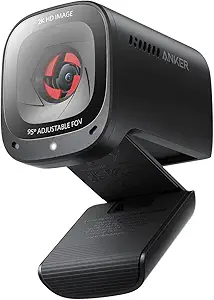 | Best Budget Choice with Solid Low-Light Performance | Resolution: 2K Ultra-Clear | Microphone: AI Noise Canceling Dual Mics | Field of View: 65°, 78°, 95° (software adjustable) | VIEW LATEST PRICE | See Our Full Breakdown |
| Logitech C920S HD Pro Webcam with Privacy Shutter and Full HD 1080p Video |  | Best Overall for Reliable, Clear Video in Dim Rooms | Video Resolution: Full HD 1080p/30fps | Audio: Stereo with dual mics | Autofocus: Yes | VIEW LATEST PRICE | See Our Full Breakdown |
| Insta360 Link 2C Pro 4K Webcam for PC/Mac with Auto Framing and HDR |  | Best for Versatile, High-Resolution Streaming in Low Light | Sensor: 1/1.3” | Video Resolution: 4K | Microphone: Directional noise-canceling dual-mic | VIEW LATEST PRICE | See Our Full Breakdown |
| Insta360 Link 2 Pro – 4K PTZ Webcam for PC/Mac with AI Tracking and Professional Audio |  | Best for Professional-Grade Video and AI Tracking in Dim Rooms | Sensor Type: CMOS | Sensor Size: 1/1.3″ | Video Resolution: 4K | VIEW LATEST PRICE | See Our Full Breakdown |
| low light webcams for dim room | Compatibility | Resolution | Microphone | Sensor |
|---|---|---|---|---|
| Logitech Brio 4K Webcam with N | Windows, Mac, ChromeOS | 4K at 30 fps | Dual omnidirectional noise-canceling | — |
| Logitech MX Brio Ultra HD 4K W | Windows, macOS, Chrome OS, Linux | 4K at 30 fps, 1080p at 60 fps | — | Advanced sensor with larger pixels |
| Insta360 Link 2 4K Webcam for | — | 4K | AI Noise-Canceling | 1/2" |
| Insta360 Link 2C 4K Webcam for | Windows, Mac | 4K | — | 1/2" |
| Anker PowerConf C200 2K Webcam | Windows 7 or later, macOS 10.11+ | 2K Ultra-Clear | AI Noise Canceling Dual Mics | — |
| Logitech C920S HD Pro Webcam w | PC, Mac, Laptop, Tablet, Xbox | — | — | — |
| Insta360 Link 2C Pro 4K Webcam | Windows, Mac | — | Directional noise-canceling dual-mic | 1/1.3” |
| Insta360 Link 2 Pro | Windows, Mac | — | — | — |
More Details on Our Top Picks
Logitech Brio 4K Webcam with Noise-Canceling Microphone and Windows Hello
The Logitech Brio 4K Webcam stands out for its stunning 4K resolution and auto light correction, making it ideal for professional settings where clarity in low-light environments is critical. Compared to the Insta360 Link 2, it offers more reliable auto light correction but at a higher price, and with a more complex setup process. Its dual noise-canceling microphones provide clear audio, and the inclusion of Windows Hello facial recognition streamlines login, adding to its productivity appeal. However, full feature access depends on compatible software, and some users may find the initial setup somewhat daunting. This pick suits remote workers and streamers needing high-quality visuals with ease of security features.
Pros:- Excellent 4K video clarity with auto light correction
- Built-in noise-canceling microphones for clear audio
- Supports Windows Hello for quick, secure login
- Adjustable field of view for flexible framing
Cons:- Higher price compared to standard webcams
- Requires compatible software for full feature utilization
- Setup can be complex for less tech-savvy users
Best for: Professionals and streamers who prioritize high-resolution video and seamless login in low-light conditions
Not ideal for: Casual users seeking a simple plug-and-play experience, as setup complexity may be off-putting
- Resolution:4K at 30 fps
- Field of View:65°, 78°, 90°
- Microphone:Dual omnidirectional noise-canceling
- Light Correction:RightLight 3 with HDR
- Compatibility:Windows, Mac, ChromeOS
- Windows Hello:Yes
Our verdict“This webcam is perfect for professionals needing top-tier video quality and security in dim environments, despite its higher cost and setup complexity.”
Logitech MX Brio Ultra HD 4K Webcam for Collaboration and Streaming
The Logitech MX Brio offers an impressive combination of 4K resolution and AI features, such as enhanced image quality and noise reduction, making it a versatile choice for both professional streaming and conference calls. Compared to the Brio 4K, it provides additional AI capabilities like auto white balance and an adjustable white light feature, but at a premium price. Its support for 1080p at 60fps ensures smooth streaming, while the AI-enhanced image adapts well to dim rooms, though its complex controls might overwhelm beginners. The inclusion of a privacy cover adds security, and broad platform compatibility makes it highly flexible. This model is best suited for users who need high-quality, adaptable video in various lighting conditions without sacrificing performance.
Pros:- High-resolution 4K video with smooth 1080p at 60fps
- AI-enhanced image processing for better low-light performance
- Customizable controls including white balance and brightness
- Privacy cover for security
Cons:- Premium price may be prohibitive for some users
- Requires USB-C port, not available on all devices
- Complex settings could be confusing for casual users
Best for: Remote professionals and content creators wanting premium features and adaptive control in low-light settings
Not ideal for: Budget-conscious users who prefer straightforward, basic webcams without advanced AI features
- Resolution:4K at 30 fps, 1080p at 60 fps
- Sensor:Advanced sensor with larger pixels
- Microphones:Dual beamforming noise-reducing
- Features:Show Mode, AI-enhanced image, adjustable lighting
- Compatibility:Windows, macOS, Chrome OS, Linux
- Privacy Cover:Yes
Our verdict“This webcam delivers adaptable, high-quality visuals for those who need flexible performance in dim rooms, despite its cost and learning curve.”
Insta360 Link 2 4K Webcam for PC/Mac with AI Tracking and HDR
The Insta360 Link 2 shines with its AI tracking and HDR capabilities, making it a standout choice for dynamic video calls and streaming in dim environments. Its 1/2″ sensor and phase detection autofocus produce sharp images, and the AI tracking keeps you centered during movement, unlike the static Brio models. However, it currently lacks compatibility with Windows Hello, which might be a drawback for users seeking facial recognition security. Its noise-canceling mic and gesture control support professional communication and ease of use. Compared to the Insta360 Link 2C, it offers more advanced tracking but less versatility in modes. This webcam caters to content creators and professionals who need reliable tracking and HDR in low-light conditions.
Pros:- High-quality 4K HDR with excellent low-light performance
- AI tracking keeps you in frame during movement
- Professional noise-canceling microphone
- Gesture control and remote operation
Cons:- Lacks Windows Hello facial recognition
- Some features require dedicated software with a learning curve
- Not compatible with ARM-based Windows systems
Best for: Streamers and remote workers needing precise AI tracking and high-quality low-light visuals
Not ideal for: Users seeking built-in facial recognition or simple plug-and-play webcams
- Sensor:1/2″
- Resolution:4K
- HDR:Yes
- AI Tracking:Yes
- Auto Focus:PDAF
- Microphone:AI Noise-Canceling
Our verdict“Ideal for users who value AI tracking and HDR performance in low-light settings, despite some compatibility limitations.”
Insta360 Link 2C 4K Webcam for PC/Mac
The Insta360 Link 2C shares many features with the standard Link 2 but emphasizes modes like Auto Framing and Whiteboard, making it a great choice for creative professionals. Its HDR and 1/2″ sensor deliver solid low-light performance, and AI noise-canceling mic ensures clear communication. Unlike the original Link 2, the 2C is more tailored for productivity and presentation scenarios, though it still lacks compatibility with ARM-based Windows systems. Its auto framing feature helps maintain focus during video calls, but some features need software setup, which could slow down quick-use scenarios. This model is suited for educators, presenters, and streamers needing versatile modes for creative low-light environments.
Pros:- High-quality 4K HDR video with good low-light handling
- Auto framing and gesture control for easy operation
- Special modes like DeskView and Whiteboard for versatile use
- AI noise-canceling microphone
Cons:- Requires software setup for many features
- No Windows Hello facial recognition
- Some features may need learning time for optimal use
Best for: Educators and content creators needing auto framing and mode versatility in dim environments
Not ideal for: Users seeking built-in facial recognition or simple webcam setups without mode customization
- Sensor:1/2″
- Resolution:4K
- HDR:Yes
- Features:Auto Framing, Gesture Control, DeskView
- Compatibility:Windows, Mac
- Privacy Mode:Yes
Our verdict“Great for creative and educational use in dim rooms thanks to auto framing and mode options, with some setup required.”
Anker PowerConf C200 2K Webcam with AI Noise Canceling Mics and Privacy Cover
The Anker PowerConf C200 offers reliable 2K video quality with low-light correction and adjustable viewing angles, making it a sensible pick for budget-conscious professionals. Its AI noise-canceling microphones ensure clear communication, and the built-in privacy cover protects security. Compared with the Insta360 Link 2C, it provides slightly lower resolution but at a more accessible price point, and its broad compatibility with Windows and Mac platforms makes it versatile. The main tradeoff involves its fixed field of view, which requires software for adjustments—something the Insta360 models handle more intuitively. This webcam works best for small to medium-sized meetings where high resolution isn’t the priority but decent low-light performance is needed.
Pros:- Reliable 2K video with effective low-light correction
- AI noise-canceling microphones for clear audio
- Built-in privacy cover for security
- Adjustable field of view via software
Cons:- Requires software to change viewing angles
- No built-in microphone mute button
- Lower resolution than 4K competitors
Best for: Small business teams and remote workers needing good low-light video at an affordable price
Not ideal for: Creators requiring ultra-high resolution or advanced AI tracking features
- Resolution:2K Ultra-Clear
- Microphone:AI Noise Canceling Dual Mics
- Field of View:65°, 78°, 95° (software adjustable)
- Low-Light Performance:Yes
- Privacy Cover:Yes
- Compatibility:Windows 7 or later, macOS 10.11+
Our verdict“A practical, budget-friendly webcam that balances low-light performance with affordability for everyday professional use.”
Logitech C920S HD Pro Webcam with Privacy Shutter and Full HD 1080p Video
The Logitech C920S stands out for consistently delivering sharp 1080p footage with automatic light correction, making it a solid choice for those in dimly lit environments. While it doesn’t support 60fps, its autofocus and dual microphones ensure clear visuals and audio, surpassing many basic webcams. Compared to the Insta360 models, it lacks advanced AI tracking and 4K resolution, but it compensates with straightforward plug-and-play simplicity and a privacy shutter for security. The main tradeoff is that it limits users to 1080p at 30fps, which may be less ideal for high-frame-rate streaming or fast-paced meetings. Best for users who prioritize dependable, high-quality video without complex setup or premium features.
Pros:- Clear 1080p video with autofocus and automatic light correction
- Built-in privacy shutter for security
- Stereo microphones for natural sound
- Plug-and-play USB connection
Cons:- Limited to 1080p at 30fps, not 60fps, affecting fast-motion clarity
- Does not include advanced features like AI tracking or HDR
Best for: Professionals and casual users seeking consistent, high-quality video with easy setup in low light.
Not ideal for: Content creators needing 4K resolution or advanced AI features for dynamic filming or streaming.
- Video Resolution:Full HD 1080p/30fps
- Audio:Stereo with dual mics
- Autofocus:Yes
- Light Correction:Yes
- Privacy Shutter:Yes
- Compatibility:PC, Mac, Laptop, Tablet, Xbox
Our verdict“This webcam is best suited for users prioritizing reliable, high-quality video in dim environments without needing high frame rates or advanced AI features.”
Insta360 Link 2C Pro 4K Webcam for PC/Mac with Auto Framing and HDR
The Insta360 Link 2C Pro offers impressive 4K video quality coupled with a large 1/1.3″ sensor that excels in dimly lit conditions. Its AI-powered auto framing and tracking capabilities make it ideal for dynamic presentations or streaming sessions where movement is frequent, setting it apart from the more static Logitech C920S. While it doesn’t support ARM-based Windows systems or feature built-in image stabilization, its HDR and light correction enhance low-light performance significantly. Compared to the Insta360 Link 2, the 2C Pro provides a more professional audio experience with directional microphones, but at the expense of a steeper learning curve and slightly higher complexity. This pick is best for professionals or streamers who need high resolution, smart framing, and adaptability in low-light scenarios.
Pros:- Exceptional 4K resolution with excellent low-light handling
- Auto framing and AI tracking for dynamic video
- HDR and light correction improve dim environment quality
- Versatile modes like Whiteboard and DeskView
Cons:- Lacks compatibility with ARM-based Windows systems
- No built-in image stabilization, risking shaky footage during movement
Best for: Content creators and remote professionals who require high-res video and intelligent framing in dimly lit rooms.
Not ideal for: Users seeking simple, plug-and-play webcams or with limited technical setup experience.
- Sensor:1/1.3”
- Video Resolution:4K
- Microphone:Directional noise-canceling dual-mic
- Features:Auto Framing, HDR, AI Tracking
- Compatibility:Windows, Mac
- Software:Link Controller software
Our verdict“This webcam is ideal for professionals needing high-resolution, adaptive video with intelligent framing in low-light conditions.”
Insta360 Link 2 Pro – 4K PTZ Webcam for PC/Mac with AI Tracking and Professional Audio
The Insta360 Link 2 Pro combines 4K resolution with a large 1/1.3″ sensor that delivers outstanding low-light performance, making it a strong choice for professional environments. Its AI tracking and smart gesture controls enable effortless framing and focus, even in challenging lighting. The professional directional microphones ensure clear audio, which pairs well with its visual capabilities. Unlike the 2C Pro, the 2 Pro offers better image stabilization options, though it still isn’t water-resistant and involves some setup complexity. Compared to the Logitech C920S, it provides much higher resolution and smarter features but demands a more involved learning curve. This webcam is perfect for serious streamers, remote workers, or content creators who need top-tier low-light performance and automation.
Pros:- Excellent 4K video with superb low-light handling
- Advanced AI tracking and gesture controls
- Professional directional microphones for clear sound
- Versatile modes including Whiteboard and DeskView
Cons:- Lacks image stabilization, potentially affecting video smoothness during movement
- Some features require software setup and familiarity
Best for: Professionals requiring high-quality, AI-enhanced video with superior low-light capability and professional audio.
Not ideal for: Casual users or those seeking a straightforward, plug-and-play webcam without a learning curve.
- Sensor Type:CMOS
- Sensor Size:1/1.3″
- Video Resolution:4K
- Features:AI Tracking, Gesture Control, Professional Audio
- Compatibility:Windows, Mac
- Water Resistance:Not Water Resistant
Our verdict“This webcam is ideal for users who need professional-quality, AI-assisted video with excellent low-light performance and are comfortable with setup complexity.”
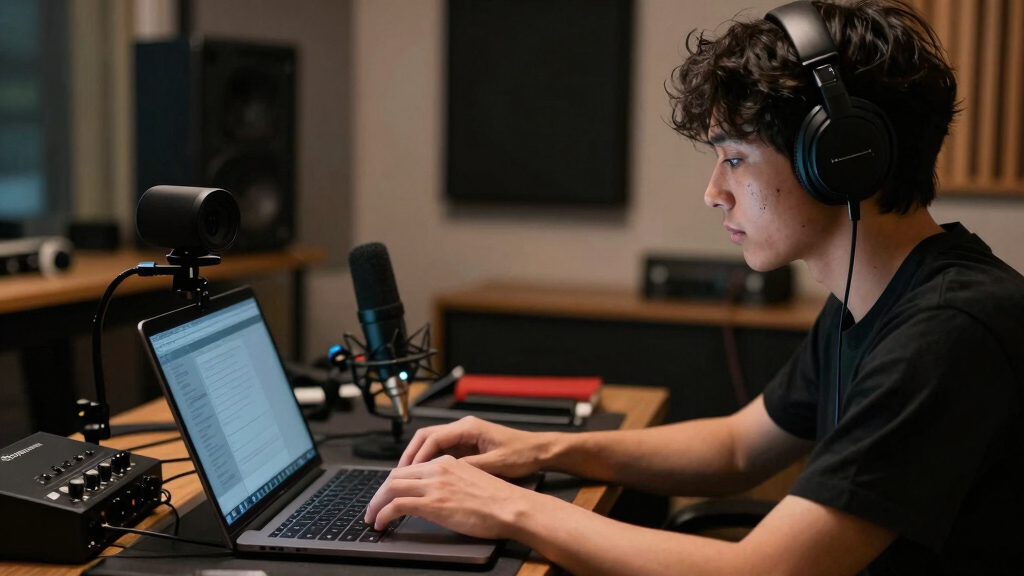
How We Picked
Products were evaluated based on their performance in low-light conditions, usability, build quality, and value for the price. We prioritized webcams that deliver clear, colorful images without excessive noise or grain, even in dim environments. Features like HDR, AI tracking, and low-light enhancement technology played key roles in our rankings. We also considered user reviews and ease of setup, ensuring that each option offers a reliable experience for both casual users and professionals. The final order reflects a balance between performance, versatility, and cost, aiming to meet diverse needs in low-light situations.| low light webcams for dim room | Microphone | Compatibility | Features |
|---|---|---|---|
| Logitech Brio 4K Webcam with N | Dual omnidirectional noise-canceling | Windows, Mac, ChromeOS | — |
| Logitech MX Brio Ultra HD 4K W | — | Windows, macOS, Chrome OS, Linux | Show Mode, AI-enhanced image, adjustable lighting |
| Insta360 Link 2 4K Webcam for | AI Noise-Canceling | — | — |
| Insta360 Link 2C 4K Webcam for | — | Windows, Mac | Auto Framing, Gesture Control, DeskView |
| Anker PowerConf C200 2K Webcam | AI Noise Canceling Dual Mics | Windows 7 or later, macOS 10.11+ | — |
| Logitech C920S HD Pro Webcam w | — | PC, Mac, Laptop, Tablet, Xbox | — |
| Insta360 Link 2C Pro 4K Webcam | Directional noise-canceling dual-mic | Windows, Mac | Auto Framing, HDR, AI Tracking |
| Insta360 Link 2 Pro | — | Windows, Mac | AI Tracking, Gesture Control, Professional Audio |
Factors to Consider When Choosing Best Low Light Webcams For Dim Rooms
When selecting a webcam for dim rooms, it’s important to understand the key factors that influence low-light performance. Beyond megapixels or resolution, look for features that enhance image quality in poor lighting, such as HDR, night mode, or low-light sensors. Ease of use and compatibility also matter, especially if you plan to adjust settings frequently. Consider your budget carefully, as premium features often come with higher prices. Lastly, think about the environment—if you need auto-tracking or background removal, ensure the webcam supports those functions without compromising low-light clarity.Low-Light Performance and Image Quality
The core factor in choosing a webcam for dim rooms is how well it performs in low-light conditions. Look for models with sensors that can capture more light and software features like HDR or night mode that improve color accuracy and brightness. Some webcams use AI-driven algorithms to boost image quality, but these can sometimes introduce artifacts if overused. The tradeoff often involves higher costs or increased complexity in setup, so consider how much enhancement you need versus what you’re willing to pay.Ease of Use and Setup
A webcam with many advanced features isn’t useful if it’s difficult to set up or adjust. Simpler models with automatic low-light adjustments tend to be more user-friendly, especially for those who aren’t tech-savvy. Look for options with straightforward software interfaces, plug-and-play connectivity, and clear instructions. For professionals or streamers, more configurable options might be worth the extra effort, but for casual use, simplicity can often be more valuable.Build Quality and Reliability
Durability and stability matter, especially if you move your webcam frequently or use it in different environments. A sturdy, well-built webcam reduces the risk of damage and ensures consistent performance over time. Additionally, reliable autofocus, noise-canceling microphones, and stable mounting options contribute to a smoother experience. Keep in mind that cheaper models might compromise on build quality, leading to issues like shaky images or unreliable autofocus.Additional Features and Compatibility
Features like AI tracking, background removal, and adjustable field of view can enhance your video quality but often come with higher prices or compatibility considerations. Make sure the webcam integrates seamlessly with your operating system and streaming or conferencing software. Also, consider if you need privacy shutters or built-in microphones, which add convenience and security. These extras can be game-changers in specific scenarios but may not justify the cost if your primary concern is basic low-light performance.Budget and Value
While high-end webcams deliver superior low-light images, they also cost more. Balance your budget against the features you need. Sometimes, a mid-range model with good low-light capabilities offers the best value, especially if you don’t require all the bells and whistles of premium options. Be cautious of very cheap webcams that promise great low-light performance; they often fall short and might require additional lighting setups. Investing a bit more upfront can lead to better results and longer-lasting performance.Frequently Asked Questions
Do I need special lighting for a low light webcam to work properly?
While many webcams have low-light enhancement features, additional lighting can significantly improve image quality. Soft, diffused light sources like ring lights or LED panels can reduce shadows and brighten your face without creating glare. If your room is very dark, combining a good webcam with basic lighting will produce the best results, ensuring clearer, more natural images.Are HDR webcams worth the extra cost for low-light use?
HDR technology can greatly enhance image quality in challenging lighting conditions by balancing exposure and preserving detail in shadows and highlights. For dim rooms, HDR webcams produce brighter, more colorful images without overexposing bright backgrounds. However, they tend to be more expensive and sometimes require more processing power. If low-light quality is a priority, investing in an HDR-capable webcam generally offers noticeable improvements.Can I use a standard webcam in a dim room without additional accessories?
Yes, but the quality of your video will likely suffer in low-light settings. Standard webcams without low-light enhancement features tend to produce grainy or dull images in dim rooms. To improve performance, consider adjusting your environment with simple lighting solutions or opting for webcams with built-in night mode or AI-based low-light optimization. This way, you’ll get clearer images without needing extensive setups.How important is autofocus for low-light webcams?
Autofocus ensures that your image stays sharp as you move or adjust your position, which is especially useful in low-light conditions where image clarity can be compromised. A webcam with reliable autofocus can help maintain crispness without manual adjustments, saving you time and frustration. Be aware that some models may struggle to autofocus accurately in very poor lighting, so look for reviews highlighting autofocus performance in dim environments.Should I prioritize resolution or low-light performance when choosing a webcam?
While higher resolution provides sharper images, it doesn’t guarantee good quality in low-light conditions. A webcam with excellent low-light performance might have a lower resolution but produce more natural, colorful images in dim rooms. Conversely, high-resolution webcams can still produce grainy or washed-out images if they lack proper low-light sensors or software. For dim environments, prioritize low-light enhancement features first, then consider resolution as a secondary factor.Conclusion
For casual users or those on a budget, a model like the Logitech C920S provides decent low-light performance with straightforward setup. Professionals or streamers aiming for the best quality in dim rooms should consider the Logitech Brio 4K or Insta360 Link 2 series, which offer advanced HDR and AI tracking. Beginners will benefit from models with automatic adjustment features, while those with specific needs like auto-framing or professional audio should look at higher-end options. Ultimately, your choice depends on your environment, budget, and how much you value features that optimize low-light video quality.
Halloween Picks
halloween
As an affiliate, we earn on qualifying purchases.