
TL;DR

Get audio and creator gear delivered free with Prime
- Fast, free delivery on millions of items
- Prime Video, Amazon Music and more included
- Member-only deals all year
Gain staging manages your audio levels at every stage, preventing distortion and noise. Proper gain control makes your podcast sound clearer, more consistent, and easier to edit, especially with new tech tools. It’s a simple step that can dramatically improve your sound quality.
Imagine listening to a podcast where some voices are muffled, others scream, and background noise rattles your eardrums. Frustrating, right? That’s what happens when gain staging gets ignored. It’s the silent hero behind every professional-sounding podcast, yet many creators overlook it.
In this guide, you’ll discover exactly what gain staging is, why it’s critical for your show, and how to do it without breaking the bank. If you want your audio to sound crisp, balanced, and engaging—this is your starting point.
Always set your mic gain to keep peaks below -6 dB, avoiding distortion.
Use visual meters on your audio interface or DAW to monitor levels in real-time.
Understand that gain staging happens at every step—mic, interface, and during mixing.
Recent AI and automation tools help maintain proper levels with less effort.
Follow loudness standards like LUFS to keep your podcast sounding consistent across platforms.
What Exactly Is Gain Staging? Think of It Like Setting the Right Volume on Your Gear
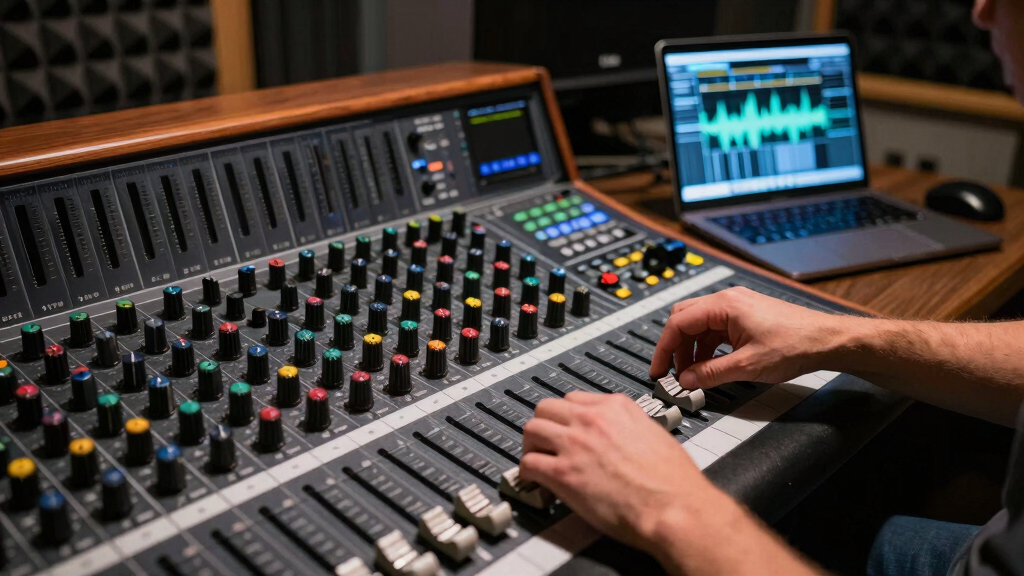
Gain staging is the process of managing your audio levels at each step—from microphone to final export—to keep your sound clear and distortion-free. Imagine turning a dial on your mixer or interface; you’re controlling how loud or soft each signal is at every point.
For example, if your mic input is too quiet, background noise becomes noticeable. If it’s too loud, it distorts. Proper gain staging ensures your voice stays within a sweet spot—loud enough to be clear but not so loud it clips.
Think of it like pouring water into a glass: too little, and you get a tiny splash; too much, and it spills over. The goal is a perfect, steady stream—just enough to fill the glass without overflow.
Understanding why this matters is crucial. Poor gain staging can lead to distorted audio that’s unpleasant to listen to, forcing you to spend hours editing or re-recording. Conversely, well-managed gain preserves the dynamic range and clarity, ensuring your voice sounds natural and professional. The tradeoff is that improper levels can either cause clipping and harshness or leave your recordings noisy and underpowered, both of which diminish listener experience and credibility.
As an affiliate, we earn on qualifying purchases.
How to Set Gain Levels for Your Microphone in 3 Easy Steps
- Start with your microphone gain control. Speak naturally at your usual volume. Watch your audio meter—aim for the green zone, avoiding the red peak.
- Adjust your interface or preamp gain to keep your loudest speech peaks just below clipping—about -6 dB to -12 dB on your meters.
- Test with different speaking styles and distance. Make sure your loudest sounds stay within that safe zone, and quieter parts aren’t drowned in noise.
This method works whether you’re using a USB mic or a traditional XLR setup. The key is to watch those meters like a hawk during your recording.
Properly setting your gain levels is vital because it directly impacts the quality of your recording. Too high, and you risk distortion that can sound harsh and unprofessional, forcing you to do time-consuming repairs. Too low, and your audio may be filled with background noise and hiss, reducing clarity and engagement. Striking the right balance ensures your voice remains natural and intelligible, making editing smoother and your final product more polished.
As an affiliate, we earn on qualifying purchases.
Comparison Table: Gain Staging vs. Volume Leveling — What’s the Difference?
| Gain Staging | Volume Leveling |
|---|---|
| Adjusts levels during recording and mixing to prevent distortion and noise | Adjusts volume after recording to make segments sound even |
| Focuses on controlling the signal at each stage, from source to mix | Focuses on balancing loudness across clips or tracks during editing |
| Prevents clipping, maintains dynamic range, and preserves audio integrity | Ensures consistent loudness, making the listening experience uniform |
| Done before and during recording, requiring careful monitoring | Performed after recording, often during editing or post-production |
Think of gain staging as setting a solid foundation—it’s about controlling the raw signal quality from the start. Volume leveling then smooths out the final surface, ensuring your podcast sounds balanced and professional. Neglecting proper gain staging may lead to distorted, harsh audio that’s difficult to fix later, while proper gain control can save you time and effort during editing, resulting in a cleaner, more consistent sound.
As an affiliate, we earn on qualifying purchases.
Why Poor Gain Staging Kills Your Podcast Audio (And How To Avoid It)
Bad gain staging leads to distorted, noisy, or inconsistent sound. Imagine recording a guest who suddenly raises their voice—if your levels aren’t set right, it’ll sound like a loud bang or an ugly crackle. That’s distortion.
On the flip side, if your gain is too low, your recordings will be filled with background hiss and noise—like trying to listen to someone whisper in a noisy room. The result? Listeners hit skip or turn off.
To avoid this, always monitor your meters during recording. Keep peaks below 0 dBFS—preferably around -6 dB—and check your recordings regularly. Little adjustments early save hours of cleanup later.
Understanding the implications of poor gain staging is essential. If you don’t manage levels properly, you risk damaging the clarity and professionalism of your podcast. Clipping causes harsh, unpleasant distortion that can be jarring, while low levels lead to noisy recordings that distract listeners. Both issues can frustrate your audience and diminish your show’s credibility. The tradeoff is clear: consistent, well-managed gain preserves audio quality, reduces editing time, and helps maintain a professional image.
audio mixing software for podcasts
As an affiliate, we earn on qualifying purchases.
As an affiliate, we earn on qualifying purchases.
Tech Tools and Tips to Nail Gain Staging Every Time
- Use audio interfaces with built-in meters—look for ones with clear, responsive LED level indicators.
- Leverage digital audio workstations (DAWs) that show real-time meters with peak hold and LUFS meters.
- Get familiar with your gear—know where your gain controls are and how they affect the sound.
- Record test clips regularly. Play them back and check for noise or clipping.
- Consider software plugins that automatically analyze and suggest gain adjustments based on your audio.
For example, ArtzArtz’s latest interfaces include visual meters that make it easy to keep your levels in check. Consistent monitoring means less guesswork and better sound.
Mastering gain staging with the right tools prevents accidental clipping, reduces noise, and ensures your recordings are clean and balanced. Using visual meters and automated analysis tools not only saves time but also helps you develop good habits that lead to consistently high-quality audio.
Recent Advances Making Gain Staging Easier for Podcasters
New tech makes gain staging simpler and more consistent. Automated gain controls in interfaces and DAWs help keep your levels stable without constant manual tweaking. Many plugins now analyze your audio in real-time, offering instant suggestions.
Industry standards like LUFS mean your podcast loudness stays consistent across episodes and platforms—even if you record in different environments or with different gear. Streaming giants like Spotify and Apple set loudness norms that creators must meet.
Plus, online tutorials and webinars from industry pros break down complex concepts into easy steps—so even beginners can master gain staging without headaches.
Embracing these advances means you can focus more on your content and less on technical troubleshooting. Automated tools and standards ensure your audio quality remains high, regardless of your recording environment or equipment variations, which is crucial for maintaining a professional and consistent listener experience.
Frequently Asked Questions
What is the best way to set gain levels for my microphone?
Start by speaking naturally and adjusting your mic gain so that your loudest words hit just below 0 dB on your meter, ideally around -6 dB. Avoid peaking into the red zone, and check your recordings to ensure clarity without distortion.
How do I know if my audio is properly gain staged?
Listen to your test recordings. They should sound clear, free of distortion, and have a consistent volume level. Use visual meters to confirm peaks stay below 0 dB, with most signals around -6 to -12 dB for headroom.
Can improper gain staging damage my equipment?
While it’s unlikely to cause hardware damage unless levels are extremely high, improper gain staging can seriously degrade your audio quality, making your recordings unusable and forcing costly re-records. Proper levels protect your gear’s integrity by preventing clipping and distortion.
What tools or meters should I use to monitor gain levels?
Use your audio interface’s built-in LED meters or a DAW’s real-time level meters. For extra accuracy, LUFS meters and peak indicators help you keep your levels consistent and prevent clipping across different environments and devices.
How does gain staging differ from volume leveling?
Gain staging manages your audio levels at every stage during recording and mixing to prevent distortion. Volume leveling adjusts the loudness of clips or tracks during editing to ensure a uniform sound for your listeners.
Conclusion
Getting gain staging right is like tuning your instrument before a gig. It’s the small tweak that makes your entire podcast sound more professional and engaging.
Start paying attention to your levels today. Your listeners will thank you with every crisp, clear word. After all, good sound isn’t just nice to have—it’s the foundation of a show people stick around for.
Halloween Picks
halloween
As an affiliate, we earn on qualifying purchases.