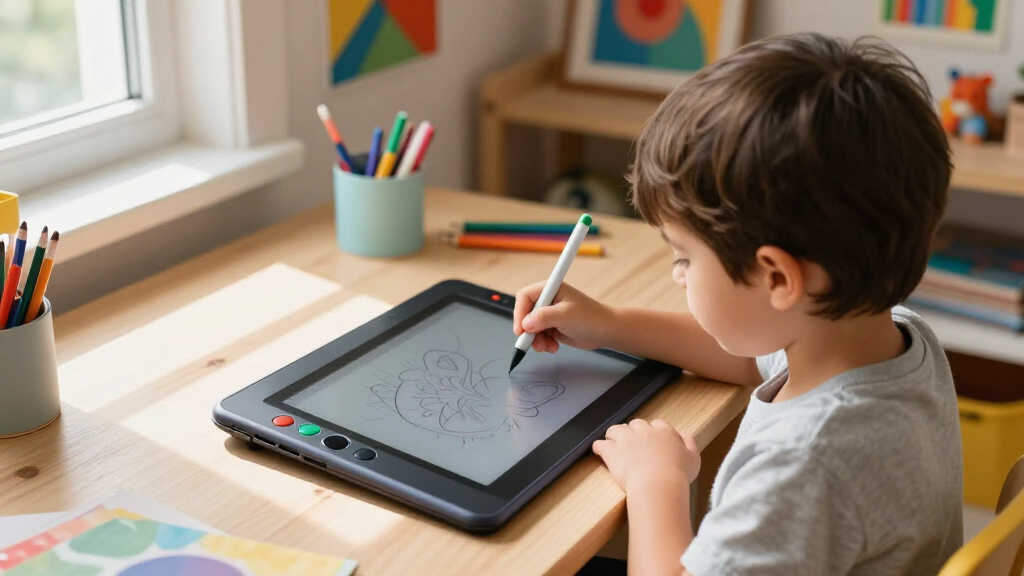

Finding the best drawing tablets for kids learning digital art involves balancing ease of use, affordability, and features that foster creativity. The Portability PicassoTab X11 stands out as the best overall choice thanks to its standalone design and kid-friendly interface. The T8 Standalone 8-inch Drawing Tablet offers a compact and budget-friendly option for beginners, while the XPPen 16K Artist 15.6 Pro V2 provides a more advanced screen experience for older or more experienced young artists. Most options face tradeoffs between affordability, screen quality, and ease of use, making it important to match the device to the child’s skill level and needs. Continue reading for a detailed breakdown of each option and which one might be right for your young artist.
Listen free for 30 days with Audible
Thousands of audiobooks and originals — cancel anytime.
Start your free trialAs an affiliate, we earn on qualifying purchases.
Complete the kit



Key Takeaways
- The best overall drawing tablet for kids combines portability, a user-friendly interface, and standalone capability, exemplified by the PicassoTab X11.
- Budget-friendly options like the T8 Standalone 8-inch Tablet are ideal for beginners but often come with smaller screens and fewer advanced features.
- Screen quality and stylus responsiveness are key for older children who want a more realistic drawing experience, as seen in higher-end models like the XPPen Artist series.
- LCD writing tablets like the Bravokids model are excellent for basic doodling and learning, but lack the features needed for serious digital art creation.
- Tradeoffs between price, functionality, and durability are common; investing more usually means better build quality and a more engaging artistic experience.
| 11″ Standalone Drawing Tablet, Portable PicassoTab X11 |  | Best Overall for Versatile Beginners and Enthusiasts | Display: 11″ 2K laminated screen | Stylus: 4096-level pressure-sensitive stylus | Processor: Octa-core | VIEW LATEST PRICE | See Our Full Breakdown |
| T8 Standalone 8-inch Drawing Tablet – No Computer Needed |  | Best for Portability and On-the-Go Creativity | Display: 8-inch, 1200×800 resolution | Operating System: Android 13 | Processor: MTK Quad-Core | VIEW LATEST PRICE | See Our Full Breakdown |
| XPPen 16K Artist 15.6 Pro V2 Drawing Tablet with Screen |  | Best for Aspiring Artists Needing High Precision | Screen Size: 15.6 inches | Pressure Sensitivity: 16,384 levels | Color Gamut: 99% sRGB, 96% Adobe RGB, 96% Display P3 | VIEW LATEST PRICE | See Our Full Breakdown |
| XP-PEN Artist 13.3 Pro V2 Drawing Tablet with Screen |  | Best for Versatile Creativity and Compatibility | Screen Size: 13.3 inches | Pressure Sensitivity: 16,384 levels | Display Type: Fully laminated | VIEW LATEST PRICE | See Our Full Breakdown |
| XPPen Artist 13.3 Pro Drawing Tablet with Screen |  | Best for Vivid Colors and Tilt Shading Support | Display Size: 13.3 inches | Color Gamut: 88% NTSC | Stylus: Battery-free, tilt support | VIEW LATEST PRICE | See Our Full Breakdown |
| Bravokids 10 Inch LCD Writing Tablet for Kids – Educational Drawing and Doodle Board (Pink) |  | Best Budget-Friendly, Kid-Safe Drawing Tool | Screen Size: 10 inches | Color: Pink | Material: Durable plastic | VIEW LATEST PRICE | See Our Full Breakdown |
| 12-Inch Standalone Drawing Tablet with 4096-Level Stylus |  | Best for Serious Young Artists and Mobile Creators | Screen Size: 12 inches | Resolution: 2000×1200 | Stylus Pressure Levels: 4096 | VIEW LATEST PRICE | See Our Full Breakdown |
| drawing tablets for kids learning digital art | Battery | Screen Size |
|---|---|---|
| 11" Standalone Drawing Tablet | Not specified | — |
| T8 Standalone 8-inch Drawing T | 4000mAh, up to 20 hours | — |
| XPPen 16K Artist 15.6 Pro V2 D | — | 15.6 inches |
| XP-PEN Artist 13.3 Pro V2 Draw | — | 13.3 inches |
| XPPen Artist 13.3 Pro Drawing | — | — |
| Bravokids 10 Inch LCD Writing | Screw-fixed back battery compartment | 10 inches |
| 12-Inch Standalone Drawing Tab | 8000mAh | 12 inches |
More Details on Our Top Picks
11″ Standalone Drawing Tablet, Portable PicassoTab X11
The PicassoTab X11 stands out for its fully standalone operation, allowing kids to sketch, paint, and learn without a computer. Its 2K laminated display provides a natural drawing experience, comparable to more complex options like the XPPen Artist 15.6 Pro V2, but in a compact form. The device includes lifetime tutorials and bonus accessories, making it ideal for beginners who want comprehensive support. The powerful octa-core processor and expandable storage ensure smooth performance and room for creative projects. However, the lack of specific battery details and price information can be frustrating for budget-conscious buyers. This tablet suits families seeking an all-in-one, portable art device that requires minimal setup, but those needing detailed technical specs or a dedicated stylus may want to consider alternatives.
Pros:- Fully standalone with no external computer needed
- High-quality 2K laminated display for natural drawing feel
- Includes lifetime tutorials and bonus accessories
- Powerful octa-core processor with expandable storage
Cons:- No specific battery life information provided
- Limited details on stylus charging or battery
Best for: Beginners and young artists who need a portable, all-in-one device with educational support
Not ideal for: Advanced users or professional artists who require high-end color accuracy and extensive customization
- Display:11″ 2K laminated screen
- Stylus:4096-level pressure-sensitive stylus
- Processor:Octa-core
- RAM:6GB
- Storage:128GB (expandable up to 1TB)
- Battery:Not specified
Our verdict“This tablet makes the most sense for beginners and families seeking a versatile, portable art device with guided learning.”
T8 Standalone 8-inch Drawing Tablet – No Computer Needed
The T8 Standalone 8-inch Drawing Tablet offers a compact, Android-based experience perfect for kids and casual artists who want a device they can carry anywhere. Its 8-inch screen is smaller than the PicassoTab X11, which means less workspace but increased portability. The device’s 4000mAh battery supports up to 20 hours of creative time, making it ideal for long trips or late-night doodling sessions. With pre-installed drawing apps and tutorials, it caters well to beginners. The tradeoff is that the smaller screen may not satisfy more serious artists, and performance could lag with complex graphics—unlike larger, more robust tablets. This pick suits kids and hobbyists prioritizing portability and battery life over expansive drawing space or advanced features.
Pros:- Compact, lightweight design for portability
- High-resolution display with vivid colors
- Long battery life supports extended use
- Pre-installed apps and tutorials for beginners
Cons:- Limited to 8-inch screen size, restricting detailed work
- Expandable storage requires microSD card
Best for: Kids or casual users who need a lightweight, portable device for quick sketches and learning
Not ideal for: Older children or artists seeking a larger workspace or professional-grade features
- Display:8-inch, 1200×800 resolution
- Operating System:Android 13
- Processor:MTK Quad-Core
- RAM:4GB
- Storage:64GB (expandable to 256GB)
- Battery:4000mAh, up to 20 hours
Our verdict“This tablet works best for young children or casual artists looking for a portable device with long battery life.”
XPPen 16K Artist 15.6 Pro V2 Drawing Tablet with Screen
The XPPen Artist 15.6 Pro V2 is designed for serious young artists who want a professional-grade drawing experience at home or school. Its 15.6-inch anti-glare display and 16,384 pressure levels provide a level of control comparable to professional tablets like the XPPen Artist 13.3 Pro V2, but with a larger workspace. The high color accuracy and ergonomic stand make it suitable for detailed projects and extended creative sessions. The main tradeoff is that it requires connection to a computer, which limits portability but offers better performance and customization. This makes it ideal for dedicated learners or hobbyists ready to upgrade from basic tablets. It’s best suited for users who prioritize precision and a larger working area over standalone convenience.
Pros:- Large, anti-glare 15.6-inch screen for detailed work
- High 16,384 pressure sensitivity for control
- Excellent color accuracy with wide gamut
- Ergonomic adjustable stand included
Cons:- Requires connection to a computer or laptop
- Larger size may be less portable
Best for: Older kids or teen artists with a dedicated workspace who need high precision and color accuracy
Not ideal for: Young children or those seeking a portable, all-in-one solution
- Screen Size:15.6 inches
- Pressure Sensitivity:16,384 levels
- Color Gamut:99% sRGB, 96% Adobe RGB, 96% Display P3
- Brightness:250 cd/m²
- Contrast Ratio:1000:1
- Compatibility:Windows, Mac OS, Chrome OS
Our verdict“This tablet is perfect for teens or ambitious young artists who want a professional-level drawing experience at home.”
XP-PEN Artist 13.3 Pro V2 Drawing Tablet with Screen
The XP-PEN Artist 13.3 Pro V2 strikes a balance between portability and professional features, making it a strong choice for older kids or teens who want detailed control and broad OS support. Its 13.3-inch fully laminated display with 16,384 pressure levels delivers precise lines and nuanced shading, rivaling larger tablets like the XPPen Artist 15.6 Pro V2 but in a more compact form. The wide compatibility with Windows, macOS, Chrome OS, Android, and Linux expands its versatility. Its foldable stand and customizable shortcut keys boost workflow efficiency. The downside is that it requires connection to a computer, limiting true portability. This makes it better suited for dedicated creative spaces rather than on-the-go use. Ideal for tech-savvy young artists seeking flexibility across devices.
Pros:- Compact, portable 13.3-inch display
- High 16,384 pressure levels for detailed drawing
- Wide OS compatibility including Linux and Android
- Foldable stand and customizable shortcut keys
Cons:- Requires connection to a computer or device
- Not suitable for portable, on-the-go use without a workspace
Best for: Older children and teens with a dedicated workspace who want a versatile, high-precision drawing tablet
Not ideal for: Younger kids or those seeking a standalone, portable device
- Screen Size:13.3 inches
- Pressure Sensitivity:16,384 levels
- Display Type:Fully laminated
- Connectivity:USB-C, HDMI
- Compatibility:Windows, macOS, Chrome OS, Android, Linux
Our verdict“This tablet offers a flexible, professional experience for tech-savvy young artists who work mainly at a desk.”
XPPen Artist 13.3 Pro Drawing Tablet with Screen
The XPPen Artist 13.3 Pro is tailored for young artists who value color accuracy and natural shading, thanks to its 88% NTSC color gamut and tilt-support stylus. Its fully laminated 13.3-inch display provides a vivid, immersive drawing surface, making it a compelling choice over entry-level models like the Bravokids LCD Tablet. Its battery-free stylus with tilt support enables more expressive shading and line work, perfect for teens exploring more advanced techniques. The main limitation is its dependency on a computer, which reduces portability for mobile use. This tablet suits those who have a dedicated workspace and want professional-level color and shading capabilities. Best for young artists with a focus on color vibrancy and shading nuances.
Pros:- Vivid 88% NTSC color gamut for accurate colors
- Tilt support for natural shading and brush dynamics
- Fully laminated display reduces parallax
- Supports major creative software
Cons:- Requires connection to a computer or laptop
- Limited portability
Best for: Teen artists or older kids with a dedicated workspace seeking high color fidelity and natural shading
Not ideal for: Young children or users needing a portable, standalone device
- Display Size:13.3 inches
- Color Gamut:88% NTSC
- Stylus:Battery-free, tilt support
- Parallax:Virtually no parallax
- Connectivity:Requires connection
Our verdict“This tablet is ideal for young artists aiming for accurate colors and expressive shading in a dedicated workspace.”
Bravokids 10 Inch LCD Writing Tablet for Kids – Educational Drawing and Doodle Board (Pink)
The Bravokids 10 Inch LCD Writing Tablet stands out for offering a safe and eco-friendly way for young children to explore drawing and writing without the mess of paper and ink. Its colorful LCD screen is gentle on the eyes and provides vibrant visuals that are engaging for kids aged 3-8. Compared with larger or more advanced tablets like the 12-Inch Standalone Drawing Tablet, it lacks pressure sensitivity and advanced features but excels in simplicity, durability, and portability. Its lightweight design makes it perfect for travel and outdoor use, although its limited function set means it’s best suited for early learners or basic doodling. The battery is screw-fixed, which may be less convenient than rechargeable options, and the absence of erasing options beyond the physical button could be a drawback for frequent use. Overall, this tablet makes the most sense for parents wanting a safe, durable, and affordable device for very young children learning to draw and write.
Pros:- Eye-protection colorful LCD screen safe for extended use
- Eco-friendly, reducing paper and ink waste
- Lightweight and portable, ideal for travel and outdoor activities
- Durable plastic construction with rounded safety edges
Cons:- Limited to basic drawing and writing functions, lacking advanced features
- Battery life not specified, requiring replacement or maintenance
Best for: Families seeking a simple, safe, and portable drawing device for children aged 3-8 who are just starting out with digital art
Not ideal for: Older kids or those interested in more advanced digital art features, as it doesn’t support pressure sensitivity or app-based customization
- Screen Size:10 inches
- Color:Pink
- Material:Durable plastic
- Weight:150 grams
- Battery:Screw-fixed back battery compartment
- Suitable Age:3-8
Our verdict“This tablet is perfect for very young children who need a simple, safe, and portable drawing tool to develop basic skills without complexity.”
12-Inch Standalone Drawing Tablet with 4096-Level Stylus
The 12-Inch Standalone Drawing Tablet with 4096-Level Stylus is designed for children ready to explore more detailed digital art without the need for a connected computer. Its vibrant IPS display with 2000×1200 resolution provides rich colors and sharp images, making it ideal for budding artists who want a more professional feel. Compared to the simpler LCD doodle boards like the Bravokids LCD Writing Tablet, this device offers pressure sensitivity, a high-quality stylus, and compatibility with various creative apps, enabling more sophisticated artwork. It runs on Android 15, providing an extensive app ecosystem, but this comes at a higher price point and increased weight, which might be less suitable for very young or travel-heavy users. The longer battery life and expandable storage are significant advantages for extended creative sessions, yet the device’s size and cost could be barriers for some families. Overall, this tablet makes the most sense for older kids or serious hobbyists who want a standalone device with professional-grade features.
Pros:- Standalone device with Android OS, no need for external computer
- High-resolution IPS display with true color and anti-glare coating
- 4096 pressure levels for nuanced drawing and shading
- Long-lasting 8000mAh battery and expandable storage up to 2TB
Cons:- Higher price point may be prohibitive for budget-conscious families
- Weight and size might be cumbersome for very mobile children
- Limited to Android apps, which may not cover all professional or educational needs
Best for: Parents of children aged 8 and up who are developing serious digital art skills and want a versatile, standalone device
Not ideal for: Younger children or those who primarily need a simple, inexpensive doodle board, as its price and complexity may be overwhelming
- Screen Size:12 inches
- Resolution:2000×1200
- Stylus Pressure Levels:4096
- RAM:16GB
- Storage:256GB (expandable to 2TB)
- Battery:8000mAh
- Operating System:Android 15
Our verdict“This tablet is best suited for older kids or young artists seeking a professional-grade, standalone device for detailed digital artwork and creative growth.”

How We Picked
To evaluate these drawing tablets, I focused on factors that matter most for kids learning digital art: ease of use, durability, affordability, and the potential for growth. Standalone devices were prioritized for their convenience, removing the need for external computers. Screen quality and stylus responsiveness were key indicators of the devices’ suitability for developing skills. I also considered the overall build quality, parental controls, and the device’s ability to keep a child’s interest over time. Products were ranked based on how well they balance these criteria for different ages and skill levels, ensuring options for beginners through more advanced young artists.Factors to Consider When Choosing Best Drawing Tablets For Kids Learning Digital Art
Choosing the right drawing tablet for a child’s learning journey requires considering several key factors. While affordability is important, investing in a device with good responsiveness and durability can significantly enhance the learning experience. Ease of use is crucial for young children to avoid frustration, and a good-sized screen helps with detailed drawing. Compatibility with styluses and the availability of educational features can also influence long-term engagement. Understanding these factors can help prevent common mistakes, such as buying a device that’s too complex or lacking in essential features for a child’s age and skill level.Ease of Use and Interface
For kids, a simple, intuitive interface makes a huge difference in maintaining their interest. Devices with minimal setup, straightforward controls, and clear menus help prevent frustration. Touchscreens that respond well to stylus input without lag are essential for a natural drawing experience. Avoid overly complicated setups or devices that require extensive calibration, as these can discourage young learners. The goal is to foster creativity without technical hurdles.
Screen Size and Resolution
Screen size impacts how comfortably a child can draw and see their work. Larger screens, like 12 inches, provide more space for detailed art, but can be less portable and more expensive. Smaller screens, around 8 inches, are more compact and budget-friendly but may feel cramped for older kids. Resolution also matters; a higher pixel count results in sharper images and better color accuracy, making the drawing process more satisfying. Consider the child’s age and skill level when choosing the right balance.
Stylus Quality and Responsiveness
A good stylus mimics real drawing tools, with pressure sensitivity and minimal lag. For young learners, a stylus that’s comfortable to hold and easy to control adds to their confidence and skill development. Cheaper styluses may lack pressure sensitivity or responsiveness, which can hinder the natural feel of drawing. Investing in a device with a responsive stylus can encourage longer practice sessions and improve artistic results over time.
Build Durability and Safety
Kids can be rough on devices, so durability is a key consideration. Look for sturdy construction and quality materials that can withstand drops and knocks. Non-toxic materials and smooth edges are important for safety, especially with younger children. Some devices feature protective covers or cases, which extend their lifespan. Remember, a durable device reduces the need for repairs and replacements, making it a smarter long-term investment.
Price and Long-Term Value
While budget options are tempting, they often come with limitations in features or durability. Spending a bit more can open access to better screens, stylus responsiveness, and longevity, which are worth considering as your child’s skills develop. Keep in mind that some devices grow with the child, offering upgradeable features or compatibility with more advanced drawing apps. Balancing initial cost with potential for growth helps ensure the device remains useful over time, providing good value for money.
Frequently Asked Questions
Can a beginner use a more advanced drawing tablet?
Absolutely, but it’s important to choose a model with a simple interface and features suitable for beginners. More advanced tablets often come with a steeper learning curve, which can overwhelm a child just starting out. Look for devices that offer basic functions and responsive styluses, so they can grow into more complex features gradually. This approach helps build confidence without frustration, making the learning process more enjoyable.
Are LCD writing tablets good for learning digital art?
LCD writing tablets are excellent for basic doodling, practicing strokes, and learning fundamental skills, especially for very young children. However, they lack the features necessary for serious digital art, such as pressure-sensitive styluses and color displays. For children who want to progress beyond simple sketches, a dedicated drawing tablet with a screen and stylus is a better long-term investment. Use LCD tablets as introductory tools rather than primary devices for serious learning.
Should I prioritize screen size or portability?
It depends on your child’s age and where they will be using the device. Larger screens provide more drawing space, which is great for detailed work, but they can be heavier and less portable. Smaller, lightweight tablets are easier for young kids to carry and handle, making them suitable for travel or school use. Consider balancing comfort, ease of transport, and the child’s comfort with the drawing area size to make the best choice.
How important is stylus pressure sensitivity for kids?
Pressure sensitivity enhances the realism and control of digital drawing, making it more similar to traditional art tools. While it’s more critical for older kids or those interested in more detailed digital art, younger children can still enjoy creative expression with basic styluses. If your child shows serious interest in digital art, investing in a stylus with pressure sensitivity can help develop their skills and provide a more natural drawing experience.
Is it worth paying more for advanced features?
Paying more often means better build quality, higher screen resolution, and more responsive stylus technology, which can significantly improve the learning experience. For children who are passionate about art or show promise, investing in a higher-end device can be justified as it offers room to grow. However, if your child is just beginning or you’re unsure about their interest level, starting with a more affordable model and upgrading later can be a smart strategy to avoid unnecessary expense.
Conclusion
For parents seeking the best overall device that balances ease of use and growth potential, the Portability PicassoTab X11 is the ideal choice. Those on a budget or introducing very young children to drawing might prefer the Bravokids LCD Writing Tablet for simple doodling. For more serious young artists or older children, investing in higher-end models like the XPPen Artist 15.6 Pro V2 provides a more authentic digital art experience. Beginners should focus on devices that are intuitive and durable, while more advanced young artists benefit from features like high-resolution screens and pressure-sensitive styluses. Matching the device to the child’s current skill level and future needs ensures a satisfying and encouraging digital art journey.
College move-in / dorm season Picks
dorm essentials
As an affiliate, we earn on qualifying purchases.