
USB audio mixers for podcasting range from straightforward mic interfaces to feature-heavy streaming consoles, and my best overall pick is the MAONO P2 Hybrid for its dual XLR inputs and flexible recording setup. The M-Audio M-Track Duo is a simpler fit for two-mic recording, while the Elgato Wave XLR MK.2 suits creators who want one-mic control and DSP features. The main tradeoff is whether you need clean, dependable microphone inputs or built-in effects, sound buttons, and gaming-oriented controls. More features can simplify a live show, but they can also add setup complexity and distract from recording needs. Read on for the full breakdown of all 15 options and help matching one to your podcast format.

Get audio and creator gear delivered free with Prime
- Fast, free delivery on millions of items
- Prime Video, Amazon Music and more included
- Member-only deals all year
Complete the kit


Key Takeaways
- Podcast inputs matter more than gaming effects: the MAONO P2 Hybrid and M-Audio M-Track Duo stand out for podcasters who need two XLR microphone connections, while many gaming mixers focus on voice effects and sound triggers.
- Single-mic setups have several distinct paths: the Cubilux CB5 and FIFINE SC1 suit basic interface needs, while the Elgato Wave XLR MK.2 adds a more software-centered DSP approach.
- Streaming controls are useful only when they match the show: mixers such as the FIFINE AmpliGame SC3 and PUPGSIS include creator-focused controls, but those features are less valuable for a simple recorded interview.
- More channels can mean more setup, not automatically better audio: the Aveek 5-Channel mixer offers broader source mixing, while compact interfaces are easier to manage for one- or two-person podcasts.
- The lineup splits between recording interfaces and gaming consoles: prioritize mic inputs and monitoring for spoken-word recording; choose soundboards, voice effects, or surround features only when live interaction is central to your format.
| Cubilux CB5 USB Audio Interface |  | Best Compact Multi-Input Pick | Connectivity: USB | Inputs and outputs: 2 stereo microphone jacks, line-in, line-out, headphone jack | Channels: 3 | VIEW LATEST PRICE | See Our Full Breakdown |
| FIFINE AmpliGame SC3 Gaming Audio Mixer |  | Best for Live Podcast Controls | Channels: 4 | Connectivity: USB; USB-C power | Microphone input: XLR with 48V phantom power | VIEW LATEST PRICE | See Our Full Breakdown |
| PUPGSIS Gaming Audio Mixer for PC Streaming with Soundboard and Voice Changer |  | Best for Soundboard-Driven Shows | Channels: 4 | Connectivity: USB | Audio input: 1/4-inch TRS | VIEW LATEST PRICE | See Our Full Breakdown |
| FIFINE SC1 USB Audio Interface Mixer for Recording, Streaming, and Podcasting | 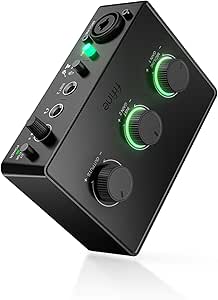 | Best for a Simple XLR Podcast Rig | Connectivity: USB | Channels: 3 | Microphone input: 1 XLR input with 48V phantom power | VIEW LATEST PRICE | See Our Full Breakdown |
| MAONO P1 USB Audio Interface with 70 dB Gain |  | Best for Mobile and Computer Podcasting | Connectivity: USB-C | Channels: 2 | Maximum gain: 70 dB | VIEW LATEST PRICE | See Our Full Breakdown |
| M-Audio M-Track Solo USB Audio Interface |  | Best Compact Starter Interface | Audio resolution: Up to 48 kHz | Inputs: 1 combo XLR/line input with phantom power; 1 switchable line/instrument input | Outputs: 1/8-inch headphone output; stereo RCA outputs | VIEW LATEST PRICE | See Our Full Breakdown |
| MAONO PS22 Lite USB Audio Interface for Guitar, Vocals, and Streaming |  | Best for High-Resolution Recording | Channels: 2 | Recording resolution: 24-bit | Maximum sample rate: 192 kHz | VIEW LATEST PRICE | See Our Full Breakdown |
| Pyle PMUX9 USB Audio Interface with 24 Digital Effects |  | Best for Built-In Effects and Connections | Connectivity: USB 2.0 Type-B | Channels: 2 | Resolution: 24-bit / 48 kHz | VIEW LATEST PRICE | See Our Full Breakdown |
| M-Audio M-Track Duo USB Audio Interface |  | Best for Two-Microphone Podcasts | Audio resolution: Up to 48 kHz | Inputs: 2 combo XLR/line/instrument inputs | Preamps: Crystal preamps with phantom power | VIEW LATEST PRICE | See Our Full Breakdown |
| MAONO P2 Hybrid USB Audio Interface with Dual XLR Inputs |  | Best for Hybrid Computer-and-Mobile Streaming | Connectivity: USB-C | Channels: 2 | Audio resolution: 24-bit | VIEW LATEST PRICE | See Our Full Breakdown |
| FIFINE SC8 Gaming Audio Mixer for Live Streaming with 7.1-Channel Surround Sound |  | Best for Gaming-Focused Podcast Streams | Microphone input: XLR with 48V phantom power; also supports 6.35 mm microphones | Microphone compatibility: Dynamic and condenser microphones; not compatible with USB microphones | Connectivity: USB-C, optical AUX, 3.5 mm AUX-In | VIEW LATEST PRICE | See Our Full Breakdown |
| FIFINE AmpliGame SC3W Gaming Audio Mixer | 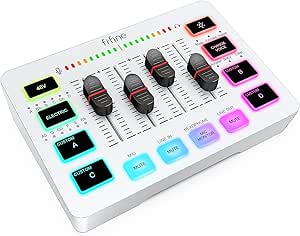 | Best for Beginner Streamers | Channels: 4 | Connectivity: USB; XLR microphone input | Phantom power: 48V | VIEW LATEST PRICE | See Our Full Breakdown |
| MAONO G1 NEO Gaming Audio Mixer with XLR Input and 48V Phantom Power | 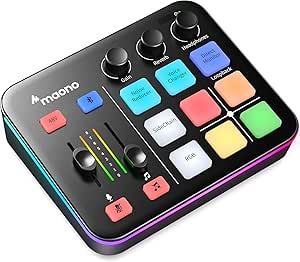 | Best for Flexible Streaming Features | Channels: 4 | Connectivity: Auxiliary, Bluetooth, USB | XLR phantom power: 48V | VIEW LATEST PRICE | See Our Full Breakdown |
| Aveek 5-Channel Audio Mixer with USB Recording, Bluetooth, and 48V Phantom Power |  | Best for Multi-Mic Podcast Recording | Channels: 5 | Microphone inputs: 3 XLR inputs with 48V phantom power | Connectivity: USB, Bluetooth, XLR, 1/4-inch, RCA | VIEW LATEST PRICE | See Our Full Breakdown |
| Elgato Wave XLR MK.2 USB Audio Interface and DSP Mixer |  | Best Premium Single-Mic Interface | Connectivity: USB | Audio input: XLR | Gain: 80 dB | VIEW LATEST PRICE | See Our Full Breakdown |
| USB audio mixers for podcasting | Connectivity | Channels |
|---|---|---|
| Cubilux CB5 USB Audio Interfac | USB | 3 |
| FIFINE AmpliGame SC3 Gaming Au | USB; USB-C power | 4 |
| PUPGSIS Gaming Audio Mixer for | USB | 4 |
| FIFINE SC1 USB Audio Interface | USB | 3 |
| MAONO P1 USB Audio Interface w | USB-C | 2 |
| M-Audio M-Track Solo USB Audio | — | — |
| MAONO PS22 Lite USB Audio Inte | USB | 2 |
| Pyle PMUX9 USB Audio Interface | USB 2.0 Type-B | 2 |
| M-Audio M-Track Duo USB Audio | — | — |
| MAONO P2 Hybrid USB Audio Inte | USB-C | 2 |
| FIFINE SC8 Gaming Audio Mixer | USB-C, optical AUX, 3.5 mm AUX-In | — |
| FIFINE AmpliGame SC3W Gaming A | USB; XLR microphone input | 4 |
| MAONO G1 NEO Gaming Audio Mixe | Auxiliary, Bluetooth, USB | 4 |
| Aveek 5-Channel Audio Mixer wi | USB, Bluetooth, XLR, 1/4-inch, RCA | 5 |
| Elgato Wave XLR MK.2 USB Audio | USB | 2 |
More Details on Our Top Picks
Cubilux CB5 USB Audio Interface
The Cubilux CB5 is the smallest, simplest fit here for a podcaster who needs several audio connections without a full desktop mixer. Its stereo microphone jacks, line input, line output, and headphone jack give a computer-based setup more routing options than the single-XLR FIFINE SC1, while USB power keeps the unit portable. Independent device names can also help with multi-track recording, a useful distinction for editing separate sources later. The tradeoff is that the CB5 is better understood as a compact interface than a hands-on podcast console: it lacks the stated channel controls, effects, and dedicated XLR/phantom-power setup found on the FIFINE AmpliGame SC3. Its line-out and audio output also cannot operate simultaneously, which can limit monitoring arrangements. I’d choose it for compactness and connections, not live-show control.
Pros:- Compact, USB-powered design needs no external power source.
- Provides stereo microphone jacks plus line-in, line-out, and headphone connections.
- Independent device names support multi-track recording workflows.
- Records up to 96 kHz/24-bit and outputs audio up to 192 kHz/32-bit.
Cons:- Line-out and audio output cannot be used at the same time.
- No stated XLR input or 48V phantom power for condenser microphones.
- Offers fewer live mixing and sound-effect controls than the FIFINE AmpliGame SC3.
Best for: Solo podcasters or small mobile recording setups that need multiple mic and line connections to a Windows or macOS computer in a very small USB-powered unit.
Not ideal for: Hosts using XLR condenser microphones who need onboard phantom power, hands-on mixing controls, or simultaneous line-out and headphone routing.
- Connectivity:USB
- Inputs and outputs:2 stereo microphone jacks, line-in, line-out, headphone jack
- Channels:3
- Maximum recording quality:96 kHz/24-bit
- Maximum audio output:192 kHz/32-bit
- Compatibility:Windows and macOS
- Power:USB-powered; no external power source required
- Dimensions and weight:0.59 × 1.38 × 1.4 in; 0.11 kg
Our verdict“Choose the CB5 when a tiny USB interface with several connection types matters more than XLR support and live podcast controls.”
FIFINE AmpliGame SC3 Gaming Audio Mixer
For a podcaster who wants immediate control over several audio sources, the FIFINE AmpliGame SC3 offers more at-the-desk interaction than the Cubilux CB5. Its XLR input, 48V phantom power, separate channel controls, mute and monitoring buttons, and built-in effects suit a live show where quick adjustments matter more than a minimal interface. It also works with Windows and macOS through plug-and-play support. The gaming focus shows in its voice-changing modes and RGB lighting: those can add personality to a casual show, but they are less useful for a clean, edited interview format. Unlike the FIFINE SC1, this model includes controls for multiple channels, yet it does not support USB microphones, and the XLR cable is not included. I’d pick it for hands-on live mixing, not a stripped-down recording chain.
Pros:- XLR microphone input with 48V phantom power.
- Independent controls for microphone, line-in, headphone, and line-out channels.
- Dedicated mute and monitoring buttons support quick live adjustments.
- Built-in sound effects and voice-changing modes add on-air options.
Cons:- Does not support USB microphones.
- XLR cable is not included.
- Gaming features and RGB lighting may add little value in a conventional podcast studio.
Best for: Solo streamers and podcast hosts using an XLR microphone who want physical channel controls, quick muting, monitoring, and optional voice effects during a live show.
Not ideal for: Podcasters using USB microphones, or editors seeking a simple recording interface without gaming-oriented lighting and voice effects.
- Channels:4
- Connectivity:USB; USB-C power
- Microphone input:XLR with 48V phantom power
- Other input connectors:Line-in and headset
- Output connectors:3.5 mm line-out and headphone jacks
- Controls and effects:Independent channel controls, mute, monitoring, sound effects, voice-changing modes
- Compatibility:Windows and macOS
- Dimensions and weight:4.44 × 6.45 × 1.6 in; 0.5 kg
Our verdict“Pick the SC3 for a live, XLR-based podcast setup that benefits from quick physical controls and onboard effects.”
PUPGSIS Gaming Audio Mixer for PC Streaming with Soundboard and Voice Changer
The PUPGSIS Gaming Audio Mixer is aimed at hosts who treat sound cues as part of the show. Four programmable pads, Bluetooth input for background audio, noise reduction, reverb, and voice changing give it a more performance-oriented toolkit than the FIFINE SC1, which focuses on microphone and instrument recording rather than built-in show effects. That makes PUPGSIS a distinctive fit for gaming podcasts, character bits, or live segments with recurring cues. The connection path needs care, though: the listed microphone connection is a 1/4-inch TRS input, so an XLR mic requires a separate TRS-to-XLR cable. It also does not support USB microphones or 48V dynamic microphones, and Bluetooth is input-only—not a way to connect wireless headphones or microphones. Wired monitoring is required, which narrows its appeal for mobile or cable-free setups.
Pros:- Four programmable sound-effect pads provide quick access to show cues.
- Noise reduction, adjustable reverb, and voice changing suit performative live formats.
- Bluetooth input allows background audio playback.
- Designed for streaming, gaming, and podcasting workflows.
Cons:- Does not support USB microphones or 48V dynamic microphones.
- XLR microphones require a separate 1/4-inch TRS-to-XLR cable.
- Bluetooth is input-only, and wired monitoring is required.
Best for: Gaming podcasters and live hosts who use recurring sound cues, background audio, and voice effects as part of their format.
Not ideal for: Podcasters with USB microphones, 48V dynamic microphones, or a preference for wireless monitoring and straightforward XLR connectivity.
- Channels:4
- Connectivity:USB
- Audio input:1/4-inch TRS
- Microphone compatibility:XLR microphones via a separate TRS-to-XLR cable; not compatible with USB microphones or 48V dynamic microphones
- Bluetooth:Input only
- Sound and control features:Noise reduction, adjustable reverb, voice changer, 4 programmable sound-effect pads
- Power:Corded electric; 5 V
- Dimensions:16.5 × 15 × 3.5 in
Our verdict“Choose PUPGSIS for a cue-heavy live show, but skip it if your priority is simple XLR setup or wireless monitoring.”
FIFINE SC1 USB Audio Interface Mixer for Recording, Streaming, and Podcasting
The FIFINE SC1 makes the most sense for a podcaster who wants a direct, uncomplicated path from one XLR microphone to a computer. Its 48V phantom power supports condenser mics, while the dedicated instrument input gives a host the option to add guitar or bass without swapping the mic connection. Separate gain, output-volume, and direct-monitoring controls make basic adjustments easier than on the compact Cubilux CB5, which offers a broader mix of connection types but fewer stated hands-on recording controls. The SC1’s simplicity also sets its limit: there is only one XLR input, so it is a poor match for two-host interviews recorded through separate microphones. Its 192 kHz maximum sample rate is ample on paper, but compatibility depends on software that supports USB audio devices. It is a focused interface, not a multi-mic mixer.
Pros:- XLR input supplies 48V phantom power for condenser microphones.
- Dedicated instrument input accommodates guitar or bass.
- Separate controls for input gain, output volume, and direct monitoring.
- Works with Mac and PC and includes a USB-C-to-USB cable.
Cons:- Only one XLR microphone input, limiting two-host recording.
- Requires software that supports USB audio devices.
- Does not offer the onboard sound effects and channel controls of the FIFINE AmpliGame SC3.
Best for: Solo podcasters recording with one XLR microphone who want phantom power, direct monitoring, and an additional instrument input.
Not ideal for: Two-host shows that need separate XLR microphone inputs or buyers who want built-in effects and multi-channel live controls.
- Connectivity:USB
- Channels:3
- Microphone input:1 XLR input with 48V phantom power
- Additional input:Dedicated instrument input
- Maximum sample rate:192 kHz
- Controls:Input gain, output volume, direct monitoring
- Compatibility:Mac and PC; software must support USB audio devices
- Dimensions and weight:5.51 × 6.3 × 1.97 in; 500 g
Our verdict“The SC1 is a sensible pick for a solo XLR-mic podcast, but multi-host shows should look for more microphone inputs.”
MAONO P1 USB Audio Interface with 70 dB Gain
The MAONO P1 stands apart from the computer-focused FIFINE SC1 by supporting connections to computers, phones, and tablets, making it a better fit for creators who move between a desk and mobile recording. Its 70 dB of gain, auto-gain, direct monitoring, independent mute controls, and loopback address common podcast needs: setting microphone level, checking audio, silencing a source, and bringing computer audio into a stream. The 24-bit/192 kHz recording support is also a strong specification set, though those numbers alone do not make a recording sound better. Its two-channel design is still a compact setup rather than a full multi-mic console, and some routing and effects depend on ProStudio2 software. The listed frequency response is 20 kHz, so buyers should check that specification against their intended recording needs. I’d favor it for flexible device connections over the SC1’s simpler instrument-oriented layout.
Pros:- Connects with computers, phones, and tablets, including simultaneous computer and mobile-device connections.
- Offers up to 70 dB gain and 24-bit/192 kHz audio support.
- Auto-gain, loopback, direct monitoring, and independent mute controls suit podcast and streaming workflows.
- Zinc-alloy housing has a 15° tilt for desktop use.
Cons:- Two-channel design is limited for shows needing several separately managed microphones.
- Some routing and effects features depend on ProStudio2 software.
- The listed frequency response is 20 kHz.
Best for: Mobile-first podcasters and streamers who want one compact interface for a computer, phone, or tablet, with loopback and monitoring tools.
Not ideal for: Multi-host shows needing several separate microphone inputs, or buyers who want all routing and effects handled without companion software.
- Connectivity:USB-C
- Channels:2
- Maximum gain:70 dB
- Audio quality:24-bit/192 kHz
- Frequency response:20 kHz
- Features:Auto-gain, loopback, direct monitoring, independent mute controls, ASIO support
- Compatible operating systems:Android, ChromeOS, Windows, iOS
- Housing and dimensions:Zinc alloy; 5.9 × 5.98 × 3.46 in (D × W × H)
Our verdict“Pick the MAONO P1 if you need a compact interface that can move between mobile and computer podcast setups with loopback and mute controls.”
M-Audio M-Track Solo USB Audio Interface
The M-Track Solo is the simplest fit here for a solo podcaster who needs one microphone input and a second input for an instrument or line-level source. Its USB-powered design and zero-latency monitoring make a small, portable recording setup easier to manage without an external power supply. Compared with the M-Audio M-Track Duo, it gives up a second combo mic input, so it is less suited to interviews with two XLR microphones. The Solo does include phantom power for a condenser mic, but its 48 kHz ceiling is less flexible than the 24-bit/192 kHz recording offered by the MAONO PS22 Lite. I’d choose it for straightforward one-person sessions, not as a mixer for a growing multi-mic show. iOS use also depends on a separately purchased camera adapter.
Pros:- One combo input provides phantom power for a condenser microphone
- Separate switchable line/instrument input adds flexibility for recording a guitar or other source
- USB power and zero-latency monitoring suit a simple portable recording setup
- MPC Beats software is included
Cons:- Only one combo microphone input, unlike the M-Audio M-Track Duo
- Recording resolution tops out at 48 kHz
- iOS connection requires a separate Apple Lightning to USB 3 Camera Adapter
Best for: Solo podcasters who want a compact USB-powered interface for one microphone, with an instrument or line input available for occasional use.
Not ideal for: Two-host shows that need two XLR microphones at once, or mobile iOS users who do not want to add a separate camera adapter.
- Audio resolution:Up to 48 kHz
- Inputs:1 combo XLR/line input with phantom power; 1 switchable line/instrument input
- Outputs:1/8-inch headphone output; stereo RCA outputs
- Recording channels:2
- Power:USB-powered
- Supported software:Ableton Live Lite; MPC Beats
- Operating systems:Windows 7–10; macOS High Sierra–Big Sur; iOS with Apple Lightning to USB 3 Camera Adapter
Our verdict“Choose the M-Track Solo for portable solo podcasting; choose the M-Track Duo if you need two microphone inputs.”
MAONO PS22 Lite USB Audio Interface for Guitar, Vocals, and Streaming
The MAONO PS22 Lite stands out for podcasters who want a two-channel interface with 24-bit/192 kHz recording and built-in routing options. Its preamp offers up to 56 dB of gain and 48 V phantom power, while direct monitoring lets a speaker hear their input without relying on software playback. The included ProStudio routing software, with virtual channels and loopback, gives streamers more control over combining a microphone and computer audio than the basic M-Track Solo. That added flexibility does not make it a multi-mic mixer: it still has just two channels, so larger panels will outgrow it. Its listed 32-ohm impedance may also be a mismatch for some headphones. I’d favor it over the M-Track Duo when sample-rate headroom and software routing matter more than a familiar, minimal interface.
Pros:- Records at up to 24-bit/192 kHz
- Microphone preamp provides up to 56 dB gain and 48 V phantom power
- Direct monitoring and ProStudio virtual-channel and loopback routing support streaming workflows
- Listed compatibility spans Android, ChromeOS, Windows, iOS, and macOS
Cons:- Two-channel setup limits simultaneous microphones and other sources
- The listed 32-ohm impedance may not suit every headphone
- More routing options may be unnecessary for podcasters who want a basic plug-in setup
Best for: Solo creators and two-source podcasters who want high-resolution recording, loopback routing, and compatibility across computer and mobile operating systems.
Not ideal for: Panel podcasters needing several microphone inputs, or users whose headphones may not suit the listed 32-ohm impedance.
- Channels:2
- Recording resolution:24-bit
- Maximum sample rate:192 kHz
- Microphone preamp gain:Up to 56 dB
- Phantom power:48 V
- Dynamic range:106 dB
- Connectivity:USB
- Compatible operating systems:Android, ChromeOS, Windows, iOS, macOS
Our verdict“Pick the PS22 Lite if high-resolution capture and software loopback matter more than having inputs for a larger podcast group.”
Pyle PMUX9 USB Audio Interface with 24 Digital Effects
The Pyle PMUX9 is the connection-heavy pick for podcasters who want several kinds of source available without relying on a two-input interface. Alongside its two combo inputs, it has instrument, AUX, and RCA inputs, plus headphone and monitor connections. That range is broader than the M-Audio M-Track Duo, which focuses on two combo inputs rather than multiple consumer-audio connections. The PMUX9 also includes 24 preset digital effects, which may suit a creator who wants effects at the device, though they are less central to clean spoken-word recording than dependable mic gain and routing. Recording is limited to 24-bit/48 kHz. I’d approach the listed platform support cautiously: the description mentions Mac, but the supplied operating-system specification names Windows only. That uncertainty makes it a less straightforward pick for a Mac-based podcast desk.
Pros:- Multiple connection types include combo, instrument, AUX, and RCA inputs
- 24-bit/48 kHz recording suits standard spoken-word production
- Includes 24 preset digital effects
- Offers both headphone and monitor output options with 48 V phantom power
Cons:- Supplied operating-system specification lists Windows only, despite the description also mentioning Mac
- Recording is limited to 48 kHz, below the MAONO PS22 Lite’s 192 kHz maximum
- Its effect presets may add complexity without helping a clean podcast recording
Best for: Windows-based podcasters who connect microphones alongside AUX or RCA audio sources and want built-in effects and multiple monitoring connections.
Not ideal for: Mac users who need clearly specified compatibility, or podcasters who prioritize high sample rates and a simple, focused microphone workflow.
- Connectivity:USB 2.0 Type-B
- Channels:2
- Resolution:24-bit / 48 kHz
- Inputs:2 combo XLR/6.35 mm; 1 6.35 mm; 1 3.5 mm AUX; 1 RCA stereo pair
- Outputs:6.35 mm and 3.5 mm headphone; 3.5 mm stereo; RCA monitor
- Digital effects:24 presets
- Phantom power:+48 V DC
- Supported operating system:Windows listed in specifications
Our verdict“Choose the PMUX9 for a Windows setup that needs varied audio connections and onboard effects, but verify platform compatibility before buying.”
M-Audio M-Track Duo USB Audio Interface
For a host and guest sharing a desk, the M-Track Duo is the most direct choice in this group: its two combo XLR/line/instrument inputs let both speakers use microphones, with phantom power available for condenser models. That makes it a more practical podcast pick than the M-Track Solo, which has only one combo mic input. The USB/Direct monitoring switch provides zero-latency listening, and USB power keeps the rig easy to move. The tradeoff is a modest 48 kHz ceiling; the MAONO PS22 Lite offers a higher maximum sample rate and software loopback, so it suits creators wanting more digital routing options. The Duo stays focused on recording rather than functioning as a larger production mixer, and its 1/4-inch headphone output may call for an adapter depending on your headphones.
Pros:- Two combo inputs accommodate two microphones or a mix of microphones and instruments
- Crystal preamps and phantom power support condenser microphones
- Zero-latency direct monitoring with a USB/Direct switch
- USB-powered design and included MPC Beats software
Cons:- Recording resolution is limited to 48 kHz
- iOS use requires a separate Lightning to USB 3 Camera Adapter
- The 1/4-inch headphone output may require an adapter
Best for: Two-person podcast teams who need two microphone-capable inputs and a portable interface for recording to a Mac or PC.
Not ideal for: Podcasters who need more than two sources, advanced loopback routing, or a headphone output that directly matches a smaller plug.
- Audio resolution:Up to 48 kHz
- Inputs:2 combo XLR/line/instrument inputs
- Preamps:Crystal preamps with phantom power
- Outputs:Stereo 1/4-inch outputs; 1/4-inch headphone output
- Monitoring:Zero-latency direct monitoring with USB/Direct switch
- Power:USB-powered
- Compatible platforms:Mac, PC, and iOS with Apple Lightning to USB 3 Camera Adapter
- Included software:MPC Beats
Our verdict“Choose the M-Track Duo for a straightforward two-microphone podcast setup; opt for the PS22 Lite if higher-resolution capture and loopback are priorities.”
MAONO P2 Hybrid USB Audio Interface with Dual XLR Inputs
The MAONO P2 is aimed at podcasters who move between a computer and mobile streaming, with the product description specifying that it can connect a computer and mobile device simultaneously. Its loopback, direct monitoring, mute controls, and signal indicators give creators more session control than the M-Track Duo’s simpler monitoring setup. A tilted aluminum-alloy housing adds a sturdier, desk-oriented feel, while listed compatibility covers major desktop and mobile operating systems. The main limitation is the two-channel design: it is not a solution for a panel needing multiple independent microphones. I’d also check the microphone requirements before choosing it, since the description does not specify phantom power—unlike the M-Track Duo, which explicitly lists it. The listed frequency response is only 20 kHz, with no range provided, so the specification offers little detail for comparing tonal coverage.
Pros:- Description supports simultaneous connection of a computer and mobile device
- Direct monitoring and loopback support recording and streaming workflows
- Independent mute and monitoring controls with signal indicators
- Aluminum-alloy housing with a tilted design
Cons:- Phantom power support is not specified in the supplied product details
- Two channels limit use with larger podcast groups
- Listed frequency response gives only 20 kHz without a range
Best for: Creators who record or stream across computer and mobile devices and want accessible mute, monitoring, and loopback controls in a compact interface.
Not ideal for: Podcasters using condenser microphones who require confirmed phantom power, or groups needing more than two channels.
- Connectivity:USB-C
- Channels:2
- Audio resolution:24-bit
- Maximum sample rate:192 kHz
- Microphone gain:56 dB
- Compatible operating systems:Android, ChromeOS, Windows, iOS, macOS
- Housing:Aluminum alloy
- Dimensions:6.42 × 8.27 × 3.23 inches
Our verdict“Pick the P2 for hybrid computer-and-mobile streaming control, but choose a model with confirmed phantom power if you rely on a condenser microphone.”
FIFINE SC8 Gaming Audio Mixer for Live Streaming with 7.1-Channel Surround Sound
The FIFINE SC8 suits a podcast that shares space with game audio and live chat. Its dedicated controls for mic, game, chat, and background sound make balancing those sources more direct than on the Aveek 5-Channel Mixer, which is built around broader input and recording connections. An XLR input with 48V phantom power supports both dynamic and condenser microphones, while monitoring helps keep the host aware of their voice during a stream.
The tradeoff is its gaming-first feature set: virtual 7.1 surround, voice effects, and four sound buttons add stream flair but matter less for a conventional spoken-word show. It also rejects USB microphones, and the XLR cable is not included. I’d choose it for a gaming podcaster who wants hands-on source balancing, not for someone seeking a simple multi-mic recording mixer.
Pros:- Dedicated controls make balancing microphone, game, chat, and background audio straightforward.
- XLR input with 48V phantom power supports dynamic and condenser microphones.
- Microphone monitoring helps hosts hear their voice while streaming.
- USB-C connectivity, customizable sound buttons, and voice effects suit interactive broadcasts.
Cons:- Does not support USB microphones.
- Only one XLR microphone input is listed, limiting simultaneous host-and-guest recording.
- XLR cable is not included, and surround effects are more gaming-oriented than podcast essentials.
Best for: Gaming podcasters who need separate hands-on control of microphone, game, chat, and background audio while streaming.
Not ideal for: Podcast beginners with a USB microphone or anyone who needs multiple XLR mic inputs; this mixer does not support USB mics and lists one XLR input.
- Microphone input:XLR with 48V phantom power; also supports 6.35 mm microphones
- Microphone compatibility:Dynamic and condenser microphones; not compatible with USB microphones
- Connectivity:USB-C, optical AUX, 3.5 mm AUX-In
- Surround sound:Virtual 7.1-channel
- EQ presets:Game, Music, Movie
- Voice effects:8 voice effects
- Customizable buttons:4
- Signal-to-noise ratio:75 dB (microphone); 93 dB (headphones)
Our verdict“Choose the SC8 if your podcast is a gaming stream with several audio sources to balance; skip it for USB-mic or multi-host setups.”
FIFINE AmpliGame SC3W Gaming Audio Mixer
The FIFINE AmpliGame SC3W is a practical entry point for a new podcaster who also streams and wants separate control over several audio sources. Its four individually controlled channels, mute function, and real-time monitoring make common live tasks easier to manage without leaning on software for every adjustment. Built-in 48V phantom power also lets a beginner use a compatible condenser XLR microphone without adding a separate power supply.
Compared with the MAONO G1 NEO, the SC3W’s listed feature set is less elaborate: the MAONO adds Bluetooth input, loopback, and noise reduction. The SC3W instead keeps the essentials visible in a compact, eight-ounce unit, with voice effects and RGB lighting as extras. Its limits matter for more formal podcast production: it requires corded power, and the supplied data does not establish software update support. I’d pick it for a first live setup, not a growing multi-host studio.
Pros:- Four individually controlled channels help separate and adjust audio sources during a stream.
- Built-in 48V phantom power supports condenser XLR microphones.
- Mute, volume adjustment, and real-time monitoring provide useful live controls.
- Compact 8-ounce design includes voice effects and RGB lighting.
Cons:- Requires a corded electric power source.
- Its gaming-oriented effects and lighting offer less value for straightforward spoken-word recording.
- Software update support date is unknown.
Best for: New gaming podcasters who want physical channel controls, XLR condenser-mic support, and monitoring in a compact mixer.
Not ideal for: Hosts planning a more advanced multi-person recording workflow or needing documented ongoing software support.
- Channels:4
- Connectivity:USB; XLR microphone input
- Phantom power:48V
- Power source:Corded electric
- Output connector:3.5 mm
- Dimensions:4.44 × 6.45 × 1.6 in
- Weight:8 oz
- Warranty:1 year
Our verdict“Pick the SC3W for an approachable first streaming-podcast mixer with physical channel controls, but look at the MAONO G1 NEO for more routing features.”
MAONO G1 NEO Gaming Audio Mixer with XLR Input and 48V Phantom Power
The MAONO G1 NEO stands out for podcasters who want more than a mic-to-computer path: it combines four channels, loopback, direct monitoring, and Bluetooth input in a compact streaming mixer. Loopback can bring computer audio into a live program, while direct monitoring helps the host hear the mic without relying only on a software return. Its XLR preamp and 48V phantom power also support a broad choice of conventional podcast microphones.
Against the FIFINE SC3W, the G1 NEO offers more clearly specified routing and connectivity features, including noise reduction and compatibility with PS4 and PS5. That flexibility comes with boundaries: it does not work with USB microphones or Xbox, and its corded power setup may need the included 5V adapter during demanding use. The voice changer and RGB options are optional stream extras, not a reason alone to buy it. This is the stronger fit for a creator mixing computer, phone, or console audio.
Pros:- Four channels combine with loopback and direct monitoring for flexible live audio routing.
- XLR preamp and 48V phantom power support condenser microphones.
- Noise reduction and Bluetooth input suit mixed computer and mobile streaming setups.
- Works with computers, phones, tablets, PS4, and PS5.
Cons:- Does not support USB microphones or Xbox.
- Corded power may require the included 5V adapter for stable demanding use.
- Gaming effects and RGB options may be unnecessary for a conventional podcast workflow.
Best for: Streaming podcasters who want loopback, direct monitoring, Bluetooth input, and compatibility across computers, phones, tablets, and PS4 or PS5.
Not ideal for: Xbox users, USB-microphone owners, or hosts seeking a mixer specifically designed for multi-XLR guest recording.
- Channels:4
- Connectivity:Auxiliary, Bluetooth, USB
- XLR phantom power:48V
- Power:Corded electric; 5V
- Output connectors:3.5 mm, USB-C
- Dimensions:6.29 × 2 × 5.19 in
- Weight:1.2 lb
- Compatibility:Phones, computers, tablets, PS4, PS5; not USB microphones or Xbox
Our verdict“Choose the G1 NEO for a feature-rich stream that mixes computer or mobile audio; the simpler SC3W may suit a first setup better.”
Aveek 5-Channel Audio Mixer with USB Recording, Bluetooth, and 48V Phantom Power
For a spoken-word show with several hosts or guests, the Aveek 5-Channel Mixer is the lineup’s clearest choice for connecting multiple conventional microphones: it lists three XLR inputs with 48V phantom power, plus instrument and stereo-source connections. Its physical gain and two-band EQ controls let a host shape each mic signal at the mixer, while the peak indicator and headphone output help with basic session monitoring. USB recording and playback broaden its usefulness beyond the gaming-focused FIFINE and MAONO mixers.
That flexibility asks for more attention to signal routing. USB, Bluetooth, and channel functions cannot all run simultaneously, so it is not a do-everything-at-once hub for a complex live show. Bluetooth is for streaming audio in, not connecting output devices. Compared with the single-XLR Elgato Wave XLR MK.2, the Aveek is better suited to several local microphones, but it lacks the Elgato’s specified onboard DSP and high-gain focus.
Pros:- Three XLR inputs with 48V phantom power support multi-mic podcast sessions.
- USB recording and playback add a direct computer connection.
- Multiple XLR, 1/4-inch, RCA, and Bluetooth inputs accommodate varied sources.
- Channel gain, two-band EQ, peak indicator, and headphone output support hands-on recording control.
Cons:- USB, Bluetooth, and channel functions cannot all be used simultaneously.
- Bluetooth does not support connecting output devices.
- Echo and delay effects may be less useful than clean, consistent voice processing for many podcasts.
Best for: Small podcast teams recording several XLR microphones alongside instruments or stereo audio sources.
Not ideal for: Hosts who need USB, Bluetooth, and every channel available at once, or creators seeking software-based DSP and detailed computer routing.
- Channels:5
- Microphone inputs:3 XLR inputs with 48V phantom power
- Connectivity:USB, Bluetooth, XLR, 1/4-inch, RCA
- Outputs:RCA and 1/4-inch main outputs; 3.5 mm headphone output
- Effects:Echo and delay
- Controls:2-band EQ, gain, LED peak level indicator
- Dimensions:8.27 × 8.27 × 2.56 in
- Bluetooth range:Up to 15 feet
Our verdict“Choose the Aveek when several XLR guests and varied sources matter more than unrestricted simultaneous routing or onboard DSP.”
Elgato Wave XLR MK.2 USB Audio Interface and DSP Mixer
The Elgato Wave XLR MK.2 is the most focused pick here for a solo host who wants a polished XLR microphone signal and software-led control rather than a bank of input channels. Its specified 80 dB of gain gives demanding XLR microphones substantial amplification, while onboard EQ and compression can shape voice without placing all processing work on the computer. Ultra-low-latency monitoring and touch controls with LED feedback suit a host who adjusts levels while speaking.
This is a different proposition from the Aveek 5-Channel Mixer: the Aveek supports up to three XLR microphones, while the Elgato lists one XLR input and prioritizes DSP and Wave Link routing. That makes it a poor match for in-person guest panels. Software integration also depends on Windows 11 or newer or macOS 14.2+ with Apple Silicon. I’d choose it for a solo podcast or stream built around one XLR mic, not a multi-mic recording room.
Pros:- 80 dB of gain supports XLR microphones that need substantial amplification.
- Onboard EQ and compression provide voice processing without relying entirely on computer CPU.
- Ultra-low-latency monitoring supports real-time mic feedback.
- Touch controls and LED feedback make adjustments visible while recording.
Cons:- One XLR input limits simultaneous multi-microphone recording.
- Full software integration requires Windows 11+ or macOS 14.2+ with Apple Silicon.
- Its software-centered workflow may be less suitable for users seeking a standalone multi-channel mixer.
Best for: Solo podcasters using an XLR microphone who want high gain, onboard voice processing, low-latency monitoring, and Wave Link or Stream Deck integration.
Not ideal for: Two-person or panel podcasts that need simultaneous microphone inputs, and users whose computer does not meet the stated software requirements.
- Connectivity:USB
- Audio input:XLR
- Gain:80 dB
- Sample rate:192 kHz
- Bit depth:24-bit
- Channels:2
- OS compatibility:Windows 11+; macOS 14.2+ with Apple Silicon for full software integration
- Included components:Wave XLR MK.2, USB-C to C cable, Quick Start Guide
Our verdict“Pick the Wave XLR MK.2 for a software-integrated solo mic chain; choose the Aveek instead when recording multiple XLR voices at once.”

How We Picked
I ranked these products around podcast tasks rather than feature counts: connecting the right number of microphones, setting usable input levels, monitoring voices, and sending audio to a computer with a manageable workflow. I also weighed connection flexibility, physical controls, stated recording and DSP features, and whether a product’s design appears aimed at spoken-word production or gaming streams. A dual-XLR interface can rank ahead of a flashier console when it better serves interviews and co-hosted shows.
The order reflects fit across common podcast setups, not a claim that one feature set works for everyone. The MAONO P2 Hybrid and M-Audio M-Track Duo lead for two-mic recording, while the Elgato Wave XLR MK.2 is a stronger match for a more controlled single-mic workflow. Gaming mixers remain relevant for live creators who want sound triggers or voice effects, but I rank them lower for conventional podcast recording when those extras do not address core recording needs. Before buying, check the exact input count, computer compatibility, and monitoring features for your own setup.
Factors to Consider When Choosing USB Audio Mixers For Podcasting
Choosing a podcast mixer starts with the show you plan to record, not the longest feature list. I would settle the microphone count, recording style, and monitoring needs first; those choices help separate a practical interface from a streaming console with controls you may never use.
Match inputs to the show you record
Count microphones that need to connect at the same time, then add only the sources you genuinely expect to use, such as a guest phone or instrument. A solo host can often work with one mic input, but interviews in the same room need separate mic connections if each voice should have its own level control. Do not confuse multiple playback controls with multiple microphone preamps. If you plan to expand, check whether the mixer can handle that setup directly rather than relying on adapters. Buying extra inputs can add cost and complexity, while buying too few may force a hardware replacement when the show grows.
Choose recording control over effect count
Soundboards and voice effects can make a live broadcast more expressive, yet they are not substitutes for good microphone placement and clear input levels. For an edited podcast, clean voice capture and a reliable route into recording software usually matter more than a large bank of effects. Effects applied during recording may be difficult to remove later, so keep a clean voice track when your workflow allows it. Before paying for built-in processing, identify which tasks your editing software already handles. A console with fewer effects may be the better fit if it keeps setup simple and gives you the controls you need.
Plan for monitoring and guest comfort
Headphone monitoring lets hosts catch clipping, background noise, or a disconnected mic while recording rather than after the session. For a two-person show, check how many people can monitor and whether each can hear the mix clearly. Direct monitoring can reduce distracting delay, but a USB connection alone does not tell you how monitoring is routed. A guest who cannot hear the host or playback comfortably may disrupt a session even if the recorded signal is fine. Check the mixer’s headphone connections and controls against your actual recording routine before choosing based on input count alone.
Check the whole signal chain before buying
A mixer is only one part of the setup: microphone type, cable, computer port, recording software, and headphones all affect the result. If you plan to use a condenser microphone, verify that the product supplies the phantom power that microphone requires; dynamic microphones generally do not need it. Also confirm whether the USB connection works with your computer and preferred software, rather than assuming every feature is available on every operating system. A mixer marketed for streaming may route audio differently from what a multitrack editing workflow expects. Mapping the signal path in advance helps avoid buying features that do not work with your setup.
Decide whether portability or expansion matters more
Compact interfaces are easier to pack and usually take less space on a desk, which suits a solo host or a small travel setup. Larger mixers can offer more physical controls and connections, but they occupy more room and may take longer to configure. Think about where recordings happen most often and whether you need to leave the setup connected between sessions. A portable unit is not automatically the right choice if it lacks the inputs your show needs. Conversely, a large mixer may be unnecessary if you record one voice and rarely change sources.
Pay more for features you will use regularly
Extra processing, dedicated controls, or added input flexibility can save time when they fit a repeatable production routine. They are harder to justify if your show is recorded simply and edited afterward. Write down the tasks you want the mixer to handle, such as switching sources live or managing several microphones, and compare those needs against its controls. Avoid choosing by a long feature list without checking which functions are available during USB recording. The best value is the model that covers your real workflow without making basic recording harder.
Frequently Asked Questions
Do I need two XLR inputs to record a podcast with a guest?
You need two mic inputs if you and an in-person guest will use separate XLR microphones at the same time. Separate inputs make it easier to set each voice independently and give an editor more control over the recording. A single-input interface may still work if you use a different recording arrangement, but it will not connect two XLR mics directly. For remote guests, you may not need a second physical mic input if the guest joins through your computer or recording platform. Choose based on how guests will actually participate, not just how many people appear on the show.
Is a gaming audio mixer suitable for a podcast?
It can be suitable when your podcast is also a live stream and you will use features such as sound triggers, voice effects, or on-device controls. For a conventional recorded show, those features may add setup steps without improving the core voice recording. Check how many microphone inputs it offers and how it sends audio to your computer; the word mixer does not guarantee multichannel recording. If you mainly need clean spoken-word capture, a simpler interface may be easier to manage. Choose a gaming model when its live controls serve a clear purpose in your format.
Should I choose a two-input interface or a mixer with more channels?
A two-input interface is usually a sensible match for a host and one in-room guest using separate microphones. More channels help when you record several people, connect playback devices, or mix multiple sources during a live show. Before choosing a larger unit, distinguish mic inputs from stereo playback inputs and other connections, since they do not all serve the same purpose. Extra channels can take up desk space and make routing more involved. Pick the smallest setup that supports your current show and any near-term format changes you can name.
Do I need phantom power for my podcast microphone?
Phantom power is needed for many condenser microphones, but most dynamic microphones do not require it. Check the exact microphone’s specifications before buying a mixer, and confirm that phantom power is available on the input you plan to use. If you expect to change microphones later, having phantom power can give your setup more flexibility. Do not assume that a product with an XLR input supplies phantom power. Also follow the microphone and mixer instructions when switching phantom power on or off.
Can I record separate microphone tracks through any USB audio mixer?
No. Some USB mixers send a combined stereo mix to the computer, while others can provide separate channels, and product names alone do not make that distinction clear. Separate tracks are useful when one person speaks too quietly, coughs, or needs more editing than the other. If individual-track editing matters, check the supported USB routing and recording software compatibility before purchase. A mixer that records a combined mix can still work for a simple show, but it offers less flexibility afterward. Confirm this workflow in the product documentation rather than relying on the number of physical inputs.
Conclusion
For most podcasters who need room to record a co-host or in-person guest, I recommend the MAONO P2 Hybrid as the best overall choice in this lineup. The M-Audio M-Track Duo is my value pick for straightforward two-mic recording, while the Elgato Wave XLR MK.2 is the premium-style option for a solo creator who wants a more feature-led control setup. Beginners with a basic one-mic show can start with a simpler interface such as the FIFINE SC1 or Cubilux CB5, after confirming the inputs and monitoring they need. For live shows built around sound triggers and voice effects, look at the FIFINE AmpliGame SC3 or PUPGSIS Gaming Audio Mixer; for a larger collection of sources, the Aveek 5-Channel Mixer may be a better match. Choose by microphone count and recording workflow first, then add streaming features only if your show will use them.
Halloween Picks
halloween
As an affiliate, we earn on qualifying purchases.