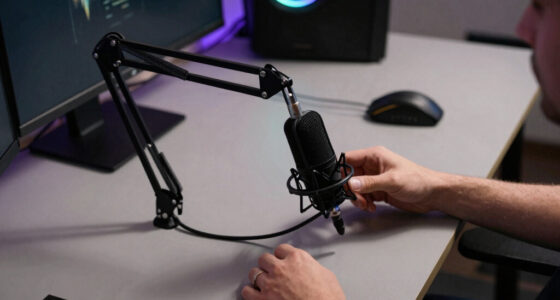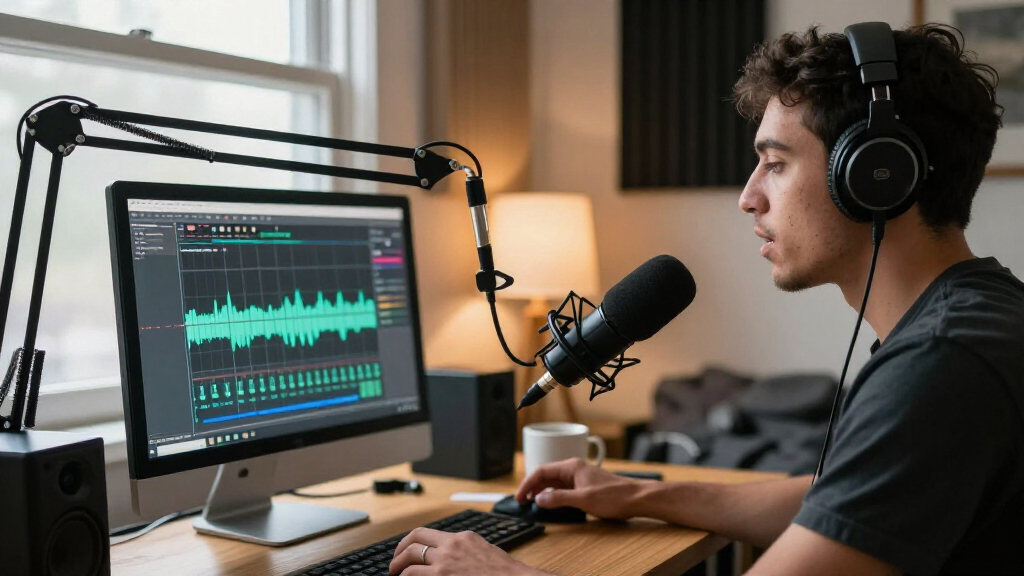

For most streamers, I’d start with the FIFINE AmpliGame AM8: its dynamic design and USB/XLR connections suit voice-focused streams and leave room to expand. The Sennheiser Profile is a strong alternative for a straightforward desktop setup, while the Logitech Blue Yeti offers more pickup-pattern flexibility for shared or varied recording. The main tradeoffs are condenser sensitivity versus dynamic-style focus, simple USB convenience versus XLR upgrade options, and a compact setup versus bundled accessories. The best fit depends on your room, mic placement, and how much control you want during a live broadcast. Continue reading for the full breakdown of all 15 USB microphones for streaming.

Get audio and creator gear delivered free with Prime
- Fast, free delivery on millions of items
- Prime Video, Amazon Music and more included
- Member-only deals all year
Complete the kit



Key Takeaways
- The AM8 and AM8T stand apart for upgrade flexibility: both pair amazon.com/dp/B07N2WRHMY?tag=artzartz-20&ascsubtag=dc-1160909″ target=”_blank” rel=”nofollow sponsored noopener”>USB convenience with an XLR connection, while the AM8T adds a boom-arm kit for a more complete desk setup.
- Dynamic models make more sense for untreated, noisy rooms: the AM8 options are better aligned with close, voice-focused streaming than sensitive condenser models that can pick up more room sound.
- The Blue Yeti and Blue Yeti Midnight Blue offer a different kind of flexibility: their multi-pattern approach suits shared audio or varied recording, but can be more than a solo streamer needs.
- Starter kits trade simplicity for desk space: the TONOR TC-777 and FIFINE A6T include useful setup pieces, while a bundled stand or arm may limit how compact the setup can be.
- Small controls can matter more live than lighting: mute and gain access on options such as the ZealSound K66 or MRSDY can help with quick adjustments, while RGB is mainly a style choice.
| TONOR TC310+ USB Condenser Gaming Microphone Kit with Boom Arm | 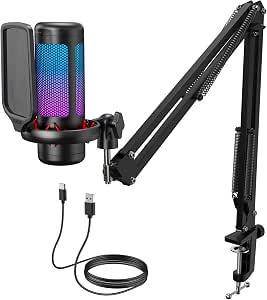 | Best Complete Starter Kit | Connectivity: USB-A | Polar pattern: Unidirectional | Signal-to-noise ratio: 78 dB | VIEW LATEST PRICE | See Our Full Breakdown |
| USB Microphone with Adjustable Gooseneck, Mute Button, and LED Indicator |  | Best for Simple Voice Chat | Microphone type: USB omnidirectional condenser | Gooseneck: 360-degree adjustable | Controls: One-click mute and unmute | VIEW LATEST PRICE | See Our Full Breakdown |
| FIFINE AmpliGame A6T USB Gaming Microphone Kit |  | Best for Boom-Arm Streaming | Connectivity: USB | Polar pattern: Unidirectional (cardioid) | Frequency response: 60 Hz–18 kHz | VIEW LATEST PRICE | See Our Full Breakdown |
| Amazon Basics USB Condenser Microphone with Cardioid Pickup |  | Best Compact Desk Setup | Connectivity: USB | Pickup pattern: Cardioid (unidirectional) | Diaphragm: 14 mm | VIEW LATEST PRICE | See Our Full Breakdown |
| FIFINE AmpliGame AM8 USB/XLR Dynamic Microphone |  | Best Upgrade Path | Connectivity: USB, XLR | Microphone type: Dynamic | Polar pattern: Unidirectional cardioid | VIEW LATEST PRICE | See Our Full Breakdown |
| FIFINE AmpliGame A6V USB Condenser Gaming Microphone with RGB |  | Best for RGB-Focused Streaming Setups | Connectivity: USB | Microphone type: Condenser | Polar pattern: Conflicting listing: cardioid in description, bidirectional in specifications | VIEW LATEST PRICE | See Our Full Breakdown |
| FIFINE K669B USB Condenser Microphone |  | Best Value for a Simple Desktop Setup | Connectivity: USB Type-A; USB Type-C connection support | Microphone type: Condenser | Polar pattern: Unidirectional (cardioid) | VIEW LATEST PRICE | See Our Full Breakdown |
| FIFINE AmpliGame AM8T USB/XLR Dynamic Gaming Microphone Kit with Boom Arm |  | Best for a Streaming Setup That Can Grow | Connectivity: USB, XLR | Microphone type: Dynamic | Polar pattern: Unidirectional (cardioid) | VIEW LATEST PRICE | See Our Full Breakdown |
| COCONISE USB Condenser Microphone for Gaming, Streaming, and Podcasts |  | Best for Headphone Monitoring at the Desk | Connectivity: USB | Microphone type: Condenser | Polar pattern: Unidirectional (cardioid) | VIEW LATEST PRICE | See Our Full Breakdown |
| TONOR TC-777 USB Cardioid Condenser Microphone with Tripod, Shock Mount, and Pop Filter | 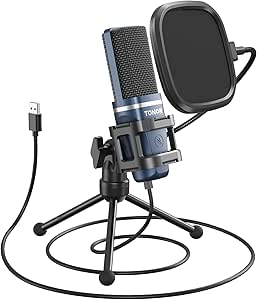 | Best Starter Kit for PC and PlayStation | Model: TC-777 | Connectivity: USB 2.0, USB Type-A | Microphone type: Condenser | VIEW LATEST PRICE | See Our Full Breakdown |
| Logitech Blue Yeti USB Microphone with Blue VO!CE, Midnight Blue |  | Best for Flexible Streaming Setups | Connectivity: USB, USB Type-A | Microphone type: Tri-capsule condenser array | Pickup patterns: Cardioid, omnidirectional, bidirectional, stereo | VIEW LATEST PRICE | See Our Full Breakdown |
| MRSDY USB Gaming Microphone with Noise Reduction, Mute, Gain Control, and RGB Lighting |  | Best for RGB Gaming Desks | Connectivity: USB Type-A | Microphone type: Desktop condenser microphone | Polar pattern: Unidirectional | VIEW LATEST PRICE | See Our Full Breakdown |
| Sennheiser Profile USB Cardioid Condenser Microphone with Table Stand |  | Best for Simple, Software-Free Setup | Connectivity: USB-C | Microphone type: Cardioid condenser | Polar pattern: Unidirectional | VIEW LATEST PRICE | See Our Full Breakdown |
| ZealSound K66 USB Condenser Microphone with Noise Reduction, Gain and Mute Controls |  | Best for Multi-Device Streaming | Microphone type: USB condenser | Pickup pattern: Cardioid | Frequency response: 40 Hz–18 kHz | VIEW LATEST PRICE | See Our Full Breakdown |
| Logitech Blue Yeti USB Microphone, Blackout |  | Best for Pattern Variety Without Added Effects | Connectivity: USB | Microphone type: Tri-capsule array condenser | Pickup patterns: Cardioid, omnidirectional, bidirectional, stereo | VIEW LATEST PRICE | See Our Full Breakdown |
| USB microphones for streaming | Connectivity | Microphone type | Polar pattern | Signal-to-noise ratio |
|---|---|---|---|---|
| TONOR TC310+ USB Condenser Gam | USB-A | — | Unidirectional | 78 dB |
| USB Microphone with Adjustable | — | USB omnidirectional condenser | — | — |
| FIFINE AmpliGame A6T USB Gamin | USB | — | Unidirectional (cardioid) | 70 dB |
| Amazon Basics USB Condenser Mi | USB | — | — | — |
| FIFINE AmpliGame AM8 USB/XLR D | USB, XLR | Dynamic | Unidirectional cardioid | 80 dB |
| FIFINE AmpliGame A6V USB Conde | USB | Condenser | Conflicting listing: cardioid in description, bidirectional in specifications | 70 dB |
| FIFINE K669B USB Condenser Mic | USB Type-A; USB Type-C connection support | Condenser | Unidirectional (cardioid) | 78 dB |
| FIFINE AmpliGame AM8T USB/XLR | USB, XLR | Dynamic | Unidirectional (cardioid) | 80 dB |
| COCONISE USB Condenser Microph | USB | Condenser | Unidirectional (cardioid) | 78 dB |
| TONOR TC-777 USB Cardioid Cond | USB 2.0, USB Type-A | Condenser | Cardioid (unidirectional) | 80 dB |
| Logitech Blue Yeti USB Microph | USB, USB Type-A | Tri-capsule condenser array | — | 70 dB |
| MRSDY USB Gaming Microphone wi | USB Type-A | Desktop condenser microphone | Unidirectional | — |
| Sennheiser Profile USB Cardioi | USB-C | Cardioid condenser | Unidirectional | — |
| ZealSound K66 USB Condenser Mi | — | USB condenser | — | — |
| Logitech Blue Yeti USB Microph | USB | Tri-capsule array condenser | — | — |
More Details on Our Top Picks
TONOR TC310+ USB Condenser Gaming Microphone Kit with Boom Arm
The TONOR TC310+ makes streaming setup easier by bundling a boom arm, shock mount, pop filter, and desk clamp, so there is less need to source mounting gear separately. Its one-tap mute and adjustable gain put useful sound controls within reach, while four adjustable RGB modes add visual customization. Compared with the Amazon Basics USB Condenser Microphone, this is the more ready-to-mount gaming setup; the Amazon Basics model is a simpler choice for someone who wants a compact adjustable stand instead. The TC310+ uses a unidirectional pickup and supports PC, Mac, PS4, and PS5, but the listed signal-to-noise ratio is 78 dB, and the specifications do not give a frequency response. Check desk fit before choosing it: its clamp supports surfaces up to 2.36 inches thick, and it needs a USB port with its Type-C connection seated fully.
Pros:- Includes a boom arm, desk clamp, shock mount, pop filter, and USB cable
- One-tap mute and adjustable gain support quick adjustments during a stream
- Four RGB modes include brightness control
- Works with PCs, Mac OS, PS4, and PS5
Cons:- Desk clamp supports desks only up to 2.36 inches thick
- Requires a USB port and a fully seated Type-C connection
- No frequency response is provided in the listed specifications
Best for: PC and PlayStation streamers who want a boom-arm setup, pop filter, and quick mute and gain controls in one kit.
Not ideal for: Streamers with desks thicker than 2.36 inches or buyers who want a compact tabletop microphone without a clamp-mounted arm.
- Connectivity:USB-A
- Polar pattern:Unidirectional
- Signal-to-noise ratio:78 dB
- Audio sensitivity:10 dB
- Compatible devices:Desktop computer, laptop, Mac OS, PS4, PS5
- Controls and lighting:One-tap mute, gain control, four RGB modes, brightness control
- Desk clamp capacity:Up to 2.36 inches thick
- Included components:Microphone, pop filter, mic stand, shock mount, USB cable, manual
Our verdict“Choose the TC310+ if you want a bundled boom-arm streaming setup with onboard controls and your desk fits its clamp.”
USB Microphone with Adjustable Gooseneck, Mute Button, and LED Indicator
This gooseneck USB microphone favors straightforward positioning over the arm-mounted gaming setup offered by the FIFINE AmpliGame A6T. Its 360-degree adjustable neck lets a streamer aim the capsule toward their voice without installing a desk clamp, and the mute button with LED status light makes it easier to see when the mic is muted. Plug-and-play support for Windows and macOS keeps setup simple for voice chat, calls, or a basic streaming station. Its omnidirectional pickup is a meaningful tradeoff: it can capture sound from around the mic rather than focusing as tightly on a single speaker as the A6T’s cardioid pattern. The product description says noise-canceling technology is designed to reduce background noise and echo, but this is not a substitute for a directional pickup in a noisy room. It also does not support Xbox, Raspberry Pi, or Android.
Pros:- 360-degree adjustable gooseneck makes mic placement easy to change
- One-click mute button has a built-in LED status indicator
- Plug-and-play operation requires no driver on Windows or macOS
- Noise-canceling technology is designed to reduce background noise and echo
Cons:- Omnidirectional pickup can capture more surrounding sound than the cardioid FIFINE AmpliGame A6T
- Not compatible with Xbox, Raspberry Pi, or Android
- No boom arm, shock mount, or pop filter is listed as included
Best for: Windows or Mac streamers who want a simple desktop voice-chat microphone with flexible positioning and a visible mute status.
Not ideal for: Streamers in noisy rooms, console users on Xbox, or buyers who need a directional mic and boom-arm mounting.
- Microphone type:USB omnidirectional condenser
- Gooseneck:360-degree adjustable
- Controls:One-click mute and unmute
- Indicator:Built-in LED
- Cable length:1.8 m (6 ft)
- Compatibility:Windows 7, 8, 10, and 11; macOS
- Not compatible with:Xbox, Raspberry Pi, Android
- Materials:Metal pipe and ABS stand
Our verdict“Pick this model for uncomplicated Windows or Mac voice chat, but choose a cardioid option like the FIFINE AmpliGame A6T for a noisy streaming space.”
FIFINE AmpliGame A6T USB Gaming Microphone Kit
The FIFINE AmpliGame A6T is a strong fit for streamers who want the mic suspended near their mouth rather than occupying the center of the desk. Its included boom arm, shock mount, and detachable pop filter provide a more developed mounting setup than the compact stand supplied with the Amazon Basics USB Condenser Microphone. The cardioid pickup is aimed at sound from the front, which can help keep keyboard and room noise from competing with a close-miked voice. Touch mute and a volume control add quick adjustments, and the USB connection works with Windows, Mac, PS4, and PS5. The tradeoff is desk fit: the C-clamp supports edges up to 2 inches thick, so it may not suit every desk. It is also a corded USB mic, with no XLR path for a later audio-interface setup.
Pros:- Includes an adjustable boom arm, shock mount, pop filter, and C-clamp
- Cardioid pickup favors voice in front of the microphone
- Touch mute and volume control allow quick adjustments
- Compatible with desktop and laptop computers, Mac, PS4, and PS5
Cons:- Included clamp supports desk edges only up to 2 inches thick
- USB-only connection does not offer an XLR upgrade path
- Requires a wired connection to the streaming device
Best for: PC, Mac, PS4, and PS5 streamers who want a cardioid mic on an included boom arm with a shock mount and pop filter.
Not ideal for: People with desk edges thicker than 2 inches or streamers planning to move to an XLR audio interface.
- Connectivity:USB
- Polar pattern:Unidirectional (cardioid)
- Frequency response:60 Hz–18 kHz
- Signal-to-noise ratio:70 dB
- Cable length:8.2 ft (2.5 m)
- Compatible devices:Desktop, laptop, PS4, PS5, Mac, Windows
- Included accessories:Boom arm stand, shock mount, pop filter, C-clamp, USB-C to USB-A/C cable
- Channels:1
Our verdict“Choose the A6T if you want an included boom-arm kit and front-focused pickup, rather than the simpler stand-based Amazon Basics model.”
Amazon Basics USB Condenser Microphone with Cardioid Pickup
The Amazon Basics USB Condenser Microphone suits streamers who want a small, uncomplicated mic rather than a full mounting kit. Its 360-degree adjustable stand and built-in shock absorber make placement straightforward on a desk, and the cardioid pattern is geared toward capturing a voice from in front of the mic. Unlike the TONOR TC310+, it does not arrive with a boom arm, pop filter, or separate shock mount; its advantage is a compact setup that can also attach to compatible stands or boom arms if your needs change. A one-tap mute button is useful during live sessions, while plug-and-play USB support avoids driver setup on supported Windows and Mac systems. The limitations are its single-channel wired connection and basic control set, so it is less suited to buyers seeking RGB, gain adjustment, or a complete gaming kit.
Pros:- Cardioid pickup is suited to a voice positioned in front of the microphone
- 360-degree adjustable stand supports flexible desk placement
- Built-in shock absorber helps isolate the microphone from some handling and desk vibration
- Can attach to compatible microphone stands or boom arms
Cons:- Does not include the boom arm and accessory bundle supplied with the TONOR TC310+
- Single audio channel and USB wired connection
- Listed controls are limited to one-tap mute
Best for: Streamers who want a compact cardioid USB mic for a desk, with the option to attach it to a compatible stand or boom arm later.
Not ideal for: Buyers seeking included boom-arm accessories, RGB lighting, onboard gain control, or a wireless setup.
- Connectivity:USB
- Pickup pattern:Cardioid (unidirectional)
- Diaphragm:14 mm
- Mute function:One-tap
- Compatibility:Windows 7 or higher; Mac OS 10.10 or higher
- Stand:360-degree adjustable; compatible with some tripods and boom arms
- Weight:0.2 kg
- Dimensions:3.37 x 3.37 x 5.79 inches
Our verdict“Pick this for a compact, straightforward cardioid desk mic; choose the TONOR TC310+ if you want a bundled boom arm and more onboard controls.”
FIFINE AmpliGame AM8 USB/XLR Dynamic Microphone
The FIFINE AmpliGame AM8 is the most flexible long-term pick here: streamers can begin over USB, then switch to XLR when adding an audio interface or mixer. Its dynamic capsule and cardioid pattern suit close voice work, with a recommended recording distance of 2–6 inches; that close positioning can help put the voice ahead of room sound, but it calls for more deliberate mic placement than the bundled boom-arm convenience of the FIFINE AmpliGame A6T. Over USB, the AM8 adds tap-to-mute, RGB, headphone monitoring, and volume and gain controls. Those onboard functions are inactive over XLR, and the XLR cable is not included, so the second connection brings extra equipment needs rather than an instant feature upgrade. Its stand threads fit common 3/8-inch and 5/8-inch mounts, but no boom arm is listed in the package.
Pros:- USB and XLR connectivity support a future interface or mixer setup
- Dynamic cardioid design is suited to close-miked streaming voice
- USB mode includes tap-to-mute, RGB, headphone monitoring, and volume and gain controls
- Built-in 3/8-inch and 5/8-inch mounting threads fit many microphone stands
Cons:- XLR cable is not included
- RGB and onboard controls are inactive when connected over XLR
- Recommended 2–6 inch recording distance requires close mic placement
Best for: Streamers who want USB convenience now and a dynamic XLR microphone option for a future interface or mixer setup.
Not ideal for: Buyers who want an included boom arm, do not plan to speak close to the mic, or expect USB controls and RGB to work over XLR.
- Connectivity:USB, XLR
- Microphone type:Dynamic
- Polar pattern:Unidirectional cardioid
- Frequency response:50 Hz–16 kHz
- Signal-to-noise ratio:80 dB
- USB features:Tap-to-mute, RGB lighting, headphone monitoring, volume and gain controls
- Mounting threads:3/8 inch and 5/8 inch
- Recommended recording distance:2–6 inches
- XLR cable:Not included
Our verdict“Choose the AM8 if you want to start with USB and retain an XLR path, but pick the FIFINE AmpliGame A6T if you need a boom arm included.”
FIFINE AmpliGame A6V USB Condenser Gaming Microphone with RGB
The A6V suits streamers who want desk lighting and quick access to voice controls in one compact USB setup. Its tap-to-mute button and gain knob make it easy to manage mic level without opening streaming software, while the included shock mount, pop filter, and tripod provide more in-box setup gear than the basic FIFINE K669B. The 192 kHz sampling specification is generous for a gaming mic, though it does not by itself promise better stream audio; placement and room noise still matter. One drawback is a conflicting pickup-pattern listing: the description says cardioid, while the specifications say bidirectional. I’d favor another clearly specified option if directional voice pickup is a priority. It also needs a wired USB connection.
Pros:- Tap-to-mute and gain controls are accessible on the microphone
- Includes a shock mount, pop filter, and tripod stand
- Works with PC, PS4, and PS5 through plug-and-play USB
- Seven-gradient RGB lighting adds a visible gaming accent
Cons:- Product information conflicts on whether the pickup pattern is cardioid or bidirectional
- Wired USB connection limits placement and mobility
- Tripod placement takes up desk space compared with a boom-arm setup
Best for: PC and PlayStation streamers who want RGB on camera, easy mute and gain controls, and a ready-to-assemble desktop kit.
Not ideal for: Streamers who need confirmed cardioid pickup, wireless operation, or a microphone they can position on a boom arm.
- Connectivity:USB
- Microphone type:Condenser
- Polar pattern:Conflicting listing: cardioid in description, bidirectional in specifications
- Sampling rate:192 kHz
- Signal-to-noise ratio:70 dB
- Frequency response:60 Hz–18 kHz
- Controls and lighting:Tap-to-mute, gain knob, RGB with seven gradient colors
- Compatibility:PC, PS4, PS5, Windows, Mac OS
- Included accessories:Shock mount, pop filter, tripod stand, detachable USB cable
Our verdict“Choose the A6V for a colorful, accessory-rich streaming setup if the pickup-pattern ambiguity is not a dealbreaker.”
FIFINE K669B USB Condenser Microphone
The K669B is the straightforward pick for a streamer who wants a dedicated mic without a bundle of lighting and extra controls. Its cardioid pickup pattern focuses on sound from the front, and the metal body gives it a sturdier feel than a lightweight plastic desktop mic. Compared with the FIFINE AmpliGame A6V, it is less feature-heavy: there’s no RGB or separate tap-to-mute button, but the built-in volume control and included tripod keep the setup simple. It connects to PCs and PS4/PS5, though Xbox and phone users need another option. The USB-powered design is convenient, but software settings may need attention so application-level changes do not alter recording volume. Its tripod also offers less placement flexibility than a boom arm.
Pros:- Cardioid pickup is suited to focusing on a voice in front of the mic
- Metal construction and included tripod provide a sturdy basic setup
- Built-in volume control makes quick level adjustment accessible
- Plug-and-play compatibility includes PCs and PS4/PS5
Cons:- Not compatible with Xbox or phones
- No dedicated mute button or lighting features
- Application settings may need adjustment to prevent recording-level changes
Best for: First-time PC or PlayStation streamers who want a durable, plug-and-play cardioid mic with a simple desktop footprint.
Not ideal for: Xbox or phone streamers, and anyone who wants RGB, a dedicated mute button, or boom-arm positioning.
- Connectivity:USB Type-A; USB Type-C connection support
- Microphone type:Condenser
- Polar pattern:Unidirectional (cardioid)
- Frequency response:20 Hz–20 kHz
- Signal-to-noise ratio:78 dB
- Audible noise:16 dB
- Cable:6.5 ft USB-B to USB-A/C
- Compatible devices:Desktop, laptop, PC, PS4, PS5
- Construction and included accessory:Metal; tripod stand
Our verdict“Pick the K669B for a no-frills PC or PlayStation streaming mic when sturdy basics matter more than lighting and extra controls.”
FIFINE AmpliGame AM8T USB/XLR Dynamic Gaming Microphone Kit with Boom Arm
The AM8T is the most upgrade-friendly choice here: streamers can start over USB and later connect through XLR to an audio interface or mixer. Its dynamic cardioid design is a different fit from the condenser FIFINE K669B, and the included boom arm helps keep the mic close to the speaker while freeing desk space. On-mic mute, gain, and headphone monitoring controls also reduce the need to reach for software during a live session. That flexibility comes with setup tradeoffs: the XLR cable is not included, and the clamp only fits desktops up to two inches thick. The 2.6-pound kit and arm require more planning than a small tripod microphone, so it makes most sense for streamers building a fixed workstation rather than seeking a quick portable setup.
Pros:- USB and XLR connectivity support a future audio-chain upgrade
- Included boom arm and clamp free desk space and allow mic positioning
- Onboard mute, gain, and headphone monitoring controls suit live use
- RGB lighting can be customized or switched off
Cons:- XLR cable is not included
- Desk clamp fits desktops only up to two inches thick
- Boom arm and 2.6-pound kit take more setup space than a desktop tripod mic
Best for: Streamers who want a boom-arm USB setup now and the option to move to an XLR mixer or interface later.
Not ideal for: Buyers with desks thicker than two inches, those who want a compact tripod mic, or anyone expecting a complete XLR connection in the box.
- Connectivity:USB, XLR
- Microphone type:Dynamic
- Polar pattern:Unidirectional (cardioid)
- Frequency range:50 Hz–16 kHz
- Signal-to-noise ratio:80 dB
- Controls and monitoring:Mute button, gain control, headphone jack and volume control
- Included accessories:Boom arm, C-clamp, 8.2 ft USB-to-USB-C cable, windscreen
- Desk clamp capacity:Desktop thickness up to 2 inches
- Weight:2.6 lbs
Our verdict“Choose the AM8T if you want a dynamic USB mic with an included boom arm and a practical route to XLR later.”
COCONISE USB Condenser Microphone for Gaming, Streaming, and Podcasts
The COCONISE stands out for streamers who want to hear their microphone feed while speaking. Its headphone jack supports real-time monitoring, and touch mute paired with an RGB indicator makes it easy to see when the mic is off. A metal pop filter and shock mount help limit plosive and vibration noise, while the weighted base is more reassuring on a desk than the light tripod included with the FIFINE K669B. Those extras make this a more control-focused desktop choice, but its listed 20–2000 Hz frequency range is unusually narrow for a voice microphone and should be treated cautiously. It is also USB-wired and listed for computers and PlayStation, not Xbox. I’d choose it for monitoring convenience only after checking that its audio specifications match your intended setup.
Pros:- Headphone jack supports real-time audio monitoring
- Touch mute has an RGB indicator that turns off when muted
- Metal pop filter and shock mount help reduce plosives and vibration
- Weighted base helps keep the microphone stable on a desk
Cons:- Listed 20–2000 Hz frequency range is unusually limited for a streaming microphone
- USB connection requires a compatible computer or console
- No boom arm is listed for flexible mic placement
Best for: PC and PlayStation streamers who want headphone monitoring, visible mute status, and a stable weighted desktop base.
Not ideal for: Buyers who need clearly documented full-range voice response, Xbox compatibility, or a boom-arm mounting option.
- Connectivity:USB
- Microphone type:Condenser
- Polar pattern:Unidirectional (cardioid)
- Listed frequency range:20–2000 Hz
- Sampling rate:Up to 192 kHz
- Signal-to-noise ratio:78 dB
- Controls and connections:Touch mute, volume control, headphone jack
- Cable length:180 cm
- Compatibility:Headphones, laptops, PCs, PS4, PS4 Pro, PS5
Our verdict“Choose the COCONISE for desktop headphone monitoring and clear mute status, but verify the listed frequency range before buying.”
TONOR TC-777 USB Cardioid Condenser Microphone with Tripod, Shock Mount, and Pop Filter
The TC-777 is a practical first streaming mic for buyers who want the basic desk accessories included rather than sourced separately. Its cardioid pickup pattern is intended to favor the voice in front of the mic, and the tripod, mini shock mount, and pop filter make it a more complete starter package than the barebones FIFINE K669B. USB connection supports Windows, Mac, PS4, and PS5, with listed mute and volume controls for quick adjustments. The tradeoff is a conventional desktop setup: the tripod takes up desk space, and there is no Xbox compatibility. The specifications list a 20 kHz frequency response rather than a range, so the audio detail is limited. Single-channel audio is also a straightforward fit for solo voice streaming, not multi-mic or stereo capture.
Pros:- Cardioid pickup is designed to focus on voice from the front
- Includes a tripod, mini shock mount, and pop filter
- USB setup supports Windows, Mac, PS4, and PS5
- Listed mute and volume controls support quick streaming adjustments
Cons:- Not compatible with Xbox
- Single-channel audio does not suit stereo or multi-mic capture needs
- Frequency response is listed only as 20 kHz, without a stated range
Best for: New Windows, Mac, or PlayStation streamers who want a simple cardioid mic with a pop filter and shock mount in the box.
Not ideal for: Xbox users, streamers who need stereo or multi-channel capture, and buyers seeking a boom-arm kit or detailed frequency specifications.
- Model:TC-777
- Connectivity:USB 2.0, USB Type-A
- Microphone type:Condenser
- Polar pattern:Cardioid (unidirectional)
- Frequency response:20 kHz (listed)
- Signal-to-noise ratio:80 dB
- Cable length:70 in / 180 cm
- Compatible devices:Windows, Mac, PC, laptop, PS4, PS5
- Included accessories:Foldable tripod, mini shock mount, pop filter, power cord, manual
Our verdict“Pick the TC-777 as a starter PC or PlayStation kit if you want basic noise-control accessories included and do not need Xbox support.”
Logitech Blue Yeti USB Microphone with Blue VO!CE, Midnight Blue
The Blue Yeti’s four pickup patterns make it a more adaptable choice than the Sennheiser Profile, which is limited to unidirectional pickup. For a solo stream, cardioid mode focuses capture toward the speaker; the other patterns can suit interviews or group recordings. On-mic gain and mute controls, plus zero-latency headphone monitoring, also make common adjustments accessible without reaching for software. Blue VO!CE adds optional vocal effects, though using its full feature set requires downloading Logitech G HUB. The tradeoff is a larger, more setup-dependent feature set than a straightforward single-pattern mic like the Profile. Its included desktop stand is convenient, but streamers who need more precise positioning may prefer a boom-arm setup. I’d choose this Yeti for varied formats, not just a fixed solo desk stream.
Pros:- Four pickup patterns support solo streaming, interviews, and group recording
- Onboard gain and mute controls simplify adjustments during a live session
- Zero-latency headphone monitoring helps with real-time voice checks
- Blue VO!CE software provides optional vocal effects
Cons:- Full Blue VO!CE functionality requires Logitech G HUB
- The included desktop stand offers less flexible positioning than a boom arm
- The additional pickup patterns may be unnecessary for a solo streamer
Best for: Streamers who switch between solo commentary, interviews, and group audio and want pickup-pattern options with onboard controls.
Not ideal for: Solo streamers seeking a simple, compact mic with no companion software or those who need boom-arm placement out of the box.
- Connectivity:USB, USB Type-A
- Microphone type:Tri-capsule condenser array
- Pickup patterns:Cardioid, omnidirectional, bidirectional, stereo
- Frequency response:20 Hz–20 kHz
- Signal-to-noise ratio:70 dB
- Channels:2
- Controls and monitoring:Onboard gain, mute, pattern selection, and zero-latency headphone monitoring
- Color and enclosure:Midnight Blue; metal
Our verdict“Choose this Blue Yeti if your stream formats vary and you want more recording patterns than the single-direction Sennheiser Profile provides.”
MRSDY USB Gaming Microphone with Noise Reduction, Mute, Gain Control, and RGB Lighting
The MRSDY is aimed squarely at streamers who want a gaming-focused desk mic with visible RGB lighting, quick mute, and gain adjustment close at hand. Its unidirectional pickup suits a speaker positioned in front of the mic, while the headphone jack supports real-time monitoring. Compared with the ZealSound K66, this model lists PC and PlayStation compatibility but not mobile-device support; the K66 includes USB-C and Lightning adapters for compatible phones and tablets. The MRSDY also keeps its feature set simple: it records in single-channel audio, so it is less flexible for multi-source production than the Logitech Blue Yeti’s four-pattern, two-channel setup. Noise reduction is listed, but the product data does not explain its behavior in detail. I’d pick it for a gaming station where RGB and easy mute access matter more than recording versatility.
Pros:- Unidirectional pickup is suited to a speaker positioned in front of the mic
- Quick mute and adjustable gain are accessible on the microphone
- Headphone output supports real-time monitoring
- RGB lighting adds a gaming-focused visual accent
Cons:- Single-channel audio offers less recording flexibility than the Logitech Blue Yeti
- Noise-reduction performance is not detailed in the supplied product information
- Requires a wired USB connection
Best for: PC or PlayStation streamers who want a desktop mic with RGB, a quick mute button, and headphone monitoring.
Not ideal for: Creators who need stereo or multi-pattern recording, mobile-device adapters, or clearly documented noise-reduction performance.
- Connectivity:USB Type-A
- Microphone type:Desktop condenser microphone
- Polar pattern:Unidirectional
- Channels:1
- Compatible devices:PC, laptop, PS4, PS5, Mac
- Headphone output:3.5 mm stereo
- Cable length:2 m (78 in)
- Dimensions and weight:3.54 × 3.54 × 6.3 in; 8.8 oz
Our verdict“Pick the MRSDY for a straightforward RGB gaming setup, but choose the ZealSound K66 if mobile-device compatibility matters more.”
Sennheiser Profile USB Cardioid Condenser Microphone with Table Stand
The Sennheiser Profile suits streamers who want direct control without companion software: gain, mix, volume, and mute are built into the mic, and a headphone jack supports monitoring. Its cardioid pickup is a focused, uncomplicated fit for one person at a desk. Unlike the Logitech Blue Yeti, it does not offer alternate pickup patterns or Blue VO!CE effects; that narrower approach makes operation simpler but limits use for interviews and group recording. The metal body and included table stand provide a sturdy desktop setup, although the stand gives less placement freedom than a boom arm. It connects over USB-C and is listed for PC, tablet, and Mac. I’d choose it over feature-heavy alternatives when predictable controls and a minimal setup matter more than extra recording modes.
Pros:- Gain, mix, volume, and mute controls are built into the microphone
- Plug-and-play USB-C setup does not require software or an audio interface
- Metal enclosure and included table stand suit a permanent desk setup
- Built-in headphone jack supports monitoring
Cons:- Single-channel, unidirectional pickup is less versatile than the Logitech Blue Yeti
- The included table stand limits placement compared with a boom arm
Best for: Solo streamers who want a durable USB-C cardioid mic with hands-on controls and no audio software or interface setup.
Not ideal for: Streamers who record multiple people, want alternate pickup patterns, or need flexible boom-arm positioning included.
- Connectivity:USB-C
- Microphone type:Cardioid condenser
- Polar pattern:Unidirectional
- Channels:1
- Controls:Gain, mix, volume, mute
- Headphone jack:Built-in
- Enclosure and weight:Metal; 717 g
- Included accessories:Table stand and 1.2 m USB-C cable
Our verdict“Choose the Sennheiser Profile for straightforward solo streaming with accessible controls, not for multi-person recording or pattern switching.”
ZealSound K66 USB Condenser Microphone with Noise Reduction, Gain and Mute Controls
The K66 stands out for streamers who move between a computer, console, and compatible phone or tablet: it includes USB-C and Lightning adapters, while the Sennheiser Profile uses USB-C and is listed for PC, tablet, and Mac. Its cardioid pattern, mute control, and mic and monitoring volume adjustments cover the essentials for a solo stream. A 3.5 mm jack provides zero-latency headphone monitoring, and an echo control gives creators another adjustment that the Profile’s listed controls do not include. The tradeoff is that the noise-reduction mode is described without measured performance details, so buyers should not treat it as a guarantee of clean audio in a noisy room. Device support also depends on compatibility with the included adapters. I’d favor the K66 for varied devices, not for proven noise handling.
Pros:- USB-C and Lightning adapters broaden its potential device compatibility
- Dedicated controls cover mic volume, monitoring, echo, and mute
- Zero-latency monitoring is available through the 3.5 mm headphone jack
- Cardioid pickup is suited to a single speaker at a desk
Cons:- Noise-reduction behavior is described without measured performance details
- Compatibility depends on the device and included adapters
- The supplied product data does not specify channel count
Best for: Solo creators who stream across compatible computers, consoles, iPhones, or iPads and want built-in monitoring and direct controls.
Not ideal for: Buyers who need documented noise-reduction results or want a microphone with compatibility that does not depend on adapters.
- Microphone type:USB condenser
- Pickup pattern:Cardioid
- Frequency response:40 Hz–18 kHz
- Sampling rate:46 kHz
- Sensitivity:−45 dB ±3 dB
- Monitoring:3.5 mm headphone jack; zero-latency monitoring
- Controls:Microphone volume, monitoring volume, echo, mute
- Compatibility:Windows PC, Mac, PS4, PS5, iPhone, iPad, and compatible USB-C devices
Our verdict“Choose the K66 if you stream from several compatible device types and value direct controls over clearly quantified noise reduction.”
Logitech Blue Yeti USB Microphone, Blackout
This Blackout Blue Yeti shares the lineup’s broadest pickup-pattern approach with the Midnight Blue Blue Yeti, but its listed controls and software support tell a slightly different story: the Midnight version specifically includes Blue VO!CE support, while this model lists vocal effects through Logitech G HUB without detailing that software in the description. Both offer four pickup patterns, onboard mute and gain, and zero-latency monitoring, so either can adapt beyond a solo stream. That flexibility comes with more choices and a desktop form factor that may take up more space than a simpler single-pattern mic such as the Sennheiser Profile. The supplied specs also list unusually different sensitivity and signal-to-noise figures from the Midnight model, alongside a note that frequency information is inconsistent. I’d pick this version for pattern versatility, while checking the setup details against the specific unit.
Pros:- Four pickup patterns cover solo streaming, interviews, and group recording
- Onboard gain, mute, pattern, and headphone-volume controls
- Zero-latency headphone monitoring supports real-time listening
- USB connectivity and an adjustable desktop stand simplify desk setup
Cons:- Full software functionality requires installing Logitech G HUB
- The supplied frequency information is flagged as inconsistent
- More pickup options may add complexity for a solo streamer
Best for: PC and Mac streamers who want one USB mic for solo sessions, interviews, and other recording formats with onboard controls.
Not ideal for: Streamers seeking a small, single-purpose desk mic or buyers who want fully consistent specification details before choosing.
- Connectivity:USB
- Microphone type:Tri-capsule array condenser
- Pickup patterns:Cardioid, omnidirectional, bidirectional, stereo
- Frequency response:20 Hz–20 kHz (listed with inconsistent frequency information)
- Channels:2
- Controls:Headphone volume, pattern selection, instant mute, microphone gain
- Compatibility:PC and Mac
- Color and stand:Blackout; adjustable desktop stand
Our verdict“Choose this Blackout Yeti for flexible recording patterns and physical controls, but favor the Sennheiser Profile for a simpler single-pattern setup.”

How We Picked
I compared these microphones around the needs of a live stream: clear close-mic speech, practical pickup behavior, accessible mute and gain controls, dependable desk placement, and a setup process that does not demand extra equipment. I also looked at what comes in the box, whether the mic offers USB-only simplicity or an XLR path, and how much desk space its stand or boom-arm kit is likely to take. A feature only counted as an advantage when it solved a real streaming problem.
The ranking favors useful voice control and flexibility over decorative extras. The AM8 leads because its dynamic design and USB/XLR connectivity serve both a direct streaming setup and a later audio upgrade; the AM8T is close behind for buyers who want an arm included. The Blue Yeti models rank well for pickup flexibility, while simpler condenser microphones remain sensible for quieter rooms and tighter setups. Compact or entry-level picks rank lower when they offer fewer ways to adapt to room noise, placement, or changing needs.
| USB microphones for streaming | Polar pattern |
|---|---|
| TONOR TC310+ USB Condenser Gam | Unidirectional |
| USB Microphone with Adjustable | — |
| FIFINE AmpliGame A6T USB Gamin | Unidirectional (cardioid) |
| Amazon Basics USB Condenser Mi | — |
| FIFINE AmpliGame AM8 USB/XLR D | Unidirectional cardioid |
| FIFINE AmpliGame A6V USB Conde | Conflicting listing: cardioid in description, bidirectional in specifications |
| FIFINE K669B USB Condenser Mic | Unidirectional (cardioid) |
| FIFINE AmpliGame AM8T USB/XLR | Unidirectional (cardioid) |
| COCONISE USB Condenser Microph | Unidirectional (cardioid) |
| TONOR TC-777 USB Cardioid Cond | Cardioid (unidirectional) |
| Logitech Blue Yeti USB Microph | — |
| MRSDY USB Gaming Microphone wi | Unidirectional |
| Sennheiser Profile USB Cardioi | Unidirectional |
| ZealSound K66 USB Condenser Mi | — |
| Logitech Blue Yeti USB Microph | — |
Factors to Consider When Choosing USB Microphones For Streaming
I’d choose a streaming microphone by matching it to the room and workflow first, then checking extras. A mic with more controls is not automatically better if it captures keyboard noise or sits awkwardly on the desk. These broader tradeoffs can help narrow the field before comparing individual models.
Match the Mic’s Pickup Style to Your Room
Your room often affects stream audio more than small differences between microphones. A condenser can capture a detailed voice, but it may also pick up fans, keyboard taps, and reflections from bare walls. A dynamic-style mic placed close to your mouth can help keep attention on your voice in a less-treated room, though close placement takes some adjustment. Before buying, listen to a test recording from your current setup and identify the loudest unwanted sound. If room noise is the main problem, changing mic position or adding soft furnishings may help more than adding software noise reduction. Choose for the sound environment you actually have, not the studio you might build later.
Plan Your Mic Position Before Choosing a Stand
Microphone distance and angle shape both voice level and the amount of room sound in a stream. A tabletop stand is quick to set up, but it can transmit desk bumps and may place the mic farther away than ideal. A boom arm can move the microphone closer and free up workspace, yet it needs a suitable mounting edge and enough clearance for your monitor and hands. Bundled accessories are convenient, but check whether they fit your desk and leave room for your camera view. If you stream with a keyboard in front of you, a stable arm may be more useful than decorative lighting or a large desktop base. Think through the mic’s position during gameplay before choosing a kit.
Decide Whether USB Is Enough or XLR Matters
USB keeps a streaming setup simple: connect the mic, select it as the input, and manage your voice from the computer or mic controls. XLR can make sense if you plan to add an audio interface, use several audio sources, or change your recording setup later. That flexibility comes with extra gear, cables, and setup decisions; an XLR port alone does not improve sound when the mic is connected over USB. Avoid paying for an upgrade path you do not expect to use. If you are unsure, USB-first models with an XLR option provide a gradual route, while USB-only microphones keep the desk and workflow uncomplicated. Prioritize today’s setup unless a specific future use justifies the added complexity.
Treat Live Controls as Workflow Tools
A mute button is useful when you need to cough, answer someone nearby, or step away without reaching for software. Gain controls help you adjust input level, but they cannot fix poor mic placement or a noisy room. Check whether controls are easy to reach and whether their status is clear while you are looking at your game or stream. A headphone monitoring connection, when available, can help catch clipping or unwanted noise before viewers do. RGB lighting may suit a coordinated setup, but it has little bearing on voice capture. For live use, prioritize controls you can operate quickly without interrupting what is on screen.
Choose Pickup Patterns for Your Actual Use
A solo streamer usually needs a microphone that focuses on one voice from one position. Multiple pickup patterns can help when recording two people, capturing a group, or switching between voice and room audio, but those modes also add choices and can capture more background sound. Do not assume that more patterns automatically mean better streaming audio. If your microphone will stay in the same place and serve one speaker, a straightforward directional setup may be easier to manage. If you plan interviews or shared recordings, pattern flexibility could prevent the need for a second microphone. Base this choice on who needs to be heard and where they will sit.
Set a Realistic Upgrade and Accessory Plan
A microphone kit can reduce the number of separate purchases, but included accessories are useful only when they fit your setup. A pop filter can soften plosive sounds, while a shock mount or boom arm may reduce desk handling and improve placement. Accessories do not replace correct gain, distance, and speaking angle. If your current stand works and your room is quiet, a simpler microphone may be the more practical choice. If you need an arm, pop filter, or mount from day one, compare the bundled kit with what you would otherwise need to source. The best value is the setup you can use comfortably, not the box with the longest feature list.
Frequently Asked Questions
Should I choose a dynamic or condenser USB microphone for streaming?
I’d lean toward a dynamic-style option if your room has a loud keyboard, fan, or noticeable echo and you can keep the mic close to your mouth. A condenser may suit a quieter room where you want a more open capture, but it can make untreated room noise more apparent. Neither type cancels background sound by itself; placement and speaking distance still matter. The AM8 models represent the dynamic-style path in this lineup, while the Blue Yeti and several compact models are condenser options. Choose based on your room and mic position rather than the label alone.
Is an XLR connection worth choosing if I stream over USB now?
An XLR connection is useful if you expect to add an audio interface or build a setup with more control over multiple sources. It does not make the microphone sound better when you are using its USB connection, and the extra path brings more equipment and setup work. If your stream only needs one mic input, USB may be all you need for a long time. The AM8 and AM8T give you the option to add XLR later, but a USB-only pick can be a simpler fit for a fixed setup. I’d pay attention to XLR only when you have a clear plan for using it.
Will a USB microphone stop my keyboard from being heard on stream?
No microphone can guarantee that a keyboard will disappear from your stream. A close speaking position and a directional pickup approach can reduce how prominent desk sounds are, while a quieter keyboard, better placement, and a stable arm can help further. Software noise reduction may reduce steady background noise, but strong processing can affect voice quality and may not remove sharp key taps cleanly. A sensitive condenser positioned far away can make the problem more noticeable. Before buying, check whether you can move the mic closer and place the keyboard outside its main pickup direction.
Do I need a boom arm, or is a desktop stand enough?
A desktop stand is a sensible choice when you have room beside your keyboard and can place the mic close enough for clear speech. An arm can free desk space, improve positioning, and move the microphone away from some desk vibrations, but it needs a compatible desk edge and careful placement. Bundled kits such as the TONOR TC-777 or FIFINE A6T can get a new setup started, though the included support may not suit every desk layout. Check your monitor and camera framing before choosing an arm. If you already have a stable stand that places the mic well, changing it may not improve your stream.
Which features should I prioritize if I stream alone rather than interview guests?
For solo streaming, I’d prioritize a clear directional voice setup, easy mute access, and a position that keeps the mic close without blocking your screen. Multiple pickup patterns can be useful, but they are less valuable if only one person speaks into the microphone. A compact stand or practical arm may matter more than extra modes if desk space is limited. Check that gain adjustment is simple enough to use during a broadcast, and keep lighting features low on the priority list. The Blue Yeti’s pattern flexibility is better suited to varied recording, while a focused, simpler setup may better match a solo stream.
Conclusion
For the broadest mix of voice-focused streaming and future flexibility, I’d choose the FIFINE AmpliGame AM8 as the best overall pick; choose the AM8T instead if having a boom-arm kit included matters more. For best value, the TONOR TC-777 is a practical starter route with a stand and useful accessories, while the FIFINE K669B suits buyers who want a simpler condenser setup. The Sennheiser Profile is my best premium-style choice for streamers seeking a more focused desktop setup, and the FIFINE AmpliGame A6T is a strong beginner pick for an all-in-one gaming-oriented kit. For flexible recording beyond solo streaming, choose a Logitech Blue Yeti; for a compact, control-forward setup, compare the ZealSound K66 and gooseneck option. Match the microphone to your room and desk before giving extra features the deciding vote.
Columbus Day / Indigenous Peoples' Day Picks
long weekend sales
As an affiliate, we earn on qualifying purchases.