TL;DR

Get audio and creator gear delivered free with Prime
- Fast, free delivery on millions of items
- Prime Video, Amazon Music and more included
- Member-only deals all year
Pad sensitivity controls how strongly your controller responds to a hit, while threshold sets the minimum signal that counts as a note. For missed soft hits, gradually raise sensitivity or lower threshold; for double triggers, check mounting and tension, then lower sensitivity or raise threshold and adjust retrigger cancel in small steps. Test rolls and neighboring pads after each change, because extreme settings can trade one problem for another.
You strike the snare once, but your DAW records two notes. Then a quiet ghost note vanishes from the next bar. That kind of inconsistency can make a cheap practice kit feel broken and an expensive one feel impossible to play.
Pad sensitivity is only one part of the fix. You’ll learn how sensitivity, threshold, retrigger cancel, and crosstalk rejection shape what your module hears, plus how to check cables and mounting before changing settings. The goal is a kit that catches your soft notes without turning rack vibration into a drum fill.
Controller menus use different names, and there’s no universal setting that works for every pad. Treat each adjustment like tuning a room: change one thing, listen closely, then decide whether the sound improved.
For missed soft notes, try raising sensitivity or lowering threshold in small steps.
For repeated notes from one strike, check mounting and pad tension, then adjust retrigger cancel carefully so fast rolls still work.
If hitting one pad triggers another, inspect rack vibration and contact before increasing crosstalk rejection.
Test quiet taps, strong hits, rolls, and simultaneous strikes after each change.
Save original values and treat velocity curves as a feel adjustment after triggering becomes reliable.
Trigger tuning / practical guide
Pad Controller Sensitivity: Fixing Missed Hits and Double Triggers
One snare strike records twice; the next quiet ghost note disappears. Build a reliable response by separating sensitivity, threshold, retrigger cancel, and crosstalk—and checking the hardware before chasing menu values.
01 / Understand the controls
Four settings shape what your module hears
Sensitivity and threshold affect whether a signal becomes a note. Retrigger cancel and crosstalk rejection help the module distinguish separate hits from vibration. Names and behavior vary by controller, so check its manual.
Input response
Sensitivity / gain
Controls how strongly the module responds to a hit. Raise it gradually when soft playing is missed; lower it if normal hits trigger too easily. Like a preamp, more gain can also bring up noise.
Minimum signal
Threshold
Sets the minimum signal that counts as a note. A high threshold can suppress quiet taps; a low one may admit rack shake or background vibration.
Hit separation
Retrigger cancel
Ignores extra signals for a short period after a strike. Increase it a little if one hit repeats, then test fast rolls and ghost notes for lost strokes.
Neighbor control
Crosstalk rejection
Reduces false notes when vibration travels between pads. Use it for neighboring triggers, but excessive rejection can mute intentional simultaneous hits.
Physical setup
Mount, head, cable
Loose hardware, rack contact, uneven mesh tension, worn pads, or a faulty cable can cause inconsistent response. Fix contact and connections before masking the symptom.
Playing feel
Velocity curve
Shapes how hit strength maps to MIDI velocity and volume. Fine-tune it after triggering is reliable; it is rarely the first fix for missed or duplicated notes.
02 / Match symptom to first move
Different problems call for different adjustments
Avoid raising sensitivity across the whole kit to solve one pad. Identify which pad misbehaves and what kind of stroke causes it, then make a small, reversible change.
| What you notice | Check first | Small adjustment to try | Watch for |
|---|---|---|---|
| Soft hits disappear | Pad, cable, sensor, and playing level | Raise sensitivity or lower threshold | False triggers from vibration |
| One strike makes repeated notes | Mounting, pad tension, and connection | Lower sensitivity or raise threshold; then raise retrigger cancel slightly | Fast roll notes being erased |
| A neighbor fires too | Rack shake and pad contact | Remove contact; then adjust crosstalk rejection | Simultaneous hits being muted |
| Velocity feels uneven | Response reliability first | Shape velocity curve after triggering is stable | Changing feel without fixing missed notes |
03 / Troubleshooting sequence
Start with the setup. Then tune the signal.
A snare that misses ghost notes and a tom that double fires may have different causes. Test one pad and one symptom at a time.
Identify
Note which pad, stroke, and playing pattern causes the issue. Compare quiet taps, ordinary hits, and strong strokes.
Inspect
Seat the plug, check the cable, tighten loose hardware, and move pads away from racks, walls, or stands they touch.
Isolate
Test the pad alone; try a known-good cable. If trouble follows the cable, replace it; if it stays with the pad, inspect its condition.
Adjust
Save original values. Change one setting by a small step, replay the same pattern, and keep the change only if the response improves.
Mechanical fixes come first
A snare pressed against a metal rack can shake a nearby tom. Moving it a few centimeters may solve the cause more cleanly than increasing crosstalk rejection. Settings cannot repair a broken connection or sensor.
04 / Small moves, useful tests
Make every adjustment earn its place
There is no universal sensitivity number. The goal is dependable response across your playing range, without trading one problem for another.
- 1Save the starting point. Record current values or save a copy of the kit.
- 2Repeat a consistent test. Try ten quiet taps, ten ordinary hits, then a short roll.
- 3Check the tradeoff. Test ghost notes, strong strokes, and fast playing after every change.
- 4Test the whole kit. Strike pads separately and together to catch crosstalk or muted unison hits.
Trace the signal
From a strike to a dependable note
Use this chain to keep the diagnosis grounded in what the pad and module are actually doing.
What Pad Sensitivity Changes When You Strike
Pad controller sensitivity sets how strongly the module responds to a hit, while threshold sets the minimum signal that counts as a note. If you play a soft tap and nothing happens, the controller may need more sensitivity or a lower threshold. If the pad fires from a light brush or rack shake, it may be responding too easily.
Think of sensitivity like a microphone preamp: more gain helps a quiet source come through, but it also brings up noise. Threshold acts more like a gate at the door. A signal has to cross that line before the module accepts it. The exact implementation varies by controller, so check the manual when a menu uses unfamiliar labels.
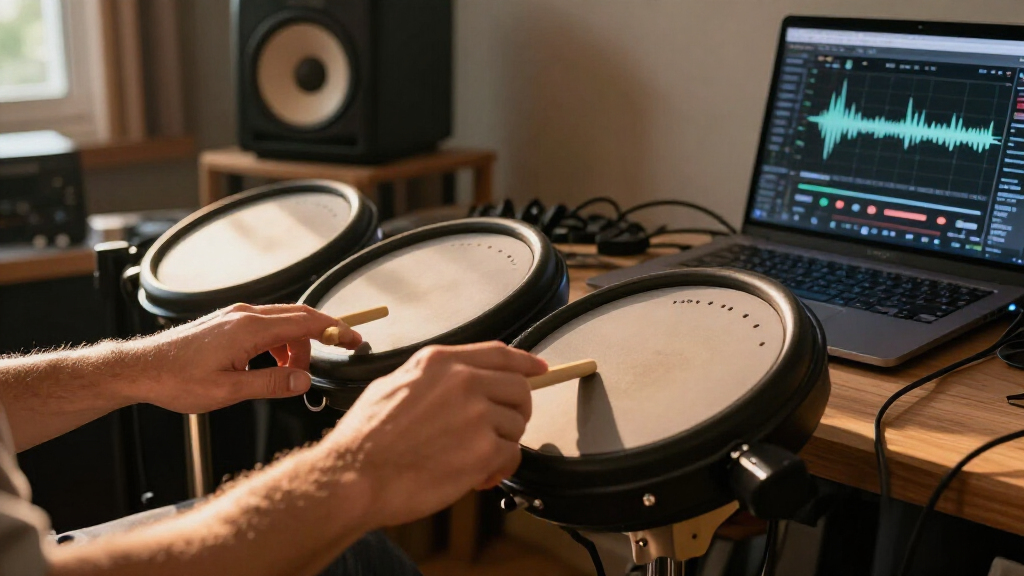
For example, imagine practicing quiet snare ghost notes on a mesh head. If firm backbeats register reliably but the delicate taps disappear, raising sensitivity slightly may help. If the same change makes a nearby cymbal respond whenever you hit the snare, return to the previous value and check mounting and crosstalk before pushing the setting further.
Sensitivity and threshold solve different parts of the response problem, and they can interact. A controller may combine functions or use its own terminology. Start from the recommended default, note the original number, and change one control at a time so you can hear what each adjustment actually does.
Popular right now

Bose QuietComfort Wireless Bluetooth Headphones with Active Noise Cancellation, Mic, USB‑C Charging, Deep Bass, 24‑Hour Battery – White Smok

Roborock F25 BX Cordless Wet Dry Vacuum Mop

De'Longhi 15-Bar Pump Espresso Machine with Milk Frother & Temperature Control
As an affiliate, we earn on qualifying purchases.
Find Out Whether the Problem Is One Pad or the Whole Kit
When you’re fixing missed hits or duplicate notes, first identify where and when the issue happens. A single pad that misses soft notes points toward its settings, sensor, cable, or physical condition; trouble across several pads can point toward module settings, shared mounting vibration, or playing technique.
Try the same pattern at three levels: quiet taps, ordinary strokes, and firm hits. Then play a short roll and strike one pad while listening for false notes from its neighbors. If only quick strokes cause trouble, retrigger handling may matter. If a nearby pad fires when you strike the rack side or kick tower, vibration has entered the story.
Here’s a useful studio example: your snare misses quiet taps, while the floor tom plays a second note after strong hits. Those are two different symptoms. Increasing sensitivity on every pad could make the snare better and the tom worse. Write down which pad misbehaves, what stroke caused it, and what else you were playing.
Separate symptoms before changing settings. Use a simple note in your phone or a scrap of tape beside the module: “snare misses ghost notes” and “tom double fires on hard hits.” That small record helps you avoid chasing several controls at once and lets you compare each change against the same playing test.
Check the Pad and Cable Before You Touch the Menu
A controller can only interpret the signal it receives, so physical setup matters as much as the menu. Check that each plug sits firmly in its socket, inspect the cable for damage, and look for a pad or cymbal that touches a rack, wall, stand, or another part of the kit. A loose clamp can turn one strike into a shudder that travels through the frame.
Test a suspect pad on its own, then swap in a cable you know works. If the problem follows the cable, you’ve found a likely cause; if it stays with the pad, inspect its tension, sensor area, and mounting. On mesh heads, uneven tension or a worn head can change the response from one area to another. Older rubber pads can also wear out.
For instance, a snare pad pressed against a metal rack may trigger a nearby tom whenever you play a strong backbeat. Raising crosstalk rejection could mask the symptom, but moving the snare a few centimeters away from the rack may solve the cause. Like a rattling shelf, the hardware can make the whole setup sound unreliable.
Fix contact and loose hardware first. Don’t pull apart a pad or module unless you know how to do that safely and within its service instructions. If a known-good cable and a stable mount don’t help, a damaged sensor may need repair; settings cannot restore a broken connection.
Use These Small Adjustments for Missed Hits and Double Triggers
Pad sensitivity determines how readily the controller reacts to a signal; threshold determines how much force a signal needs before it counts. For missed soft notes, gradually raise sensitivity or lower threshold. For double triggers from ordinary hits, try the reverse, then adjust retrigger cancel if one strike still produces multiple notes.
- Save your starting values. Record the current settings or save a kit copy so you can return to a known baseline.
- Test the pad alone. Play ten quiet taps, ten ordinary strokes, and a short roll at a consistent pace.
- Change one control by a small step. If soft taps vanish, raise sensitivity or lower threshold, then repeat the same pattern.
- Address duplicate notes. If one strike still sends several triggers, raise retrigger cancel a little at a time. This setting ignores extra signals for a short period after a hit.
- Test the tradeoff. Play a fast roll and quiet ghost notes. If notes disappear, reduce retrigger cancel or return to the previous value.
Say your module uses a threshold numbered from 0 to 127. Don’t jump from 20 to 80 because a few notes were missed. Move a few points, play the same passage, and keep the setting only if quiet strokes improve without dulling your roll.
One change at a time keeps the result readable. A controller may reverse a number scale or combine sensitivity and threshold, so confirm how yours works before interpreting the display. The right result is not a particular number; it’s dependable response across the way you actually play.
Stop Nearby Pads from Firing When You Hit One
Crosstalk rejection reduces false triggers caused by vibration traveling from one pad to another. It helps when striking a snare makes a nearby tom sound, or when a kick thump wakes a loosely mounted cymbal. The controller can reject signals that arrive through the frame, but too much rejection may also mute real simultaneous hits.
Start by playing each pad alone and watching or listening for unwanted notes from the others. Then play combinations you use in real music, such as a snare and crash together. If false notes happen only when one neighboring pad is struck, adjust the relevant crosstalk setting modestly and repeat both tests.
Picture a rehearsal where your snare and crash share a wobbly rack. A hard snare backbeat makes the crash trigger, but you also need to play both together on the chorus. Turning rejection up until the crash never responds may fix the accidental note and break the musical one. Stabilizing the rack or changing pad positions can reduce the vibration before you fine-tune rejection.
Keep intentional hits alive. After every change, test simultaneous strikes as well as isolated ones. If the controller offers per-pad rejection, work on the pads involved rather than raising a global setting across the kit. A little extra rack movement in one corner doesn’t mean every pad needs more filtering.
Save Velocity Curves for When the Notes Register Reliably
Velocity curves shape how hit strength maps to MIDI velocity. They affect the volume or sample layer you hear after a hit registers, but they usually aren’t the first fix for a note that never arrives or arrives twice. First make sure quiet strokes, strong hits, and rolls trigger once each.
Imagine your snare notes all register, but light taps sound almost as loud as full backbeats. A curve or dynamic-range setting may help spread those values out. If the light taps are completely missing, the issue is more likely threshold, sensitivity, the pad, or its connection. Changing the curve can alter the feel without repairing the missing trigger.
Think of the trigger as a doorbell and velocity as how hard someone presses it. If the bell never rings, adjusting how loudly it plays after the press won’t help. Once every press produces one ring, you can shape the loudness to suit your hands and sounds.
Tune detection first, expression second. A useful check is to record a few soft, medium, and hard hits into a DAW and inspect the MIDI velocities. If the notes appear but bunch into a narrow range, review the curve. If some notes are absent or duplicated, return to trigger behavior and physical setup.
Build a Repeatable Test for Your Own Playing
A good setting works across your actual playing, not just one loud hit. Test ghost notes, strong strokes, rolls, and simultaneous strikes after each adjustment. Keep the same short pattern each time so you can compare results instead of relying on a vague memory of how the kit felt ten minutes ago.
A practical loop takes less than a minute: eight soft snare taps, eight ordinary hits, a steady roll, then a snare-and-crash combination. Listen for missing notes, extra notes, and changes in how strongly the samples respond. If you play with brushes or an unusually light touch, include that technique. A setting that works for heavy rock backbeats may not suit quiet practice.
For example, a player might find that a higher sensitivity value catches delicate taps but makes a hard roll trigger extra notes. A modest retrigger-cancel increase may settle the roll, yet swallow the quickest strokes. The workable setting sits between those outcomes, and it may differ between the snare and the toms.
There is no universal sensitivity number because pads, heads, mounting, technique, and module firmware vary. Save a named kit preset when you find a good balance. If a firmware update changes trigger behavior, check the manufacturer’s release notes and test the saved kit again before a session.
Frequently Asked Questions
Why does one hit produce two notes?
The module may be reading pad vibration as a second strike. Check the pad’s tension and mounting, then lower sensitivity or raise threshold slightly; if it continues, adjust retrigger cancel in small steps and test your rolls.
Why are my soft hits missed?
Sensitivity may be too low or threshold too high. Raise sensitivity or lower threshold gradually, and check the cable, pad condition, and sensor before assuming the menu is the only problem.
What is the difference between sensitivity and threshold?
Sensitivity controls how strongly the incoming signal is interpreted, while threshold sets the minimum signal needed to count as a hit. Manufacturers may combine these controls or use different names, so check your module manual.
What does retrigger cancel do?
It ignores extra signals for a short time after a hit to stop one strike from registering repeatedly. Too much cancellation can erase fast notes, so test quick rolls after adjusting it.
Why does hitting one pad trigger another?
Vibration may be traveling through the rack or another point of contact. Stabilize the hardware and move pads apart where possible, then adjust crosstalk rejection carefully so intended simultaneous hits still register.
Can sensitivity settings fix every trigger problem?
No. A worn pad, damaged sensor, bad cable, loose connection, or mechanical vibration may need physical attention or repair. If the problem stays with one pad after you test a known-good cable and stable mounting, settings may not solve it.
Conclusion
When your pad misses notes or fires twice, start with the pad, cable, and mounting, then make one small setting change and repeat the same test. Reliable triggering means catching soft notes, holding together on hard hits, and letting your rolls breathe.
Save the setting that works for your hands. A good kit should follow the music, not turn a loose rack into an accidental drum solo.