TL;DR

Get audio and creator gear delivered free with Prime
- Fast, free delivery on millions of items
- Prime Video, Amazon Music and more included
- Member-only deals all year
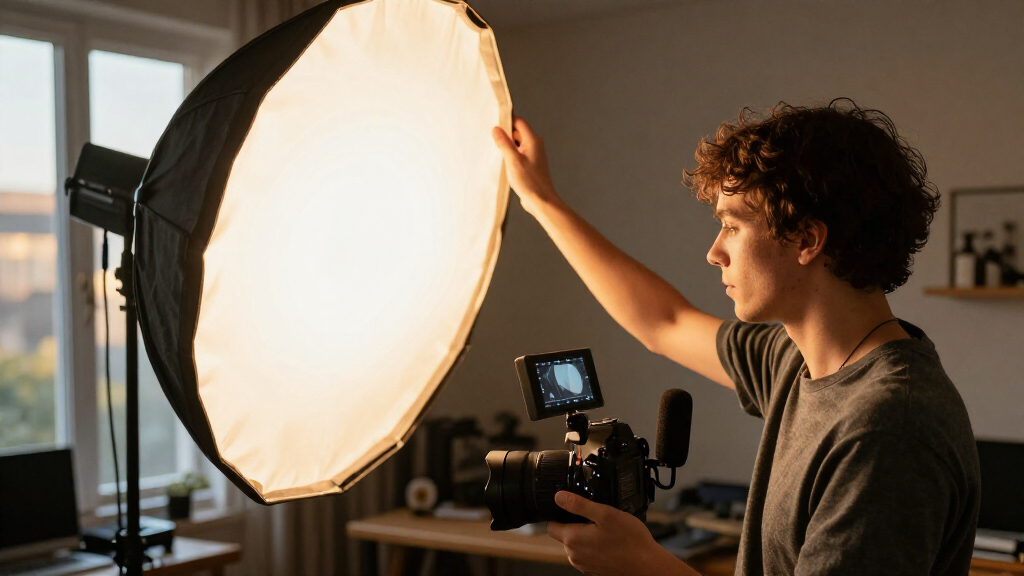
A key light is your main source for shaping a subject’s face, and placing it about 45 degrees to one side of the camera and slightly above eye level is a useful starting point. Change the horizontal angle, height, distance, and softness while watching facial shadows, catchlights, glasses, and the background; your room and subject matter more than an exact angle.
A light can be exactly where the diagram says and still put a dark stripe under your subject’s nose. That’s because 45 degrees is a starting mark, not a magic number that guarantees a good image.
Your key light is the main source shaping a person’s appearance. Placing it roughly 45 degrees to one side of the camera and slightly above eye level often gives a face more depth than a light aimed straight on. In this guide, you’ll see how to separate the light’s side angle from its height, how size and distance affect shadows, and how to make the setup work with glasses, a blank wall, or one inexpensive light.
You don’t need a studio full of gear. A window, a portable LED, or a softbox can all do the job. What matters is watching what the light does to the face and adjusting one thing at a time.
Place your key light about 45 degrees to one side of the camera, then adjust by watching the far-cheek and nose shadows.
Treat the horizontal side angle and the light’s height as separate controls.
A larger, closer source usually creates softer shadows; a distant or smaller apparent source tends to make them harder.
Move the subject away from the wall or change the light’s angle and softness to reduce background shadows.
Use a reflector or nearby light-colored surface to lift shadows, then reduce fill if the face starts to look flat.
Portrait lighting · Field guide 01
45 Degrees Is a Starting Point
Your key light shapes the face through highlight and shadow. Begin about 45 degrees to one side of the camera and slightly above eye level, then adjust by watching the person and the whole frame.
01 / Position
Separate the side angle from the height
“45 degrees” usually describes where the light sits around the subject, as seen from above. Its downward tilt is a different choice.
Move it to the side
Start near 45° from the camera line. Closer to the lens tends to look flatter; farther around the side deepens contrast. Stop when the far-cheek and nose shadows look pleasing.
Set height on its own
Try slightly above eye level with a gentle downward tilt. Too high can deepen under-eye and nose shadows; too low may feel theatrical. Eye-level is fine if it looks better.
Read the setup
Place the light around the camera line
Imagine looking down from above: the lens points toward the subject, and the key light moves off to one side.
Side position shapes wrap · Height changes where shadows fall
02 / Repeatable routine
Change one variable at a time
A quick sequence helps you find a good look and reproduce it for interviews, portraits, or video calls.
Start near 45°
Put the main source to one side of the camera, then check the face from the camera position.
Set the height
Lift it slightly above eye level and tilt gently down. Lower it if eye sockets become too dark.
Soften the source
Try a closer, larger apparent source, diffusion, or a softbox for a gentler shadow edge.
Review the frame
Look at skin, glasses, catchlights, and the wall. Mark positions that give you a repeatable result.
03 / Shadow quality
Source size changes the edge
The source’s apparent size from the subject’s chair often matters more than the fixture’s price or power.
Soft light, harder light
A large source close to the subject usually wraps more gently. A small or distant source tends to create harder shadows. Diffusion spreads light across a larger surface.
softer edge SOURCE Small & distant
harder edge
04 / Room & balance
Keep the wall and shadow side in view
Your room affects both background shadows and the darkness of the far side of the face.
Create breathing room
Move the subject forward from the wall. Reposition or soften the key so any shadow falls outside the visible frame.
Bounce, then judge
A reflector or nearby light-colored wall can lift the shadow side without adding another lamp.
Leave some contrast
If the face starts to look flat, move the reflector farther away or reduce fill. Shadows can stay.
For glasses or calls: shift or raise the light slightly to reduce lens reflections. A diffused source near the camera can look flattering even when it is not exactly at 45°.
05 / Troubleshooting
Use the picture, not the number
Camera previews are useful, though automatic exposure can change brightness as the scene changes. Judge shadows and skin tones directly.
Does it need to be 45°?
No. Start nearby, then adjust for the person, mood, and space.
Can one source work?
Yes. Use a reflector or light-colored surface to bounce light, or keep deeper shadows for a more dramatic look.
How can I reduce it?
Move the subject away from the background, soften or reposition the light, or move the shadow outside the frame.
How do I know it works?
Inspect the nose and far-cheek shadows, catchlights, glasses, and the background. Make a small change and compare.
Start at 45 degrees, then let the face decide
Key light position works best as a visual starting point: put your main light about 45 degrees to one side of the camera, then adjust until the shadows on the face look right. That angle often gives you a bright side and a gently shaded side, adding shape without making the face look split in half.
Here, “45 degrees” usually means the light’s horizontal position around the subject, as seen from above. Stand at the camera and imagine a line from the lens to the subject; the light sits off to one side of that line. The light’s downward angle is a separate choice. Mixing up those two measurements can make a simple setup sound more exact than it is.
Try it with a friend sitting in front of a plain wall. Start with the light near the camera, then move it sideways until you see a soft shadow along the far cheek. At a smaller angle, the face looks flatter; farther around the side, the shadow deepens. It’s a little like turning a desk lamp toward a textured wall: the grazing light reveals shape that a head-on beam hides.
There is no need to measure with a protractor. Placing it roughly where the light creates pleasing, readable shadows is enough. If the subject turns toward the camera or looks off to the side, the best position may shift with them.
Popular right now

TCL QM64L 85-Inch QD-Mini LED 4K Smart Fire TV

Sony BRAVIA 5 85-Inch Mini LED 4K HDR Smart TV (K-85XR50)

KitchenAid Artisan Series 5-Quart Tilt-Head Stand Mixer, Dried Rose (KSM150PS)
As an affiliate, we earn on qualifying purchases.
Set the height separately to avoid harsh shadows
Set the light’s height independently from its side position: a little above eye level, angled down gently, is a dependable first try. It gives the face a familiar shape while keeping the light out of the camera frame. A high source can carve dark hollows under the eyes and nose; a low source can throw shadows upward and make the face feel theatrical.
Imagine you’re filming a quick interview at a kitchen table. A lamp perched on a tall shelf might technically sit off to the side, but its steep downward beam darkens the eye sockets. Lower it until the eyes catch the light, then tilt it down just enough to keep the beam on the face. Catchlights—the small reflections in the eyes—are a handy clue that the source is visible to your subject.
Guides sometimes say “45 degrees to one side and 45 degrees above.” Treat those as two different suggestions, not a single fixed placement. The horizontal angle controls how far the light wraps around the face; the height changes where shadows fall. “Degrees is a” measurement, but your face is not a diagram. A small shift can matter more than matching a number precisely.
If the subject is tall, seated low, or looking down at notes, the ideal height changes. Check the face from the actual camera position and make a small adjustment. Eye-level light is not a failure if raising the fixture makes the shadows unpleasant.
Use size and distance to soften the shadow edge
A larger light source close to your subject usually creates softer shadows, while a smaller or more distant source tends to make them harder. The light’s apparent size matters: a softbox that looks broad from the subject’s chair wraps around the face more gently than a bare LED panel that looks like a small bright rectangle.
For example, if a portable LED gives you a crisp nose shadow, try adding diffusion or moving the light closer, as long as it stays out of frame and remains comfortable. A diffusion sheet or softbox spreads the light over a wider surface, like the difference between noon sun and daylight through a thin curtain. The room’s walls may also bounce light back, softening the shadow side without extra equipment.
Distance brings a practical tradeoff. Moving a light closer often makes it appear larger and softer, but it can make brightness fall off more noticeably across the subject. In a two-person interview, the person nearest the fixture may look brighter than the one farther away. A more distant light can cover both people more evenly, though the shadows may look harder.
There isn’t one correct distance for every fixture. A small LED, a window, and a large softbox behave differently. Adjust size, distance, and brightness together, and judge the skin and shadow edges on camera. A low-cost diffuser can do more for a face than buying a brighter lamp and pointing it straight at the subject.
Keep the wall from stealing attention
Your subject’s distance from the background affects whether the key light throws a distracting shadow on the wall. Moving the subject farther forward often helps: the wall receives less direct light, and a shadow that does appear may soften or fall outside the frame. The background is part of the lighting setup, even when your only goal is to light a face.
Say you’re recording a video call at a small desk, with your chair almost touching a pale wall. A light off to the side paints a dark head-and-shoulder shadow just behind you. Pull the chair forward a little, then shift the lamp until the shadow moves away from the camera’s view. Even a short step can create breathing room in a tight home office.
You can also change the source. A softer, larger light tends to leave gentler edges, while changing its angle may move the shadow to the hidden side of the subject. Watch the entire frame, not just the face. A beautiful cheek highlight does little for the shot if a hard shadow cuts across the wall behind the head.
With source shaping, you control where and how the light falls using its position, size, and diffusion. A curtain over a window, a softbox, or an umbrella can soften the beam. For a repeat shoot, note the subject’s chair distance from the wall as well as the key light position; otherwise the same light mark can produce a different background shadow.
Balance the shadow side without flattening the face
Fill light brightens the shadow side of a face, but you don’t have to erase every shadow to get a usable image. A reflector, a light-colored wall, or a second lamp can return some light into the darker cheek. The goal is to choose how much contrast you want, then keep the face readable.
With one key light, place a white foam board or reflector opposite the light. In a home interview, that might mean propping a board just out of frame near the shadow cheek. Bring it closer for a brighter lift; move it away or turn it slightly for more contrast. A white wall can do the same job if the room is tight, though you’ll have less control over exactly where the reflected light lands.
For a moodier portrait, let the far cheek stay dark. For a friendly instructional video, soften that shadow enough to show detail around the eye and mouth. Think of fill as a dimmer on contrast, not a switch that turns shadows off. If your fill fixture is too strong, it can make both sides of the face equally bright and undo the depth you created with the key.
Start by setting the key alone, then add or adjust fill. One change at a time makes it easier to see what each source does. If the setup starts to look flat, reduce the fill or move it farther away before shifting the key again.
Make the setup work for glasses and video calls
For glasses, video calls, and compact rooms, keep the same basic idea but judge the reflections and framing rather than insisting on a precise 45-degree position. Glass lenses can catch a bright rectangle from a softbox or window, especially when the source and camera sit at similar angles. A slight change in the light’s height or side position can move that reflection out of the viewer’s line of sight.
Try a simple check before recording: ask the person to turn their head a little left and right while you watch the lenses on the camera preview. If a reflection blocks an eye, raise the light or shift it sideways in small steps. You can also change the angle of the glasses or screen if that feels comfortable, but avoid asking the subject to hold an awkward pose for the entire call.
On a webcam, a diffused light near the camera can be flattering even if it sits much closer to the lens than 45 degrees. That placement reduces harsh shadows, which often suits a call where people need to see your expression clearly. The tradeoff is a flatter look. If you want more depth, move the light off to the side until the far cheek gains a gentle shadow without putting glare across the glasses.
Phone and webcam previews help you set the shot, but automatic exposure may brighten or darken the image as you move a lamp or change what’s in frame. Judge the shadow shape and skin tone, not just the preview’s overall brightness. The same rule applies to windows and portable lights: watch the light on the person.
Repeat a good look with a quick setup routine
You can reproduce a useful lighting setup by changing one variable at a time and marking the positions that work. This saves you from rebuilding the scene from memory before every interview or weekly recording. A bit of tape on the floor costs almost nothing and can make a small studio feel dependable.
- Place the key about 45 degrees to one side of the camera and slightly above eye level.
- Check the face for a clear far-cheek shadow, a comfortable shadow under the nose, and catchlights in the eyes.
- Check the background for a hard wall shadow or a bright patch that pulls attention.
- Adjust one thing: angle, height, distance, diffusion, or fill. Watch the change before moving anything else.
- Mark and note the camera, light, chair, and reflector positions if you’ll repeat the shoot.
For example, if a weekly cooking interview always uses the same chair, you might tape the light stand’s feet and note “softbox left, just above eye height; reflector across the table.” Those notes are more useful than writing “45 degrees,” because the stand mark and modifier describe a setup you can actually rebuild.
Small changes count. Move the lamp a few inches, compare the shadow, and decide whether the face looks better. Treat the camera preview as a useful window, while remembering that automatic exposure can shift as the scene changes. Consistency comes from observing and recording the result, not from trusting a number by itself.
Frequently Asked Questions
Does the light need to be exactly 45 degrees?
No. 45 degrees is a starting position, not a required measurement. Move the light closer to the camera for flatter light or farther to the side for stronger contrast, and judge the result on the subject’s face.
Should my key light sit above or level with my eyes?
A little above eye level, angled down gently, is a common first try. If that creates dark hollows under the eyes or nose, lower it until the shadows look more natural.
How far away should the key light be?
There is no fixed distance because the fixture and modifier matter. A closer, larger-looking source usually gives softer shadows, while a more distant source may spread light more evenly across several people.
Can I get a good result with one light?
Yes. One well-placed key can shape a face on its own. Add a reflector or bounce light from a pale wall if you want to brighten the shadow side, or leave the contrast for a more dramatic look.
How do I stop a hard shadow appearing on the wall?
Move the subject farther from the wall, soften or reposition the key, or shift the light so the shadow falls outside the frame. Check the background through the camera, since a change that looks small in the room can move the shadow noticeably in the shot.
How can I tell whether the light position is working?
Look at the shadow under the nose, the far cheek, the catchlights in the eyes, and any shadow on the background. Make one small adjustment and compare the new frame with the old one.
Will a 45-degree setup work for glasses or video calls?
It can, but glasses may reflect the light. Raise or shift the source while watching the lenses; for a video call, a diffused light nearer the camera can also work well if you prefer a softer, flatter look.
Conclusion
Start with the key about 45 degrees to the side and a little above eye level, then trust what you see on the face. Adjust the side angle, height, softness, or fill one at a time; a few inches can turn a hard nose shadow into a gentle line.
Mark the positions when the image works. The best lighting diagram is the one you can rebuild on a Tuesday afternoon, with your subject in the chair and the room doing what it always does.