
TL;DR

Get audio and creator gear delivered free with Prime
- Fast, free delivery on millions of items
- Prime Video, Amazon Music and more included
- Member-only deals all year
sRGB covers about 72% of the NTSC color space, enough for most digital work. Adobe RGB offers nearly complete coverage of the NTSC space, ideal for print and professional photography. Choosing the right depends on your workflow and color accuracy needs.
When you’re working on digital art or photography, color accuracy isn’t just a nice-to-have — it’s a necessity. But with so many displays claiming wide color gamuts, how do you know what really matters? Understanding the difference between sRGB and Adobe RGB coverage can help you pick the right tablet and get consistent results across screens and print. This isn’t about hype; it’s about making sure your work looks just as good in the real world as it does on your screen.
In this guide, you’ll learn what these color spaces mean, why coverage percentage matters, and how recent tech advances are changing the game. Whether you’re a hobbyist or a pro, knowing this will keep your art vibrant and true to your vision.
Wider color gamuts like Adobe RGB can reproduce nearly twice the saturated colors compared to sRGB, crucial for print and professional work.
Always verify your display’s color coverage specs and calibrate regularly to ensure consistent, accurate colors.
For casual digital art, sRGB coverage is typically enough; choose wider gamuts only if your workflow demands it.
Calibration tools are affordable and straightforward, making it easy to improve color fidelity without replacing hardware.
A display’s true color accuracy depends on both hardware specs and proper setup—never rely on specs alone.
Color Accuracy for Pen Displays
sRGB vs Adobe RGB coverage: the practical difference between colors that look right on the web and colors that survive a professional print workflow. The best choice is not always the widest gamut—it is the gamut your final medium can use.
The established baseline for websites, apps, mobile screens and everyday digital art.
A broader professional space with stronger greens, cyans and saturated hues.
A practical interval for maintaining dependable screen-to-output consistency.
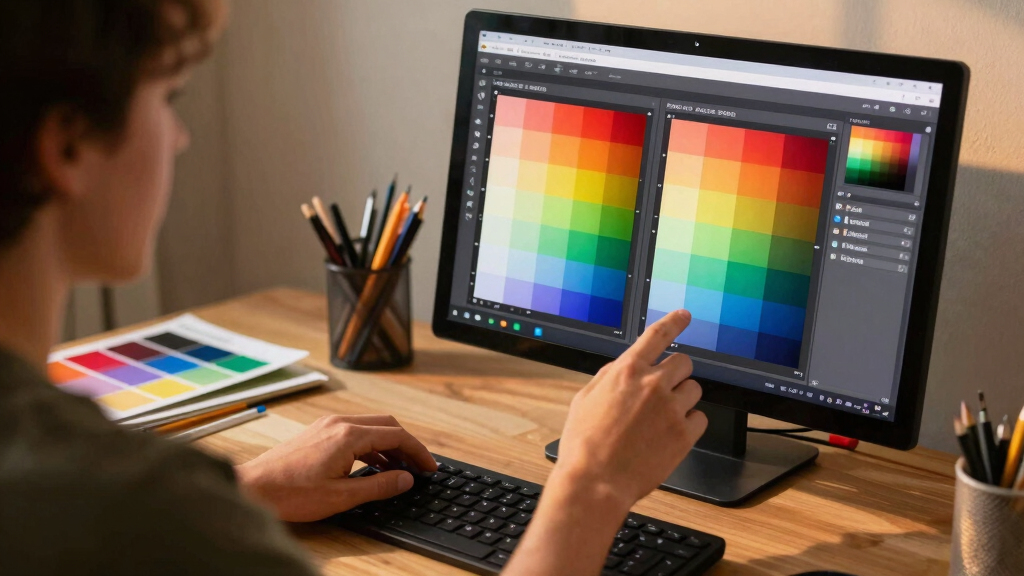
Same image. Different color envelope.
Coverage describes how much of a defined color space the display can reproduce. It does not, by itself, prove that those colors are accurate.
sRGB
Designed for predictable viewing across common monitors, browsers and consumer devices. Its narrower range is highly practical when your work will primarily live on screens.
Adobe RGB
Built for imaging and print workflows that benefit from a wider gamut. Its extra reach is most visible in saturated greens, cyans and blues that sRGB cannot fully represent.
Adobe RGB reaches further.
Using NTSC as a familiar reference, sRGB covers about 72%, while Adobe RGB reaches roughly 98%. The wider space retains more intense color information for demanding output.
A professional pen display approaching 99% Adobe RGB can reproduce substantially more saturated colors than a standard sRGB display—especially where print, photography and vivid natural scenes demand extra gamut.
Choose for the destination.
A wide-gamut display pays off when the rest of the workflow supports it. For web-first work, sRGB remains the safer and simpler delivery space.
| Feature | sRGB | Adobe RGB |
|---|---|---|
| NTSC reference coverage | ~ 72% | ✓ ~ 98% |
| Web and social delivery | ✓ Excellent fit | ~ Conversion needed |
| Professional print | ~ Limited gamut | ✓ Preferred |
| Saturated greens and cyans | ~ Reduced range | ✓ Expanded range |
| Hardware requirement | Standard display | Wide-gamut calibrated display |
| Workflow complexity | ✓ Straightforward | ~ Color-managed |
Screen-first creator
Ideal for web illustration, UI work, streaming assets, social media and casual digital painting.
Print-first professional
Worth the investment for photography, fine-art printing, publishing and color-critical production.
Hybrid workflow
Work wide when needed, soft-proof for output, then convert exported web files to sRGB.
Coverage is only the opening move.
True color fidelity comes from the panel, calibration, profile-aware software and controlled viewing conditions working together.
Verify coverage
Check whether the specification states sRGB or Adobe RGB coverage.
Control the light
Avoid glare and strongly colored ambient lighting around the display.
Calibrate
Use a hardware colorimeter to measure and correct the screen.
Apply profiles
Keep ICC profiles embedded and use color-managed applications.
Proof output
Test the final screen or print destination before delivery.
Improve the display you own
Calibration cannot add colors the panel is physically unable to show, but it can make its available gamut far more dependable.
What 99% does not guarantee
A high coverage figure is valuable, but it says little about factory tuning, uniformity, grayscale balance or how accurately individual colors are rendered.
Color accuracy, clarified.
The right display is the one that supports the colors your workflow can preserve from creation through delivery.
Is a wider gamut always better?
No. If the work is mainly viewed online, sRGB is usually sufficient and easier to manage. Adobe RGB matters most when the output can use its wider range.
Can calibration turn an sRGB panel into Adobe RGB?
No. Profiling improves accuracy within the panel’s physical limits; it cannot create colors the display hardware cannot reproduce.
Does 99% Adobe RGB guarantee accurate color?
No. It indicates broad coverage, but accuracy also depends on calibration, bit depth, uniformity, software and viewing conditions.
What should buyers verify?
Look for clearly named gamut coverage, calibration support, reliable measured reviews, panel uniformity and a workflow-compatible color profile.
Choose sRGB for universal screen delivery. Choose Adobe RGB for controlled print and photography workflows. Whichever gamut you use, calibration is the bridge between impressive specifications and trustworthy color.
What Exactly Are sRGB and Adobe RGB? Why Do They Matter?
sRGB is the standard color space used everywhere — on websites, mobile screens, and most consumer monitors. It covers about 72% of the NTSC color space, meaning it can reproduce most colors we see daily, but not the most saturated or intense hues.
On the other hand, Adobe RGB was designed for professional use, covering roughly 98% of NTSC. It captures more of the saturated greens, cyans, and blues that printers and high-end displays need for true color reproduction. If your work involves print or high-res photography, Adobe RGB’s wider range makes a noticeable difference.
For example, a landscape artist aiming for lush, vibrant greens will find Adobe RGB can display those hues more accurately, while sRGB might make them look dull or washed out.
As an affiliate, we earn on qualifying purchases.
How Do You Know If Your Pen Display Has Good Color Coverage?
Checking your pen display’s color coverage isn’t complicated, but it’s essential. Look at specs: if it claims 99% Adobe RGB, that’s a good sign it can handle professional color work. But real-world performance depends on calibration and setup.
For example, a Wacom Cintiq Pro with 99% Adobe RGB coverage will reproduce colors more vividly and accurately than a budget model with only 70% sRGB coverage. To be sure, consider calibration tools or professional reviews that include color accuracy tests.
Remember: a display’s raw specs only tell part of the story. Regular calibration ensures you’re getting the most accurate colors possible, especially if you’re planning to print or showcase your work professionally.
color calibration tool for monitors
As an affiliate, we earn on qualifying purchases.
As an affiliate, we earn on qualifying purchases.
Comparison Table: sRGB vs Adobe RGB — What You Need to Know
| Feature | sRGB | Adobe RGB |
|---|---|---|
| Coverage of NTSC color space | ~72% | ~98% |
| Ideal for | Web, casual digital art | Print, professional photography |
| Color vibrancy | Good, but limited saturation | Rich, saturated colors |
| Hardware needed | Standard displays | High-quality, calibrated displays |
| Workflow suitability | Sufficient for most digital projects | Necessary for high-end print and photography |
professional drawing tablet with wide color gamut
As an affiliate, we earn on qualifying purchases.
As an affiliate, we earn on qualifying purchases.
Why Upgrading to a Wide Gamut Display Matters
If you want your work to pop with true-to-life colors, a display covering 99% Adobe RGB makes a huge difference. You’ll see richer greens, deeper cyans, and more vibrant hues that standard sRGB screens can’t reproduce. For instance, a digital painter working on a lush jungle scene will notice how the colors look more natural and immersive.
Plus, wider gamuts future-proof your workflow. As printing and display tech improve, having a broader color range means less guesswork and more confidence your work will translate well across media. It’s like upgrading from a basic camera to a full-frame professional model — the quality is night and day.
sRGB and Adobe RGB calibrated monitor
As an affiliate, we earn on qualifying purchases.
As an affiliate, we earn on qualifying purchases.
How to Make Your Existing Pen Display More Accurate
If upgrading isn’t in the cards right now, don’t despair. Calibration is your best friend. Use hardware calibrators like the X-Rite i1Display or Datacolor Spyder to fine-tune colors and ensure your display is showing the right hues.
For example, a photographer noticed her prints looked dull compared to her screen. After calibration, the colors matched perfectly, saving her hours of guesswork. Regular calibration, at least monthly, keeps your colors consistent and your work reliable.
Also, work in a controlled lighting environment and embed color profiles into your workflow. These small steps make a big difference in professional projects.
Frequently Asked Questions
Is a wider color gamut always better for my digital art?
Not necessarily. If your work is mainly for screen viewing or web use, sRGB coverage is sufficient. Wide gamuts like Adobe RGB are most beneficial if you print your work or work in high-end photography where color fidelity makes a real difference.Can I convert a standard display to display Adobe RGB colors?
You can’t physically change the display’s hardware, but you can calibrate and profile it to improve its color accuracy. For true Adobe RGB coverage, a display designed for wide gamuts is required.How often should I calibrate my pen display?
For consistent results, calibrate at least once a month. If you work in changing lighting environments, more frequent calibration ensures your colors stay accurate.Does a higher percentage of Adobe RGB coverage guarantee better colors?
It’s a strong indicator, but real-world accuracy also depends on calibration, bit depth, and workflow. A high-coverage display that’s poorly calibrated can still produce inaccurate results.What should I look for when buying a pen display for color accuracy?
Check for specifications like 99% Adobe RGB coverage, good calibration options, and positive reviews about color fidelity. Also, consider the calibration tools and software support for consistent performance.Conclusion
Getting your colors right isn’t just about buying the biggest or most expensive screen. It’s about understanding what your work needs and choosing the right tools to match. Whether you stick with sRGB or go for Adobe RGB, calibration and workflow control are your secret weapons for vibrant, consistent art.
Think of your pen display as a paintbrush — the more precisely you can control its colors, the better your art will look in the world outside your screen. Keep your tools sharp, and your work will shine.
Halloween Picks
halloween
As an affiliate, we earn on qualifying purchases.