
TL;DR

Get audio and creator gear delivered free with Prime
- Fast, free delivery on millions of items
- Prime Video, Amazon Music and more included
- Member-only deals all year
The key to selecting the right MIDI controller is less about skill and more about your workflow. Smaller controllers are portable and great for beatmaking, while larger ones suit piano playing and complex arrangements. Pick what supports your regular tasks without sacrificing comfort or space.
Ever try to squeeze a full piano into a tiny studio desk? It’s a disaster. The same goes for MIDI controllers. Picking the right size isn’t about impressing with giant keybeds or shrinking down for portability—it’s about matching your musical needs with your workspace. You want enough keys to perform comfortably, but not so many that your setup becomes unwieldy or distracts from making music.
This guide breaks down the differences between 25, 49, and 61 keys, showing you exactly where each size shines and where it falls short. Whether you’re laying down beats on the go or crafting lush, layered arrangements, understanding these differences helps you choose what truly works for your workflow.
Match your controller size to the parts you play most—small for samples and bass, large for piano and layered sounds.
Physical workspace and portability often outweigh the number of keys—measure before you buy.
Key feel and action quality impact playing comfort more than key count.
Octave buttons help extend range but don’t replace the need for more keys if you often play full chords or two-handed parts.
Prioritize workflow features like DAW integration, controls, and connectivity over size alone.
25 vs 49 vs 61 Keys: Matching Controller Size to Workflow
The best MIDI controller is not the largest one you can afford. It is the smallest one that lets you play your regular parts comfortably—without constant octave switching, blocked desk space, or compromised key feel.
01 · Range profiles
Three sizes, three working styles
More keys provide more simultaneous notes, but also demand more width, weight, and commitment from the workspace.
The portable sketchpad
Best for beats, bass lines, sample triggering, lead parts, simple chords, and ideas entered one layer at a time.
The producer sweet spot
Enough room for chords, melodies, synth work, and moderate two-handed parts without dominating a typical studio desk.
The player’s workspace
Built for piano-style parts, scoring, organ work, orchestral libraries, layered sounds, splits, and live performance.
02 · Workflow comparison
What can each size handle?
The middle option is the broadest compromise. The extremes become better choices when portability or two-handed performance clearly dominates.
| Regular task | 25 keys | 49 keys | 61 keys |
|---|---|---|---|
| Drums, samples, and bass | ✓Excellent | ✓Excellent | ~More than needed |
| Chords plus melody | ~Cramped | ✓Comfortable | ✓Comfortable |
| Two-handed piano parts | ✕Poor fit | ~Moderate | ✓Strong fit |
| Orchestral libraries and splits | ✕Restrictive | ~Workable | ✓Preferred |
| Small desk or travel bag | ✓Ideal | ~Manageable | ✕Difficult |
| Live keyboard performance | ✕Limited | ~Capable | ✓Natural |
03 · The real buying test
Range is only half the instrument
A controller succeeds when its musical range, physical footprint, key action, and control surface support the same workflow.
Simultaneous range
Relative key count, with 61 keys used as the comparison maximum.
Measure before buying
Nominal key count does not reveal the controller’s complete footprint.
04 · Beyond key count
Feel, control, and connection
A well-made 49-key controller can be more playable and productive than a flimsy 61-key model.
Choose the action
Compare full-size, slim, and mini keys alongside synth-action, semi-weighted, or hammer-action mechanisms. Test resistance, return speed, velocity response, aftertouch, pivot length, noise, and stability.
Count useful controls
Pads, encoders, faders, transport controls, chord modes, scales, arpeggiators, and deep DAW mapping may improve production more than an extra octave.
Plan the signal path
Check USB MIDI, five-pin MIDI output, sustain and expression pedal inputs, USB-C power, and CV connections. Buy for the hardware you use now and the setup you expect next.
Trace your decision from music to hardware
Octave buttons extend theoretical pitch range, not simultaneous access. If both registers must sound together, a phrase crosses the switch boundary, or key switches sit far from the playing range, physical keys remain the cleaner solution.
05 · Final match
The shortest useful recommendation
Start with the smallest controller that handles your recurring parts without breaking concentration.
You build in layers
You sequence drums, trigger samples, play bass or leads, travel frequently, and value pads and encoders more than two-handed range.
You need one flexible desk controller
You move between chords, melodies, synths, beatmaking, and occasional two-handed work while preserving room for the computer.
You perform through the keybed
You play piano-style parts, score with orchestral libraries, use splits or layered instruments, and have space for a dedicated setup.
The winning controller is the one that stays accessible, feels natural, and lets the music happen with the fewest interruptions.
What size keyboard suits your music parts best?
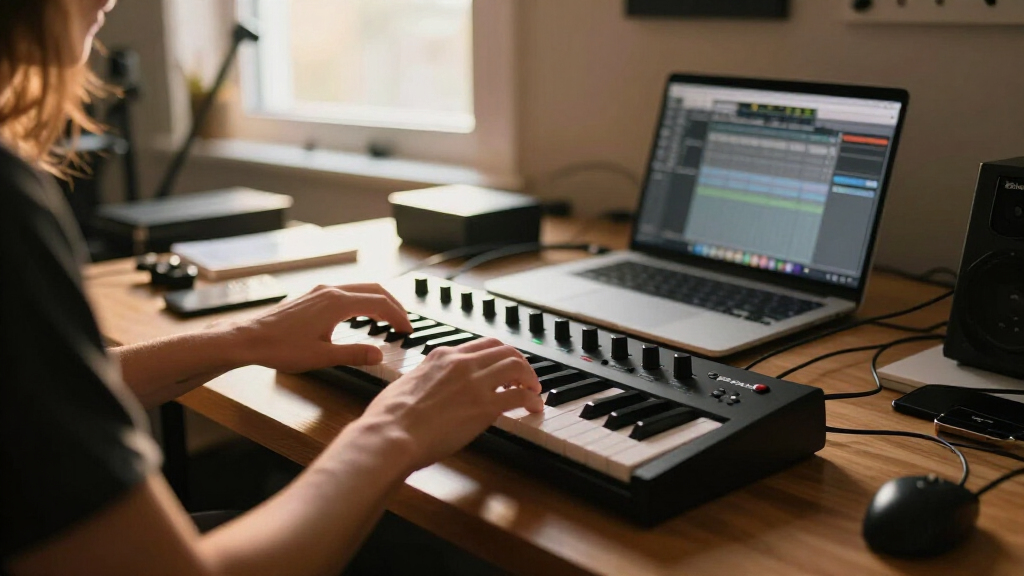
Start with what you usually play. A 25-key controller covers just two octaves. It’s perfect for quick melodies, bass lines, and sample triggering—think of it as your portable sketchpad. But if you’re doing more complex chords or two-handed parts, it quickly feels cramped. Octave buttons extend the range, but they don’t give you more notes at the same time.
Jump to a 49-key controller, and you get four octaves. It’s the sweet spot for many producers—enough room for chords, melodies, and some expressive playing without overwhelming your desk. Think of it as a versatile tool for songwriting, synth work, and beatmaking.
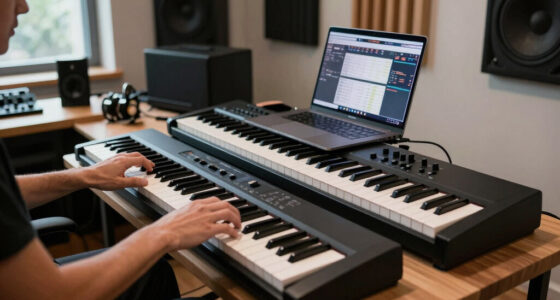
Then there’s 61 keys, which cover five octaves. It’s a real performer’s size—ideal for keyboardists, scoring, and layered sounds. You can comfortably play full chords, organ parts, or split zones for live gigs. Still, it’s not quite a full piano, but it’s close enough for most serious players.
As an affiliate, we earn on qualifying purchases.
How much space do you really need for your MIDI controller?
Physical space matters just as much as musical range. Measure your desk or travel bag before buying. A 25-key controller is compact enough to sit beside your laptop or slide into a backpack. It’s practically a notebook you can carry everywhere.
A 49-key takes up more room but still fits on most desks. It’s a manageable size that balances functionality with portability. Many home studios use these for daily work—easy to store, easy to reach.
61 keys demand a larger surface, often a dedicated stand or big desk. They’re best for setups where playing comfortably and quickly is essential—like live gigs or scoring sessions. Keep in mind, the bigger the controller, the more space it eats and the less portable it becomes.
49 key MIDI controller with DAW integration
As an affiliate, we earn on qualifying purchases.
As an affiliate, we earn on qualifying purchases.
Are all keys created equal? Size and feel matter more than you think
Not all keys are the same size or action. A 25-key controller might have tiny mini keys, or they could be full-sized but lightweight. Your choice depends on your playing style. Full-size keys feel more familiar—like a real piano—while mini keys save space but can make fast, intricate passages tricky.
Similarly, key action varies: synth-action, semi-weighted, or hammer-action. For piano-style playing and expressive dynamics, weighted keys are best. For quick synth parts or drum programming, lighter keys often work better.
A well-made 49-key with good action can outperform a cheap 61-key with flimsy keys. Focus on the feel, resistance, and velocity response—these impact how naturally you can play and perform.
As an affiliate, we earn on qualifying purchases.
Can octave buttons replace a bigger keyboard? Not really.
Octave buttons extend your note range, but they don’t give you more notes at the same time. Think of them as a remote control—useful, but not a substitute for physical space. If you’re crossing into high or low registers often, a small controller will frustrate you.
Imagine trying to play a Bach organ piece on a 25-key controller—octave buttons help, but you’ll spend more time switching than playing. For live performance or complex arrangements, a controller with actual range—like 49 or 61 keys—feels more natural.
In short, octave buttons are a helpful tool but can’t fully replace the flexibility of having more keys available at once. If you often need both hands on different sections of the keyboard, bigger is better.
compact MIDI controller for studio
As an affiliate, we earn on qualifying purchases.
As an affiliate, we earn on qualifying purchases.
Workflow influences key size more than your skill level
Are you a pianist or a beatmaker? Your musical background shapes what size fits best. Piano players often find 25 keys restrictive—it’s hard to do full voicings or bass-and-melody at once. For them, 61 keys or more is a must.
Non-keyboardists—like electronic producers or sound designers—might prefer smaller controllers packed with pads, encoders, and controls. They can create complex textures and arrangements without needing a full range of keys.
Think about your typical work. If you spend most of your time sequencing drums, tweaking synths, or triggering samples, a 25- or 49-key controller might be enough. But if you’re composing for piano, orchestras, or performing live, larger ranges help keep your flow smooth.
How much does software workflow matter? It can tip the scale
Some controllers go beyond just keys—they come with knobs, pads, and integration features that streamline your production. For example, a 49-key controller with deep DAW integration can control tracks, transport, and plug-ins directly—saving you time.
In practice, this means you might prefer a smaller keyboard if it offers better software control than a bigger, more basic model. For busy producers, tight DAW integration often outweighs an extra octave or two.
Look for controllers that support your DAW, have customizable mappings, and include features like arpeggiators or chord modes. These can compensate for limited key range and boost your creativity.
Portability and transport: size isn’t everything
Portability involves weight, build quality, power options, and ease of carrying. A tiny 25-key controller might slip into a backpack, while a 61-key model needs a dedicated bag or stand. Think about how often you’ll move it.
If you’re gigging or working on location, a lightweight, bus-powered device is a big plus. For studio use, size and weight matter less. Just remember, larger controllers often come with sturdier build and more controls, but sacrifice transportability.
When choosing, ask yourself: Will I carry this every day? Will I need batteries or just USB power? These factors can be just as important as the number of keys.
Connection options you need to look for
Not all controllers are created equal in ports and connectivity. Some have only USB MIDI, while others feature five-pin MIDI out, pedal inputs, and CV outputs for modular gear. Consider what you need now—and down the line.
If you plan to control hardware synths directly, a MIDI out port is a must. For computer-only setups, USB MIDI might suffice. Pedal inputs are essential if you want sustain or expression pedals. Extra outputs and MIDI over USB-C can future-proof your setup.
Always check the specs—assuming a controller has what you need can lead to frustration mid-session.
Budget wisely: don’t sacrifice feel for size
More keys usually mean higher cost, but don’t let size dictate quality. A well-built 49-key with good action can outperform a cheap 61-key that feels terrible. Prioritize key feel, control surface quality, and features like aftertouch or pedal support.
Spend on what impacts your playing most. If you need expressive control, invest in a controller with better keys. If portability is king, sacrifice some features for a lightweight design.
Remember, a more expensive controller isn’t automatically better—match features and build quality to your actual needs, not just size.
Size-by-size summary: when to pick what
- 25 keys: Best for portability, quick ideas, samples, bass, and lead lines. Not suited for complex chords or full piano work.
- 49 keys: The all-rounder for home studios, combining playability and space efficiency. Great for chords, melodies, and DAW control.
- 61 keys: Ideal for piano, layered sounds, splits, and live performance. Offers enough range for most serious keyboard work.
Frequently Asked Questions
Is 25 keys enough for music production?
Yes, for beatmaking, bass lines, and simple melodies. But it quickly becomes restrictive for two-handed parts or full chord voicings. If you often layer sounds or play complex parts, consider a larger size.
Is 49 keys the best all-purpose size?
For many home producers, yes. It balances range, portability, and affordability. It’s enough for most songwriting, sequencing, and sound design tasks without taking up too much space.
Is 61 keys enough to learn piano?
It’s enough for basic technique, chords, and students. Serious pianists aiming for classical repertoire or advanced techniques will prefer 88 weighted keys, but 61 is a practical starter for many.
Can octave buttons replace more keys?
Not really. They extend the range but don’t give you more notes at once. If you need wide voicings or two-handed parts often, bigger controllers are more comfortable.
Should beginners buy 25, 49, or 61 keys?
49 keys are a good middle ground—compact, versatile, and enough for most beginner tasks. 25 keys work for quick ideas and portability, while 61 keys prepare you for serious piano learning down the road.
Conclusion
Choosing the right MIDI controller isn’t about size for size’s sake. It’s about fitting your musical life—what you play, how you perform, and where you work—into a compact, comfortable setup. The best controller is the one that makes you want to sit down and create, not the one that fills your space with unused keys.
Think about your workflow, space, and budget, then pick the size that lets you perform naturally, without compromise. Your music will thank you for it.
Fall Picks
fall essentials
As an affiliate, we earn on qualifying purchases.