
TL;DR

Get audio and creator gear delivered free with Prime
- Fast, free delivery on millions of items
- Prime Video, Amazon Music and more included
- Member-only deals all year
Vertical videos dominate mobile platforms like TikTok and Shorts. A simple setup with proper framing, lighting, and stabilization can make your content stand out. Recent tech advances and smart equipment choices help creators produce professional-looking videos on any budget.
Imagine holding your phone vertically, the screen filling your entire field of view. That’s the default for Shorts and TikTok — and it’s where your audience is, too. No matter if you’re filming a quick dance, a product demo, or a chat, the way you frame your shot can make or break your engagement.
If you want viewers to stop scrolling and watch your entire clip, you need to understand the art of vertical framing. This guide will walk you through setting up your space, choosing the right gear, and mastering techniques that turn simple shots into scroll-stopping videos.
Always shoot in a 9:16 aspect ratio, filling the entire vertical screen for maximum impact.
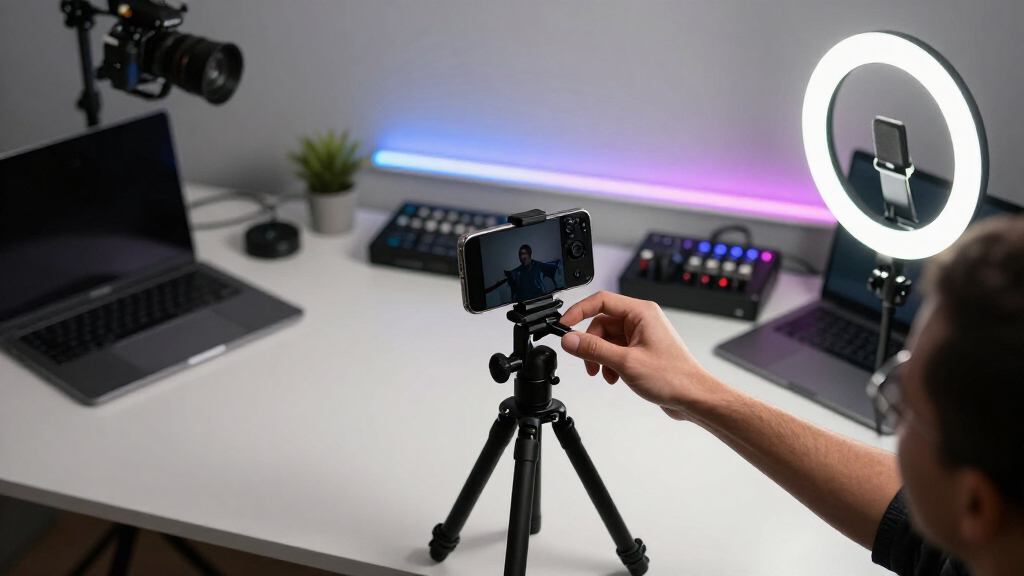
Use simple, affordable gear like a smartphone, a stable mount, and natural or ring lighting to start.
Master framing basics — rule of thirds, headroom, and uncluttered backgrounds — to craft engaging videos.
Leverage recent AI tools and accessories to boost production quality without a big budget.
Plan your shots and edit carefully to make your vertical videos look polished and professional.
Why Vertical Framing Is Your Secret Weapon for Shorts and TikTok
Vertical framing isn’t just a trend; it’s the natural way most people hold their phones. Videos in a 9:16 aspect ratio fill the entire screen, grabbing attention instantly. If your content isn’t optimized for this format, it risks getting lost in the shuffle.
Picture your favorite TikTok creator — their face perfectly centered, with enough space around for expressive gestures or product placement. That’s intentional framing. It makes viewers feel connected and keeps their eyes on the action.
Recent stats show that over 90% of TikTok and Shorts views are on mobile, so designing for this vertical view isn’t optional — it’s critical.
Popular right now

Philips Café Aromis Automatic Espresso Machine with LatteGo Pro Milk System

Dyson V8 Cyclone Cordless Vacuum

Ninja Foodi DZ201 8-Quart DualZone 6-in-1 Air Fryer
As an affiliate, we earn on qualifying purchases.
How to Set Up Your Space for Perfect Vertical Videos
- Choose a stable mount or tripod. Use a vertical tripod or clamp mount to keep your phone steady. Stability is crucial because shaky footage can distract viewers and diminish perceived professionalism. Cheap clamps or makeshift setups might suffice initially, but they often introduce jitter or wobble, which can be tiring to watch. Investing in a sturdy tripod or clamp ensures consistent framing and smooth footage, which enhances viewer engagement and signals quality.
- Pick good lighting. Proper lighting isn’t just about brightness; it shapes the mood and clarity of your video. A ring light or softbox can evenly illuminate your face and surroundings, reducing shadows and highlighting details. Natural light from a window is an excellent free option, but it can be inconsistent—cloudy days or changing sunlight can affect your shot. Therefore, supplement natural light with consistent artificial sources to maintain a professional look regardless of the time of day. Good lighting minimizes distractions and ensures your audience focuses on your content, not poor visuals.
- Clear the background. A tidy, uncluttered background keeps viewer attention on you and your message. Cluttered or distracting backgrounds can pull focus away from your content and make your video look amateurish. Consider using a simple backdrop or a clean, well-organized space. If you want to add visual interest, incorporate relevant elements like plants, artwork, or minimal decor that support your brand or message without overwhelming the shot. The goal is to create a setting that enhances your presence rather than competes with it.
- Frame your shot. Position yourself so your head and upper body are comfortably centered, with some space above your head to avoid feeling cramped. Leave lead room in the direction you’re facing or moving toward; this guides viewers’ eyes naturally and creates a sense of movement or anticipation. Using the rule of thirds—placing your eyes along the top third line—helps achieve balanced and engaging compositions. Proper framing isn’t just aesthetic; it influences how viewers perceive your professionalism and confidence. Well-framed shots cue viewers to focus on your message and can evoke emotional responses, making your content more memorable.
- Test and adjust. Always record a short clip before your main shot. Review it critically: how do you look? Is the lighting even? Is the framing balanced? Make necessary adjustments—reposition yourself, tweak the lighting, or change your background. Small refinements can significantly improve your final product, ensuring your videos are consistently engaging and look polished. Developing this habit helps you become more intuitive about framing and setup, saving time and effort in the long run.
For example, if you’re filming a makeup tutorial, place your face slightly off-center, with enough space to show your hands and tools. This setup not only makes the shot more dynamic but also allows room for overlays or text if needed, making your content more engaging and professional.
What Gear Really Matters for a Budget-Friendly Vertical Setup
| Essential Gear | Why It Matters | Budget Tips |
|---|---|---|
| Smartphone | Your main camera, always with you | Use your existing phone; newer models are better but even older ones shoot in 4K now, so don’t feel pressured to buy immediately. |
| Tripod or Mount | Stability keeps footage smooth and professional | DIY options like a stack of books or a homemade clamp can work temporarily. As you grow, investing in a dedicated tripod improves consistency and reduces fatigue from holding or unstable setups. |
| Lighting | Bright, even light improves clarity and mood | Natural window light is free and effective. Affordable ring lights (<$30) can dramatically enhance your visuals without breaking the bank. Consistent lighting reduces shadows and makes editing easier. |
| Audio | Clear sound hooks viewers better than visuals alone | Your phone’s built-in mic may suffice initially, but investing in a lavalier mic under $50 can significantly improve audio quality, making your videos more professional and engaging. |
Most creators start with just a smartphone, some natural or affordable lighting, and a makeshift mount. This minimalist approach allows you to experiment and learn. As your content improves and your audience grows, upgrading your gear—like adding a better microphone or a dedicated tripod—can elevate your production quality, making your videos more polished and appealing.
Master These Framing Hacks to Make Your Videos Pop
Getting the framing right isn’t just about placement — it’s about feeling natural and engaging. Here are key tricks to level up:
- Use the rule of thirds. Position your eyes along the top third line; this creates a balanced and aesthetically pleasing composition that naturally draws viewers’ attention to your face and expressions, fostering a connection.
- Leave headroom and lead room. Adequate space above your head prevents the shot from feeling cramped and allows room for movement or gestures. Lead room in the direction you’re facing or moving guides the viewer’s eye, making the scene feel more dynamic and less static. Proper framing communicates professionalism and deliberate intent, which can elevate even simple content to a more polished level.
- Check your background. A cluttered or distracting background pulls focus away from you. Keep it simple or curate elements that support your message, like relevant decor or branding. A clean background not only looks better but also reduces viewer fatigue and keeps the focus where it belongs.
- Test different angles. Small variations in your camera’s position can dramatically change the feel of your video. Record short clips from slightly different angles or distances, then review which feels most natural, lively, or professional. This experimentation helps you discover your best framing, ensuring consistency and enhancing viewer engagement.
For example, a fitness creator might frame themselves in a wide shot, showing full arm movements while keeping their face front and centered. This not only demonstrates the exercise clearly but also makes the video more energetic and engaging, encouraging viewers to follow along.
How Recent Tech Turns Your Phone Into a Pro Video Setup
Smartphones are more capable than ever. AI-powered apps and accessories turn a basic phone into a broadcast-quality tool. For instance, gimbals stabilize shaky footage, enabling smooth, professional-looking motion shots that elevate your content. Auto-framing apps use AI to keep your face centered as you move, ensuring you remain the focus without manual adjustments.
Background removal and virtual sets are now accessible thanks to AI advancements. You can replace a cluttered or unprofessional background with a clean virtual scene in seconds, making your videos look polished and intentional. This flexibility allows casual creators to produce high-quality content without expensive studio setups.
Live streaming in vertical format is booming — platforms like TikTok support multi-camera setups with switchers, giving your content a professional edge. You can switch between different angles or scenes seamlessly, creating a dynamic broadcast that rivals traditional studios—all from your smartphone. This tech democratizes high-quality live content creation, allowing even solo creators to produce engaging, multi-faceted streams.
Imagine doing a product demo with a gimbal for smooth motion, then switching to a close-up shot for details, all from a single device. These recent technological innovations empower creators to produce professional-level videos without costly equipment. Embracing these tools can dramatically expand your creative possibilities and audience engagement.
Quick Tips to Make Your Vertical Content Look More Professional
- Plan your shots. Know what you want to show before hitting record. Jot down quick ideas or sketches. Planning helps avoid rambling or missed shots, ensuring your content flows smoothly and stays focused on your message.
- Use natural or artificial lighting strategically. Avoid harsh shadows or overexposure by positioning lights thoughtfully. Proper lighting sets the tone and mood, making your content more inviting and easier to watch. Experiment with angles and intensity to find what works best for your scene.
- Stabilize your camera. Use a tripod, gimbal, or DIY stabilizer to prevent shaky footage. Consistent, smooth visuals are essential for a professional appearance and viewer retention. Shaky videos can be distracting and diminish your credibility, so investing in stabilization pays off.
- Keep it simple. Cluttered backgrounds and inconsistent lighting kill the professional vibe. Focus on clean, well-lit scenes that highlight your subject without unnecessary distractions. Simplicity directs viewer attention where you want it and makes editing easier.
- Edit thoughtfully. Trim unnecessary parts, add captions, and enhance lighting or color for polish. Thoughtful editing not only improves visual quality but also helps tell a cohesive story, increasing viewer engagement and retention.
For example, a cooking creator might set their phone on a stack of cookbooks, add a ring light, and plan shots to highlight ingredients, making the final video look sharp and inviting. Thoughtful planning and editing turn simple footage into a compelling, professional-looking piece that encourages viewers to watch until the end.
Frequently Asked Questions
Do I need expensive gear to make good vertical videos?
Not at all. A modern smartphone, a stable mount, and good lighting are enough to produce professional-looking vertical videos. Upgrade as you grow, but start simple.How do I keep my vertical shot steady without a big tripod?
Use DIY solutions like stacking books, mounting your phone on a stable surface, or using inexpensive clamp mounts. Even a steady hand with practice can work for casual content.What’s the best way to improve my framing for vertical videos?
Deeply understanding framing means considering how composition influences viewer perception. Follow basic rules like the rule of thirds, leave adequate headroom to avoid cramped shots, and keep backgrounds uncluttered to maintain focus. Testing different angles helps you discover what looks most natural and engaging. Proper framing communicates professionalism, confidence, and intent, which in turn increases viewer trust and retention. Avoid random or accidental compositions by planning your shots and reviewing them critically, ensuring your videos look deliberate and polished rather than amateurish.Are there free or cheap apps to edit vertical videos?
Yes. Apps like TikTok, InShot, CapCut, and Adobe Premiere Rush support vertical formats and offer easy editing tools to enhance your videos quickly.Can I do live vertical streaming with just my phone?
Absolutely. Many platforms like TikTok and Instagram support live streams from your phone. Just set up your shot, ensure good lighting, and go live!Conclusion
Vertical videos aren’t just a trend — they’re the new standard for mobile content. With a few smart choices in gear, framing, and editing, you can turn a simple smartphone into a storytelling powerhouse. The key is to keep it natural, clean, and well-composed.
Remember, your best shot at standing out on TikTok or Shorts is a well-framed, authentic video that feels effortless. So get your phone, set up your space, and start creating — the scrolls are waiting.