For streamers who want control over multiple audio sources — microphone, game audio, chat, and music — a USB audio mixer replaces the messy software routing that eats your CPU and patience. The NearStream AMIX40U stands out as my best overall pick for its 10-channel flexibility combined with a straightforward USB interface, while the Elgato Stream Deck + offers tightest software integration if you live inside OBS, and the Audio-Technica AT-UMX3 delivers the cleanest preamps for vocal-focused creators. The main tradeoff in this category is simplicity versus control: gaming-focused mixers like the FIFINE line add fun soundboard features but cut corners on preamp quality, while pro-grade interfaces sound better but demand more setup knowledge. Price is another dividing line — under-$100 units work fine for casual streams, but anyone chasing broadcast-grade voice should budget for better converters and XLR headroom. Read on for the full breakdown of all 15 mixers and which one fits your setup.

Get audio and creator gear delivered free — and shop member deals
- Fast, free delivery on millions of items
- Access to Prime Big Deal Days deals on October 6–7
- Prime Video, Amazon Music and more included
Complete the kit


Key Takeaways
- The NearStream AMIX40U earned the top spot because it is the only affordable option that combines true multi-channel mixing (10 inputs) with a reliable USB audio interface — most rivals force you to choose one or the other.
- The FIFINE family (SC3, SC3W, SC8, KS5) dominates the budget and beginner tier, but the comparison revealed real quality gaps between siblings: the SC8 and SC3W justify their step-up cost with better faders and noise handling, while the base SC3 is best reserved for absolute first-timers.
- Preamp quality proved to be the clearest price divider: the Audio-Technica AT-UMX3 and Universal Audio Volt 876 deliver noticeably cleaner microphone gain than every gaming-branded mixer tested here, which matters most for vocal-heavy podcast and commentary streams.
- Bundles like the FIFINE KS5 and the MAILANGSHI and PUPGSIS mixers trade audio fidelity for convenience features (bundled mics, voice changers, soundboards) — a reasonable shortcut for new streamers, but most will outgrow them within a year.
- The Behringer XENYX 802S and Elgato Stream Deck + occupy opposite ends of the control spectrum: pure analog hardware knobs versus software-driven customization, and choosing between them depends entirely on whether you adjust audio live or pre-configure everything.
- At the entry level, the M-Audio M-Track Duo and XTUGA Q-12 are better treated as bare-bones interfaces than true mixers — they solve the ‘connect an XLR mic’ problem and nothing more.
| Universal Audio Volt 876 24×28 USB Audio Interface |  | Best Premium Pick | Channels: 24×28 | Audio Resolution: 32-bit / 192 kHz | Preamps: 8 Vintage preamps with 1176-style compressors | VIEW LATEST PRICE | See Our Full Breakdown |
| Audio-Technica AT-UMX3 USB Desktop Audio Mixer |  | Best for Clean, Simple Streaming | Channels: 2 | Audio Resolution: 24-bit / 192 kHz | Mic Input: XLR or 1/4-inch | VIEW LATEST PRICE | See Our Full Breakdown |
| MAILANGSHI Gaming Audio Mixer |  | Best Value Entertainment Mixer | Mic Input: XLR (dynamic and condenser) | Phantom Power: 48V | Faders: 4 physical | VIEW LATEST PRICE | See Our Full Breakdown |
| MAONO P2 Hybrid USB Audio Interface |  | Best for Multi-Device Streaming | Connectivity: USB-C | Channels: 2 | Audio Resolution: 24-bit / 192 kHz | VIEW LATEST PRICE | See Our Full Breakdown |
| XTUGA Q-12 2-Channel USB Audio Interface |  | Best Budget Starter Interface | Channels: 2 | Resolution: 16-bit / 48 kHz | Inputs: XLR, 3.5 mm microphone jack | VIEW LATEST PRICE | See Our Full Breakdown |
| FIFINE AmpliGame SC3W Gaming Audio Mixer | 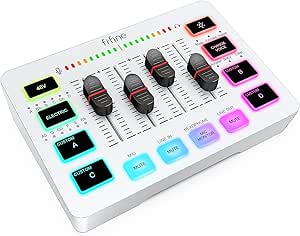 | Best for Dual-PC Streamers | Channels: 4 | Microphone input: XLR | Phantom power: 48V | VIEW LATEST PRICE | See Our Full Breakdown |
| NearStream AMIX40U 10-Channel USB Audio Interface and Mixer |  | Best for Multi-Guest Podcasts | Channels: 10 | Inputs: 2 XLR/6.35mm combo inputs | Phantom power: 48V | VIEW LATEST PRICE | See Our Full Breakdown |
| Behringer XENYX 802S 8-Input Analog Mixer with USB Streaming Interface |  | Best Analog Foundation | Inputs: 8 | Mixer type: Analog | USB interface: Stereo | VIEW LATEST PRICE | See Our Full Breakdown |
| FIFINE AmpliGame KS5 Gaming Microphone and Audio Mixer Bundle |  | Best Starter Kit | Microphone type: Dynamic | Connectivity: XLR and USB | Included equipment: Microphone and gaming audio mixer | VIEW LATEST PRICE | See Our Full Breakdown |
| M-Audio M-Track Duo USB Audio Interface |  | Best Portable Interface | Compatibility: Mac or PC | Audio resolution: Up to 48 kHz | Inputs: Two combo XLR/Line/Instrument inputs | VIEW LATEST PRICE | See Our Full Breakdown |
| FIFINE AmpliGame SC3 Gaming Audio Mixer |  | Best Value XLR Mixer | Channels: 4 | Connectivity: USB, XLR microphone input | Phantom power: 48V | VIEW LATEST PRICE | See Our Full Breakdown |
| PUPGSIS Gaming Audio Mixer for PC Streaming with Soundboard and Voice Changer |  | Best Budget Soundboard | Channels: 4 | Connectivity: USB | Audio input: 1/4-inch TRS | VIEW LATEST PRICE | See Our Full Breakdown |
| Elgato Stream Deck + Audio Mixer and Studio Controller |  | Best Premium Control Hub | Keys: 8 customizable LCD keys | Dials: 4 x 360° encoders with push function | LCD touch panel: 108 x 14 mm | VIEW LATEST PRICE | See Our Full Breakdown |
| FIFINE SC8 Gaming Audio Mixer for Live Streaming |  | Best for Console Streaming | Channels: 5 | Connectivity: USB-C | Phantom power: 48V | VIEW LATEST PRICE | See Our Full Breakdown |
| Aveek 5-Channel Audio Mixer with USB Recording Interface |  | Best Multi-Input Versatility | Number of channels: 5 | Inputs: 3 XLR, 1/4-inch L/R pair, RCA L/R pair, USB, Bluetooth | Outputs: RCA L/R pair, 1/4-inch L/R main output pair | VIEW LATEST PRICE | See Our Full Breakdown |
| USB audio mixers for streaming | Connectivity | Channels | Phantom Power | Inputs |
|---|---|---|---|---|
| Universal Audio Volt 876 24×28 | USB 2.0 (USB-C connector) | 24×28 | — | — |
| Audio-Technica AT-UMX3 USB Des | USB-C | 2 | — | — |
| MAILANGSHI Gaming Audio Mixer | Bluetooth plus USB | — | 48V | — |
| MAONO P2 Hybrid USB Audio Inte | USB-C | 2 | — | Microphone, guitar, PC, smartphone, iPad |
| XTUGA Q-12 2-Channel USB Audio | — | 2 | Switchable 48V | XLR, 3.5 mm microphone jack |
| FIFINE AmpliGame SC3W Gaming A | Multiple audio ports; supports dual-PC setup | 4 | 48V | — |
| NearStream AMIX40U 10-Channel | Bluetooth, AUX, USB, OTG | 10 | 48V | 2 XLR/6.35mm combo inputs |
| Behringer XENYX 802S 8-Input A | Computer or mobile device | — | — | 8 |
| FIFINE AmpliGame KS5 Gaming Mi | XLR and USB | — | — | — |
| M-Audio M-Track Duo USB Audio | — | — | Yes | Two combo XLR/Line/Instrument inputs |
| FIFINE AmpliGame SC3 Gaming Au | USB, XLR microphone input | 4 | 48V | XLR, line-in, headset |
| PUPGSIS Gaming Audio Mixer for | USB | 4 | — | — |
| Elgato Stream Deck + Audio Mix | USB-C | — | — | — |
| FIFINE SC8 Gaming Audio Mixer | USB-C | 5 | 48V | XLR, 3.5 mm AUX-in, optical AUX |
| Aveek 5-Channel Audio Mixer wi | — | — | 48V | 3 XLR, 1/4-inch L/R pair, RCA L/R pair, USB, Bluetooth |
More Details on Our Top Picks
Universal Audio Volt 876 24×28 USB Audio Interface
This option stands out as the closest thing to a pro studio console in a streaming roundup. Eight Vintage preamps with onboard 1176-style analog compression mean you can dial in broadcast-ready vocal tone before audio ever reaches your computer — no plugins, no latency guessing. Compared with desktop units like the Audio-Technica AT-UMX3, the Volt 876 trades portability for sheer channel count and conversion quality at 32-bit/192 kHz, plus session recall through the UAD Console app so your settings survive a reboot. The tradeoff is honest: at nearly 14 pounds and rack-mount sized, it belongs in a dedicated studio space, not squeezed next to a keyboard. Streaming solo? It’s overkill. Running a multi-person podcast or music-and-stream hybrid setup, nothing else here comes close.
Pros:- Eight onboard preamps with vintage-style analog compression on every channel
- 32-bit/192 kHz conversion with full session recall via UAD Console
- Two low-latency cue mixes with talkback for multi-guest monitoring
- Bundle includes premium UAD plug-ins and the LUNA DAW
Cons:- Rack-mount size and 13.9-pound weight make it impractical for small desks
- Far more channels and processing than a typical solo stream needs
Best for: Multi-mic streaming studios and music producers who need eight preamps and real analog processing in one box
Not ideal for: Solo streamers with a single mic — the size, cost, and channel count are wasted on a one-person setup
- Channels:24×28
- Audio Resolution:32-bit / 192 kHz
- Preamps:8 Vintage preamps with 1176-style compressors
- Connectivity:USB 2.0 (USB-C connector)
- Compatibility:Mac, PC, iPad, iPhone
- Weight:13.9 lbs
- Warranty:Limited lifetime
Our verdict“Buy this only if your stream involves multiple microphones or serious music production — otherwise its scale is money and desk space spent for nothing.”
Audio-Technica AT-UMX3 USB Desktop Audio Mixer
Where the MAILANGSHI gaming mixer leads with sound pads and RGB, the AT-UMX3 goes the opposite direction: no gimmicks, just clean signal. Its standout feature for streamers is loopback mixing, which lets you blend your mic with game or music audio from your computer and route it all out as one source — the exact function OBS users fight with when using bare interfaces like the XTUGA Q-12. At 12 ounces and roughly five inches square, it disappears into a laptop streaming kit. The honest limitation is the single mic channel; if a co-host ever joins your stream, this mixer has nothing to offer them. But for a solo podcaster or Twitch streamer who values reliable, high-resolution audio over flashy controls, this pick makes the most sense.
Pros:- Loopback mixing combines computer audio with mic and instrument inputs in one stream feed
- 24-bit/192 kHz conversion rivals interfaces at much higher price points
- Plug-and-play with computers and mobile devices over USB-C
- Genuinely compact at 12 ounces and 5 inches wide
Cons:- Only one microphone input limits future expansion
- No sound pads, voice effects, or hardware mute buttons that gaming mixers include
Best for: Solo streamers and podcasters who want plug-and-play loopback mixing without gaming-style extras
Not ideal for: Anyone planning multi-guest shows — the single XLR input caps you at one microphone
- Channels:2
- Audio Resolution:24-bit / 192 kHz
- Mic Input:XLR or 1/4-inch
- Line Inputs:2
- Connectivity:USB-C
- Dimensions:5.2 × 5 × 1.7 inches
- Weight:12 oz
- Warranty:2 years
Our verdict“The right choice for the minimalist streamer who wants professional-grade conversion and loopback in the smallest possible footprint.”
MAILANGSHI Gaming Audio Mixer
This model is better suited to streamers who treat audio as part of the show. Four physical faders for mic, accompaniment, speakers, and headset give you live control without touching software — a real advantage over the simpler two-fader designs common at this price. Add one-touch noise reduction, Bluetooth audio, six voice effects, twelve Auto-Tune levels, and four customizable sound pads, and it covers nearly every entertainment feature the FIFINE AmpliGame line offers while supporting both dynamic and condenser mics via 48V phantom power. The tradeoffs are real, though: connection requirements vary by device, so console and mobile streamers may need extra cables or adapters, and the effects lean fun rather than subtle. Compared with the cleaner AT-UMX3, this one prioritizes showmanship over purity.
Pros:- Four physical faders with dedicated mute buttons for instant live control
- 48V phantom power supports both condenser and dynamic XLR microphones
- One-touch noise reduction tames background sound mid-stream
- Bluetooth audio, voice effects, and four customizable sound pads built in
Cons:- Cables or adapters may be needed depending on your device or console
- Voice effects and Auto-Tune are gimmicky for professional-sounding broadcasts
Best for: Entertainment-focused streamers who want voice effects, sound pads, and hands-on fader control on a budget
Not ideal for: Podcasters chasing clean, neutral audio — the effects-heavy feature set adds complexity where it isn’t wanted
- Mic Input:XLR (dynamic and condenser)
- Phantom Power:48V
- Faders:4 physical
- Voice Effects:6, plus 12 Auto-Tune levels
- Sound Pads:4 customizable
- Connectivity:Bluetooth plus USB
- Signal-to-Noise Ratio:85 dB
- Compatibility:Windows, Mac, mobile, supported consoles
Our verdict“The best pick when stream personality matters more than studio purity — just budget for whatever adapters your setup demands.”
MAONO P2 Hybrid USB Audio Interface
The P2’s defining trick is simultaneous connection: computer and phone or tablet at the same time, which makes it a natural fit for streamers running Twitch on PC while pulling calls or audio from a phone. That hybrid routing, plus loopback and low-latency direct monitoring, puts it a step above the XTUGA Q-12, which tops out at 48 kHz and offers no phone integration. The aluminum housing with a 15° tilt also feels more desk-friendly than the flat plastic boxes in this price bracket. The catch is software: several routing and effects features live inside MAONO’s ProStudio 2 app and require setup there rather than working straight out of the box, so less technical streamers face a learning curve the plug-and-play AT-UMX3 avoids entirely.
Pros:- Connects a computer and phone or tablet simultaneously for hybrid streaming
- 24-bit/192 kHz recording with loopback and low-latency direct monitoring
- Independent mute controls and 56 dB mic gain handle both dynamic and condenser mics
- Durable aluminum housing with an ergonomic 15° tilt
Cons:- Routing and effects features require setup in ProStudio 2 software
- Two channels cap multi-guest expansion
Best for: Creators who stream from a PC while integrating a phone or tablet into their audio setup
Not ideal for: Plug-and-play purists — key routing features require configuration in the ProStudio 2 software first
- Connectivity:USB-C
- Channels:2
- Audio Resolution:24-bit / 192 kHz
- Mic Gain:56 dB
- Inputs:Microphone, guitar, PC, smartphone, iPad
- Compatibility:Windows, macOS, iOS, Android, ChromeOS
- Weight:0.5 kg
- Housing:Aluminum alloy
Our verdict“The smart pick if your stream blends computer and mobile audio sources and you don’t mind a one-time software setup.”
XTUGA Q-12 2-Channel USB Audio Interface
For a first streaming setup, the Q-12 keeps things honest: USB-powered, plug-and-play, and compatible with the free software most beginners already use, including Audacity. Both XLR and 3.5 mm mic inputs mean you can start with a cheap headset mic and upgrade to an XLR microphone later without replacing hardware, and switchable 48V phantom power keeps condenser options open. Compared with the MAONO P2, the compromises are clear — 16-bit/48 kHz resolution caps your recording quality, and there’s no loopback, so mixing game audio with your mic has to happen in software like OBS. Still, against the M-Audio M-Track Duo class of starter interfaces, it holds its own for pure simplicity. This pick makes the most sense for testing whether XLR streaming is for you before committing real money.
Pros:- Both XLR and 3.5 mm mic inputs let you start with cheap gear and upgrade later
- Switchable 48V phantom power supports condenser microphones
- USB-powered plug-and-play setup needs no external power supply
- Works with Audacity, Ableton Live, FL Studio, and Pro Tools
Cons:- 16-bit/48 kHz resolution is noticeably below the 192 kHz options in this roundup
- No loopback function, so computer audio must be mixed in software
Best for: Beginners testing XLR streaming on a tight budget with free software like Audacity or OBS
Not ideal for: Anyone recording music or vocals seriously — 48 kHz and 16-bit resolution fall short of modern standards
- Channels:2
- Resolution:16-bit / 48 kHz
- Inputs:XLR, 3.5 mm microphone jack
- Phantom Power:Switchable 48V
- Power:USB-powered
- Dimensions:5.98 × 4.92 × 1.97 in
- Weight:0.31 kg
Our verdict“A sensible low-cost entry point for XLR streaming, as long as you accept its audio ceiling and software-side mixing.”
FIFINE AmpliGame SC3W Gaming Audio Mixer
Four independent faders are the standout here — the SC3W lets you balance mic, game chat, music, and system audio without touching software settings mid-stream. Compared with the FIFINE AmpliGame KS5 bundle, this model is the more capable hub: it carries 48V phantom power for condenser mics and supports a dual-PC setup, which single-channel competitors can’t manage. The customizable sound buttons and voice effects lean toward entertainment streaming rather than clean production. The tradeoff is transparency — FIFINE doesn’t clearly document which audio ports are included or full compatibility details, so buyers with unusual setups may need to verify connections before committing.
Pros:- Four individually adjustable channels for mic, chat, music, and game audio
- Built-in 48V phantom power supports condenser microphones
- Dual-PC support plus multiple audio ports for flexible routing
- Real-time monitoring, voice effects, and customizable sound buttons on board
Cons:- Audio port types are not clearly documented, complicating pre-purchase planning
- Limited detailed compatibility information for less common setups
Best for: Dual-PC streamers and entertainers who want hardware faders for multiple audio sources plus soundboard effects
Not ideal for: Streamers running minimalist or condenser-heavy studio setups who need clearly documented port types and routing details
- Channels:4
- Microphone input:XLR
- Phantom power:48V
- Controls and features:Mute, volume adjustment, real-time monitoring, voice effects, customizable sound buttons, RGB lighting
- Connectivity:Multiple audio ports; supports dual-PC setup
Our verdict“This pick makes the most sense for entertainers running two machines who want hands-on control of four audio sources at once.”
NearStream AMIX40U 10-Channel USB Audio Interface and Mixer
Where the FIFINE SC3W is built around solo streamers, the AMIX40U is built for crowded desks: ten channels, two combo inputs, and Bluetooth, AUX, USB, and OTG connections mean phones, tablets, instruments, and remote callers can all join the mix. Onboard EQ, noise cancellation, and reverb reduce the need for post-processing software, and the 2-inch display gives you visible feedback that blind-fader competitors lack. The bundled cable kit is genuinely useful rather than filler. The main compromises are practical: it requires external USB-C power — no battery, no bus power — and iPhone users with Lightning ports need a separate adapter and power source.
Pros:- Ten channels combine interface and mixer functions in one device
- Two combo inputs with phantom power handle both microphones and instruments
- Onboard gain, EQ, noise cancellation, reverb, and monitoring reduce software dependence
- Broad connectivity (Bluetooth, AUX, USB, OTG) plus a full cable kit in the box
Cons:- Requires external USB-C power and has no rechargeable battery
- Lightning-port iPhones need a separate USB 3 Camera Adapter and power source
Best for: Podcasters and streamers who regularly host multiple guests or blend phones, instruments, and computers into one mix
Not ideal for: Streamers who want a plug-and-play bus-powered desk solution without an extra wall adapter
- Channels:10
- Inputs:2 XLR/6.35mm combo inputs
- Phantom power:48V
- Display:2-inch
- Connectivity:Bluetooth, AUX, USB, OTG
- Compatible operating systems:Android, Windows, iOS, macOS
- Power:External USB-C power required; not rechargeable
- Included accessories:USB-A/USB-C to USB-C cable, 3.5mm TRRS cable, 3.5mm TRS cable, 3.5mm to 6.35mm adapter, user manual
Our verdict“If your streams involve more than one voice or device at a time, this is the most capable mixing hub in this batch.”
Behringer XENYX 802S 8-Input Analog Mixer with USB Streaming Interface
Most entries here are digital-first devices with effects and RGB; the XENYX 802S takes the opposite approach — a traditional analog signal path with physical EQ and a stereo USB interface bolted on for streaming output. That design suits creators who prefer turning real knobs over clicking through menus, and who want to mix PC or console game audio directly into their stream without software routing. Compared with the NearStream AMIX40U, you lose onboard effects, Bluetooth, and display feedback, but gain a straightforward layout that behaves predictably. The drawback is scope: it’s a mixer with USB output, not a full-featured streaming interface, so expect fewer modern conveniences.
Pros:- Eight inputs accommodate multiple microphones and line sources
- Analog EQ gives hands-on tonal control without software
- Stereo USB interface mixes PC or gaming audio directly into the stream output
- Flexible enough for podcasting and recording alongside streaming
Cons:- No onboard digital effects, soundboard, or voice-changing features
- Analog design means more cable management than compact USB-only interfaces
Best for: Audio traditionalists and multi-input creators who want physical EQ knobs and analog routing with a simple USB path to the computer
Not ideal for: Streamers who expect built-in effects, soundpads, or one-touch streaming features found on digital gaming mixers
- Inputs:8
- Mixer type:Analog
- USB interface:Stereo
- Connectivity:Computer or mobile device
- Use cases:Streaming, podcasting, recording
- Game audio routing:Mixes PC or gaming audio into streaming output
Our verdict“This model is better suited to creators who value analog control and multi-input flexibility over streaming-friendly gimmicks.”
FIFINE AmpliGame KS5 Gaming Microphone and Audio Mixer Bundle
This bundle solves the beginner’s chicken-and-egg problem: instead of buying a mic and mixer separately, you get a dynamic microphone plus a compact mixer in one box. The dynamic capsule is a smart default for untreated rooms because it rejects background noise better than the condensers the FIFINE SC3W is designed to power. Flexibility is the real selling point — the mic works over XLR or USB, so you can start simple and upgrade your chain later. But read the fine print: over XLR, the RGB lighting, mute, monitoring, and volume knob stop working, which means the mixer’s full feature set only applies in USB mode. That limitation matters once you outgrow the bundled setup.
Pros:- Microphone and mixer included in a single coordinated purchase
- Dual XLR and USB connectivity leaves room to grow
- Dynamic mic design naturally reduces room noise pickup
- Mixer covers the basics: mute, headphone monitoring, volume fader, and entertainment modes
Cons:- RGB, mute, monitoring, and volume controls are unavailable over XLR
- Single-channel mixer limits multi-source audio routing
Best for: New streamers who want a matched mic-and-mixer kit and plan to start in USB mode before upgrading later
Not ideal for: Creators planning to run XLR into a more advanced interface, since most mixer controls go dark in that mode
- Microphone type:Dynamic
- Connectivity:XLR and USB
- Included equipment:Microphone and gaming audio mixer
- Mixer features:Mute control, headphone monitoring, volume fader, entertainment modes
- RGB lighting:Five lighting effects
- XLR control limitation:RGB, mute, monitoring, and volume knob functions unavailable over XLR
Our verdict“The most sensible entry point for anyone who wants a complete, working stream audio chain out of one box.”
M-Audio M-Track Duo USB Audio Interface
The M-Track Duo isn’t a mixer in the streaming-gadget sense — it’s a compact two-input USB interface aimed at people who also record instruments. Its zero-latency direct monitoring via the USB/Direct switch means you hear yourself instantly, which matters more for singing and commentary than the effect-laden features on the FIFINE SC3W. Two combo inputs accept mics, guitars, and line sources, and Mac/PC compatibility plus bus-powered portability make it a grab-and-go option. The tradeoff is that 48 kHz audio resolution and a total absence of soundpads, voice effects, or RGB put it closer to a recording tool than an entertainment streaming hub.
Pros:- Two combo inputs accept microphones, guitars, and line-level sources
- USB/Direct switch provides true zero-latency monitoring
- Compact, bus-powered design works on both Mac and PC
- Bundled MPC Beats software adds production value
Cons:- 48 kHz audio resolution caps recording quality compared with higher-spec interfaces
- No streaming-oriented extras like soundpads, voice effects, or multiple faders
Best for: Musician-streamers and podcasters who need a portable interface that handles instruments as well as microphones
Not ideal for: Entertainment streamers chasing soundboards, voice effects, and RGB flair
- Compatibility:Mac or PC
- Audio resolution:Up to 48 kHz
- Inputs:Two combo XLR/Line/Instrument inputs
- Phantom power:Yes
- Preamps:Crystal preamps
- Monitoring:USB/Direct switch for zero-latency monitoring
- Outputs:1/4-inch headphone output and 1/4-inch stereo outputs
- Included software:MPC Beats
Our verdict“This option stands out for creators whose audio work sits between music recording and live streaming rather than purely in gaming.”
FIFINE AmpliGame SC3 Gaming Audio Mixer
For streamers ready to move from a USB microphone to an XLR setup without overspending, the SC3 hits a practical sweet spot. Its four independent channel controls — mic, line-in, headphones, and line-out — let you set levels once and forget them, which is more than most pads at this tier offer. 48V phantom power means condenser microphones work out of the box, something the PUPGSIS mixer below simply can’t do. Compared with its sibling, the FIFINE SC8, the SC3 trades console connectivity and surround processing for a smaller desk footprint and simpler operation. The tradeoffs are real: no XLR cable in the box, and USB microphones won’t connect at all, so anyone not committed to XLR should look elsewhere.
Pros:- Four independent channel volume controls for precise level management
- 48V phantom power supports condenser microphones without extra hardware
- Mute, monitoring, and customizable sound effect buttons within finger reach
- Plug-and-play on both Windows and macOS
Cons:- No XLR cable included, so the true cost is higher than the sticker suggests
- Does not support USB microphones at all
Best for: PC streamers upgrading to their first XLR condenser microphone on a tight budget
Not ideal for: Console streamers — no optical or PS5/Switch support like the SC8 offers
- Channels:4
- Connectivity:USB, XLR microphone input
- Phantom power:48V
- Power:USB-C
- Inputs:XLR, line-in, headset
- Outputs:3.5 mm line-out, 3.5 mm headphone jack, headset
- Compatibility:Windows, macOS
- Dimensions:4.44 × 6.45 × 1.6 in
Our verdict“This pick makes the most sense for streamers who have already decided on XLR and want phantom power and per-channel control at the lowest entry point.”
PUPGSIS Gaming Audio Mixer for PC Streaming with Soundboard and Voice Changer
If sound effects and a voice changer are the main attraction rather than serious audio engineering, this option bundles the entertainment features streamers actually play with. The four programmable pads, adjustable reverb, and onboard noise reduction give a single desk gadget plenty of party tricks, and compared with the FIFINE SC3 the feature-to-cost story looks strong. But the audio foundations are thinner: there’s no 48V phantom power, so condenser microphones are off the table, and XLR mics need a separately sourced adapter cable. Bluetooth is input-only, meaning wireless headphones won’t work for monitoring. This model is better suited to casual streamers layering sound bites over gameplay than anyone building a clean broadcast chain.
Pros:- Four programmable pads for custom sound clips
- Voice changer and adjustable reverb built in
- Onboard noise reduction targets background sounds
- Combines mixing, effects, and soundboarding in one compact unit
Cons:- No support for USB microphones or 48V phantom power microphones
- XLR connection requires a separately purchased adapter cable
- Bluetooth is input-only; wireless headphone monitoring is not possible
Best for: Casual PC streamers and gamers who want soundboard pads and voice effects in one gadget
Not ideal for: Condenser microphone owners — no 48V support means dynamic XLR or TRS mics only
- Channels:4
- Connectivity:USB
- Audio input:1/4-inch TRS
- Microphone compatibility:XLR via TRS adapter cable; no USB or 48V mic support
- Sound effects:4 programmable pads
- Effects:Adjustable reverb, noise reduction, voice changer
- Bluetooth:Input only
- Voltage:5 V
Our verdict“Choose this if entertainment effects matter more than microphone flexibility; skip it if you plan to run a condenser mic or monitor wirelessly.”
Elgato Stream Deck + Audio Mixer and Studio Controller
The Stream Deck + approaches streaming audio from a different angle than every mixer here: instead of physical faders wired to channels, it puts four LCD-topped dials and a touch strip in front of Wave Link software, which handles the actual mixing. That makes it far more flexible than the FIFINE SC8 — the same dial can adjust Discord volume, Twitch transitions, or lighting depending on the profile — but it also means there’s no audio hardware inside at all. No XLR input, no phantom power, no headphone jack. Plugin support for OBS, Twitch, Discord, and Spotify is the real draw, and profile switching that triggers multi-action macros is something no analog mixer can copy. It requires a Windows 10 or macOS 10.13+ machine and lives or dies by its software.
Pros:- Eight customizable LCD keys plus four multifunction dials and a touch strip
- Profiles can trigger multiple actions and switch automatically per app
- Deep plugin support for OBS, Twitch, Discord, Spotify, and more
- Includes Wave Link mixing software and the Stream Deck Store ecosystem
Cons:- No audio inputs or outputs — must be paired with a separate interface or mixer
- Fully dependent on compatible Windows/macOS software to function
Best for: Established streamers already running XLR interfaces who want a software mixing command center
Not ideal for: Anyone needing an actual audio interface — this controls sound but captures none of it
- Keys:8 customizable LCD keys
- Dials:4 x 360° encoders with push function
- LCD touch panel:108 x 14 mm
- Connectivity:USB-C
- Power source:Corded electric
- System requirements:Windows 10 (64-bit) or macOS 10.13+
- Dimensions:140 × 138 × 110 mm
- Weight:465 g
Our verdict“This is the right pick for streamers who already own audio hardware and want a premium control surface, not for anyone expecting a mixer in the box.”
FIFINE SC8 Gaming Audio Mixer for Live Streaming
Where the FIFINE SC3 stops at PC and Mac, the SC8 stretches across PS5, Switch, and mobile, with optical AUX input making console audio routing straightforward. The game/chat balance control is the standout — on a console you can’t alt-tab into Discord settings, so a physical knob to tip the mix mid-match matters. Virtual 7.1 surround, three EQ presets, and eight voice effects round out a feature set that clearly targets gamers rather than podcasters. Compared with the Aveek 5-channel below, the SC8 is less of a recording workhorse but far more at home next to a console. Same recurring catches as its smaller sibling: no XLR cable in the box, and USB microphones are incompatible.
Pros:- Works with PC, PS5, Switch, and mobile devices
- Physical game/chat balance control for mid-game adjustments
- 48V phantom power plus three EQ presets and virtual 7.1 surround
- Eight voice effects and customizable sound buttons
Cons:- No XLR cable included, adding to the real cost
- Does not support USB microphones
- Larger footprint than compact options like the SC3
Best for: Console and multi-platform streamers who need game/chat balance and cross-device audio routing
Not ideal for: Podcasters focused on multitrack PC recording — the Aveek or an interface suits that job better
- Channels:5
- Connectivity:USB-C
- Phantom power:48V
- Inputs:XLR, 3.5 mm AUX-in, optical AUX
- Outputs:3.5 mm audio jack, USB
- Audio features:Virtual 7.1 surround, 3 EQ presets, game/chat balance, 8 voice effects
- Dimensions:9.53 × 6.14 × 2.68 in
Our verdict“For streamers broadcasting from a console as often as a PC, this is the mixer in this lineup built for that job.”
Aveek 5-Channel Audio Mixer with USB Recording Interface
This is the only mixer in this batch shaped like a traditional mixing desk rather than a gaming accessory. Three XLR inputs, 1/4-inch and RCA pairs, Bluetooth input, and USB-B recording make it capable of hosting a two-person podcast or mixing instruments alongside chat audio — flexibility the FIFINE SC8 can’t touch with its single XLR channel. Onboard 2-band EQ, echo, and delay, plus 48V phantom power and a headphone jack, cover the recording basics. The catch is operational: Bluetooth, USB, and channels 4/5 can’t run at the same time, so the spec sheet oversells what works simultaneously. And like the PUPGSIS, Bluetooth is strictly input — no wireless speakers or headphones. RGB lighting and voice effects are absent, which podcasters won’t miss but gamers might.
Pros:- Three XLR inputs plus 1/4-inch, RCA, USB, and Bluetooth sources
- Built-in USB recording and USB drive playback without a computer
- 48V phantom power with onboard EQ, echo, and delay
- Dedicated 3.5 mm headphone monitoring with LED peak indicators
Cons:- Bluetooth, USB, and channels 4/5 cannot be used simultaneously
- Cannot connect Bluetooth output devices such as wireless speakers or headphones
- Desk-sized footprint is larger than gaming-focused mixers like the SC3
Best for: Podcasters and multi-guest streamers needing several microphones and instruments mixed at once
Not ideal for: Solo game streamers wanting soundboard pads, voice effects, and a compact desk footprint
- Number of channels:5
- Inputs:3 XLR, 1/4-inch L/R pair, RCA L/R pair, USB, Bluetooth
- Outputs:RCA L/R pair, 1/4-inch L/R main output pair
- Recording:USB-B to PC; USB drive recording and playback
- Phantom power:48V
- Controls and effects:2-band EQ, gain, echo, delay, LED peak indicator
- Headphone monitoring:3.5 mm jack
- Dimensions:8.27 × 8.27 × 2.56 in
Our verdict“Buy this if your stream involves multiple voices or instruments; skip it if you’re a solo streamer chasing gaming effects.”
How We Picked
My ranking logic starts with a simple question: can this device actually improve a stream’s audio in the hands of its target buyer? I evaluated each mixer on four fronts. First, preamp and converter quality — gain headroom for XLR microphones, noise floor at higher gain levels, and whether the USB output is clean enough for live broadcast. Second, routing and control — how many independent channels you can balance, whether faders or encoders feel precise, and how easily you can mute or blend sources mid-stream without fumbling. Third, setup friction — a mixer that requires an hour of driver wrangling loses to one that is plug-and-play, especially for beginner streamers. Fourth, value relative to intent: a $60 gaming mixer with fun sound effects can be a smarter buy than a $500 interface if the user only needs basic mic control.
Because ‘best’ depends on the streamer, I sorted the lineup into roles rather than a single ladder. Products aimed at beginners were judged on ease of setup and forgiveness of mistakes; enthusiast and pro picks were held to stricter standards on preamp quality, build, and multi-device routing. I also penalized feature bloat — voice changers and RGB add cost without improving what viewers actually hear. The final order reflects a balance of audio performance, usability, and long-term upgrade potential, so the top picks are units a streamer can grow into rather than out of.
Factors to Consider When Choosing USB Audio Mixers For Streaming
Before choosing a specific mixer, it helps to understand what actually separates a good streaming audio setup from a frustrating one. These are the broader factors I weighed while ranking the 15 products above — and the mistakes I see buyers make most often.Interface or Mixer: Know Which Problem You Are Solving
The most common mistake in this category is buying a two-channel USB interface (like the M-Audio M-Track Duo or XTUGA Q-12) when you actually need a mixer, or vice versa. An interface’s job is to get one or two microphones into your computer with clean gain — it does not let you balance game audio, chat, and music independently. A true mixer, like the NearStream AMIX40U or Behringer XENYX 802S, gives you physical control over multiple sources at once. If your only pain point is ‘my mic sounds bad,’ an affordable interface is the right buy and a mixer is wasted money. If you constantly ask chat to wait while you fiddle with volume sliders in software, you need hardware mixing. Be honest about which problem you have before spending anything.
Loopback and Monitoring: The Features Nobody Checks Until It Is Too Late
Loopback — the ability to mix your computer’s own audio (game sound, Discord, music) into the hardware output — is what separates real streaming mixers from repurposed podcast gear. Without it, you still need software routing like Voicemeeter, which negates much of the reason to buy hardware. Equally important is direct monitoring: zero-latency headphone monitoring from the mixer itself, so you hear your own voice without the distracting echo that comes from monitoring through the computer. Neither spec is prominently advertised on budget listings, so check the manual before buying. The FIFINE SC-series and NearStream handle loopback well for their prices; the cheapest interfaces in this roundup generally do not offer it at all.
Preamp Quality and Gain Headroom for XLR Microphones
Once you plug in an XLR microphone, the mixer’s preamp becomes part of your sound chain, and cheap preamps introduce hiss exactly when you turn gain up for a quiet dynamic mic like an SM58 or SM7B. This is where broadcast-grade options earn their premium: the Audio-Technica AT-UMX3 and Universal Audio Volt 876 provide clean gain well past the levels where gaming-branded mixers start hissing. A practical rule: if your microphone needs more than roughly 40–50 dB of gain, budget mixers will struggle. Buyers also frequently pair an expensive mic with a cheap mixer and wonder why the upgrade sounds marginal — the preamp and converters are quietly capping quality. Match your investment across the chain rather than concentrating it in one component.
Soundboards, Voice Changers, and RGB: Paying for the Right Extras
Gaming mixers compete on gimmicks, and some are genuinely useful while others are pure cost. Onboard sound pads for intro sounds and alerts are legitimately handy for live interaction, which is why mixers like the PUPGSIS and FIFINE SC8 rank reasonably despite modest audio specs. Voice changers, by contrast, tend to be novelty features that most streamers disable after a month — they process your voice and almost always degrade fidelity. RGB lighting adds nothing viewers hear. My advice: price out what you are paying for entertainment features versus audio features, and if the split is more than a third of the budget toward gimmicks, consider a plainer mixer plus a separate soundboard app. The MAONO P2 is a good example of a hybrid that keeps the fun extras without abandoning audio fundamentals.
Channel Count and Growth: Buy for the Stream You Will Have in a Year
Channel count is the spec most buyers under-buy. Today you may need one mic and a headphone channel; in a year you might add a second host, a phone for calls, or a hardware sound source. Extra channels cost little at purchase and are impossible to add later, which is why the NearStream AMIX40U’s 10 channels and the XENYX 802S’s 8 inputs carry long-term value that a two-channel device cannot match. That said, more channels also means a bigger footprint and more knobs to learn — over-buying produces a confusing desk full of unused faders. A sensible middle ground for solo streamers is four to six channels; podcasters and multi-guest setups should start at eight. Consider your realistic upgrade path, not your dream studio.
Software Integration and Ecosystem Lock-In
Some mixers are designed to work with specific streaming software, and that integration can be a blessing or a trap. The Elgato Stream Deck + is the clearest example: its value comes from deep integration with OBS and WaveLink-style software mixing, so if you switch platforms or software, you lose much of what you paid for. Hardware mixers like the Behringer XENYX work with everything because they depend on nothing but analog signal. Ask yourself whether you stream on one platform with one toolchain, or whether you might move between OBS, Discord-focused setups, or even hardware capture. Ecosystem devices are excellent when they fit and frustrating when they do not. There is no wrong answer here, only a mismatch risk worth understanding before committing.
Frequently Asked Questions
Do I need a mixer if I already have a USB microphone?
Generally, no — a USB microphone already contains its own preamp and converter, and plugging it into a mixer adds nothing because the signal stays digital. A mixer makes sense when you move to an XLR microphone, which has no built-in electronics and requires a preamp and interface to reach your computer. That said, some streamers buy a mixer like the NearStream AMIX40U or Behringer XENYX 802S for its hardware volume control over system audio, which a USB mic cannot provide. If your only frustration is not having a physical knob for game and chat volume, a small mixer with loopback can still help, but you would be using it as a control surface rather than for audio quality. The cleaner path is usually upgrading to XLR first, then choosing a mixer to match.
What is the difference between a USB mixer and a USB audio interface?
A USB audio interface converts analog audio to digital and gets it into your computer — it typically handles one or two microphones and offers little or no ability to blend multiple sources in hardware. A USB mixer does that plus live blending of several inputs (mics, instruments, line sources, and often computer audio via loopback), with physical faders for each. In this lineup, the M-Audio M-Track Duo and XTUGA Q-12 are interfaces — great for clean mic capture, limited for live control — while the NearStream AMIX40U and Behringer XENYX 802S are true mixers. Devices like the Audio-Technica AT-UMX3 blur the line by combining interface-grade preamps with basic mixing functions. Choose an interface if your only source is a microphone; choose a mixer when balancing multiple sources in real time is the goal.
Are cheap gaming mixers with soundboards and voice changers worth it?
They are worth it for a specific buyer: the new streamer who wants a fun, low-commitment setup with sound effects and simple one-knob control. The FIFINE SC3, MAILANGSHI, and PUPGSIS mixers deliver that experience at a low cost, and their sound pads genuinely add interactivity to live streams. The tradeoffs are real, though — preamp hiss at higher gain, lighter build quality, and onboard voice processing that degrades your microphone’s fidelity. Most streamers who stick with it outgrow these units within a year and end up buying something from the next tier up, like the FIFINE SC8 or NearStream AMIX40U. If you are confident streaming will become a regular habit, spending slightly more up front is cheaper than upgrading twice. If you are experimenting, the budget tier is a perfectly sensible place to start.
Can I use one of these mixers for both streaming and podcast recording?
Yes, and this dual use actually shifts which pick makes sense. Podcast recording rewards clean preamps and multi-track capability more than soundboards or lighting, so the Audio-Technica AT-UMX3 and Universal Audio Volt 876 pull ahead of the gaming-focused options here. The NearStream AMIX40U sits in the middle — its channel count handles multi-guest sessions comfortably, though its preamps are a step below the dedicated recording interfaces. One thing to verify before buying is whether the mixer sends a single stereo mix to the computer or multiple independent tracks; a stereo-only mix means you cannot fix a bad level on one guest after recording. For hybrid streamers-and-podcasters, I would prioritize the AT-UMX3 or Volt 876 and treat gaming features as a bonus rather than a requirement.
Is the Elgato Stream Deck + a real audio mixer or just a control surface?
It is closer to a software control surface than a standalone mixer — it has no mic preamps or analog inputs, so it cannot capture audio on its own. Its power comes from integrating with Elgato’s software mixer and apps like OBS, letting you adjust virtual channels (mic, game, chat, music) with tactile dials and touchscreen displays. That makes it excellent for streamers already in the Elgato ecosystem or those who want deep customization without more boxes on the desk. The catch is dependence: if the software changes, breaks, or you switch toolchains, the hardware loses much of its function, unlike an analog mixer such as the Behringer XENYX 802S that works with everything forever. Pair it with a simple interface like the MAONO P2 and you get physical mic capture plus software-level control — or skip it entirely if you prefer everything in hardware.
Conclusion
After comparing all 15 options, the right pick depends less on specs and more on what kind of streamer you are today — and what you will be next year. For the best overall choice, the NearStream AMIX40U stands out for streamers who want genuine multi-channel control, loopback, and room to grow without stepping into professional-interface pricing. The best value pick is the FIFINE AmpliGame SC8, which delivers the core streaming mixer experience — sound pads, clean faders, reliable USB audio — at a price that leaves budget for a better microphone. For beginners, the FIFINE AmpliGame SC3 or the bundled KS5 keeps setup painless and fun, accepting that you may upgrade later.
At the premium end, the Universal Audio Volt 876 is the pick for creators whose voice is the product — podcasters, commentators, and streamers chasing broadcast fidelity — while the Audio-Technica AT-UMX3 offers most of that preamp quality in a compact desktop format at a lower tier of investment. For specific needs: the Elgato Stream Deck + suits software-centric streamers deep in the OBS ecosystem; the Behringer XENYX 802S suits multi-guest analog purists; and the M-Audio M-Track Duo or XTUGA Q-12 solve the narrow problem of getting one XLR mic online cheaply. Whatever you choose, match the mixer to your microphone and your growth plan rather than to the longest feature list — the cleanest signal chain always makes the best-sounding stream.
Fall Picks
fall essentials
As an affiliate, we earn on qualifying purchases.



![Amazing Graze [Stan Kelly]](https://artzartz.com/wp-content/uploads/2026/10/amazing-graze-stan-kelly-featured-260x140.jpg)