This checklist is for podcasters who want to record away from a fixed studio, whether they’re gathering conversations on location or building a compact portable setup. It covers core recording gear and supporting accessories, with practical setup choices in mind.

Get audio and creator gear delivered free with Prime
- Fast, free delivery on millions of items
- Prime Video, Amazon Music and more included
- Member-only deals all year
The sections follow the signal path and the gear around it: recorder, microphone guidance, stand, headphones, cable, and batteries. One slot is advice-only, so it explains what to consider without naming a product. The other sections focus on the listed picks.
Use the list to match each item to your recording setup before buying. Check connector types, cable reach, stand adjustment range, and device requirements against your own equipment; compatibility comes first. You can also treat each section as a separate upgrade rather than replacing everything at once.
Portable Audio Recorder
A portable recorder is the center of a mobile podcast setup: it gives you a place to connect microphones and capture a session away from a desktop recording station. The Zoom F6 Professional Field Recorder is the listed pick for this slot. Before choosing any recorder, map out how many people and microphones you expect to record at once, and confirm that the inputs and recording workflow suit that plan.
A common mistake is buying around the product name alone without checking the rest of the chain. Make sure your microphones, cables, monitoring headphones, and any power accessories work with the recorder. Think through how you will place it during a conversation, how you will manage cables, and whether the controls are practical for the locations where you record. Plan the full setup before committing.
For a group session, count each microphone connection and consider whether your intended recording method needs separate tracks. For solo work, prioritize a setup that is easy to carry and operate. Confirm the model’s connector and power requirements in its product documentation, and leave room in your bag for the accessories your workflow actually needs.
What to look for:
- Count the microphones you plan to connect at once.
- Confirm input and connector compatibility with your microphones.
- Check the recording workflow against your editing needs.
- Review power requirements for the locations where you record.
- Plan recorder placement and cable routing for each setup.
Zoom F6 Professional Field Recorder
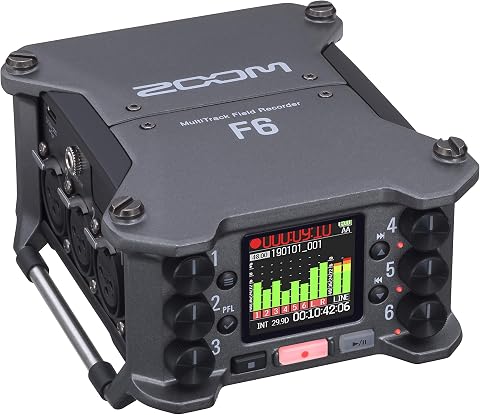
The Zoom F6 is a portable multitrack field recorder with 32-bit float recording and dual A/D converters for capturing a wide dynamic range. It has six XLR inputs, records up to 14 tracks, and includes timecode I/O for syncing audio with video.
Pros:
- 32-bit float recording with dual A/D converters provides wide dynamic range
- Six XLR inputs and up to 14 tracks support multitrack recording
- Timecode I/O supports audio and video synchronization
- Portable design with multiple power options
Cons:
- Requires four AA batteries when using battery power
- The description does not specify included storage beyond the stated 8 GB capacity
Best for: podcasters building a portable recording setup
Not ideal for: buyers who have not checked their microphone and accessory compatibility
Bottom line: Choose the Zoom F6 after confirming it fits the microphones, workflow, and power plan you intend to use.
Dynamic Podcast Microphone
A dynamic microphone can be a useful choice for spoken-word recording, but the right one depends on the room, speaker, and equipment around it. This checklist provides advice only for this slot and does not name a product. Start by deciding whether the microphone will be used at a desk, carried for interviews, or shared among several speakers; those use cases affect the mounting and cable choices you will need.
One frequent buying mistake is treating the microphone as a standalone purchase. Confirm whether it uses an XLR connection or another connector, and check whether your recorder or interface can accept it. With an XLR model, consider the cable route and the input you will use. Also confirm whether the microphone needs any particular mounting hardware, since a stand or clip that does not fit can delay setup. Check the whole connection path before ordering.
Fit matters for comfort and repeatable placement. Check the microphone’s dimensions and mounting thread against the stand or boom arm, and consider whether its shape allows the speaker to maintain a comfortable speaking distance. For a shared recording, plan how each person will position and adjust a microphone without crowding the others. Consult the manufacturer’s documentation for connector, mount, and operating requirements.
What to look for:
- Choose a use case: desk recording, mobile interviews, or shared sessions.
- Confirm the microphone connector matches your recorder or interface.
- Check mounting dimensions and thread compatibility with your stand.
- Consider how speakers will maintain a comfortable, consistent position.
- Review the manufacturer’s requirements before buying accessories.
Desktop Microphone Stand
A desktop stand helps keep a microphone positioned during a seated recording session. The listed pick is the InnoGear Desktop Microphone Stand, Adjustable Telescopic Table Mic Sta. Its product name indicates an adjustable telescopic table stand, but check the complete listing for the exact dimensions, mounting details, and included parts before deciding whether it suits your microphone and desk.
A common mistake is assuming every microphone clip or holder will attach to every stand. Check the microphone’s mount or clip, the stand’s connection, and whether any adapter is required. Also consider the available tabletop space and how the stand will sit near a keyboard, recorder, or other equipment. Verify the mount and footprint instead of relying on a general compatibility assumption.
Fit is about reach as well as connection. Compare the stand’s adjustment range with your seated position and the microphone placement you prefer, and make sure it can be positioned without pulling the cable taut. If more than one person will use the setup, consider whether the stand can be repositioned easily between speakers. Confirm the product’s dimensions and supported configuration in its listing before purchase.
What to look for:
- Check the full product listing for dimensions and included parts.
- Match the stand connection to the microphone clip or mount.
- Confirm the stand fits the available desk space.
- Compare the adjustment range with your seated recording position.
- Route the cable so it does not pull on the stand or microphone.
InnoGear Desktop Microphone Stand, Adjustable Telescopic Table Mic Stand with Mi
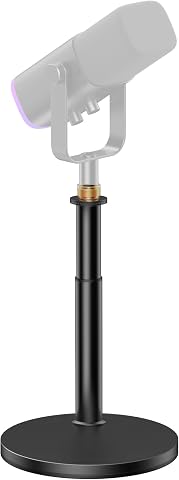
This adjustable desktop microphone stand features an instant-lock mechanism for quick height adjustments, ranging from 11.26 to 16.14 inches. Its stable, larger base provides secure support for microphones up to 3.3 lbs, compatible with various models including Blue Yeti, Snowball, and Shure SM7B.
Pros:
- Quick and easy height adjustments with instant-lock mechanism
- Enhanced stability with a larger, heavier base
- Supports a wide range of microphones with compatible adapters
- Strong load capacity for heavier microphones
Cons:
- No mention of adjustable tilt or swivel features
- Limited to desktop use, not suitable for floor mounting
- Mic clip max diameter may not fit larger microphones
Best for: podcasters who record at a tabletop
Not ideal for: buyers who have not confirmed microphone mount compatibility
Bottom line: The InnoGear stand is a candidate for desk recording once its dimensions and mount fit your setup.
Closed-Back Headphones
Headphones let you monitor a recording without relying only on the sound in the room. The listed pick is the Focal Lensys Professional Closed-Back Headphones. Before choosing headphones, confirm that their connection works with your recorder or other monitoring device, and consider how long you typically wear them during a session.
A common mistake is overlooking the output connection or assuming the recorder’s headphone output will suit every headphone configuration. Check the plug type and any adapter requirements against your equipment. If several people need to monitor at once, plan how each listener will connect; a headphone splitter or distribution device may be needed, depending on your setup. Check the monitoring path before recording day.
Fit affects whether headphones remain comfortable through a long conversation or editing session. Review the manufacturer’s fit and care information, and consider who will use them if the setup is shared. Closed-back construction is part of the product description, but your comfort and monitoring preferences are personal, so check the details that matter to you before purchasing. Confirm the headphones’ connection and intended use in the product documentation.
What to look for:
- Match the headphone plug to your recorder or monitoring device.
- Check whether an adapter is required.
- Plan connections if more than one person will monitor.
- Review fit and care details for your intended session length.
- Confirm the product documentation matches your monitoring use.
Focal Lensys Professional Closed-Back Headphones

Focal’s Lensys Professional headphones feature dual aluminum/magnesium drivers and sound isolation design, providing detailed monitoring and authentic playback. They are designed for studio use, monitoring, and casual listening, with soft memory foam earpads and a sturdy headband for comfort.
Pros:
- High-quality aluminum/magnesium drivers deliver detailed sound
- Effective sound isolation for studio and casual use
- Comfortable soft memory foam earpads and sturdy headband
- Suitable for monitoring, recording, and playback
Cons:
- Wired connection may limit mobility
- Lack of foldable design for portability
- No water resistance for outdoor use
Best for: podcasters adding headphones to a recording setup
Not ideal for: buyers who have not checked output connector compatibility
Bottom line: Consider the Focal Lensys after checking the connection, fit, and monitoring needs of your setup.
XLR Microphone Cable
An XLR cable connects compatible microphones to a recorder or other audio equipment. The listed pick is XLR Cable 25ft 10 Packs Microphone Cable with 3-Pin XLR Male to Female. Its name specifies a 25-foot length, a 10-pack, and 3-pin male-to-female XLR connectors; verify those details in the product listing and confirm that they match the gear you own.
A frequent mistake is ordering cables based on connector names without checking both ends of the signal path. Confirm that the microphone output and the recorder input accept the stated connectors, and measure the route from microphone to recorder. A cable that is too short can constrain placement, while excess length can create clutter. Measure the actual route before selecting a length.
For the 10-pack, consider how many cables your sessions require and where the extras will be stored. Check whether the pack configuration matches your use, since a multi-pack can mean more cables to organize. For group recording, label or arrange cables consistently so setup is straightforward. Confirm the cable type, length, connector details, and pack contents in the listing before buying.
What to look for:
- Verify 3-pin XLR male-to-female connectors match your equipment.
- Measure the route from each microphone to the recorder.
- Check whether 25 feet suits your room and placement plan.
- Confirm the listing’s pack quantity and contents.
- Plan storage and organization for any extra cables.
XLR Cable 25ft 10 Packs Microphone Cable with 3-Pin XLR Male to Female

This set includes ten 25-foot XLR microphone cables featuring a professional anti-noise copper core and durable PVC insulation. Compatible with various audio equipment such as microphones, mixers, and speakers, these cables ensure reliable signal transmission for live performances, studio recording, and more.
Pros:
- High anti-noise interference design for clear audio
- Durable and flexible PVC outer jacket
- Universal compatibility with audio equipment
- Includes 10 cables for versatile use
Cons:
- Bulkier with 10 cables, may require organization
- No mention of color options or different lengths
- Potentially heavy when all cables are used together
Best for: setups that need several compatible XLR cables
Not ideal for: buyers who need a different connector type or length
Bottom line: Choose this cable pack only if its connector type, 25-foot length, and quantity fit your setup.
Rechargeable AA Batteries
Batteries can help power portable gear when a suitable outlet is not available, but the right choice depends on the device. The listed pick is Energizer Ultimate Lithium AA Batteries (24 Pack). Its product name identifies AA lithium batteries in a 24-pack; confirm whether your recorder or accessories accept AA batteries and whether the manufacturer specifies a particular battery type.
A common mistake is assuming that a battery’s size alone establishes compatibility. Check the device manual for its power requirements, including battery chemistry and the number of cells needed. Also review any guidance about mixing old and new batteries or mixing types. Follow the device manual rather than relying on a general assumption about AA compatibility.
For a portable session, estimate how many compatible batteries your equipment uses and plan how you will carry and store spares. Keep track of which batteries are fresh and which have been used, and follow the battery maker’s storage and disposal guidance. If your recorder uses another power source or does not accept AA cells, this pick may not fit that device. Check the specific power instructions for every piece of gear.
What to look for:
- Confirm the device accepts AA batteries.
- Check the manual for supported battery chemistry and cell count.
- Plan the number of batteries needed for each device.
- Keep fresh and used batteries organized during travel.
- Follow manufacturer guidance for storage and disposal.
Energizer Ultimate Lithium AA Batteries (24 Pack)

These Energizer AA lithium batteries are designed for long-lasting, reliable power in critical devices such as cameras, remote controls, and smart home systems. They feature leak-proof construction, perform in extreme temperatures, and can last up to 25 years in storage, making them ideal for backup power and outdoor use.
Pros:
- Long-lasting power with up to 25 years of storage life
- Leak-proof and corrosion-resistant design
- Performs reliably in extreme temperatures
- Ideal for critical devices and outdoor use
Cons:
- Single-use batteries may generate waste
- Higher cost compared to standard alkaline batteries
- Not rechargeable
Best for: gear whose manuals specify compatible AA lithium batteries
Not ideal for: devices that use another battery type or power source
Bottom line: Buy this 24-pack only after confirming your recorder or accessories support AA lithium batteries.
Use a budget-first buying order by starting with the item that enables your recording plan, then adding only the accessories your current setup requires. Confirm recorder and microphone compatibility first, followed by the stand, monitoring connection, cable length, and power needs. Build around your actual gear so each purchase has a clear role.
You do not need to assemble every part at once. Check each product’s specifications against your equipment, then add the pieces that make your next session easier to run. A little preparation around fit, connections, and power can help you arrive ready to record.