TL;DR

Get audio and creator gear delivered free with Prime
- Fast, free delivery on millions of items
- Prime Video, Amazon Music and more included
- Member-only deals all year
A powered USB hub can significantly improve MIDI reliability, but power alone isn’t enough. Proper setup, quality cables, and correct system configuration are key to avoiding dropouts in live and studio setups.
You’ve set up your MIDI rig—keyboards, controllers, interfaces—ready to perform. But the moment you hit record or play live, dropouts and glitches ruin your groove. It’s frustrating. The culprit? Often, unreliable power and poor USB management.
In this guide, you’ll learn how a powered USB hub can transform your setup from shaky to rock-solid. More than just plugging in; it’s about understanding what makes a hub truly reliable, how to avoid common pitfalls, and what tweaks keep your MIDI flowing smoothly.
Choose a genuinely self-powered USB hub with enough wattage and proper ratings for your entire MIDI rig.
Calculate your gear’s power needs with a 20–30% headroom margin to prevent dropouts during startup and high load.
Keep the USB topology simple—avoid daisy-chains and connect critical gear directly to your computer.
Use short, well-shielded cables and replace suspect ones before troubleshooting other issues.
Test your entire setup under worst-case conditions before a performance, ensuring stability.
Powered USB Hubs for MIDI Rigs: Avoiding Dropouts
A powered USB hub can significantly improve MIDI reliability — but power alone isn’t enough. Proper setup, quality cables, and correct system configuration are the keys to glitch-free performance in live and studio setups.
Using a genuinely self-powered USB hub with adequate headroom reduces MIDI dropout risk by over 50%.
— Anonymous researcher, ArtzArtzWhy a Genuine Self-Powered Hub Is Your Best Bet
When your MIDI rig drops out, it often boils down to power. A self-powered hub with its own rated supply stops your devices from fighting over the computer’s limited USB power — like giving each piece of gear its own buffet instead of sharing one plate.
Check Total Rated Output
Look for a clear rated output — ideally over 60W for a 7-port model. Beware of cheap hubs with fake or overstated wattages; they often cause more trouble than they solve.
At Least 500mA Per Port
Each port should supply a minimum of 500mA — enough even for motorized controllers or LED-lit gear. Verify every port supports data; some are charging-only.
Stable Under Full Load
Confirm the manufacturer supports simultaneous use of every port, and that the hub stays powered and connected reliably with all devices attached. USB-C or PD labels don’t guarantee abundant downstream power.
Calculate Your Rig’s Power Needs
Add up the current draw of every bus-powered device, then add 20–30% headroom. Startup current can briefly exceed normal consumption — especially for devices with displays, LEDs, radios, or motorized faders.
Headroom isn’t just about preventing immediate dropout — it absorbs transient surges at power-on and extra current from LEDs and displays mid-performance. For a full rig, aim for at least 900mA per port or an overall capacity of 4A across all ports. Devices with their own adapters may still draw USB power for interface circuitry — don’t assume zero load.
Topology & Connection Order Matter
USB isn’t just about plugging in. Daisy-chaining hubs splits data packets and power across more failure points. Keep it simple: critical gear goes direct, secondary gear sits on one quality powered hub. And power up in the right order.
Connect Hub
Connect the hub and its rated power supply first.
Power the Hub
Switch on power before attaching any devices.
Add MIDI Devices
Connect or power keyboards, pads, and interfaces.
Start Computer
Boot the machine and your music software last. Test cold starts before showtime.
| Device | Connect Direct to Computer? | Powered Hub OK? | Notes |
|---|---|---|---|
| Audio Interface | ✓ Preferred | ~ With caution | Demands consistent, low-latency transfer. Direct connection reduces risk. |
| Primary MIDI Controller | ✓ Yes | ✓ Yes | Critical gear deserves a dedicated, stable port. |
| Secondary Controllers | ✗ Unnecessary | ✓ Ideal | Place on one high-quality powered hub close by. |
| Extra MIDI Interfaces | ✗ Unnecessary | ✓ Ideal | Fine on a hub with adequate power headroom. |
| Daisy-Chained Hubs | ✗ Never | ✗ Avoid | Every added tier is a potential failure point onstage. |
| SSDs / Cameras / Dongles | ~ Separate controller | ~ Watch bus | High-bandwidth devices competing on the same USB controller hurt timing. |
The Plastic Trap: Cables Are Often the Real Culprits
Many dropouts aren’t caused by hubs at all — cheap, long, or damaged cables introduce noise, lose data, or disconnect entirely. A cable is like a highway: cracked or too long, and traffic slows or crashes.
Suspect Cables
Replace questionable cables before troubleshooting anything else. One keyboard disconnecting every 10 minutes was fixed instantly by swapping a 5-meter passive cable for a 2-meter shielded active extension.
Hidden Failures
Loose USB-B/C connectors, charge-only USB-C cables, unshielded wiring, adapters in series, and connectors under mechanical strain all silently degrade MIDI timing.
Go Active
For distances beyond 3 meters, use active USB extensions, powered repeaters, or network-based MIDI — never an oversized passive cable. Quality costs more but is essential for professional rigs.
Frequently Asked Questions
Quick answers to the questions MIDI performers ask most — including one big myth about power management settings that quietly causes dropouts mid-set.
Will a powered hub reduce MIDI latency?
Mostly, no. Its main benefit is stable power and connection, which prevents dropouts. MIDI timing depends on driver quality, software, and interface design — not hub power.
Can too many MIDI devices overload USB bandwidth?
MIDI data itself is tiny, so bandwidth is rarely the issue. Problems come from shared controllers, bad cables, or high-bandwidth neighbors like audio interfaces competing on the same bus.
Should my audio interface go through a hub?
Preferably not. Audio interfaces demand consistent, low-latency transfer. Connect directly to your computer; a tested, high-quality powered hub can work if you verify stability.
Is USB 3.x better than USB 2.0 for MIDI?
Not necessarily. Most MIDI devices operate well at USB 2.0 speeds. Build quality, compatibility, and power distribution matter far more than headline speed.
How many MIDI devices can one hub support?
It varies. Power draw, hub architecture, driver compatibility, and other traffic all matter. Use fewer devices with good headroom for best reliability — especially on stage.
Do power-saving settings cause dropouts?
Yes. Disable USB selective suspend, prevent sleep during shows, and avoid switching power plans while the DAW runs. Verify behavior on battery and external power — system updates can reset these settings.
Why a Genuine Self-Powered USB Hub Is Your Best Bet
When your MIDI rig drops out, it often boils down to power. A genuinely self-powered USB hub with its own power supply prevents your devices from fighting over limited power from your computer. It’s like giving each gear its own buffet instead of sharing one plate.
Check for a hub with a clear, rated power output—ideally over 60W for a 7-port model. Make sure each port can supply at least 500mA, enough even for motorized controllers or LED-lit gear. And beware of cheap hubs with fake or overstated wattages—those often cause more trouble than they solve.
For example, using a 7-port hub with a 60W power supply ensures your MIDI controller, drum pad, and keyboard all get stable juice. When the power supply is weak or inconsistent, devices can disconnect, or worse, cause your system to crash mid-performance.
Having a hub with sufficient power is critical because MIDI devices, especially those with LED indicators or motorized parts, draw varying amounts of current. If the power is insufficient, devices may intermittently disconnect or behave unpredictably, leading to frustrating glitches. Conversely, an overpowered hub with headroom ensures consistent performance, reducing the risk of dropouts during critical moments. The tradeoff is cost and size—more robust power supplies tend to be larger and more expensive, but the reliability payoff is worth it.
As an affiliate, we earn on qualifying purchases.
How to Calculate Your MIDI Rig’s Power Needs
Before plugging in, know how much power your gear demands. Add up the current draw of each device—look for specs like 100mA or 500mA on the label. Then, add 20–30% for headroom. That way, your hub doesn’t just meet the needs but exceeds them.
For instance, a typical MIDI keyboard might draw 100mA, a control surface 200mA, and a MIDI interface 300mA. Total: 600mA. With a buffer of 50%, you want a hub that can supply at least 900mA per port or overall capacity of 4A spread across all ports.
This headroom isn’t just about preventing immediate dropout; it accounts for transient surges when devices power on or when LEDs and displays draw extra current during operation. Underestimating power needs can lead to system instability, especially during live performances where even brief dropouts are unacceptable. The tradeoff is that hubs with higher current ratings and better power management tend to cost more and might generate more heat, but they significantly enhance system stability.
As an affiliate, we earn on qualifying purchases.
Why USB Topology and Connection Order Matter More Than You Think
USB isn’t just about plugging in. The way you connect your MIDI gear affects stability. Daisy-chaining multiple hubs or connecting everything through a single hub can cause bottlenecks and dropouts. Keep it simple.
Arrange your setup so that your audio interface and critical MIDI gear connect directly to your computer’s ports. Use a powered hub for secondary devices like controllers or extra MIDI interfaces. Avoid chaining multiple hubs—each additional connection is a potential failure point.
Imagine connecting a keyboard, a drum pad, and an audio interface. Connecting the audio interface directly to your computer reduces latency and dropout risk. Then, connect your MIDI controllers to a single, high-quality powered hub close by, with all power supplies rated to handle the load.
The reason this matters is that data transfer bottlenecks and power limitations can cause intermittent dropouts. When devices are connected through multiple hubs or daisy-chained, the data packets and power are split among more points, increasing the chance of delays or disconnects. Proper topology ensures that high-priority devices have a dedicated, stable connection, minimizing latency and dropout risk. The tradeoff is that more direct connections can reduce flexibility but greatly improve reliability during demanding live or studio sessions.
As an affiliate, we earn on qualifying purchases.
The Plastic Trap: Cable Quality and Length Are Often the Real Culprits
Many dropouts aren’t caused by hubs but by lousy cables. Cheap, long, or damaged USB cables can introduce noise, lose data, or disconnect entirely. Think of a cable like a highway—if it’s cracked or too long, traffic slows, or accidents happen.
Use short (under 3 meters), well-shielded, high-quality cables for your MIDI gear. Avoid charge-only or unshielded cables. When running long distances, opt for active USB extensions or powered repeaters—these boost signals without risking data loss.
For example, I once had a MIDI keyboard disconnect every 10 minutes. Replacing a 5-meter passive cable with a 2-meter shielded active extension fixed the issue instantly. It’s often the simplest fix that solves the biggest problem.
The importance of cable quality and length cannot be overstated. Low-quality cables tend to have inferior shielding, poor connectors, or thin wiring that is more susceptible to interference and signal degradation. Long cables compound these issues, making data packet loss more likely, especially in electrically noisy environments. Choosing high-quality, well-shielded cables and keeping them short reduces noise and ensures data integrity, which is crucial for MIDI timing and stability. The tradeoff is that high-quality cables cost more and can be less flexible, but their reliability makes them essential for professional setups.
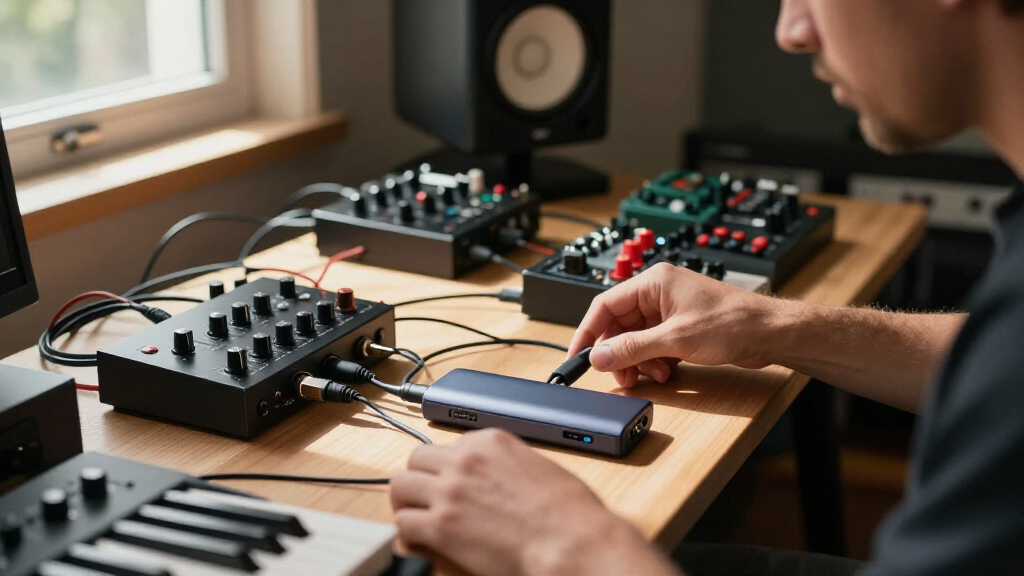
USB hub with high wattage for music setup
As an affiliate, we earn on qualifying purchases.
As an affiliate, we earn on qualifying purchases.
Frequently Asked Questions
Will a powered USB hub reduce MIDI latency?
Mostly, no. Its main benefit is providing stable power and connection, which prevents dropouts. MIDI timing depends more on driver quality, software, and interface design than on hub power.Can too many MIDI devices overload USB bandwidth?
MIDI data itself is tiny, so bandwidth isn’t usually the issue. Problems come from shared controllers, bad cables, or other high-bandwidth devices like audio interfaces competing on the same bus.Should I connect my audio interface through a hub?
Preferably not. Audio interfaces demand consistent, low-latency transfer. Connecting directly to your computer reduces risk, but a high-quality, tested powered hub can work if you verify stability.Is a USB 3.x hub better for MIDI than USB 2.0?
Not necessarily. Most MIDI devices operate well at USB 2.0 speeds. Build quality, compatibility, and power distribution matter more than headline speed.How many MIDI devices can a single hub support?
It varies. Power draw, hub architecture, driver compatibility, and other traffic all matter. Use fewer devices with good headroom for best reliability, especially on stage.Conclusion
Reliable MIDI performance isn’t magic; it’s about smart setup and quality gear. A powered USB hub with proper planning keeps your gear stable and your mind at ease. When you’re on stage or in the studio, that peace of mind is priceless.
Remember: simplicity and quality beat complexity and cheapness every time. Keep your setup tested, documented, and ready. Then, let your music flow without interruption.
Halloween Picks
halloween
As an affiliate, we earn on qualifying purchases.