
TL;DR

Get audio and creator gear delivered free with Prime
- Fast, free delivery on millions of items
- Prime Video, Amazon Music and more included
- Member-only deals all year
Reliable face tracking autofocus keeps you sharp during streams, making your videos look polished. Modern cameras now feature AI-powered face and eye detection, but setup and lighting matter. Properly configuring these settings ensures focus stays on you, even with movement or multiple faces.
Nothing kills a good stream faster than fluctuating focus or a blurry face. You’re talking, moving around, maybe even gesturing — your camera needs to keep up. Modern autofocus tech, especially face and eye tracking, promises to hold focus like a loyal dog. But not all settings are created equal, and setup makes all the difference.
In this guide, you’ll learn how to make your camera’s face tracking work reliably during your streams. Expect practical tips, recent tech updates, and real-world examples to help you nail that perfect, sharp shot every time.
Enable face detection and eye AF in your camera’s menu to keep your face sharp during movement.
Adjust focus sensitivity and focus area to match your streaming environment and movement style.
Good lighting and clean backgrounds are critical for reliable face tracking.
Test your setup thoroughly before going live to prevent focus hunting during your stream.
Regular firmware updates improve autofocus performance and stability.
Streaming camera field guide / autofocus
Camera Autofocus for Streaming: Face Tracking Settings That Hold
Nothing breaks a polished stream faster than a face drifting soft. Configure face and eye detection, sensitivity, focus area, lighting, and lock behavior so the camera follows your movement without jumping to the background.
What makes tracking hold
Reliable autofocus is a system, not a single toggle. The camera must see a clear subject, identify the face, choose an eye, predict movement, and resist tempting distractions elsewhere in the frame.
Face detection
Machine-learning models separate facial features from the scene, giving the autofocus system a meaningful subject instead of a random high-contrast edge.
Eye priority
Eye AF shifts the focus target from the general face to the eye plane, helping portrait-style streams look crisp during head turns and small movements.
Continuous AF
Continuous focusing updates distance as you lean or pace. Pair it with moderate tracking sensitivity to avoid abrupt jumps between subjects.
Soft front light
Even illumination creates usable facial contrast. A soft key or bounced light often improves tracking more than an aggressive menu adjustment.
Clean background
Simple backdrops reduce competing edges and face-like shapes, making it easier for the camera to remain committed to the presenter.
Current firmware
Manufacturers regularly refine subject recognition, tracking stability, processing behavior, and camera-to-streaming compatibility through updates.
Build the lock in four moves
Menu names vary by manufacturer, but the underlying sequence is consistent. Start with continuous focusing, tell the camera who matters, define where it may search, then tune how readily it abandons the target.
Continuous AF
Use AF-C, Servo AF, or the equivalent continuous mode for a moving presenter.
Face + eye
Enable human subject recognition and set eye priority when the option is available.
Focus area
Choose wide for movement; choose center or zone for a mostly fixed seated frame.
Sensitivity
Begin near the middle, then move toward locked-on behavior if the camera jumps.
Choose for your movement
Face and eye tracking is the strongest default for presenter-led streams. Simpler areas can be more stable when the host stays seated or when a complex background repeatedly pulls the camera away.
| Focus mode | Best for | Strength | Limitation | Stream fit |
|---|---|---|---|---|
| Single-point AF | Stationary, controlled shots | Precise focus on one fixed location | Does not follow meaningful movement | Good for a locked seated frame |
| Zone AF | Moderate, predictable movement | Balances precision with room to move | Can lose the face outside the selected zone | Useful for desk tutorials |
| Wide-area AF | Dynamic or unpredictable movement | Searches broadly across the composition | May choose a strong background detail | Good when paired with face priority |
| Face / Eye Tracking Recommended | Moving hosts and portrait streams | Automatically follows face and eye position | Depends on lighting, visibility, and scene clarity | Best general streaming choice |
Balance speed with stability
High sensitivity reacts quickly but can produce visible focus shifts. Lower sensitivity looks calmer but may lag after a large move. These starting points favor a natural presenter stream rather than high-speed action.
Practical starting profile
Responsive enough for leaning and gesturing without instantly abandoning your face.
Encourages the camera to wait through brief occlusions such as a hand crossing the face.
A softer transition looks deliberate and prevents distracting snap corrections on stream.
Prioritize even, soft light on the eyes and face before pushing camera sensitivity higher.
When tracking slips
Focus hunting usually has a visible cause. Correct the scene first, then constrain the autofocus system if it still chooses the wrong target.
Add facial contrast
Bring a soft light closer, brighten the face evenly, and avoid strong backlighting that turns the presenter into a silhouette.
Simplify the frame
Remove high-contrast clutter, create separation from the backdrop, or switch from wide-area to a center zone.
Register a priority
Use subject selection or face registration when supported. Otherwise, narrow the focus area around the main presenter.
Let face AF persist
Reduce switching sensitivity so glasses glare, a microphone, or a brief hand gesture does not trigger a new target.
Slow the transition
Lower autofocus transition speed and increase subject persistence for a calmer, less mechanical correction.
Use a controlled fallback
Mark your seated position, stop down slightly for more depth of field, then use center AF or manual focus lock.
Every stable frame starts before autofocus moves
Do not compensate for a weak scene with extreme autofocus settings. Light the face, reduce background competition, select the right focus area, and only then tune sensitivity. If the shot is fixed and mission-critical, focus lock remains the safest final fallback.
Why Proper Autofocus Setup Turns Your Stream into a Pro Look
Autofocus isn’t just about sharpness; it’s about consistency. When your camera loses focus, viewers notice. A quick head turn or a slight lean can turn your shot blurry if autofocus isn’t set right. Modern face tracking keeps your face in crisp focus, even if you move around or turn your head.
Imagine streaming a tutorial while gesturing wildly. Without good autofocus, your face can drift out of focus, distracting your audience. With well-configured face tracking, your camera adapts seamlessly, making your stream look polished without extra effort.
camera autofocus face tracking for streaming
As an affiliate, we earn on qualifying purchases.
As an affiliate, we earn on qualifying purchases.
How Face Detection and Eye AF Actually Work — And How to Turn Them On
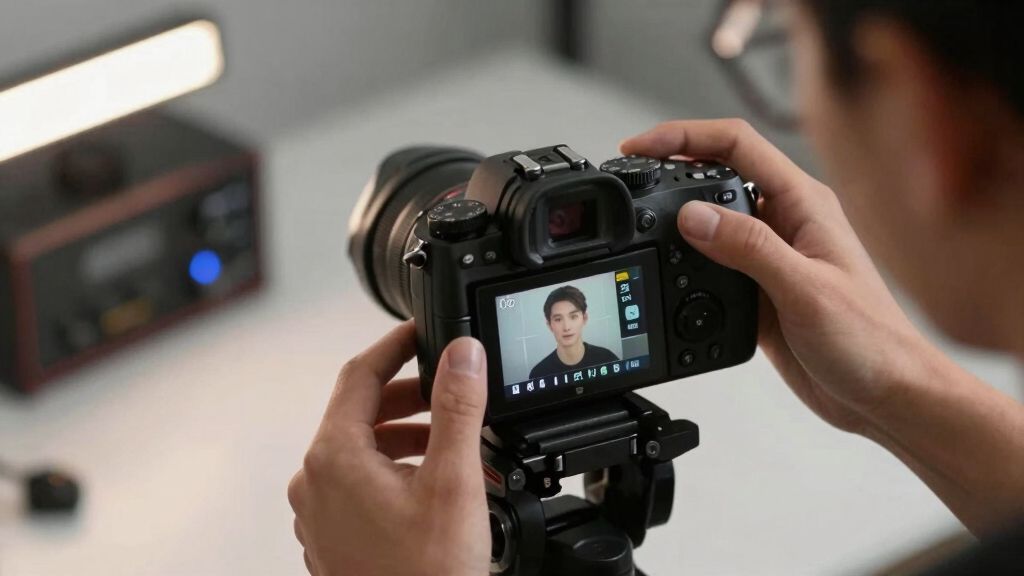
Face detection and eye autofocus are AI-driven features that identify and lock onto your face or eyes. They use machine learning algorithms trained on vast datasets of faces to distinguish facial features from the background. This distinction is crucial because it allows the camera to focus precisely on your face, even in complex scenes. When you move or turn, these systems predict where your face or eyes will go next, maintaining focus. The tradeoff here is that these features rely heavily on good lighting and contrast; poor lighting can confuse the algorithms, leading to focus errors or hunting.
To activate them, dive into your camera’s menu. Most modern models have dedicated options for face detection and eye AF, often with adjustable sensitivity. Enabling these features essentially gives your camera a ‘smart’ focus assistant that dynamically follows your face and eyes, reducing manual focus adjustments during your stream. But remember, enabling these features isn’t a silver bullet—proper setup and environmental conditions are key to their effectiveness.
For example, a Sony Alpha mirrorless camera lets you toggle face and eye AF with quick switches, making setup fast and easy. Once enabled, your camera actively follows your face, even if you turn or lean. If you’re using a webcam, look for models with built-in autofocus or software that mimics this capability. The implications are significant: a well-activated face/eye tracking system can make your streams look more professional, but if lighting or background clutter confuses the system, the focus can hunt or drift, undermining that professional look.
As an affiliate, we earn on qualifying purchases.
Compare Autofocus Modes: Which One Keeps Your Face Sharp?
| Focus Mode | Best For | Strengths | Limitations |
|---|---|---|---|
| Single-point AF | Stationary shots, controlled environments | Precise focus on one spot | Won’t track movement; best for static scenes |
| Zone AF | Moderate movement, predictable areas | Focus within a selected zone, balancing precision and flexibility | Can miss if face moves outside zone, especially during rapid movement |
| Wide-area AF | Dynamic movement, unpredictable scenes | Tracks faces across a broad area, useful when you move around a lot | Less precise, may hunt focus or switch unexpectedly |
| Face/Eye Tracking | Moving subjects, portrait-style streams | Automatic face and eye follow, ideal for maintaining focus on your face regardless of movement | Dependent on environmental factors like lighting and background clarity; may struggle in low light or busy backgrounds |
Choosing the right autofocus mode is about understanding your movement style and environment. Face/eye tracking is generally best for streaming because it actively follows your face, reducing the need for manual adjustments. However, it’s not perfect; in low light or cluttered backgrounds, its accuracy diminishes, and focus hunting can occur. Weighing these tradeoffs helps you select the mode that best suits your setup and movement patterns, ensuring your face stays sharp without constant manual intervention.
streaming camera with autofocus settings
As an affiliate, we earn on qualifying purchases.
As an affiliate, we earn on qualifying purchases.
How to Fine-Tune Face Tracking for Rock-Solid Focus During Your Stream
Once face tracking is enabled, small tweaks make a big difference. Adjust tracking sensitivity—too high, and focus jumps around; too low, and it may lag behind your movement. Finding the right balance requires understanding how your camera interprets movement and environmental cues. For instance, high sensitivity can make focus more responsive, but might cause it to hunt or shift focus during minor movements, creating distractions. Conversely, low sensitivity provides stability but can cause lag, making your focus feel unresponsive. The tradeoff is between responsiveness and stability — adjusting this setting according to your typical movement style and lighting conditions is essential for a natural, seamless focus experience.
Here’s a quick checklist:
- Test in different lighting conditions; poor light confuses face detection and can cause focus hunting or loss.
- Use a clean, uncluttered background to reduce distractions for the autofocus system, which relies on contrast and edge detection.
- Set focus area to ‘wide’ if you move around a lot; choose ‘single’ or ‘center’ if you mostly stay in one spot, to prevent focus from shifting unexpectedly.
- Enable eye AF if your camera supports it — this helps keep your eyes sharp even during rapid head movements, but be aware it may also cause focus to hunt if the eyes are obscured or in poor lighting.
- Lock focus once you’re ready to go live, if your camera allows, to prevent focus hunting mid-stream, especially during critical moments.
For example, I once streamed a Q&A while pacing around my room. Enabling eye AF and locking focus midway through kept my face sharp despite my movement. It’s all about testing and tweaking beforehand, understanding how your settings respond to your environment and movement patterns.
Amazonprofessional streaming camera accessories
As an affiliate, we earn on qualifying purchases.
As an affiliate, we earn on qualifying purchases.
The Biggest Challenges with Face Tracking and How to Fix Them
Face tracking isn’t foolproof. Poor lighting, cluttered backgrounds, or multiple faces can cause focus to jump or lose track. Recognizing these limitations allows you to mitigate issues proactively. For example, in low-light conditions, the autofocus system may struggle to distinguish your face from the background, leading to focus hunting or loss. Adding a ring light or bouncing a soft light onto your face can dramatically improve contrast and stability, making tracking more reliable. Similarly, cluttered backgrounds can confuse the system; simplifying your scene or using a solid backdrop helps the camera differentiate you from the surroundings.
When multiple faces are present, the camera might switch focus unpredictably. To avoid this, switch to a focus mode that prioritizes a single face or manually lock onto your face before starting your stream. External tracking tools or software can also help stabilize focus when your camera’s native system struggles, especially if you’re using a webcam or lower-end camera. Understanding these limitations and preparing your environment accordingly ensures smoother focus and a more professional appearance.
Top Tips to Keep Your Focus Locked During the Whole Stream
Nothing derails a good stream like focus hunting in the middle of a chat. Here are some quick tips to keep your focus steady:
- Use cameras with dedicated face and eye tracking features, and ensure they are properly enabled and configured.
- Update your camera firmware regularly, as manufacturers often release improvements that enhance autofocus stability and accuracy.
- Set focus to ‘lock’ once you’re framed perfectly. Many cameras allow you to lock focus manually, preventing focus shifts during movement or changes in lighting.
- Ensure your lighting is bright and even, reducing shadows and contrast issues that can confuse autofocus algorithms.
- Test your setup with movement before going live. Moving side to side, looking around, and adjusting your position helps identify potential focus issues in advance.
For example, a streamer I know always does a quick run-through, moving side to side, to see if focus stays on her face. It’s a simple step that saves her from embarrassing focus slips mid-stream and ensures a consistent, professional look.
Frequently Asked Questions
Can I rely on autofocus for professional-level streaming?
Yes, if you have a camera with good face and eye tracking features and you set it up properly. Modern autofocus systems are surprisingly reliable for streaming, especially with good lighting and correct settings.What if my camera keeps hunting focus during a stream?
Try locking focus once you’re framed correctly. Also, improve lighting, reduce background clutter, and test different focus modes. Firmware updates can also help fix focus hunting issues.Are external face tracking tools worth it?
External tools or software can enhance focus stability, especially with cheaper cameras or webcams lacking advanced autofocus. They add a layer of reliability, but proper setup and lighting are still key.Does eye autofocus work better than face detection?
Typically, yes. Eye autofocus targets the eyes specifically, keeping them sharp even during quick head movements. It’s especially useful for portrait-style streams or talking head videos.How often should I update my camera firmware for better autofocus?
Check your manufacturer’s website regularly. Firmware updates often include autofocus improvements, bug fixes, and new features. Updating every few months ensures you get the latest stability and performance.Conclusion
Focus can make or break your streaming quality. Spend time setting up and testing your autofocus features, especially face and eye tracking. When done right, it’s like having a dedicated focus assistant that’s always on your side — making your streams look professional and polished.
Remember, technology isn’t perfect. Keep your lighting bright, backgrounds simple, and stay updated with camera firmware. Your viewers will notice the difference.
HALLOWEEN Halloween Picks
halloweenhalloween
As an affiliate, we earn on qualifying purchases.