TL;DR

Get audio and creator gear delivered free — and shop member deals
- Fast, free delivery on millions of items
- Access to Prime Big Deal Days deals on October 6–7
- Prime Video, Amazon Music and more included
Focal length between 35mm and 50mm offers a natural, flattering perspective for desk streaming. It balances background inclusion with minimal distortion, making your setup look polished and professional.
Ever notice how some streamers look perfectly framed, their faces clear and background just the right amount behind? It’s not magic; it’s all about choosing the right focal length. If you’re sitting at your desk, about 3-4 feet from the camera, the lens you pick makes a huge difference in how you’re seen. Get it right, and your stream looks sharp, professional, and natural—without needing fancy lighting or a giant studio.
In this guide, I’ll walk you through the best focal lengths for desk streaming, show you how they change your framing, and give practical tips to set up your camera like a pro — even on a budget. Ready to make your streams look better than ever? Let’s get started.
Aim for a focal length between 35mm and 50mm for natural, flattering desk streams.
Sit about 3-4 feet from your camera to achieve optimal framing.
Longer lenses (above 50mm) create a more compressed background and shallow depth of field.
Prime lenses offer sharper images and wider apertures; zooms provide flexibility.
Test your setup with different focal lengths and lighting to find what looks best.
What is focal length, and why does it matter for your desk stream?
Focal length, measured in millimeters, is what determines how much of the scene your camera captures. A 24mm lens gives you a wide view — perfect for showing your entire desk or background. A 50mm lens narrows it, focusing more on your face and blurring out distractions. For desk streaming, the goal is to find that sweet spot where you look natural, and your background adds context without overwhelming.
Imagine sitting at your desk, 3-4 feet from your camera. If you use a wide lens (like 16mm), your face will look distorted — exaggerated features, wide eyes, and a stretched background. Stick to lenses in the 35mm to 50mm range, and your face will look natural, with a pleasing sense of depth.
Choosing the right focal length is crucial because it directly impacts how viewers perceive you. Using a lens that’s too wide can cause distortion, making your features appear exaggerated and unflattering, which can be distracting. Conversely, a lens that’s too narrow (like 85mm or more) might make your face look unnaturally compressed and can create awkward framing. The 35mm to 50mm range strikes a balance, offering a natural perspective that mimics how we see the world, making your streams more engaging and comfortable to watch.
Additionally, the choice of focal length affects background inclusion. A wider lens captures more of your surroundings, providing context and personality, but risks cluttering the shot. A narrower lens isolates you from the background, emphasizing your face and expressions, which can be powerful for engaging viewers. Understanding these tradeoffs helps you tailor your setup for your personal style and space constraints.
As an affiliate, we earn on qualifying purchases.
How to pick the perfect focal length for your desk setup
- Measure your distance: Sit where you plan to stream, about 3-4 feet from the camera.
- Decide your framing: Do you want just your face or a bit of upper body and background?
- Select your lens: For most, a 35mm or 50mm prime lens hits the sweet spot.
- Test and adjust: Try different focal lengths if you can, to see what looks best on camera.
For example, a 35mm lens will give you a tight, professional headshot with some background, perfect for talking directly to your audience. If you want a more relaxed, wider shot, try a 24mm, but watch out for distortion.
When choosing focal length, consider the tradeoff between background visibility and potential distortion. A 35mm lens is versatile—providing a natural look while keeping your background manageable. Moving to 50mm can give a more portrait-like, compressed perspective that emphasizes your face but reduces background clutter. Testing different lengths helps you find the best balance for your space and style, ensuring your framing feels natural and professional.
As an affiliate, we earn on qualifying purchases.
Comparison table: Prime vs. zoom lenses for desk streaming
| Feature | Prime Lenses | Zoom Lenses |
|---|---|---|
| Image quality | Sharper, better low-light performance | Good, but slightly less sharp |
| Flexibility | Limited to one focal length | Adjusts between focal lengths |
| Cost | Often cheaper for equivalent quality | More expensive for comparable quality |
| Use case | Best for consistent framing | Great for versatile setups |
Choosing between prime and zoom lenses depends on your priorities. Prime lenses excel in delivering sharp images and wide apertures, which are ideal for achieving a professional look with shallow depth of field. They encourage you to set your framing precisely, making your setup more predictable. Zoom lenses, on the other hand, offer flexibility to quickly change framing without swapping lenses, which is useful if your space or setup varies often. However, they often come at a higher cost and slightly reduced image quality compared to primes. Consider your streaming style and budget to decide which type best suits your needs.
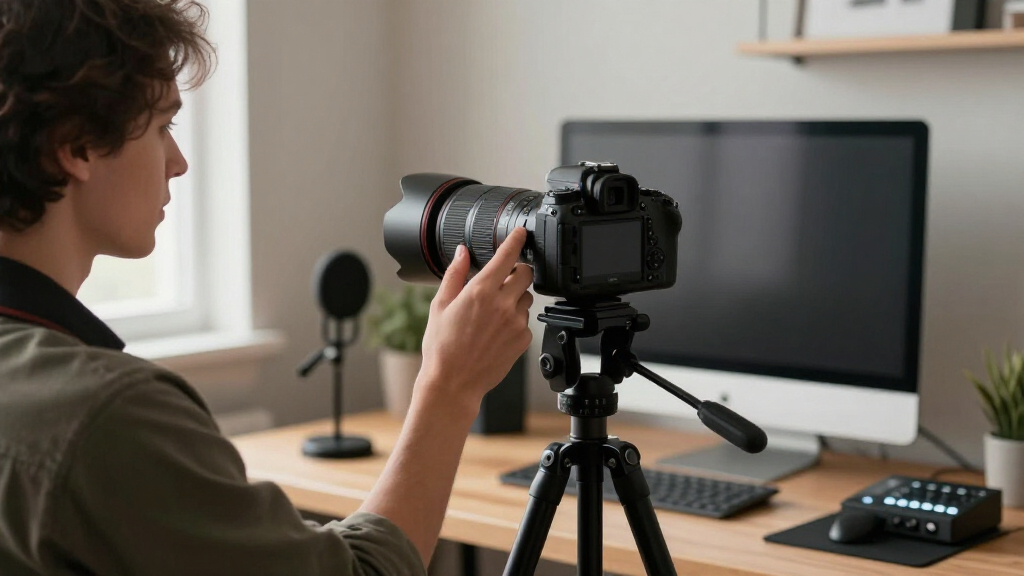
focal length 35mm to 50mm camera lens
As an affiliate, we earn on qualifying purchases.
As an affiliate, we earn on qualifying purchases.
How focal length affects your background and depth of field
Focal length doesn’t just frame your face; it also changes how your background looks. Longer lenses (like 50mm) compress space, making your background seem closer and more blurred. This isolates you, making you stand out sharply against a soft, unobtrusive backdrop.
If you use a 35mm lens at arm’s length, your background appears natural and slightly compressed, giving a professional vibe. Want that sleek, cinematic look? Use a wider aperture (like f/1.8) with longer focal lengths to get a dreamy background blur. Just remember, wider apertures need more light.
Understanding how focal length impacts depth of field is essential because it determines how much of your background is in focus. A longer focal length combined with a wide aperture creates a shallow depth of field, blurring out distractions and emphasizing you. This can be especially useful if your background is cluttered or distracting. Conversely, a shorter focal length with a smaller aperture keeps more of your environment in focus, which might be desirable for showing off a workspace or environment. Balancing focal length and aperture allows you to craft a look that’s both professional and visually appealing, guiding viewers’ attention where you want it most.
compact webcam with adjustable focal length
As an affiliate, we earn on qualifying purchases.
As an affiliate, we earn on qualifying purchases.
Recent tech that makes focal length choices easier
Mirrorless cameras now come with compact, affordable lenses in the 24mm to 50mm range. These give you a huge leap in quality over standard webcams. Plus, autofocus improvements—like eye detection—mean you stay sharp even if you move slightly during your stream.
Many streamers use adapters to fit these lenses onto their webcams, giving them a flexible setup without needing to buy a whole new camera. It’s a game-changer for quality on a budget.
Practical tips for setting up your focal length and framing
- Start with a 35mm or 50mm lens for natural, flattering shots.
- Place your camera 3-4 feet away from your face.
- Adjust your zoom or focus ring to get your head and shoulders framed neatly.
- Use good lighting to balance your shot, especially if using wider apertures.
- Test different focal lengths and see what feels most natural on camera.
Understanding how to optimize your focal length and framing is vital because it directly influences viewer engagement. Proper framing ensures your face is the focal point, while background elements support your message without overwhelming it. Experimenting with different lengths and distances allows you to find the most flattering, natural look that enhances your personality and content. This thoughtful setup increases viewer connection and makes your streams more professional and appealing.
Frequently Asked Questions
What focal length is best for a professional-looking desk stream?
Most streamers find that a 35mm to 50mm lens offers the most natural, flattering perspective. It keeps your face in focus while adding just enough background for context without distortion.
Can I use my regular camera lens with my webcam setup?
Yes, with the right adapter, many mirrorless or DSLR lenses can be mounted onto webcams or compact cameras. This opens up a range of focal lengths and improves image quality on a budget.
How far should my camera be from me for proper framing?
Typically, 3-4 feet works well at arm’s length, especially with focal lengths around 35-50mm. Adjust slightly based on your preferred framing—closer for more intimacy, farther for more background.
Should I choose a zoom or prime lens for streaming?
Prime lenses usually offer sharper images and wider apertures for better background blur, making them ideal. Zoom lenses are more flexible if you prefer quick adjustments without changing lenses.
How does focal length influence background appearance?
Longer focal lengths compress space, making backgrounds look closer and more blurred. Shorter focal lengths expand the scene, making backgrounds appear farther and more detailed.
Conclusion
Picking the right focal length at arm’s length transforms your desk streams from okay to professional. Stick to 35mm-50mm, keep your distance consistent, and tweak your framing until it feels right. Your viewers will notice the difference — sharper, cleaner, more engaging videos.
Now, next time you set up your camera, remember: it’s not just about the gear. It’s about framing yourself perfectly, every time. Your audience will thank you for it.
Fall Picks
fall essentials
As an affiliate, we earn on qualifying purchases.