TL;DR

Get audio and creator gear delivered free with Prime
- Fast, free delivery on millions of items
- Prime Video, Amazon Music and more included
- Member-only deals all year
A phone can be a capable field recorder for interviews, quick voice notes, ambience, and location audio. Choose a lavalier for close speech, a wireless kit when someone needs to move, a handheld for noisy interviews, or a stereo mic for soundscapes. Check phone, adapter, app, power, and monitoring compatibility together, then make a short test recording before the real one.
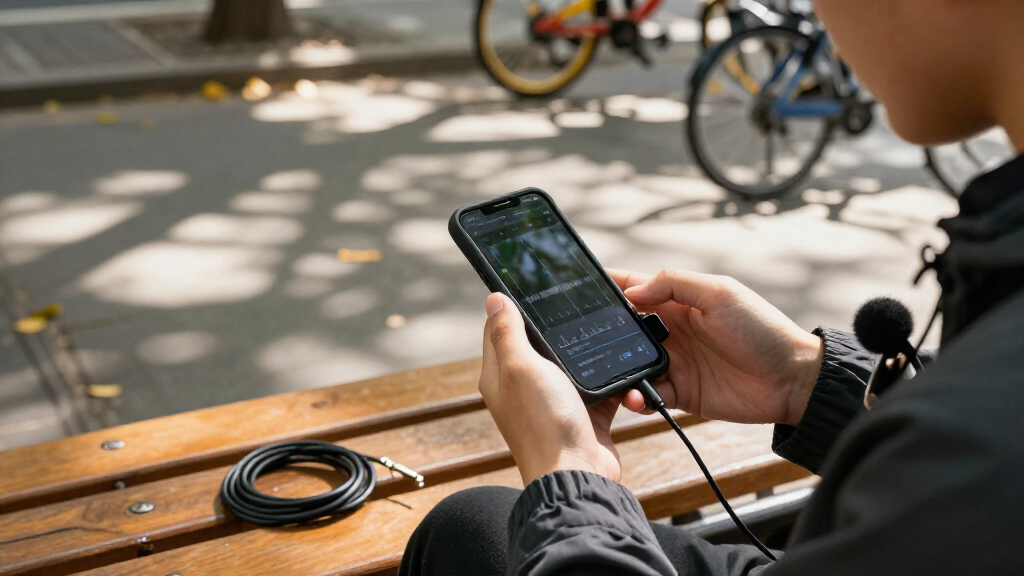
Your phone may already fit in your pocket, but that does not mean its microphone is in the right place. Hold it at arm’s length on a windy sidewalk and the recording can fill with traffic, gusts, and the soft rasp of your fingers on the case. Clip a small mic near a speaker’s collar, though, and the same phone can capture a much clearer voice.
This guide helps you choose among wired and wireless lavaliers, handheld and directional mics, stereo microphones, and USB audio gear. You’ll also learn how to check connectors, avoid common setup failures, and make a quick test that catches trouble before an interview or field recording matters. The goal is a kit that fits your work and your bag, not the longest list of gear.
Choose a lavalier for close speech, wireless when the speaker moves, a handheld for noisy interviews, and stereo for ambience or music.
Confirm that the microphone, adapter, phone, operating system, and recording app work together; a connector that fits may still lack audio input.
Keep the mic close to the sound you want, secure cables, and use a windscreen outdoors.
Make a test recording with normal and louder speech, then listen through headphones before the important take.
Check batteries, storage, recording limits, and saved files; add a backup when the audio matters.
Using Your Phone as a Field Recorder External Mic Options
Match the microphone to the sound you need to capture. Check the full setup and make a test recording before the important take.
Choose by sound and movement
The right mic helps bring the intended sound forward, while distance and position still matter.
Lavalier
Clip it near one speaker’s mouth for interviews and spoken notes.
Wireless lav
Gives someone room to walk, turn, or demonstrate a task.
Handheld
Hold it close and point it toward each person speaking.
Stereo mic
Preserves the width and position of ambience, nature sounds, or music.
Make speech clearer
A mic close to the speaker can make their voice stronger relative to distant traffic, room echo, and other background sound.
- Keep the mic near the speaker.
- Use mono when speech needs to be easy to edit.
- Secure cables and keep fabric from rubbing the mic.
- Use stereo when the space and sound positions matter.
- Hold the phone steady and avoid touching the mic.
- Use a suitable windscreen outdoors.
Check the whole setup
A connector that fits may still fail to carry audio input.
Check the mic, adapter, phone, operating system, and recording app together.
Review batteries, cable reach, and whether the mic needs power or an audio interface.
Record normal and louder speech, then listen through headphones before the real take.
Protect the recording
A quick check can catch common setup problems before the interview or field recording matters.
- Test in the actual location, especially with a wireless mic.
- Listen for wind, handling bumps, clothing noise, and clipped levels.
- Check battery, storage, recording limits, and that the file saved.
- Add a backup when the audio matters.
Choose a mic by the sound you need to bring home
A phone becomes a more useful field recorder when its external mic matches the sound you want to capture. For one person speaking, put a lavalier near the mouth; for a place full of sound, use stereo; for an interview in a loud café, keep a handheld mic close to whoever is talking. A mic helps most when it gives the wanted sound a clearer path to the recording.
Think of mic choice like choosing a lens: a wide view records the whole scene, while a tighter view emphasizes one subject. A stereo mic can preserve a creek on one side and birds in the trees on the other, but that width does little for a narration that needs to sit cleanly in a mix. Mono speech is often easier to edit and place.
For example, if you’re recording a short interview at a weekend market, the built-in phone mic may catch a broad wash of voices and clattering dishes. A lav clipped near the speaker can make their words stand out; a handheld mic lets you move between two people. Neither option erases the market. Your position and distance still shape the result.
Before buying anything, name the recording: one speaker, two people, a moving subject, outdoor ambience, or music. That simple choice narrows the field and stops you paying for features you won’t use. A phone can be a capable field recorder with modest gear, especially when you keep the mic close, steady the phone, and listen back before wrapping up.
Popular right now

Apple AirPods Pro 3 Wireless Earbuds with Active Noise Cancellation
Sony WH-1000XM4 Wireless Noise Cancelling Headphones, Black

Bose QuietComfort Wireless Noise-Cancelling Headphones, Cypress Green
As an affiliate, we earn on qualifying purchases.
Pick a lavalier for interviews and spoken notes
A lavalier is usually the simplest external mic for a single speaker because it clips close to the mouth and stays put while the person talks. A wired model is often inexpensive and easy to carry; a wireless system gives the speaker room to walk, turn, or gesture. Both can beat a phone resting several feet away when the goal is clear speech.
With a wired lav, check the plug and wiring standard before you buy an adapter. A cable long enough to reach a phone in a pocket or bag can reduce handling noise, but a cable brushing a jacket can make a scratchy sound. Clip the mic securely, leave a small loop of slack, and keep fabric from rubbing across its capsule. Outdoors, a fitted windscreen helps tame soft gusts.
A wireless system trades the cable for a transmitter on the speaker and a receiver at the phone. That setup is handy when you’re filming a walking tour or recording someone demonstrating a craft at a workbench. Check battery life, usable range, interference handling, and the exact phone connection. Walls, crowds, and radio noise can affect a wireless link, so record a short sample in the actual location.
For quick voice notes, a lav may be more kit than you need. If you’re dictating a thought while standing still, the phone’s built-in mic can be fine in a quiet room. When you’re recording a paid interview, though, consistent placement and a backup plan matter. Wired is a strong budget starting point; wireless earns its place when movement would otherwise pull the speaker away from the phone.
Use handheld or directional mics when the scene gets loud
A handheld mic can improve a noisy interview because you can hold it close to each speaker and point it toward the person talking. That control matters more than the word “professional” printed on the box. In a café, for instance, moving the mic from the interviewer to the guest can keep both voices stronger than the hiss of an espresso machine behind them.
Some handheld microphones connect directly to a phone, while others need an audio interface or a compatible adapter. Check whether the mic expects power and whether your connector actually carries audio input. A plug that fits is not proof that the phone will recognize the microphone. A small test in your chosen recording app is worth more than guessing from a product photo.
A directional shotgun-style mic can point toward a speaker or a specific outdoor sound in front of the phone. It’s useful for a short clip of a street musician or someone speaking to camera, but it does not cancel all sound outside its aim. Reflections, nearby conversations, and a passing bus can still enter the recording. Keep the mic pointed steadily and as near to the subject as the shot allows.
If the interviewer can hold the mic just below a guest’s chin, a handheld can sound clean without a complicated setup. If you need both hands for a camera or notebook, a lav may suit the job better. The practical choice depends on who can manage the mic while recording. Directional pickup is not noise removal; distance, angle, and the room remain part of the sound.
Capture a place in stereo, or keep speech simple in mono
A stereo microphone records left and right channels to preserve the width and position of sounds around you. That makes it a natural option for field ambience, birdsong, water, street scenes, and music where the space itself is part of the recording. Mono records one channel and is often the more straightforward choice for speech that needs to stay clear and easy to edit.
Imagine recording a small stream: a stereo mic can keep the rush of water broad while a bird call seems to sit off to one side. That spatial detail gives a listener a stronger sense of place. If you record a short narration for the same video, however, a mono lav may be easier to balance over music and sound effects.
Stereo also asks more of your setup. Hold the phone still, avoid touching the mic, and give the recording a few quiet seconds at the start and end. Handling bumps can spread across both channels, and wind can swamp the delicate details you hoped to capture. A windscreen suited to the conditions can help, but heavy gusts may still overpower a compact microphone.
Choose the format for the edit you expect to make. If the sound scene needs width, stereo gives you useful information; if the voice needs to sit neatly in a mix, mono is usually easier. For a one-person field interview in a quiet office, a carefully placed mono mic is often plenty. More channels do not automatically mean a better recording; they help when the sound itself benefits from space.
Check every connector before trusting your phone setup
Connector compatibility depends on the microphone, phone, adapter, operating system, and recording app, so check the complete combination before an important session. A USB-C or Lightning adapter may support charging or headphone playback without accepting microphone input. A 3.5 mm plug may also use headset wiring that differs from a camera-style mic. Similar-looking plugs can hide a very different signal path.
USB microphones send digital audio to the phone, while an analog mic needs a compatible input to convert its signal. Depending on the mic, that may mean an adapter or an audio interface. A passive adapter doesn’t necessarily supply the power or conversion the microphone needs. When you can, test the exact mic, adapter, phone, and app together before buying or booking a paid recording.
Here’s a useful check: connect the mic, open the app, record ten seconds, unplug the mic, then record another ten seconds. Listen through headphones. If both samples sound identical, the phone may still be using its built-in mic. Try a second app and look for accessory and input guidance from the phone or mic maker.
Ports and app features change with new devices and software. Some recent phones and recording apps offer multichannel capture or extra audio processing, but support varies by model and app version. Don’t assume that a bundled adapter works across every phone. Confirm the exact model combination, including whether the adapter supports audio input and whether the app can select or display the external source.
Run this five-minute check before the real recording
A five-minute check can catch a dead battery, bad cable, clipped level, or hidden phone mic before the interview starts. Make a short recording in the same place, at the same distance, and with the same people you plan to record. Then listen through headphones: a meter can show signal, but your ears catch clothing rub, wind, interference, and a disconnected mic.
- Check the chain. Confirm that the phone, adapter, mic, and app recognize one another. Watch the app’s input meter if it has one.
- Set the position. Clip a lav securely, point a handheld toward the speaker, or stabilize a stereo mic. Keep cables from brushing fabric.
- Record normal speech. Ask everyone to speak at their expected volume. Leave room for a laugh or a louder word so peaks don’t distort.
- Listen back. Use headphones to check voice clarity, rubbing, wind, traffic, and any dropouts. Fix the problem while the speaker is still there.
- Check the phone. Confirm free storage, battery, file format, sample rate, and any app recording-duration limit. When the audio matters, make a backup and verify that the file saved.
For instance, a guest who speaks softly in conversation may become much louder while describing a favorite scene. A test at only a whisper won’t reveal a clipped peak when they laugh. Ask for a normal answer and a louder sentence, then adjust the input so peaks stay below distortion rather than hugging the top of the meter.
Outdoors, add a windscreen and shield the mic from direct gusts. Keep the phone still, and use airplane mode when practical, after checking that it won’t interrupt a needed wireless connection or call. Test the whole setup, not just the microphone; a reliable recording depends on the app, power, storage, placement, and final file as much as the capsule.
Spend your first upgrade on placement and the right accessory
The most useful first upgrade is often a mic that fits your recording, plus wind protection and a way to monitor the result. A costly interface cannot fix a lav rubbing against a zipper or a speaker several metres away. At a park, a modest wired lav with a windscreen and a quick headphone check can produce more usable speech than an expensive shotgun pointed into a stiff breeze.
For a single speaker, start with a compatible lav and test cable placement. If the person needs to move freely, compare wireless systems and check their battery, range, phone receiver, and monitoring options. For two people, confirm that the system can capture both voices appropriately; a receiver that combines channels may give you less editing control than separate channels.
If you record ambience, consider a stereo microphone and a stable way to hold the phone. If your work calls for a higher-quality XLR mic or more control over gain, a USB audio interface can open those options. It also adds bulk, cables, power needs, and setup time. That tradeoff makes sense for planned sessions more often than for a spontaneous voice note from the roadside.
Use this simple rule: pick the smallest setup that reliably captures the sound you need. A basic recorder app may handle a reminder; important interviews benefit from input meters, manual gain, monitoring, uncompressed formats, and dependable export, where your phone supports them. Gear should solve a real recording problem. A small, tested kit you can deploy in two minutes beats a complex rig left at home.
Frequently Asked Questions
Can a phone record audio good enough for professional work?
Often, yes, for interviews, narration, ambience, and many location recordings. A suitable mic, close placement, a quiet position, and a test take matter more than the phone’s size. Wind, room echo, and poor monitoring can still spoil a take, so listen before the session ends.
Which external mic is best for a phone interview?
A wired lavalier is a simple, affordable choice for one stationary speaker; wireless is more convenient when they move. In a noisy place, a handheld mic lets you keep the capsule close to whoever is speaking. For two people, check how the system records each voice and whether you can monitor the channels.
Will any USB-C or Lightning microphone work with my phone?
No. Compatibility depends on the mic, phone, operating system, adapter, and recording app. Check the exact model combination and make a test recording; a connector that fits may support charging or playback without microphone input.
How do I reduce wind noise in a phone recording?
Use a foam or furry windscreen suited to the weather, shield the mic from direct gusts, and avoid pointing it straight into the wind. Move behind a wall or other windbreak when you can. Heavy gusts can overwhelm a compact mic, even with a windscreen.
Should I record speech in mono or stereo?
Mono is usually the straightforward choice for speech because it is easy to edit and place in a mix. Stereo is useful when the width and direction of a place, nature scene, or musical performance matter. Pick the format based on the sound you want listeners to hear.
What should I buy first for phone field recording?
Start with your main use. For interviews, a compatible lavalier and a windscreen may be enough; for ambience, look at a stereo mic and a stable way to hold the phone. If the built-in mic already works for quiet quick voice notes, you may not need to buy anything yet.
Conclusion
Choose the mic for the sound you need, then test the whole phone setup where you’ll record. For speech, start close; for a moving speaker, go wireless; for a soundscape, capture stereo. A short headphone check and a secured cable can save a session that a bigger price tag won’t.
Pack a setup you can connect, test, and trust. Then go record the quiet voice, passing train, or first bird call before it disappears.