TL;DR

Get audio and creator gear delivered free with Prime
- Fast, free delivery on millions of items
- Prime Video, Amazon Music and more included
- Member-only deals all year
Mix at levels below 85 dB SPL to protect your ears. Use SPL meters, take breaks, and choose quality gear to maintain accuracy and avoid long-term damage. Safe listening is key for healthy, sustainable music production.
Mixing music isn’t just about getting the sound right. It’s about protecting your most valuable tool—your ears. Many producers crank their monitors or headphones, thinking louder equals better accuracy. But loud volumes come with a hidden cost: hearing damage that sneaks up over time.
In this article, you’ll discover how loud is actually safe, what tools can help you stay within those limits, and why a little discipline now can save your hearing for decades to come.
Always monitor at levels below 85 dB SPL to prevent long-term hearing damage.
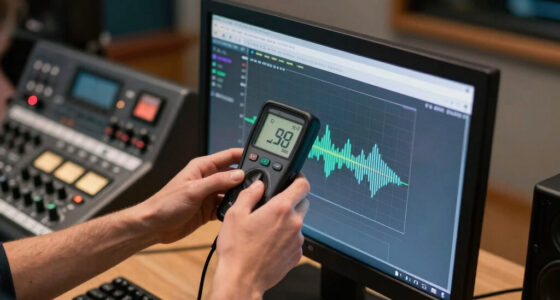
Use SPL meters or apps to keep track of your listening levels during sessions.
Take breaks every 20 minutes to give your ears a rest and maintain accuracy.
Invest in monitors and headphones with level indicators to avoid accidental overexposure.
Limit your listening time based on volume—stay within safe guidelines like 8 hours at 85 dB.
How Loud Should You Mix? Monitoring Levels That Protect Your Ears
TL;DR: Mix below 85 dB SPL, measure your room or headphones, and take regular breaks. Louder can feel clearer in the moment, but it increases ear fatigue and raises the risk of permanent hearing damage over time.
Stay under this level for long sessions to reduce risk while preserving mix judgment.
Every 20 minutes, step away for at least 20 seconds and reset your ears.
At concert-like levels, safe exposure drops sharply to roughly minutes, not hours.
dB SPL is the practical monitoring range for most mix decisions.
85 dB is commonly treated as an 8-hour occupational exposure limit.
Risk rises as volume and session length increase together.
Use an SPL meter, app, or calibrated monitor controller.
Why Monitoring Level Matters
Mixing loud is seductive because detail feels immediate. The hidden cost is biological: loud sound stresses the cochlear hair cells that translate vibration into nerve signals. Once damaged, those cells do not regenerate, so safe monitoring protects both your hearing and your future mix accuracy.
Permanent loss is cumulative
Repeated exposure above safe levels can cause subtle damage long before you notice a problem.
Fatigue changes what you hear
As your ears tire, balances, brightness, and dynamics become harder to judge reliably.
Discipline beats volume
Reference tracks, treated rooms, and quality gear let you hear clearly without cranking the monitors.
Relative risk climbs as sessions get louder
The Numbers You Need
85 dB SPL is not magic, but it is a practical threshold. Below it, long sessions are easier to sustain. Above it, safe listening time drops quickly and repeated exposure can add up.
Useful for balance, vocal level, and translation checks.
Comfortable detail without pushing ear fatigue.
Keep extended sessions below this level whenever possible.
Concert-like loudness where exposure should be very brief.
Safe Monitoring Comparison
Use this as a practical decision grid before long sessions. The safest setup combines lower levels, measured playback, good isolation, and planned pauses.
| Practice | Protects hearing | Maintains accuracy | Best use |
|---|---|---|---|
| Mixing at 75-80 dB SPL | ✓ strong | ✓ strong | Main session level |
| Brief loud checks near 85 dB SPL | ~ moderate | ✓ useful | Short energy checks only |
| Long sessions above 90 dB SPL | ✗ poor | ✗ fatigue risk | Avoid as a habit |
| Reference tracks at lower volume | ✓ strong | ✓ strong | Translation and clarity |
| Untreated room with background noise | ✗ poor | ~ inconsistent | Fix acoustics first |
A Safer Mixing Workflow
Safe monitoring is a chain of small controls. Each step lowers the chance that a normal creative session turns into accidental overexposure.
Calibrate
Use an SPL meter or trusted app to learn where 75-85 dB sits on your volume control.
Limit
Set a maximum monitor or headphone level so sudden jumps do not surprise you.
Reference
Compare against pro mixes at lower volume instead of chasing detail with loudness.
Break
Take 20-second resets every 20 minutes to reduce fatigue and preserve judgment.
Recover
After loud checks, return to a safer level and let your ears settle before final calls.
Simple Steps That Actually Work
These are not studio luxuries. They are low-friction habits that keep sessions accurate and sustainable.
- 01Measure before mixing. Check your level at the listening position, not just at the interface knob.
- 02Reduce room noise. The quieter the room, the less you need to compensate with volume.
- 03Use isolating headphones carefully. Isolation helps you monitor lower, but headphone volume can still creep upward.
- 04Keep loud checks short. Use them for vibe, not for hours of detailed editing.
Monitoring sweet spot
Frequently Asked Questions
Most monitoring problems come from underestimating loudness, over-trusting comfort, and forgetting that hearing damage can arrive quietly.
How loud is too loud when mixing?
For safe monitoring, stay below 85 dB SPL during extended work. Use a meter because loudness judgment becomes unreliable over time.
Can I mix low and still get accurate results?
Yes. Good monitors, room treatment, and reference tracks make lower-level mixing both accurate and less fatiguing.
What tools help monitor safe levels?
SPL meters, smartphone apps, monitor controllers, and headphones with level warnings all help you stay aware.
Why does volume matter for hearing health?
Persistent loud exposure damages inner-ear hair cells. Protecting them preserves your ability to produce and enjoy music for decades.
Why Your Monitoring Level Matters More Than You Think
Monitoring at the right level isn’t just about hearing details. It’s about protecting your ears and ensuring your long-term hearing health. Listening above 85 dB SPL can cause cochlear damage—specifically, the hair cells in your inner ear that translate sound waves into nerve signals. Once damaged, these hair cells do not regenerate, leading to permanent hearing loss.
When you mix at dangerously high levels, you risk not only immediate discomfort but also subtle, cumulative damage that may not be noticeable until it’s too late. This damage can impair your ability to perceive fine details, reduce your dynamic range, and ultimately compromise your mix quality. The tradeoff is clear: louder isn’t better—it’s riskier. Protecting your ears means preserving your ability to produce and enjoy music for decades. Recognizing the importance of monitoring levels helps you make smarter decisions and avoid the long-term consequences of hearing loss.
sound level meter for music production
As an affiliate, we earn on qualifying purchases.
As an affiliate, we earn on qualifying purchases.
How Loud Is Too Loud? The Exact Numbers You Need
Most experts agree: keep your monitoring below 85 dB SPL. This threshold isn’t arbitrary; it’s based on extensive research showing that prolonged exposure above this level significantly increases the risk of hearing damage. To understand its importance, consider that 85 dB SPL is roughly the volume of a loud conversation or city traffic. When you exceed this level, the hair cells in your cochlea are subjected to stress that can cause them to die or become less responsive over time.
For example, at 100 dB SPL—similar to a live rock concert or a chainsaw—your ears can tolerate only about 15 minutes of exposure before the risk of irreversible damage rises sharply. The real-world implications are that even brief, repeated exposures to high volumes can accumulate, leading to gradual hearing loss. Therefore, understanding these numbers isn’t just about avoiding discomfort; it’s about recognizing the biological limits of your ears and making conscious choices to stay within safe ranges. The tradeoff involves balancing the need for accurate sound perception with the unavoidable fact that higher volumes accelerate ear fatigue and damage.
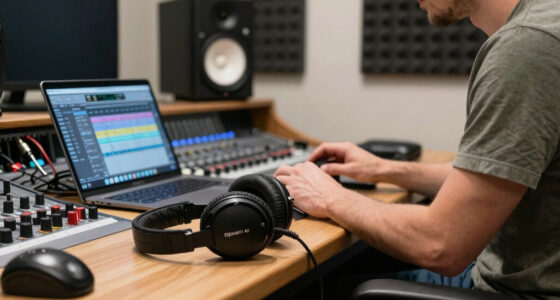
professional headphones with level indicator
As an affiliate, we earn on qualifying purchases.
As an affiliate, we earn on qualifying purchases.
Simple Steps to Keep Your Monitoring Safe
- Set a maximum volume limit on your monitors or headphones—most devices let you restrict maximum levels. This prevents accidental exposure to dangerously high volumes, which can happen during long sessions or when adjusting equipment in haste.
- Use a SPL meter or smartphone app to check your levels before starting a session. Regular monitoring helps you develop an intuitive sense of safe volume and avoid unintentional overexposure, especially in environments with variable noise levels.
- Take a 20-second break every 20 minutes—step away, lower the volume, and reset. These small pauses allow your ears to recover from fatigue, preventing temporary threshold shifts from becoming permanent damage.
- Use reference tracks at lower volumes to judge mix clarity without pushing the volume higher. This encourages disciplined listening and helps you maintain accuracy without risking your hearing.
- Reduce background noise in your room—less noise means you won’t need to turn up as loud. Improving room acoustics and minimizing ambient sounds reduce the temptation to compensate with higher volumes, ultimately protecting your ears and ensuring more precise mixes.
Implementing these steps creates a sustainable workflow where ear health is prioritized without sacrificing sound quality. Recognizing the tradeoff—higher volumes offer immediate clarity but at the cost of long-term hearing health—is key to making informed decisions during your mixing sessions.
studio monitor speakers with SPL meter
As an affiliate, we earn on qualifying purchases.
As an affiliate, we earn on qualifying purchases.
Frequently Asked Questions
How loud is too loud when mixing?
For safe monitoring, stay below 85 dB SPL. Listening at higher volumes for extended periods risks permanent hearing loss. Use a SPL meter to be sure.
Can I mix at low volumes and still get accurate results?
Yes. Proper gear, good room acoustics, and reference tracks make mixing at lower levels just as effective—and safer. It also avoids ear fatigue.
What tools help me monitor safe levels?
SPL meters, smartphone apps, and monitors with built-in level warnings are all helpful. They give real-time feedback so you stay within safe limits.
How long can I listen at high volumes without damage?
OSHA recommends limiting exposure to 8 hours at 85 dB, and shorter times at higher volumes. For example, 15 minutes at 100 dB can cause damage.
Why does monitoring volume matter for my hearing health?
Persistent loud exposure damages hair cells in your inner ear, leading to permanent hearing loss. Staying below safe levels preserves your hearing and your ability to produce quality music.
As an affiliate, we earn on qualifying purchases.
Conclusion
Your ears are your most valuable tool—protect them with conscious monitoring. Keeping your levels below 85 dB SPL isn’t just a safety tip; it’s a long-term investment in your ability to produce, mix, and enjoy music for decades.
Remember, a little discipline now saves you from silence in your old age. Turn down, take breaks, and listen smarter—your ears will thank you every time you hit ‘play.’
Halloween Picks
halloween
As an affiliate, we earn on qualifying purchases.