TL;DR

Get audio and creator gear delivered free with Prime
- Fast, free delivery on millions of items
- Prime Video, Amazon Music and more included
- Member-only deals all year
Sequencers record and automate entire patterns, while arpeggiators turn chords into rhythmic note sequences. Modern MIDI controllers often integrate both, offering powerful tools for creativity and performance.
You’ve probably seen those sleek MIDI controllers with buttons and knobs—maybe even wondered what all those features do. Sequencers and arpeggiators are game-changers in music production and live performance. They turn simple notes into complex melodies, rhythmic textures, and entire arrangements—all at your fingertips.
In this guide, you’ll learn what these tools are, how they work, and why they matter. Whether you’re a bedroom producer or a gigging musician, understanding these features helps you craft more dynamic, professional-sounding music with less hassle.
Built-in sequencers and arpeggiators turn simple notes into complex patterns instantly, especially on modern MIDI controllers.
Hardware offers tactile control, making live tweaking more intuitive, while software provides deeper editing and customization.
AI-driven features are expanding what’s possible, generating new ideas and adaptive patterns effortlessly.
Combining sequencers and arpeggiators with manual editing creates rich, professional compositions without overwhelming complexity.
Experimentation is key—try different modes, parameters, and setups to find what sparks your creativity.
Sequencers & Arpeggiators, Explained
Sequencers record and automate complete patterns. Arpeggiators transform held chords into rhythmic streams of notes. Together, they turn a MIDI controller into a fast, tactile engine for composition and performance.
Records, edits, loops and arranges notes across steps or measures.
Reorders held notes using rhythmic modes such as up, down or random.
Build the pattern quickly, then shape it by hand.
Increase in controllers with built-in pattern tools over five years.
Up, down, up-down, random and chord are common starting points.
A typical price band for dedicated tactile options.
Sequencer plus arpeggiator, refined with manual editing.
One remembers. One reacts.
The easiest distinction is the source of the notes: a sequencer plays a pattern you programmed or recorded; an arpeggiator continuously derives a pattern from notes you are holding.
Sequencer
Places notes, rests, velocity and automation on a timeline. It can repeat a bassline, drum groove or full melodic phrase without requiring the keys to remain held.
Arpeggiator
Reads the chord currently held and releases its notes one at a time. Change the chord, rate, direction, octave or gate and the result responds immediately.
From held chord to recorded pattern
Dedicated buttons and encoders make the process immediate. The same workflow works in a DAW, but hardware keeps the essential decisions under your fingers.
Choose a mode
Select up, down, random, chord or a sequencer pattern.
Play the input
Hold a chord, tap a melody or enter notes on the grid.
Activate
Start the arp or sequencer and lock it to the project tempo.
Shape the motion
Adjust rate, swing, gate, velocity and octave range.
Capture in the DAW
Record the MIDI, edit key notes and build the arrangement.
Pattern power is moving onto the controller
Built-in sequencing, pattern chaining and real-time control make advanced workflows increasingly accessible—even in portable and budget-conscious setups.
Reported growth in MIDI controllers offering integrated sequencers and arpeggiators.
Immediacy versus depth
Neither option is universally better. Hardware favors muscle memory and performance; software favors detailed editing, automation and customization.
| Feature | Hardware controller | Software / DAW |
|---|---|---|
| Portability | ✓Compact and often laptop-free | ~Depends on laptop or tablet |
| Tactile control | ✓Immediate knobs, pads and keys | ~Best with mapped controls |
| Editing depth | ~Limited by screen and controls | ✓Detailed notes and automation |
| Pattern complexity | ~Fast but device-dependent | ✓Extensive routing and variation |
| Live reliability | ✓Focused, direct workflow | ~More moving parts to manage |
| Typical cost | ~Approximately $200–$500 | ✓Free to premium options |
Choose hardware when…
You perform live, dislike mouse-heavy workflows or want ideas to emerge through physical interaction.
Choose software when…
You need precise editing, complex automation, large arrangements or highly customizable routing.
Combine both when…
You want tactile idea generation followed by deep editing and arrangement inside the DAW.
AI expands the pattern palette
Algorithmic tools can suggest melodic variations, adapt to performance input and generate new sequences. Their best role is creative partner—not substitute for musical judgment.
Fresh starting points
Pattern suggestions reduce blank-page friction and reveal combinations you might not program manually.
Responsive variation
Emerging systems vary rhythm, note choice or intensity according to your playing and musical context.
Mobile workflows
Tablet apps and cloud syncing let patterns move between portable sketches and desktop sessions.
The arpeggiator is an engine—not the vehicle
Arpeggiators excel at hooks, pulses and evolving textures. A convincing full arrangement still needs structure, contrast, complementary parts and deliberate editing.
Held chord
The harmonic source enters the controller.
Arpeggiated hook
A rhythmic motif creates instant movement.
Sequenced layers
Bass, drums and supporting patterns join.
Manual edits
Variation and expression break repetition.
Full arrangement
Sections, transitions and dynamics tell the story.
Can an arpeggiator create an entire track?
Technically, it can supply much of the raw material—but rarely the complete musical narrative. Use it to ignite ideas, then combine it with sequencing, manual performance, editing and other MIDI effects to create contrast and progression.
Can a built-in sequencer work with any DAW?
Usually. Standard USB-MIDI makes broad integration possible, but transport controls, synchronization and device-specific features vary. Check both controller and DAW specifications.
What should a beginner explore first?
Start with an up-mode arpeggio at 1/8 or 1/16 rate, then adjust swing, gate and octave range. Record the result and change a few notes manually.
What exactly are sequencers and arpeggiators? Here’s the simple scoop
Sequencers are devices or software that record, edit, and play back a series of MIDI or audio notes. Think of them as a musical grid where you lay down your ideas—every step, every note, just like programming a beat on a drum machine. Arpeggiators, on the other hand, take a held chord and automatically break it into a rhythmic pattern—up, down, random, or other modes—making chords sing with movement.
Imagine holding a C major chord on your keyboard. An arpeggiator might turn that into a rising sequence: C, E, G, then back down G, E, C—adding life to your jam instantly. Meanwhile, a sequencer could record a bassline or melody over several measures, then loop it seamlessly.
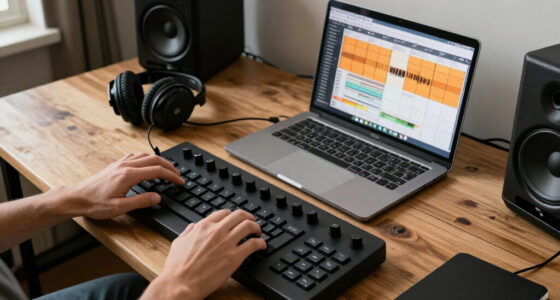
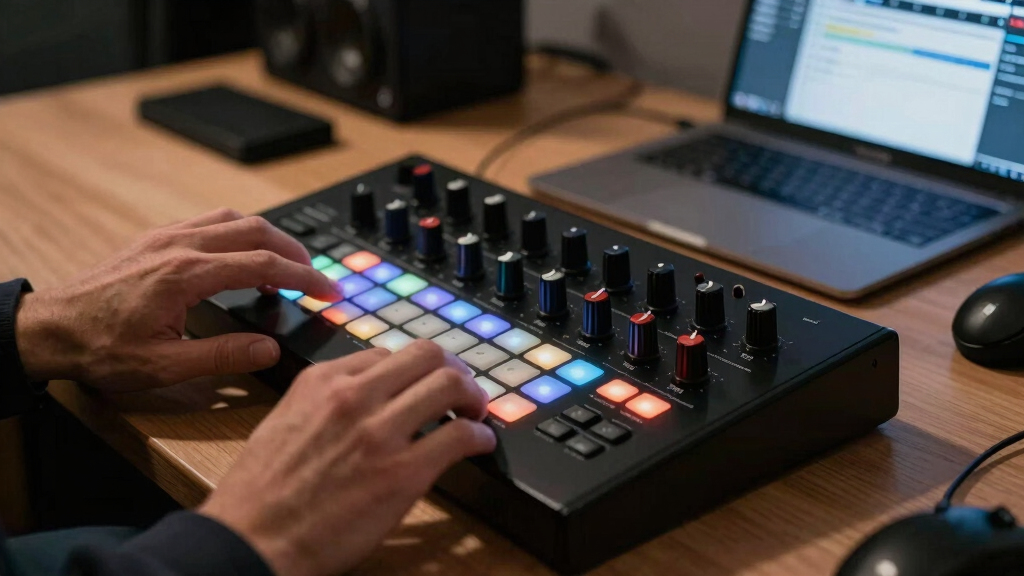
MIDI controller with built-in sequencer
As an affiliate, we earn on qualifying purchases.
As an affiliate, we earn on qualifying purchases.
How modern MIDI controllers pack in these features—what you get and how to use
Today’s MIDI controllers often come with built-in sequencers and arpeggiators, making them a one-stop shop. For example, a device like the Ableton Push not only lets you trigger clips but also sequence loops and generate arpeggios right on the pad grid. Using these features is often as simple as pressing dedicated buttons or turning knobs—no need to open complex software.
Here’s a quick rundown of how you might use them in a typical session:
- Choose a pattern mode—up, down, random, etc.
- Hold a chord or melody on your controller.
- Activate the arpeggiator or sequencer button.
- Adjust parameters like speed, swing, or octave shift.
- Play along or record your pattern into your DAW.
Many controllers also let you lock patterns to scenes or chain multiple sequences for longer arrangements. It’s tactile, immediate, and very hands-on—perfect for spontaneous creativity.
As an affiliate, we earn on qualifying purchases.
The latest tech: How AI and software boost sequencers and arpeggiators
AI-driven tools are pushing the boundaries of what sequencers and arpeggiators can do. Some software now suggests patterns based on your style or even generates entire melodic ideas, saving you hours of tweaking. For example, programs like Ableton Live’s MIDI effects include algorithms that adapt patterns to your playing style.
Mobile apps and cloud-based platforms also add new layers of flexibility. Imagine starting a beat on your tablet, then syncing it with your desktop setup—your patterns evolve in real-time, with AI helping you discover fresh ideas.
This tech makes complex, evolving sequences accessible even on budget gear, opening up new creative horizons without needing expensive hardware.
These advancements are significant because they reduce the time and effort required to craft intricate patterns, allowing producers to focus more on musicality and experimentation. However, they also introduce trade-offs—over-reliance on AI might limit your personal touch, and some tools can be complex to master initially. Balancing automation with your own creativity is key to leveraging these innovations effectively.
hardware MIDI controller for live performance
As an affiliate, we earn on qualifying purchases.
As an affiliate, we earn on qualifying purchases.
What features matter most? A quick comparison of options
| Feature | Hardware (e.g., BeatStep Pro) | Software (e.g., Ableton Live) |
|---|---|---|
| Portability | High—compact, battery-powered options available | Depends on device; often requires a laptop or tablet |
| Flexibility | Limited by physical controls | Extensive—customizable patterns, complex automation |
| Ease of use | Immediate tactile controls, straightforward | Steeper learning curve, but more features |
| Cost | Typically $200–$500 | Varies; many options free or low-cost |
Choosing between hardware and software boils down to your workflow. Hardware offers tactile immediacy, which is great for live tweaks and spontaneous ideas. Software, on the other hand, provides a broader range of features and deeper editing capabilities, making it ideal for detailed arrangements and experimentation. The tradeoff often involves mobility versus depth—consider your typical use cases and what matters most for your music production style.
As an affiliate, we earn on qualifying purchases.
Can you really create entire tracks with just arpeggiators? Here’s the truth
While arpeggiators are powerful, they’re not a magic button for full tracks. They excel at sparking ideas—melodic hooks, rhythmic layers, and evolving textures. But a full arrangement usually involves combining arpeggios with sequencers, manual editing, and other MIDI effects. This is because arpeggiators typically automate a specific pattern or motif, which then needs to be integrated into a larger context. Relying solely on arpeggiators can limit musical complexity and variation unless carefully managed.
Imagine programming a lead melody with an arpeggiator, then layering basslines and drums via a sequencer. That’s how pros craft rich, dynamic songs—using arpeggiators as a creative tool within a broader workflow. They’re best viewed as the engine that fuels your musical ideas, not the entire vehicle. Understanding their limitations helps you avoid overestimating their capabilities and encourages you to combine them with manual edits and other tools for more nuanced results.
Wrapping it up: Your best move with sequencers and arpeggiators
These tools are about efficiency and inspiration. They help you craft complex patterns without drowning in manual note entry. The key is to experiment—try different modes, tweak parameters, and see what sparks new ideas. Recognizing their potential and limitations allows you to use them more strategically, ensuring that they enhance your musical expression rather than constrain it.
If you’re serious about making your setup more expressive, pick a controller with built-in features or explore software options. Either way, these tools turn simple notes into captivating musical stories—fast. Remember that mastery comes with practice, so spend time exploring different configurations and settings to find what best suits your style.
Tools are only as good as the ideas you feed them. So get hands-on, stay curious, and let your creativity run wild. Combining these tools with your own musical intuition will lead to more compelling, professional-sounding productions.
Frequently Asked Questions
Can I use a MIDI controller’s built-in sequencer with any DAW?
Most MIDI controllers with built-in sequencers are designed to work seamlessly with popular DAWs like Ableton Live, Logic, or FL Studio. Compatibility varies, so check your controller’s specs, but generally, USB-MIDI makes integration straightforward.
What’s the main difference between a sequencer and an arpeggiator?
A sequencer records and plays back entire patterns or arrangements; it’s like your musical brain. An arpeggiator takes notes or chords you play and turns them into rhythmic, repeating sequences—like an automatic melody generator.
Are hardware sequencers better than software options?
It depends on your workflow. Hardware offers tactile control and immediate response, great for live use. Software provides more features, deeper editing, and is usually more budget-friendly. Both have their place—choose what fits your style.
How are AI tools changing sequencing and arpeggiation?
AI helps generate, suggest, and adapt patterns based on your input. It reduces creative blocks, offers fresh ideas, and accelerates the composition process—making advanced sequencing accessible even on modest setups.
Can I create entire tracks just using arpeggiators?
Arpeggiators are powerful for melodies and rhythmic motifs but usually need to be combined with other tools like sequencers and manual editing for full tracks. Think of them as a creative spark, not the whole engine.
Conclusion
Sequencers and arpeggiators are no longer just gimmicks—they’re core tools for modern music creation. They unlock spontaneous inspiration and streamline your workflow, whether on a compact controller or a full DAW. The real magic happens when you use them as part of your creative toolkit.
So, pick your gear, dive in, and start turning simple notes into intricate, lively compositions. Your next hit might just start with a single arpeggiated chord or a pattern you program in seconds.
Halloween Picks
halloween
As an affiliate, we earn on qualifying purchases.