TL;DR

Get audio and creator gear delivered free with Prime
- Fast, free delivery on millions of items
- Prime Video, Amazon Music and more included
- Member-only deals all year
Pen tablets are affordable, portable, and require looking at a separate screen, while pen displays offer a direct drawing experience with higher costs. Your choice depends on budget, workflow, and preference for natural drawing feel.
Choosing between a pen tablet and a pen display isn’t just about price. It’s about how you want to create. One feels like sketching on paper, the other like working on a computer screen. Knowing these differences can make or break your workflow—and your results.
As a working creator who’s built studios on real budgets, I’ve seen how this choice can shape an artist’s entire process. Whether you’re just starting or upgrading your setup, understanding what each device offers helps you pick what truly fits your style and needs.
Pen displays mimic traditional drawing more naturally but come at a higher price.
Pen tablets are budget-friendly, portable, and versatile, ideal for beginners or casual artists.
Recent tech improvements like 4K screens and wireless options are making high-end devices more accessible.
Choose based on your workflow: direct drawing experience or budget and portability.
High color accuracy is crucial for professional work, especially in illustration and retouching.
Pen Tablet vs Pen Display: How Digital Artists Choose
One favors affordability, portability, and a flexible monitor setup. The other puts the image beneath your pen for a more immediate, paper-like experience. The right choice is where budget, workflow, comfort, and artistic ambition meet.
Where do your eyes meet the stroke?
A pen tablet separates the hand from the image. A pen display reunites them. That single difference changes the learning curve, posture, desk setup, speed, and sense of control.
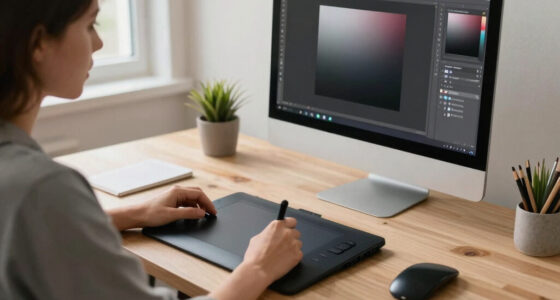
Pen Tablet
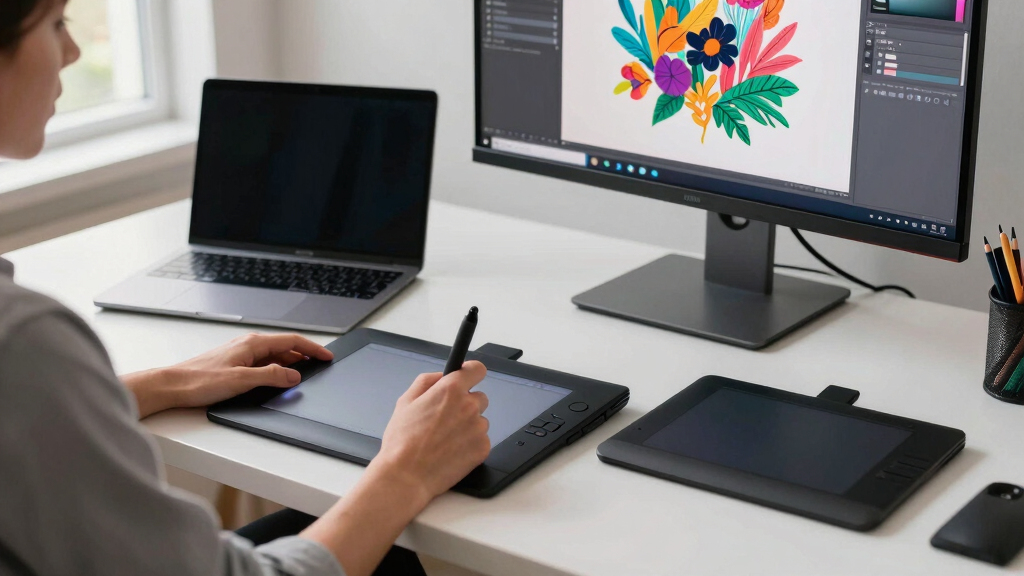
You draw on a screenless surface while watching a separate monitor. It can feel unfamiliar at first, but practice builds reliable hand-to-screen coordination.
- Lower price and lighter travel weight
- Flexible monitor size and ergonomic placement
- Clearer view because the hand never covers the artwork
- Learning curve for spatial coordination
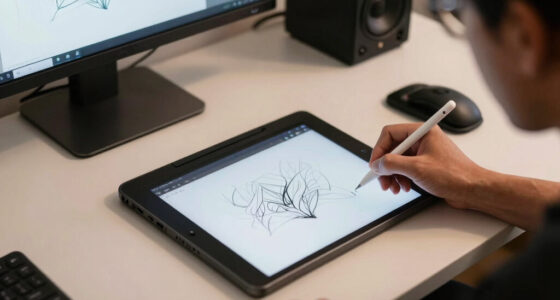
Pen Display
You draw directly on an integrated screen. Hand, eye, cursor, and image occupy the same space, closely resembling traditional drawing.
- Intuitive placement and immediate visual feedback
- Strong fit for detailed illustration and retouching
- Higher cost, greater weight, and more desk space
- Screen quality becomes part of the buying decision
What your money actually buys
Price is only the visible part of the tradeoff. Displays bundle a monitor, color system, glass surface, and direct interaction. Tablets concentrate their value on pen input.
| Decision factor | Pen tablet | Pen display | Practical winner |
|---|---|---|---|
| Typical price | $50–$600 | $500–$2,000+ | ✓ Tablet |
| Drawing surface | Screenless input area | Integrated high-resolution screen | ~ Depends |
| Natural drawing feel | Requires monitor coordination | Draw directly on the image | ✓ Display |
| Portability | Lightweight and compact | Larger, heavier, more cables | ✓ Tablet |
| Color-critical work | Depends on external monitor | Premium models offer wide gamut | ✓ Display |
| Beginner learning | Affordable, but indirect | Intuitive, but expensive | ~ Budget decides |
| Desk freedom | Easy to reposition or store | Often becomes a fixed studio tool | ✓ Tablet |
| No external computer | ✗ Usually required | ✗ Usually required | ~ Choose a hybrid |
Detailed work pulls artists toward displays
Reported market preference favors direct drawing among professionals, while screenless tablets remain highly relevant for beginners, mobile creators, editors, and budget-conscious studios.
Reported professional preference
Direct input is especially attractive in animation, concept art, character design, detailed illustration, and precision retouching.
The gap is narrowing
Better panels, lower latency, wireless connectivity, tilt support, and portable hybrids are bringing professional features into more attainable setups.
Sharper canvases
High-resolution displays reveal fine edges, textures, and line quality without constant zooming.
Pressure levels
Fine pressure control supports nuanced line weight and shading, although pen feel and software tuning matter too.
Lower latency
Premium displays can keep fast strokes visually close to the pen tip, helping the surface feel more responsive.
The investment spectrum
$50–$150 Larger tablet or compact display Pro 4K display
$2,000+
Start with the constraint that matters most
Specifications cannot choose for you. Identify the work you do repeatedly, the space you actually have, and the friction most likely to interrupt your creative rhythm.
Budget and portability first?
Choose a screenless model when affordability, travel weight, desk flexibility, and access to a larger external monitor matter most.
Best match: Pen tabletNatural feel and detail first?
Choose direct input when line placement, intricate brushwork, visual immediacy, and paper-like coordination drive your output.
Best match: Pen displayNeed both modes?
Many working artists sketch on a compact tablet and finish on a display. Portable hybrids also combine screen, pen, and computing power.
Best match: Hybrid workflowThe questions artists ask before buying
The best device is not automatically the model with the biggest number. Fit, comfort, drivers, screen quality, and reliable creative software support all shape the real experience.
Which is better for beginners?
Pen tablets usually offer the safest low-cost starting point. A display is easier to understand physically, but demands a larger initial investment.
Can artists switch between devices?
Yes. Common creative applications support both, and many artists use a portable tablet for rough work and a display for detailed finishing.
Is maximum pressure sensitivity essential?
Not by itself. Pen stability, tilt, initial activation force, driver quality, brush settings, and technique can matter just as much.
Does color accuracy matter?
It is crucial for professional illustration, photography, retouching, print, and brand work. Screenless tablets rely on the quality of your monitor.
Wireless or wired?
Wireless input reduces clutter and improves mobility. Wired connections remain appealing when stability and consistently low latency are priorities.
What should you test in person?
Check parallax, surface texture, cursor tracking, pen pressure, shortcut placement, screen glare, posture, and how your hand rests during long sessions.
Choose a pen tablet for value, portability, and setup freedom. Choose a pen display for immediacy, precision, and a more natural drawing relationship.
Device Type and How It Changes Your Workflow
A pen tablet is a separate device—think of it as a fancy pad that connects to your computer. You draw on its surface, but see your work on a monitor. Pen displays are screens you draw directly on, like a digital version of a sketchpad. The difference? One makes you look back and forth, the other lets you draw straight on the image.
Why does this matter? The workflow implications are significant. Drawing on a separate tablet requires mental coordination—you must translate what you see on the screen to your hand’s movements on the tablet. This can slow you down initially but often offers greater flexibility in setup. Conversely, drawing directly on a screen allows for a more intuitive experience, reducing cognitive load and fostering a more natural flow. However, it may limit your workspace flexibility and require a higher investment upfront. Understanding these tradeoffs helps you decide if you prefer the flexibility of separate devices or the immediacy of integrated screens, shaping your efficiency and comfort in creating.
best pen display for digital artists
As an affiliate, we earn on qualifying purchases.
As an affiliate, we earn on qualifying purchases.
The Drawing Experience: Direct vs Indirect
Pen displays give you that direct-to-surface feeling—your hand and eyes work in harmony, much like traditional drawing. This direct contact reduces the disconnect between your intention and the result, making strokes feel more natural and responsive. Artists often find this approach reduces fatigue and enhances precision, especially in detailed work or when using pressure-sensitive brushes.
Pen tablets, on the other hand, require you to adapt to a two-step process: your hand moves on the tablet, but your eyes focus on the monitor. This indirect method can initially feel awkward, as it demands a certain level of coordination and spatial awareness. Over time, some artists develop a ‘muscle memory’ that compensates, but it often involves a learning curve. The choice between the two affects not just comfort but also the speed and accuracy of your work. For artists doing intricate detail work or seeking a more natural feel, direct drawing may be advantageous, while those needing flexibility might prefer the versatility of indirect input.
affordable pen tablets for beginners
As an affiliate, we earn on qualifying purchases.
As an affiliate, we earn on qualifying purchases.
Cost Differences and What You Get for Your Money
| Feature | Pen Tablet | Pen Display |
|---|---|---|
| Price Range | $50 to $600 | $500 to over $2,000 |
| Drawing Surface | Separate device, no screen | Integrated high-res screen |
| Natural Drawing Feel | Requires looking at monitor, less intuitive | Direct drawing surface, more natural feel |
| Portability | Lightweight, portable | Larger, less portable |
If you’re on a tight budget or just starting out, a pen tablet like the Huion Kamvas or XP-Pen Artist offers solid performance at a fraction of the price of high-end displays. But investing in a pen display means you’re paying for a more seamless, paper-like experience that can significantly improve your workflow and accuracy. The tradeoff is the higher cost and larger size, which might limit portability. Your decision hinges on whether the enhanced natural feel and precision justify the investment for your projects and style.
As an affiliate, we earn on qualifying purchases.
Recent Tech Breakthroughs That Change the Game
Devices keep getting better—more pixels, better colors, lower latency. Some pen displays now boast 4K screens with Adobe RGB 100% coverage, perfect for professionals who need accuracy. Wireless options are hitting the market, giving artists more freedom in their workspace.
Take the Wacom Cintiq Pro 24. It features a 4K display, 98% DCI-P3 color gamut, and a response time under 20ms. This level of performance means artists can work with more confidence, knowing their device can handle detailed color work and fast strokes without lag. These advancements are pushing the boundaries of what’s possible, making high-end features more accessible and practical, especially for professionals who demand precision and efficiency in their workflow.
As an affiliate, we earn on qualifying purchases.
What Artists Are Actually Choosing Right Now
Market data shows that around 65% of pros prefer pen displays for their detailed work, especially in animation and concept art. Hobbyists or those working on a budget often stick with pen tablets because they offer a good balance of price and performance.
Choosing between the two often depends on the nature of the work and the artist’s comfort. For instance, professionals in animation or detailed character design find that the precision and natural feel of pen displays significantly enhance their productivity and quality. On the other hand, beginners or casual users benefit from the affordability and portability of pen tablets, which still provide a robust foundation for developing skills. This split reflects a broader trend: as technology advances, the gap between professional-grade and entry-level tools narrows, but the core tradeoffs—cost versus experience—remain central to decision-making.
Your Top Questions Answered
- Which is better for beginners? Pen tablets are usually cheaper and easier to start with. They’re great for learning the basics because they tend to have simpler setups and less initial investment. However, as you progress, you might find that a pen display offers a more intuitive experience, helping you develop better skills faster by mimicking traditional drawing more closely.
- Can I switch between devices? Yes. Many artists use both—pen tablets for quick sketches and rough ideas, and pen displays for detailed work or final touches. Compatibility is usually straightforward with common art software, allowing you to adapt your workflow as your skills grow.
- Is higher pressure sensitivity necessary? Higher sensitivity (like 8,192 levels) provides more nuanced control over strokes, which can be crucial for detailed shading and brushwork. But it’s not the only factor—software responsiveness, pen tilt, and your own technique play vital roles in achieving natural results. Consider your style and needs before prioritizing sensitivity.
- Does color accuracy matter? Especially if you’re into professional illustration or retouching, high color gamut coverage ensures your colors are true to life, reducing surprises when printing or publishing. Investing in a display with high color accuracy can save time and frustration, making it a worthwhile consideration for serious artists.
- Wireless or wired? Wireless models offer greater freedom of movement, reducing clutter and allowing more flexible setups. However, wired connections typically provide more stable performance with less lag—important during critical or time-sensitive tasks. Your choice depends on your workflow priorities and environment.
Conclusion
At the end of the day, it’s about what feels right in your hand and fits your style. If you want that direct, paper-like feel, a pen display wins. If you’re budget-conscious or need portability, a pen tablet will serve you well.
Remember: You’re not just picking a gadget. You’re choosing the tool that helps you bring your ideas to life. So test a few options, consider your workflow, and trust your instincts—your best art awaits.
Halloween Picks
halloween
As an affiliate, we earn on qualifying purchases.