
Choosing the best 61 key MIDI controller for a home studio involves balancing features, build quality, and usability within a compact form. The Novation Launchkey 61 MK4 stands out as the best overall thanks to its seamless integration with Ableton Live and versatile controls. The Arturia KeyLab Essential mk3 61 appeals for its bundled software and solid build, making it a strong contender. Meanwhile, the Nektar SE61 offers a budget-friendly option with essential features. These choices highlight common tradeoffs: more features often mean higher cost, while simplicity can limit creative control. Continue reading for a detailed breakdown to find the best fit for your setup.

Get audio and creator gear delivered free with Prime
- Fast, free delivery on millions of items
- Prime Video, Amazon Music and more included
- Member-only deals all year
Complete the kit



Key Takeaways
- Top picks are distinguished by integration with popular DAWs and software bundles, such as Arturia‘s Analog Lab and Ableton Live compatibility.
- Build quality and key feel vary significantly; premium options offer better playability but come at a higher price point.
- Budget-friendly models like the Nektar SE61 prioritize essential controls, making them suitable for beginners or limited setups.
- Size and portability are consistent across options, but some controllers include additional features like pads and knobs that enhance versatility.
- Tradeoffs often involve balancing price, features, and compatibility; the most expensive isn’t always the best choice for every home studio.
| Novation Launchkey 61 MK4 USB MIDI Keyboard Controller |  | Best Overall for Versatile Creative Control | Number of Keys: 61 | Pads: 16 FSR pads | Compatibility: Ableton Live, Logic, Cubase, Reason, Reaper, FL Studio, Ardour | VIEW LATEST PRICE | See Our Full Breakdown |
| Arturia KeyLab Essential mk3 61-Key MIDI Controller Bundle (White) |  | Best for Versatile Production with Software Included | Number of Keys: 61 | Key Type: Synth-Action | Velocity-Sensitive Pads: 8 | VIEW LATEST PRICE | See Our Full Breakdown |
| Nektar SE61 USB MIDI Controller Keyboard |  | Best for Budget-Conscious Beginners | Number of Keys: 61 | Connectivity: USB | Compatibility: Mac, PC, iOS | VIEW LATEST PRICE | See Our Full Breakdown |
| M-AUDIO Oxygen 61 MKV USB MIDI Keyboard Controller |  | Best for Full Control and Extensive Features | Number of Keys: 61 | Backlit Drum Pads: 16 (2 banks of 8) | Assignable Knobs: 8 | VIEW LATEST PRICE | See Our Full Breakdown |
| M-AUDIO Oxygen Pro 61 USB MIDI Keyboard Controller |  | Best for Professional-Grade Control and NKS Support | Keys: 61 velocity-sensitive semi-weighted with aftertouch | Pads: 16 RGB backlit | Controls: 8 knobs, 9 faders | VIEW LATEST PRICE | See Our Full Breakdown |
| Arturia KeyLab Essential mk3 — 61-Key USB MIDI Keyboard Controller with Analog Lab V Software Included | 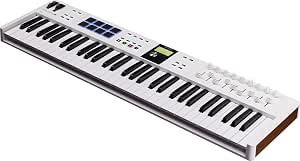 | Best Overall for Creative Flexibility | Number of Keys: 61 | Software Included: Analog Lab V, UVI Model D, NI’s The Gentleman, Loopcloud, Melodics | Features: Scale Mode, Chord Mode, Arpeggiator, RGB-backlit pads, 2.5” LCD screen | VIEW LATEST PRICE | See Our Full Breakdown |
| M-AUDIO Keystation 61 MK3 USB MIDI Controller |  | Best Value for Simplicity and Versatility | Number of Keys: 61 | Key Type: Semi-weighted, velocity-sensitive | Connectivity: USB MIDI | VIEW LATEST PRICE | See Our Full Breakdown |
| Nektar Impact GX61 USB MIDI Controller Keyboard |  | Best for DAW Integration and Performance | Number of Keys: 61 | Key Type: Synth-action | Includes: Bitwig 8-Track DAW | VIEW LATEST PRICE | See Our Full Breakdown |
| Native Instruments Komplete Kontrol A61 Controller Keyboard |  | Best Compact Control for Virtual Instruments | Keybed: Semi-weighted | Display: OLED | Control Knobs: 8 touch-sensitive | VIEW LATEST PRICE | See Our Full Breakdown |
| Novation FLkey 61 USB MIDI Controller Keyboard |  | Best for FL Studio Users with Hands-On Control | Number of Keys: 61 | Connectivity: USB | Pads: 16 | VIEW LATEST PRICE | See Our Full Breakdown |
| 61 key midi controllers for home studio | Number of Keys | Compatibility |
|---|---|---|
| Novation Launchkey 61 MK4 USB | 61 | Ableton Live, Logic, Cubase, Reason, Reaper, FL Studio, Ardour |
| Arturia KeyLab Essential mk3 6 | 61 | — |
| Nektar SE61 USB MIDI Controlle | 61 | Mac, PC, iOS |
| M-AUDIO Oxygen 61 MKV USB MIDI | 61 | — |
| M-AUDIO Oxygen Pro 61 USB MIDI | — | — |
| Arturia KeyLab Essential mk3 | 61 | Ableton Live, Logic Pro X, FL Studio |
| M-AUDIO Keystation 61 MK3 USB | 61 | Mac, PC, iOS (with adapter) |
| Nektar Impact GX61 USB MIDI Co | 61 | Mac, PC, iOS |
| Native Instruments Komplete Ko | — | — |
| Novation FLkey 61 USB MIDI Con | 61 | — |
More Details on Our Top Picks
Novation Launchkey 61 MK4 USB MIDI Keyboard Controller
The Novation Launchkey 61 MK4 stands out for its deep integration with major DAWs like Ableton Live and Logic, making it a top choice for producers seeking seamless workflow. Its 16 FSR pads enable expressive drumming and clip launching, positioning it well against the M-AUDIO Oxygen Pro 61, which emphasizes extensive control with more assignable features. While the Launchkey offers powerful creative modes such as Scale Mode and chord triggers, its complexity can be daunting for beginners. The included software bundle enhances its value, especially for users who want a ready-to-go setup. Compared to the Arturia KeyLab Essential mk3, it sacrifices some hardware simplicity for advanced DAW integration and performance features. The need for a compatible DAW for full functionality could limit some users, but for those who prioritize integration and creative tools, this is a compelling pick.
Pros:- Seamless integration with major DAWs
- Responsive FSR drum pads with polyphonic aftertouch
- Includes comprehensive software and sound libraries
- Powerful creative features like Scale Mode and chord triggers
Cons:- May be complex for beginners
- Requires compatible DAW for full functionality
Best for: Producers and advanced home studio users who need deep DAW integration and creative features.
Not ideal for: Beginners or users with limited DAW experience, as the setup and features can be overwhelming.
- Number of Keys:61
- Pads:16 FSR pads
- Compatibility:Ableton Live, Logic, Cubase, Reason, Reaper, FL Studio, Ardour
- Included Software:Ableton Live Lite, Cubase LE, Novation Play, sounds from GForce, Klevgrand, Orchestral Tools, Native Instruments, Melodics lessons
Our verdict“This controller is ideal for producers seeking a feature-rich MIDI keyboard with advanced DAW integration and creative tools.”
Arturia KeyLab Essential mk3 61-Key MIDI Controller Bundle (White)
The Arturia KeyLab Essential mk3 makes an excellent choice for musicians wanting a versatile controller with a robust software bundle. Its synth-action keys and pressure-sensitive pads allow expressive play, comparable to the M-AUDIO Oxygen 61 MKV but with a focus on sound design and studio versatility. The included Analog Lab V and over 2000 presets make it ideal for those seeking immediate access to a wide sound palette, especially compared to the Nektar SE61, which offers basic MIDI functionality without extensive sound libraries. Its size and bulk may be less suited for portability, and some users might find setup and navigation slightly complex. However, for users prioritizing software integration and sound variety, this bundle delivers significant value.
Pros:- Includes extensive software bundle for versatile music production
- Velocity- and pressure-sensitive pads for expressive playing
- Additional accessories enhance usability and protection
- Large preset library for immediate inspiration
Cons:- Bulky for portable use
- Limited to 61 keys, which may restrict range for some users
- Setup can be complex for newcomers
Best for: Home producers and performers who want a feature-packed MIDI controller with extensive software support.
Not ideal for: Travelers or those needing ultra-portable solutions, due to its size and weight.
- Number of Keys:61
- Key Type:Synth-Action
- Velocity-Sensitive Pads:8
- Presets:Over 2000
- Included Software:UVI Grand Piano, NI The Gentleman Piano, Analog Lab V
Our verdict“This controller suits home producers who value software integration and a wide array of sounds over portability.”
Nektar SE61 USB MIDI Controller Keyboard
The Nektar SE61 offers a compact, affordable MIDI solution with broad compatibility, making it appealing to those just starting out or with limited space. Its 61 keys provide a familiar range, but compared to the M-AUDIO Oxygen 61 MKV, it lacks extensive assignable controls, which limits hands-on control during performances. Its simple build and included software, like Bigwig Studio, make it a straightforward option for basic production without overwhelming features. Unlike the Launchkey MK4, it doesn’t integrate as deeply with DAWs but makes up for that with a lower price point. This makes it less suitable for advanced users but perfect for newcomers needing a reliable, no-frills controller.
Pros:- Affordable price with decent features
- Compatible with Mac, PC, and iOS
- Portable and easy to set up
- Includes basic DAW and sound content
Cons:- Limited to 61 keys, which may not suit all playing styles
- Basic build quality may not endure heavy use
- Lacks advanced controls like knobs or faders
Best for: Beginners or students seeking an affordable, straightforward MIDI controller.
Not ideal for: Experienced producers or performers requiring extensive control features or DAW integration.
- Number of Keys:61
- Connectivity:USB
- Compatibility:Mac, PC, iOS
- Included Software:Bigwig Studio, sound content
Our verdict“This controller is best for beginners who need an affordable, easy-to-use MIDI keyboard for basic production tasks.”
M-AUDIO Oxygen 61 MKV USB MIDI Keyboard Controller
The M-AUDIO Oxygen 61 MKV offers a comprehensive control surface suitable for serious producers, standing out for its extensive assignable knobs, faders, and pads. Its 61 velocity-sensitive keys provide a natural feel, which is a step up from the Nektar SE61’s basic setup, making it a better fit for users who want hands-on control over virtual instruments and effects. While it’s more feature-rich than the Arturia KeyLab Essential mk3, its interface can be overwhelming for those new to MIDI controllers. The inclusion of software like MPC Beats and Ableton Live Lite adds value but requires setup time. Compared to the Oxygen Pro, it lacks some advanced features like aftertouch, making it a slightly less versatile choice for seasoned users, but it’s still a reliable all-rounder.
Pros:- Full-size velocity-sensitive keys
- Numerous assignable knobs, faders, and pads
- Includes a broad software bundle for production
- Supports features like Smart Chord and Arpeggiator
Cons:- Can be complex for first-time users
- Requires software installation and configuration
- Limited to USB connection, no MIDI out
Best for: Intermediate producers needing extensive hands-on control and software integration.
Not ideal for: Absolute beginners or mobile users who prefer lightweight, minimal controllers.
- Number of Keys:61
- Backlit Drum Pads:16 (2 banks of 8)
- Assignable Knobs:8
- Assignable Faders:9
- Includes Software:MPC Beats, Ableton Live Lite, Hybrid 3, Mini Grand, 5 MPC Expansion packs
Our verdict“This controller is suited for users who want extensive control options and are comfortable with a more complex setup process.”
M-AUDIO Oxygen Pro 61 USB MIDI Keyboard Controller
The M-AUDIO Oxygen Pro 61 elevates control with semi-weighted keys featuring aftertouch, making it ideal for nuanced performances. Its 16 RGB backlit drum pads and multiple assignable knobs and faders provide a highly customizable workflow, especially for users invested in Native Kontrol Standard (NKS) for seamless plugin integration. Unlike the Oxygen 61 MKV, it emphasizes more expressive playing with aftertouch and RGB pads, catering to professionals and advanced enthusiasts. Its comprehensive features require a learning curve, and setup involves software updates, which could be a hurdle for some. This controller pairs well with virtual instruments and complex DAW setups but isn’t the lightest or most portable option.
Pros:- Semi-weighted keys with aftertouch for expressive play
- Supports NKS for seamless plugin control
- Extensive assignable controls including pads, knobs, and faders
- Complete software package for production
Cons:- Complex for those new to MIDI controllers
- Requires software setup and updates
- Lacks onboard sounds, relies on external virtual instruments
Best for: Experienced producers and musicians who want professional-grade control and NKS compatibility.
Not ideal for: Beginners or mobile users who need a simple, portable MIDI solution.
- Keys:61 velocity-sensitive semi-weighted with aftertouch
- Pads:16 RGB backlit
- Controls:8 knobs, 9 faders
- Additional Features:Smart Chord, Smart Scale, Arpeggiator
- Connectivity:USB MIDI, 5-pin MIDI output
Our verdict“This controller is perfect for advanced users seeking professional control, especially with NKS integration and expressive keys.”
Arturia KeyLab Essential mk3 — 61-Key USB MIDI Keyboard Controller with Analog Lab V Software Included
The Arturia KeyLab Essential mk3 stands out for its innovative features like Scale, Chord, and Arpeggiator modes, making it ideal for producers seeking more expressive control. Compared to the Novation FLkey 61, which is optimized for FL Studio, the KeyLab offers broader DAW compatibility and a more extensive software bundle, including Analog Lab V and virtual instruments. While its intuitive controls boost creativity, the extensive options can feel overwhelming for complete beginners, and its premium price might be a barrier. This model suits experienced producers or those willing to learn complex features rather than absolute beginners or budget buyers.
- Versatile creative modes for intuitive music production
- Deep integration with popular DAWs
- Large software package suitable for all levels
- Bright LCD screen for real-time feedback
- Can be complex for those new to MIDI controllers
- Premium price point
Ideal for producers who want advanced features and extensive software options in a single controller.
Pros:- Versatile creative features for intuitive music production
- Deep DAW integration with popular software
- Expanded software package suitable for all skill levels
- Bright LCD screen for real-time feedback
Cons:- May be complex for complete beginners
- Premium price point
Best for: Intermediate to advanced producers seeking versatile creative tools with deep DAW integration
Not ideal for: Beginners or those on a tight budget who prefer plug-and-play simplicity
- Number of Keys:61
- Software Included:Analog Lab V, UVI Model D, NI’s The Gentleman, Loopcloud, Melodics
- Features:Scale Mode, Chord Mode, Arpeggiator, RGB-backlit pads, 2.5” LCD screen
- Compatibility:Ableton Live, Logic Pro X, FL Studio
Our verdict“Best suited for experienced producers who value creative flexibility and comprehensive software support.”
M-AUDIO Keystation 61 MK3 USB MIDI Controller
The M-AUDIO Keystation 61 MK3 offers a straightforward, reliable experience with full-size velocity-sensitive keys and plug-and-play connectivity, making it an excellent choice for those new to MIDI controllers or looking for a versatile instrument. Unlike the Arturia KeyLab, which emphasizes creative modes and software, the Keystation focuses on fundamental performance and ease of use, with a simple layout and minimal controls. Its included software suite and free lessons add value, but the lack of advanced features or integrated controls limits its appeal for those seeking hands-on mixing or virtual instrument control. This pick makes the most sense for beginners or musicians who prioritize core keyboard feel over advanced automation.
- Full-size velocity-sensitive keys for expressive play
- Plug-and-play setup with no drivers needed
- Includes comprehensive software and free lessons
- Compact and portable design
- Requires a separate sustain pedal
- iOS compatibility needs an extra adapter
- No built-in sounds or advanced controls
Ideal for beginners or home studio musicians seeking a reliable, no-fuss MIDI keyboard.
Pros:- Full-size velocity-sensitive keys for expressive play
- Plug-and-play setup with no drivers needed
- Includes comprehensive software suite and free lessons
- Compact design suitable for limited spaces
Cons:- Requires separate purchase for sustain pedal
- iOS compatibility needs an additional adapter
- Limited to MIDI control without built-in sounds
Best for: Beginners and home studio musicians seeking straightforward, full-size keys with basic software support
Not ideal for: Experienced producers or those wanting advanced control features and integrated instruments
- Number of Keys:61
- Key Type:Semi-weighted, velocity-sensitive
- Connectivity:USB MIDI
- Compatibility:Mac, PC, iOS (with adapter)
Our verdict“Best for beginners looking for a simple, reliable keyboard with essential software support.”
Nektar Impact GX61 USB MIDI Controller Keyboard
The Nektar Impact GX61 excels in seamless DAW integration, especially with its included Bitwig 8-Track DAW, making it a strong choice for producers who want reliable software control. Its synth-action keys provide quick response suited for dynamic performances, distinguishing it from the more expressive semi-weighted options like the M-AUDIO Keystation. While setup may require consulting the included guide, its multiple assignable buttons and wheels support creative flexibility. However, it remains a MIDI-only device without built-in sounds, limiting its standalone capabilities. This controller makes sense for users who prioritize DAW control and fast, responsive keys.
- 61 synth-action keys for versatile playing
- On-board pitch bend and modulation wheels
- Seamless DAW integration with popular software
- Compatible with Mac, PC, and iOS devices
- Setup may be complex for beginners
- No built-in sounds or advanced controls
This is ideal for producers focused on DAW control and fast performance, rather than standalone use.
Pros:- 61 expressive synth-action keys for versatile performances
- On-board pitch bend and modulation wheels
- Seamless DAW integration with popular software
- Compatible with multiple platforms including iOS
Cons:- Requires user guide for optimal setup
- Limited to MIDI control functions
- No onboard sounds or instrument features
Best for: Producers and performers needing reliable DAW integration and responsive keys
Not ideal for: Musicians seeking built-in sounds or comprehensive onboard controls
- Number of Keys:61
- Key Type:Synth-action
- Includes:Bitwig 8-Track DAW
- Compatibility:Mac, PC, iOS
Our verdict“Best suited for producers who require fast, responsive keys and deep DAW integration for studio or live use.”
Native Instruments Komplete Kontrol A61 Controller Keyboard
The Native Instruments Komplete Kontrol A61 is a sleek, semi-weighted controller designed primarily for virtual instrument and effects control. Its OLED display and 8 touch-sensitive knobs streamline navigation and tweaking, making it a favorite for producers working with NI’s Komplete library. Compared to the Arturia KeyLab, which offers extensive creative modes, the Komplete Kontrol A61 emphasizes quick access to sounds and effects, ideal for those focused on virtual instrument work. Its compact size and bus-powered operation suit home studios with limited space, but it isn’t a standalone instrument and relies on a computer. This controller makes sense for users who prioritize intuitive control over extensive performance features.
- Sleek, semi-weighted keys for expressive playing
- OLED display for easy navigation
- Multiple control knobs for versatile sound tweaking
- USB bus-powered for convenience
- Limited to MIDI control, no onboard sounds
- Not suitable as a standalone instrument
- Primarily optimized for NI software users
This is best for musicians who mainly use virtual instruments and want quick control access.
Pros:- Compact and streamlined design
- Semi-weighted keys for expressive play
- Informative OLED display for navigation
- Multiple control knobs for versatile sound control
Cons:- Limited to MIDI control functions
- No standalone instrument capability
- Requires USB connection for power and operation
Best for: Producers using NI’s Komplete or similar virtual instruments seeking efficient control and compact design
Not ideal for: Producers wanting more extensive performance features or standalone capabilities
- Keybed:Semi-weighted
- Display:OLED
- Control Knobs:8 touch-sensitive
- Power:USB 2.0 bus powered
Our verdict“Ideal for users who need efficient, quick control for virtual instruments within a compact setup.”
Novation FLkey 61 USB MIDI Controller Keyboard
The Novation FLkey 61 is tailored specifically for FL Studio users, combining full-sized keys with integrated controls for mixer, channel rack, and transport functions. Its 16 pads and dedicated modes for step sequencing and chords make it a versatile option for hands-on music creation. Compared to the Arturia KeyLab, which targets a broader audience, the FLkey’s tight integration with FL Studio offers a more seamless workflow for that DAW’s environment. However, its functionality is limited outside FL Studio, and users of other DAWs may find it less versatile. The learning curve for mastering all modes can also be a consideration. This controller makes the most sense for dedicated FL Studio users who want a streamlined, integrated experience.
- Seamless FL Studio integration for efficient workflow
- Full-sized keys for expressive playing
- Multiple modes including step sequencer and chords
- Hands-on control of mixer and instrument parameters
- Limited to FL Studio users
- No standalone operation without a computer
- Potential learning curve for advanced modes
This is best suited for FL Studio enthusiasts who prioritize tight software integration and hands-on control.
Pros:- Full-sized keys suitable for expressive playing
- Integrated controls for mixer, channel rack, and transport
- Multiple modes for versatile music creation
- Designed specifically for FL Studio workflow
Cons:- Limited to FL Studio users
- No standalone functionality
- Learning curve for mastering different modes
Best for: Dedicated FL Studio users seeking deep integration and hands-on control for music production
Not ideal for: Producers working with other DAWs or those needing standalone, multi-platform control
- Number of Keys:61
- Connectivity:USB
- Pads:16
- Software Compatibility:FL Studio
Our verdict“Best for FL Studio users who want a dedicated, integrated MIDI control surface with expressive keys.”

How We Picked
Our selection process focused on controllers specifically designed with 61 keys suited for home studio environments. We evaluated each model on build quality, key action, software integration, connectivity options, and overall value. Ease of use and versatility were also key, ensuring that both beginners and experienced producers could benefit. We prioritized products with broad compatibility across major DAWs and considered user feedback to identify common strengths and weaknesses. The ranking reflects a balance between feature set, affordability, and user experience, aiming to guide different types of home studio setups.
| 61 key midi controllers for home studio | Compatibility |
|---|---|
| Novation Launchkey 61 MK4 USB | Ableton Live, Logic, Cubase, Reason, Reaper, FL Studio, Ardour |
| Arturia KeyLab Essential mk3 6 | — |
| Nektar SE61 USB MIDI Controlle | Mac, PC, iOS |
| M-AUDIO Oxygen 61 MKV USB MIDI | — |
| M-AUDIO Oxygen Pro 61 USB MIDI | — |
| Arturia KeyLab Essential mk3 | Ableton Live, Logic Pro X, FL Studio |
| M-AUDIO Keystation 61 MK3 USB | Mac, PC, iOS (with adapter) |
| Nektar Impact GX61 USB MIDI Co | Mac, PC, iOS |
| Native Instruments Komplete Ko | — |
| Novation FLkey 61 USB MIDI Con | — |
Factors to Consider When Choosing Best 61 Key Midi Controllers For Home Studios
When choosing a 61 key MIDI controller for your home studio, it’s important to consider several factors that impact your workflow and creative flexibility. Beyond features, understanding how these controllers fit into your setup will help avoid costly mistakes and ensure a smoother experience. Here are key considerations to keep in mind before making a purchase.
Key Action and Feel
The feel of the keys significantly influences your playing experience. Semi-weighted keys are common in this category, providing a balance between piano-like responsiveness and lighter playability. If you plan to perform expressive playing or piano practice, prioritize controllers with better key action. Cheaper models might have plastic keys that feel less natural, which can hinder your workflow over time.
Software Compatibility and Integration
Most 61 key controllers are designed to work seamlessly with popular DAWs like Ableton Live, Logic, or FL Studio. Choosing a controller with dedicated software bundles or pre-mapped controls can save setup time and improve your efficiency. However, check whether the controller offers native integration or requires additional configuration, especially if you use niche DAWs or custom setups.
Connectivity and Power
USB connectivity is standard, but some controllers include MIDI out ports or additional USB ports for connecting multiple devices. Consider whether your setup needs full MIDI out or if USB alone suffices. Also, look at power options—most controllers are bus-powered, but some may require external power supplies, which adds clutter and complexity.
Extras and Controls
Additional features like knobs, faders, pads, and transport controls can greatly expand your creative options. However, more controls typically mean a higher price and a larger footprint. Think about your workflow: if you need hands-on control for mixing or triggering samples, prioritize controllers with these extras. If simplicity is your aim, a basic model might be more suitable.
Build Quality and Durability
Since you’ll likely use your controller frequently, durability matters. Look for metal chassis or reinforced plastic in higher-end models, which withstands regular handling better. Cheaper controllers might feel flimsy or have loose knobs, which can become frustrating over time. Balance your budget with the need for longevity in your setup.
Frequently Asked Questions
Can I use a 61 key MIDI controller with any DAW?
Most 61 key MIDI controllers are compatible with major DAWs like Ableton Live, Logic, FL Studio, and Cubase, thanks to class-compliant drivers and standard MIDI implementation. Some controllers come with dedicated software or mappings that simplify setup, but even generic models will typically work with basic MIDI input. Always check the manufacturer’s specifications to confirm compatibility, especially if you’re using less common or niche software. Ensuring your DAW recognizes MIDI devices is usually straightforward, but verifying your specific setup avoids surprises later.
Is weighted keys necessary for home studio use?
Weighted keys are primarily beneficial for pianists or those aiming for realistic piano playing. For most home studio producers, semi-weighted or synth-action keys provide sufficient expressiveness without the heavier resistance, making them more comfortable for extended sessions. Heavier keys can slow down your workflow and may be unnecessary unless you plan to do significant piano practice. Consider your playing style and workflow preferences—weighted keys add cost and weight, which might not be justified for casual or electronic music production.
Should I prioritize software bundles over hardware features?
Software bundles can add significant value, especially if they include instruments, effects, or DAW integrations that suit your workflow. However, hardware controls—like knobs, faders, and pads—are essential for tactile manipulation and hands-on control. Depending on your production style, you may prefer a controller with extensive physical controls even if it comes with fewer bundled plugins. Balancing both aspects ensures you get the best overall experience tailored to your needs.
How important is portability for a home studio controller?
Portability is less critical for dedicated home studios but can be advantageous if you move your setup frequently or perform live. Compact controllers with fewer controls are lighter and easier to store, but they may sacrifice some functionality. If space is limited or you value easy storage, choosing a smaller, lightweight model makes sense. Conversely, a larger controller with more controls might improve your workflow but at the expense of portability.
When should I consider investing in a premium MIDI controller?
Investing in a premium controller makes sense if you require high-quality keys, extensive tactile controls, and robust build quality for daily use. They often include advanced features like motorized faders, multiple control surfaces, and superior software integration. If your workflow relies heavily on hands-on control and you want a device that can serve as a long-term investment, a higher-end model is justified. For casual or beginner setups, however, more affordable options typically suffice.
Conclusion
For most home studio owners, the Novation Launchkey 61 MK4 offers a balanced mix of features, build quality, and affordability, making it the best overall choice. Beginners or those on a tighter budget will find the Nektar SE61 provides all essential controls at a lower cost. If you’re seeking a premium experience with extensive tactile controls and software integration, the Arturia KeyLab Essential mk3 is worth the investment. Ultimately, your choice should align with your workflow, whether you prioritize portability, advanced features, or simplicity. Consider your specific needs to make the most satisfying purchase for your home studio in 2026.
Halloween Picks
halloween
As an affiliate, we earn on qualifying purchases.